
Convert PNG images to ASCII colored art

Project description
Inkaterm 🔏
Convert images into beautiful colored ASCII art directly in your terminal with a fast, customizable, and lightweight Python library.








✨ Features
- 🚀 Fast rendering
- 🎨 ANSI TrueColor and 256-color support
- 🖼️ Convert images into colored ASCII art
- 💾 Smart disk cache with LZ4 compression
- ⚡ Optimized rendering pipeline
- 🔧 Highly customizable output
- 📂 Supports file paths, bytes, bytearray, memoryview and BytesIO
- 🎭 Built-in image filters
- 🐍 Pure Python implementation
- 🔗 Method chaining support
📦 Installation
pip install inkaterm
🚀 Quick Start
import inkaterm

ink = inkaterm.Ink()

image = ink.image("image.png")
image.resize(75, 75)

print(image)
🖼️ Output
ANSI TrueColor
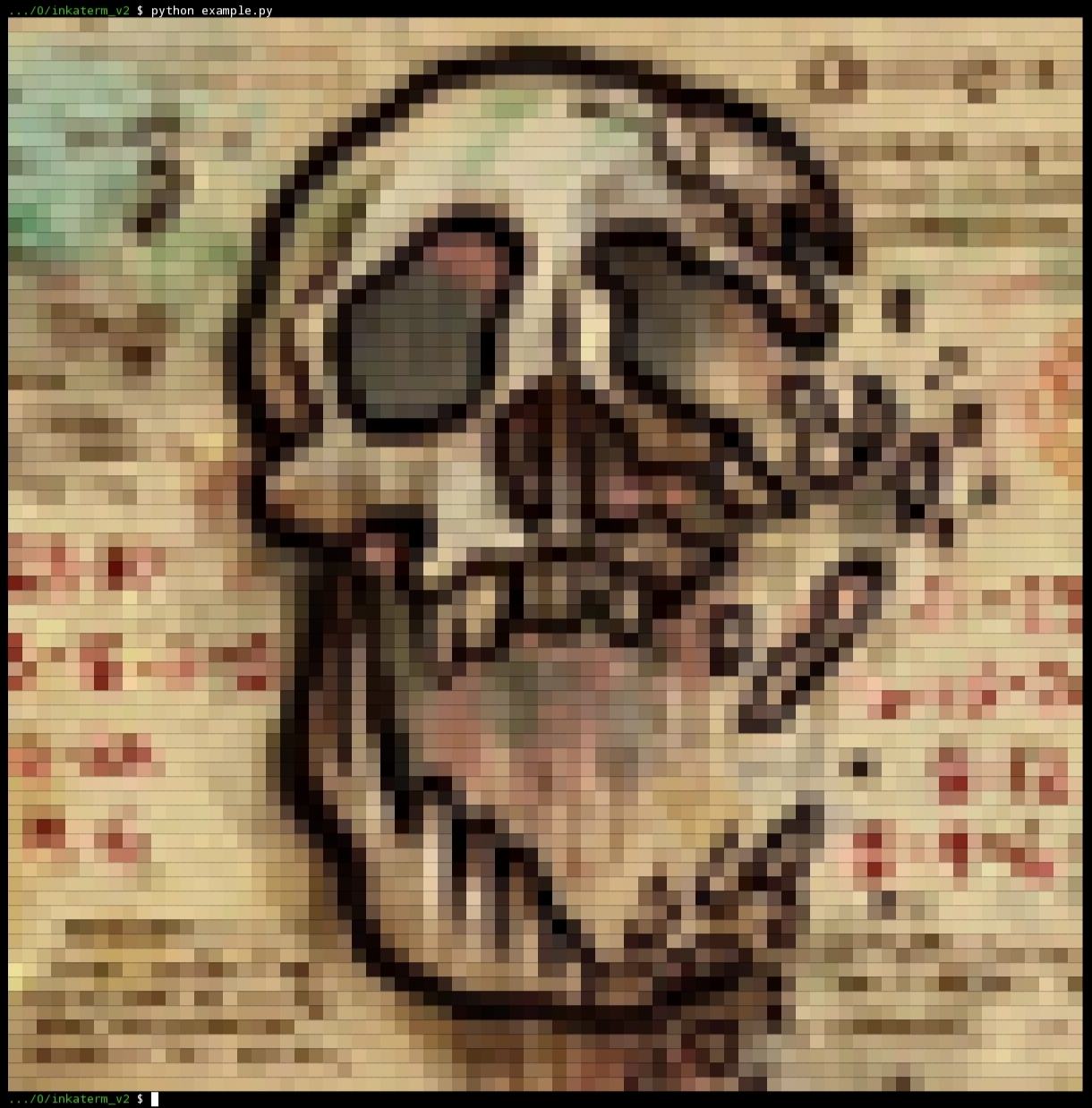
ANSI 256 Colors

All screenshots were captured inside the Termux terminal.
⚡ Performance
Inkaterm includes an optimized cache system.
Example:
Image size: 1000 × 1000

First render:
≈ 9 s

From cache:
≈ 200 ms
Cache files are compressed using LZ4.
Example:
Original cache:
12 MB

Compressed:
218 KB
⚙️ Basic Usage
Create an Ink instance
import inkaterm

ink = inkaterm.Ink()
Load an image
image = ink.image("cat.png")
Resize
image.resize(120, 80)
Apply filters
image.filter \
    .grayscale() \
    .contrast(1.5) \
    .brightness(15)

print(image)
Method chaining
image.resize(80, 80)

image.filter \
    .dreamy() \
    .contrast(1.4) \
    .sharpness(2)

print(image)
📚 API Reference
inkaterm.Ink
Main rendering class.
Constructor
Ink(
    root_dir=".",
    char="██",
    fill_background=False,
    cache=False,
    cache_dir="inkaterm_cache",
    true_color=None
)
| Parameter | Type | Default | Description |
|---|---|---|---|
root_dir |
str |
"." |
Base directory for relative image paths. |
char |
str |
"██" |
Character(s) used for rendering. |
fill_background |
bool |
False |
Uses ANSI background colors instead of foreground text colors. |
cache |
bool |
False |
Enables disk cache. |
cache_dir |
str |
"inkaterm_cache" |
Cache directory. |
true_color |
bool | None |
None |
Enables or disables TrueColor. When None, Inkaterm detects terminal support automatically. |
Ink.image()
Loads an image.
image = ink.image(
    file,
    char=None,
    fill_background=None,
    cache=None,
    cache_dir=None,
    true_color=None
)
| Parameter | Type | Description |
|---|---|---|
file |
str, bytes, bytearray, memoryview, BytesIO |
Image source. |
char |
str | None |
Overrides the default rendering character. |
fill_background |
bool | None |
Overrides the renderer background mode. |
cache |
bool | None |
Enables or disables cache for this image only. |
cache_dir |
str | None |
Overrides the cache directory. |
true_color |
bool | None |
Overrides color mode for this image. |
Returns:
Image
🖼️ Image
Represents a loaded image.
resize()
image.resize(width, height)
| Parameter | Type |
|---|---|
width |
int |
height |
int |
Returns:
Image
Rendering
print(image)
or
str(image)
🎨 Filters
Access filters through
image.filter
apply()
image.filter.apply(red, green, blue)
| Parameter | Type | Description |
|---|---|---|
red |
float |
Red channel multiplier. |
green |
float |
Green channel multiplier. |
blue |
float |
Blue channel multiplier. |
Available Filters
| Method | Description |
|---|---|
brightness(value) |
Adjust image brightness. |
contrast(factor) |
Adjust image contrast. |
invert() |
Invert image colors. |
grayscale() |
Convert the image to grayscale. |
sharpness(amount) |
Increase image sharpness. |
blur(radius) |
Apply a box blur. |
gaussian_blur(radius) |
Apply Gaussian blur. |
sepia() |
Apply a sepia effect. |
vintage() |
Apply a vintage effect. |
cool_blue() |
Apply a cool blue effect. |
retro_red() |
Apply a retro red effect. |
neon_green() |
Apply a neon green effect. |
dreamy() |
Apply a dreamy color effect. |
dark_mood() |
Apply a dark mood effect. |
Every filter returns the current Filter object, allowing method chaining.
Example:
image.filter \
    .grayscale() \
    .contrast(1.5) \
    .brightness(20)
Rendering
print(image)
or
str(image)
save()
Save rendered ASCII art to a text file.
image.save("output.txt")
| Parameter | Type | Description |
|---|---|---|
path |
str |
Output file path. |
Returns:
True
Example:
image = ink.image("cat.png")

image.resize(80, 80)

image.save("cat_ascii.txt")
📂 Supported Image Sources
| Source | Supported |
|---|---|
File path (str) |
✅ |
bytes |
✅ |
bytearray |
✅ |
memoryview |
✅ |
BytesIO |
✅ |
⚠️ Exceptions
| Exception | Description |
|---|---|
ImageNotFoundError |
Image file does not exist. |
InvalidTypeError |
Invalid argument type. |
InvalidSizeError |
Width or height is less than 1. |
FilterError |
Invalid filter parameter. |
📝 License
This project is licensed under the MIT License.
⭐ Support
If you like Inkaterm, consider giving the repository a ⭐ on GitHub.
Release history Release notifications | RSS feed


Download files
Download the file for your platform. If you're not sure which to choose, learn more about installing packages.
Source Distribution
Built Distribution
Filter files by name, interpreter, ABI, and platform.
If you're not sure about the file name format, learn more about wheel file names.
Copy a direct link to the current filters
File details
Details for the file inkaterm-2.0.1.tar.gz.
File metadata
- Download URL: inkaterm-2.0.1.tar.gz
- Upload date:
- Size: 10.6 kB
- Tags: Source
- Uploaded using Trusted Publishing? No
- Uploaded via: twine/6.2.0 CPython/3.12.11
File hashes
| Algorithm | Hash digest | |
|---|---|---|
| SHA256 |
9d20f0a63590699e7452303414fcf846d566173bb154b60dc9addc6969500e48
|
|
| MD5 |
e5627fff824da215d68360c4fd3ee964
|
|
| BLAKE2b-256 |
65e7664031d51ae4cbaad626abb49ded871c4fcc1b6a72cdfb6e0d6a514061ef
|
File details
Details for the file inkaterm-2.0.1-py3-none-any.whl.
File metadata
- Download URL: inkaterm-2.0.1-py3-none-any.whl
- Upload date:
- Size: 9.9 kB
- Tags: Python 3
- Uploaded using Trusted Publishing? No
- Uploaded via: twine/6.2.0 CPython/3.12.11
File hashes
| Algorithm | Hash digest | |
|---|---|---|
| SHA256 |
c2570085ca41d9a2c9b9ea068dc9f8c79170721569817c3049f34b33b963da37
|
|
| MD5 |
e43c12eaa16ae5975b94b4441af63687
|
|
| BLAKE2b-256 |
b6b81ba5f86f1eeab2bbf13ef6d575791a60815029bee4ac4f3cccf295a05f04
|






