
inkemu




Run and test Lua apps for the Xteink X4 Pro e-ink reader (the "InkApp" host of the XTOS Licorice firmware) on your
desktop. inkemu loads an app folder (manifest.json + index.lua), renders its 480x800 1-bpp screen and lets you
drive it from a window, a one-shot CLI run, a pytest test or an AI agent over MCP, with virtual time and recorded
network responses.
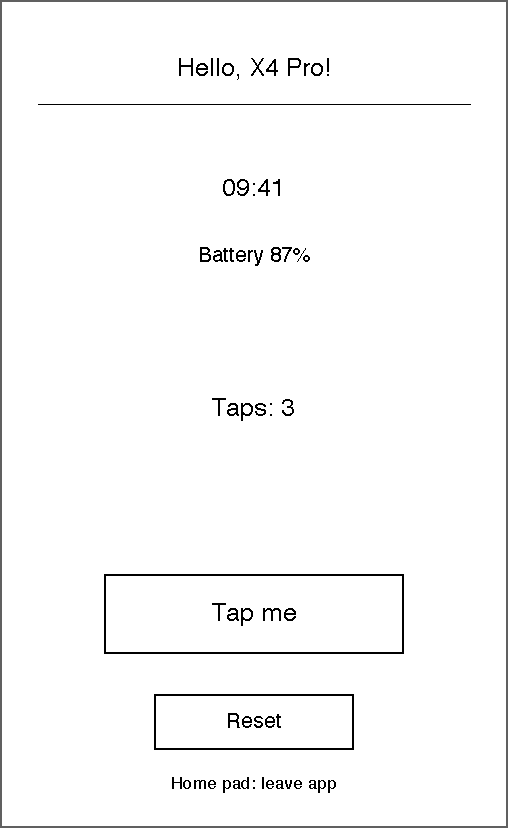
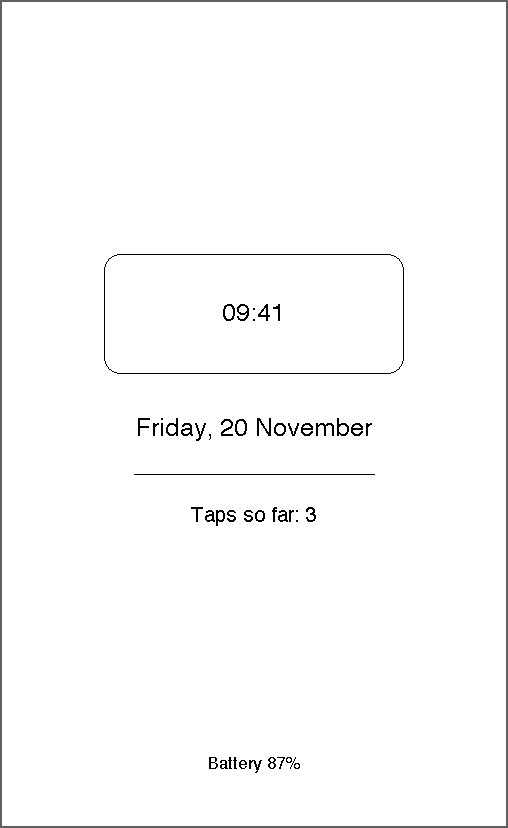
The device API is not publicly documented. Everything here is built from community reverse-engineering notes, so treat inkemu as a development aid, not as a reference of the firmware.
Install
uv tool install inkemu # or: pipx install inkemu
or as a dev dependency of your app project: uv add --dev inkemu (then prefix the commands with uv run).
Python 3.11+, macOS or Linux. Everything is headless except the window, which needs Tk (python3-tk on
Debian/Ubuntu). CI runs on uv-managed Pythons (Tk 9); with the python.org builds (Tk 8.6) the window has been seen to
crash on macOS 26.
Quick start
An app is a folder with manifest.json and index.lua; examples/hello
is a small one with a lock screen (it is not in the package: clone the repository or copy the folder).
inkemu window examples/hello # a window: click = tap, drag = swipe, arrows/Enter/Esc = side buttons
# one-shot, no window: numbered PNG shots and texts.json go to .emu/run
inkemu run examples/hello --fresh --time 2026-11-20T09:41 --steps "tap-text 'Tap me'; wait 61s; shot; texts"
The same app in a pytest test, with the network answered from recorded fixtures:
inkemu run apps/weather --net record --steps "wait 5s" # once: real requests saved to tests/fixtures/<app_id>/net/
from inkemu import Emu


def test_weather(tmp_path):
    emu = Emu("apps/weather", state_dir=tmp_path / "state", start_time="2026-11-20T09:00:00")  # net="replay"
    emu.wait("5s")
    assert emu.has_text("Berlin")
    emu.tap_text("Refresh")
    assert emu.errors == []  # Lua tracebacks are collected, never raised
Other members: emu.tap(x, y), emu.double_tap(), emu.hold(), emu.swipe(direction), emu.key(name),
emu.type_text(), emu.answer(ok), emu.lock(), emu.unlock(), emu.restart(), emu.texts(), emu.status(),
emu.log, emu.warnings, emu.shot() (a Pillow image), emu.save_shot(path).
Commands
inkemu window APP       # Tk window + command daemon
inkemu run APP --steps "..."   # one-shot, no window
inkemu serve APP        # headless daemon in the foreground
Common options: --net replay|record|live (default replay), --fresh (wipe the app state first),
--time ISO8601 (virtual start time), --state DIR, --fixtures DIR. run also takes --steps and --out DIR
(default .emu/run: numbered NNN.png shots and texts.json), prints shot paths and the output of texts, log
and state steps as they run, and exits 1 if the app raised a Lua error. window and serve take --port
(default 7480, 0 = any free port).
While a daemon runs, the same verbs work as client commands (inkemu tap-text 'Tap me'):
tap X Y, tap-text TEXT, double-tap X Y, swipe up|down|left|right, hold X Y [MS],
key up|down|left|right|ok|back, type TEXT, answer yes|no, wait DURATION (500ms, 61s, 2m),
lock, unlock, reload, restart, shot [PATH], texts, log, state, resume, stop.
tap-text taps the last drawn occurrence of the text; if it is not on screen it fails and lists the visible texts.
Every input advances virtual time by 350 ms. Daemon discovery goes through <state root>/daemon.json.
An open dialog (ctx.dialog:confirm, ctx.input:text/edit, the host's "Leave app?") is drawn as a plate with its
title, text or field and Yes/No or OK/Cancel, so it shows in shots and texts. While it is open, input does
not reach the app (the log says so); tapping a button (tap-text Yes) answers it, as do answer and type.
The window shows the same dialogs as native Tk dialogs instead.
Window keys
Mouse: click = tap, drag = swipe, long press = hold. Arrows = side buttons, Enter = ok, Esc = back,
L lock/unlock, R reload the app, ] +1 minute, } +1 hour, S save a screenshot, P pause/resume the clock.
MCP server
inkemu-mcp is a stdio MCP server, so an agent can start the app, tap, wait and look at screenshots. In Claude Code,
from your app project:
claude mcp add inkemu -- inkemu-mcp                     # inkemu installed with uv tool / pipx
claude mcp add --scope project inkemu -- uv run inkemu-mcp   # inkemu is a dev dependency; writes .mcp.json
Other clients take the same command, e.g. {"mcpServers": {"inkemu": {"command": "inkemu-mcp"}}}. App paths are
relative to the server's working directory, which is the project for Claude Code.
Tools: emu_start(app, window=None, net=None, fresh=False, port=0) (starts a detached daemon, headless and replay
unless asked otherwise, or reuses the running one for the same app; it refuses with ok: false when that daemon
runs in another window/net mode or fresh=True is asked, so call emu_stop first), emu_tap, emu_tap_text,
emu_double_tap, emu_swipe, emu_hold, emu_key, emu_type, emu_answer, emu_wait, emu_lock,
emu_unlock, emu_reload, emu_restart, emu_screenshot (PNG image), emu_texts, emu_log, emu_resume,
emu_stop. The daemon listens on 127.0.0.1 only and rejects requests with a foreign Host, an Origin header or a
non-JSON content type.
Network
ctx.net:request goes through one of three modes:
replay(default): answers from fixtures; a request without a fixture getserr='no_fixture'and a log line naming method, URL and--net record. Never touches the network.record: makes the real request and saves it as a fixture.live: real requests, nothing saved.
Fixtures live in <fixtures dir>/net/ (default tests/fixtures/<app_id>/net/, relative to the working directory),
one METHOD_host_hash.json (request key, response status/headers/body_file/delay_ms) plus a .body file.
POST bodies are matched by SHA-256. A fixture can be written by hand; a malformed one is ignored with a warning.
<state root>/secrets.json (default .emu/secrets.json) is a flat {"name": "value"} object. Values are replaced by
{{name}} in recorded URLs, bodies and headers, and {{name}} in app files seeded from the project is replaced
back for live and record requests, including their percent-encoded forms. A password in the URL
(https://user:pass@host) is always recorded as {{userinfo}}. Sensitive headers (authorization, cookie,
*token*, *key*, ...) are never recorded. Keep secrets.json out of git.
State on disk
<state root>/<app_id>/ holds state.json (ctx.state), files/ (ctx.storage), lock.json and shots/.
The state root is .emu/ in the working directory, or $INKEMU_STATE_ROOT. --fresh wipes the app state first.
Supported API
Callbacks: on_load, on_resume, on_draw(ctx, g), on_input(ctx, ev) (pointer taps, double taps, swipes and
holds; side-button keys), on_tick, on_leave. A lockscreen block in the manifest runs its own entry file on
lock and on every interval_sec wake, with ctx.lock (reason, done, set_interval, ...).
Drawing (g): clear, rect, round_rect, line, circle, arc, polygon, polyline, text, text_box,
image, pattern_rect, fill_pattern, plus layers via ctx.layers. The frame cap of 1024 commands is enforced.
ctx: invalidate, after/timers, set_tick, defer_full_refresh, quit, log, save_state, state, api,
capabilities, clock, device, fonts, storage/files, package, net (request; GET and POST),
dialog (confirm, toast), input (text, edit), image, qr, json, hex, hash, url, zlib,
random, screen, display, frontlight, system, i18n, perf, gc, budget, reader (answers from
<fixtures dir>/reader.json), lockscreen, lock. ctx.ui is not implemented.
Differences from the device
- Fonts are approximate: the system Helvetica, Arial or DejaVu (whichever exists) at fixed line heights 20/24/30,
so text widths differ from the device;
ctx.fonts:size(px)picks the nearest of the three, there is no TTF. - Lua is 5.5 via lupa: the firmware reports
_VERSION"Lua 5.5" in the reverse-engineering notes (desktop test setups often run 5.4, whose for-loop variables are not constant). Integers are 64-bit here; the device is probably built with 32-bit integers, so keep arithmetic below 2^31. - No
ctx.ui, no BLE, no WebSocket; only GET and POST get a network callback. - Layer semantics and error codes are guesses based on the notes.
- Remote commands (daemon verbs, MCP) freeze the window clock, read-only ones included, so a screenshot is stable;
resume, orPin the window, lets time run again. - A callback (or the lock screen) that runs more than 200 million Lua instructions is aborted as an app error
("callback exceeded the instruction budget ... - infinite loop?"); the device has its own, unknown budget.
Time spent inside C functions such as
string.repor pattern matching is not counted. - The app sees
debug == falseinstead ofnil(lupa reads that global on every call into Lua), and nopython,io,osorpackage.searchpath. An app that setsdebug = nilitself and then installs an erroring metatable on_Gcan still crash the emulator process (not escape it).
Development
uv sync
uv run pytest
uv run ruff check && uv run ruff format --check
uv run python docs/make_images.py    # regenerate the README screenshots
Credits
The API notes come from omer-faruq-xteink/touch-licorice-apps
(docs/firmware-notes.md) and kycube/x4pro-emu. MIT licence, see
LICENSE.
1 maintainer

Metadata
1 maintainer
Release files for inkemu 0.1.0
For a detailed explanation of source distributions (sdists) and built distributions (wheels), please see the package formats documentation.
Source distribution (sdist)
| File | Size | Uploaded | Provenance | Actions |
|---|---|---|---|---|
| inkemu-0.1.0.tar.gz | 144.9 kB | With provenance | Details for inkemu-0.1.0.tar.gz |
Built distribution (wheel)
| File | Interpreter | ABI | Platform | Actions Reset |
|---|---|---|---|---|
| inkemu-0.1.0-py3-none-any.whl | Python 3 | none | any | Details for inkemu-0.1.0-py3-none-any.whl |
Total release size: 199.6 kB
Release files / inkemu-0.1.0.tar.gz
| Download URL | inkemu-0.1.0.tar.gz |
|---|---|
| Size | 144.9 kB |
| Tags | Source |
|
SHA-256 checksum How to use checksums |
03a3dc1fed7a4a9017f6751d4273f542f01392486e96bc7488e9b3711f873a34
|
|
BLAKE2b-256 checksum How to use checksums |
97f455249ecf721fa5e924cf2d95686841fbf4ff738fcba6142e9b4116fba9ac
|
| Upload date | |
|
Uploaded using Trusted Publishing? What is trusted publishing? |
Yes |
| Uploaded via |
twine/7.0.0 CPython/3.13.16
|
Provenance
Provenance describes where a file came from. On PyPI, provenance is shared via attestations, which provide a verifiable record of the build or publishing details. View details, limitations and caveats.


PyPI Publish Attestation
PyPI verified that this artifact, at this checksum, originated from the publisher listed below.
Signed by GitHub Actions, verified by PyPI on Nov 20, 2026.
Transparency logRelease files / inkemu-0.1.0-py3-none-any.whl
| Download URL | inkemu-0.1.0-py3-none-any.whl |
|---|---|
| Size | 54.7 kB |
| Tags | Python 3 |
|
SHA-256 checksum How to use checksums |
92062ac13d147c34e736d4f24a6fd0df7e0f5391375dc192645a1a43b9807c5e
|
|
BLAKE2b-256 checksum How to use checksums |
9c3dc151e0b4909b1d8d497b9551ce706105a0986d83e8d4a1570da0bd323e7b
|
| Upload date | |
|
Uploaded using Trusted Publishing? What is trusted publishing? |
Yes |
| Uploaded via |
twine/7.0.0 CPython/3.13.16
|
Provenance
Provenance describes where a file came from. On PyPI, provenance is shared via attestations, which provide a verifiable record of the build or publishing details. View details, limitations and caveats.
PyPI Publish Attestation
PyPI verified that this artifact, at this checksum, originated from the publisher listed below.
Signed by GitHub Actions, verified by PyPI on Nov 20, 2026.
Transparency logSecurity for inkemu 0.1.0
Provenance
Provenance describes where a file came from. On PyPI, provenance is shared via attestations, which provide a verifiable record of the build or publishing details. View details, limitations and caveats.
Full provenance
Both files in this release have been uploaded with provenance metadata.
Attestation for inkemu-0.1.0.tar.gz
PyPI Publish Attestation
PyPI verified that this artifact, at this checksum, originated from the publisher listed below.
Signed by GitHub Actions, verified by PyPI on Nov 20, 2026.
Transparency logA note on package security
PyPI is a repository for distributing packages, not a service for auditing them. While third-party security researchers and our staff do their best to detect and remove malicious packages, PyPI cannot guarantee the quality, security or suitability of any given package.
To learn more about protecting yourself from malicious actors, visit our package security documentation.














