
Inkscape extensions for Barn Hunt

Project description
Inkscape Extensions for Barn Hunt





Here are some Inkscape extensions that are possibly useful when using Inkscape to draw Barn Hunt maps.
These are a freshly updated and rewritten version of plugins that I (and Sandra, my wife) have been using for several years to draw our maps. The sample course map on the official BHA Judging Assignment Cheat Sheet is one of mine. (The previous versions of the plugins worked with Inkscape version 0.x. The plugin API has changed considerably since then, so a rewrite was necessary to get the plugins to work with more modern versions of Inkscape.)
These extensions are, as yet, poorly documented, and likely not to work without tweaks in all environments (I used Linux — these extensions are totally untested on Windows), so I'm not sure that they're generally useful, yet.
The goal is for these to work on all version of Inkscape with versions of 1.0 or greater. Currently, these have be cursorily tested under Inkscape versions 1.1.2 and 1.2.1.
What’s Here?
Currently there are four extensions.
Count Symbols
We use Inkscape symbol libraries containing map elements like individual bales, rat tube markers, etc to draw our maps. This plugin simply counts what symbols are visible, and reports a list of symbol names along with how many times they are used in the drawing. (By default, only symbols on visible layers are counted.)
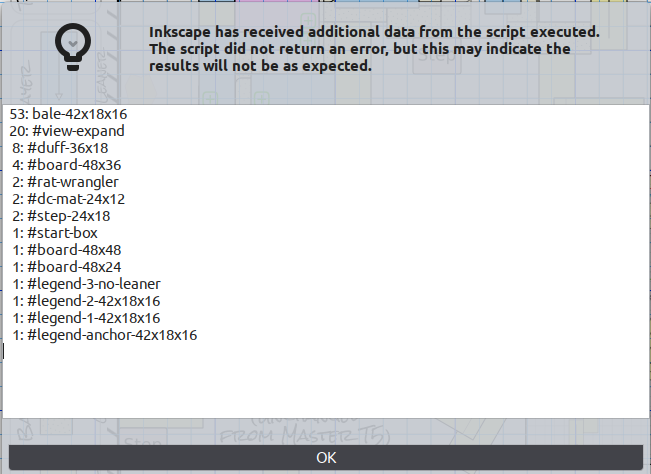
The bh:count-as symbol attribute
Symbols may be marked with a custom bh:count-as attribute, in order
to have them counted under some name other than their XML id.
I have a number of different symbols for bales: first level bales,
second level bales, bales on edge, leaners, etc. I would like all
bales of a given size counted under the same name. So, in my symbol
libraries, I set a bh:count-as="bale-42x18x16" on each of the
variants of 42”x18”x16” bales.
Create Inset
This extension creates an embedded PNG image created by exporting a portion of the drawing. Such images are useful, for example, to include a base-layer map (possibly at reduced scale) on the same page as the complete course map.
To use, one should:
-
Hide/unhide layers as you wish, to make what you want visible in the exported image visible.
-
Select one object in the drawing. That object will define the rectangular bounding box of the exported image. Then run the extension.
This will create an image. It will be created on top of all other layers in the drawing. (You will probably want to move that image into an appropriate layer.)
Regenerating the Insets
The layers that were visible when the image was generated, and the
object which defined the boundary of the image are recorded in custom
attributes on the <svg:image> element. This makes it easy to
regenerate the image(s), should that become necessary (e.g. after
you've made changes to the drawing.)
Simply select just the generated images you'd like regenerated, and fire off the extension. It will adjust layer visibility to match what it was when each image was first exported, and re-export it.
Hide Rats
The third extension is used to randomize the position of rat tubes on rat maps.
Instructions pending... :-/
Set Random Seed
This sets or updates a random number stored in a custom attribute out
the <svg> element of the drawing. This number is used by the
barnhunt program to seed the pseudo-random number generator used
when expanding text templates. Setting it to a unique number ensure,
e.g., that the Master random rat numbers come out random, but still
reproducible.
When one copies an existing .svg file to use a template for a new
trial, one should run this plugin, with the force-reseed checkbox
checked, to ensure that the copied file gets a new, unique random
seed.
Installation
The easiest way to install these extensions is using the new install
sub-command of my barnhunt
script:
First install Inkscape, python, and, then, my barnhunt script. Finally, run:
barnhunt install
to install both these extensions and my symbol sets into your Inkscape configuration.
Manual Installation
It is now recommended to use the barnhunt install sub-command to
install these extensions (see above). However, they may still be
installed manually.
To manually install a released version of this package:
-
Download the packaged zip file asset from the GitHub Releases page for the desired release. (Those are the zip files named something like
inkex_bh-version.zip.) -
Unzip the zip file into your Inkscape user extensions directory.
On Linux this can be done thusly:
# remove previous installed version, if any
rm -r "$(inkscape --user-data-directory)/extensions/org.dairiki.inkex_bh"

# unpack desired version of extensions to user's Inkscape extensions directory
unzip -d "$(inkscape --user-data-directory)/extensions" inkex_bh-X.Y.Z.zip
Warning: It is no longer recommended to install the extensions using
pip. (Though, for now, the package will continue to be published to PyPI.)
Packaging
To build a packaged zip file from the git source, clone the git repository, install hatch, then run
hatch build --target zipped-directory
That should build a zip archive in the dist/ subdirectory.
What's Elsewhere?
There are two other bits I use when drawing maps.
Neither of these are published in a public place, yet.
And, of course, their use is not documented at all.
Kick me if you want to know more.
Barn Hunt Symbol Libraries for Inkscape
I've constructed some symbol libraries for Inkscape containing things like bales, boards, rat markers, fluff pile symbols, etc.
I've even got a semi-automatic scheme set up by which I can generate symbol sets for arbitrary sized bales.
The barnhunt command-line export utility
I draw all my maps for a given course (for a day or weekend) on various nested layers in a single drawing. By hiding and unhiding various sets of layers all of my maps can be generated.
I have a python script named barnhunt, whose primary job
is to automate that layer hiding/unhiding and PDF exporting process.
While exporting the map, it can also expand special template syntax in
text in the drawings. This can be used to automate the printing of
course names and blind numbers on the exported map, and is also used
to generate the random Master rat numbers.
Sadly, at present there is zero documentation on how to use it.
Kick me if you want to know more.
Author
Jeff Dairiki, BHAJ-221A dairiki@dairiki.org
Changes
1.0.0rc6 (2023-03-06)
-
Added new update-symbols extension to update the symbol definitions in a drawing to those in the installed version of the bh-symbols symbol library.
NOTE The update symbols operation, if it goes badly, has the capability to significantly mangle the drawing. Make sure you have a back-up copy of the drawing before running the extension.
1.0.0rc5 (2023-02-17)
Refactor
- Use helpers provided by
inkex.command(rather than callingsubprocess.rundirectly) to run Inkscape (and optipng) from the create-inset extension.
Testing
-
Add integration test for the create-inset extension. This checks that the extension can be invoked from Inkscape's batch mode.
-
Omit use of virtual environment in
test_run_module_in_installed_extensions.
1.0.0rc4 (2023-02-14)
Bugs
- Fix the create inset extensions when running from the AppImage-packaged version of Inkscape 1.2.2.
1.0.0rc3 (2022-10-12)
Bugs
- Fix the create inset and hide rats extensions so that they might actually run under Inkscape 1.0.x.
Packaging
-
We now build and publish — as GitHub Release artifacts — zip archives of the extension that suitable for unzipping in a user's Inkscape extensions directory.
-
Use hatch for packaging.
Testing
-
Install
inkexfrom custom-built wheels in the python registry at https://gitlab.com/dairiki/inkex/. The versions ofinkexon PyPI are stale, and also don't match theinkexincluded in any particular version of Inkscape. -
We now test (I think) under truly the whole matrix of supported python × Inkscape/inkex versions.
1.0.0rc2 (2022-09-25)
Bugs Fixed
Hide Rats
- When Clone rat layer selected, cloning of text was screwed up.
1.0.0rc1 (2022-08-31)
This is a fairly complete rewrite and repackaging of a set of Barn Hunt extensions I used with Inkscape 0.9x. (As of Inkscape 1.0, the extension API changed significantly, so this required a significant rework.)
Release history Release notifications | RSS feed


Download files
Download the file for your platform. If you're not sure which to choose, learn more about installing packages.
Source Distribution
Built Distribution
Filter files by name, interpreter, ABI, and platform.
If you're not sure about the file name format, learn more about wheel file names.
Copy a direct link to the current filters
File details
Details for the file inkex_bh-1.0.0rc6.tar.gz.
File metadata
- Download URL: inkex_bh-1.0.0rc6.tar.gz
- Upload date:
- Size: 50.2 kB
- Tags: Source
- Uploaded using Trusted Publishing? No
- Uploaded via: twine/3.1.1 pkginfo/1.4.2 requests/2.22.0 setuptools/45.2.0 requests-toolbelt/0.8.0 tqdm/4.30.0 CPython/3.8.10
File hashes
| Algorithm | Hash digest | |
|---|---|---|
| SHA256 |
fab9901d951413fd8f465706186ac674d69a7665e3516a8aca247b986ba36acf
|
|
| MD5 |
f3bbddff668f4f4a1b70fd218e1222a5
|
|
| BLAKE2b-256 |
cb7305b7fc713ac9e2a4b938a9ed1fcb983bb8aae2bf52881d17b42e66dd25fc
|
File details
Details for the file inkex_bh-1.0.0rc6-py3-none-any.whl.
File metadata
- Download URL: inkex_bh-1.0.0rc6-py3-none-any.whl
- Upload date:
- Size: 40.7 kB
- Tags: Python 3
- Uploaded using Trusted Publishing? No
- Uploaded via: twine/3.1.1 pkginfo/1.4.2 requests/2.22.0 setuptools/45.2.0 requests-toolbelt/0.8.0 tqdm/4.30.0 CPython/3.8.10
File hashes
| Algorithm | Hash digest | |
|---|---|---|
| SHA256 |
871ea60227bd098440c9a648c31fd2d3eba1d3a5afaa8b8a624e6009f22f5b91
|
|
| MD5 |
e023f14bbf67a00eac3d16bdcbf89ec6
|
|
| BLAKE2b-256 |
86ecee8e5a490ea27d8567a54a4b4675bb33814082b756d02dc8759ab8d4c7bc
|






