
This release is a pre-release and may not be stable for production use.

Scientific figures from Python, with measured layout and editable SVG/PDF output.
Combine plots, diagrams, images and native 3D artwork on a page sized in millimetres. Keep data and labels live, compile the figure, and inspect its layout and print diagnostics before exporting.
Get started · Documentation · Examples · API reference
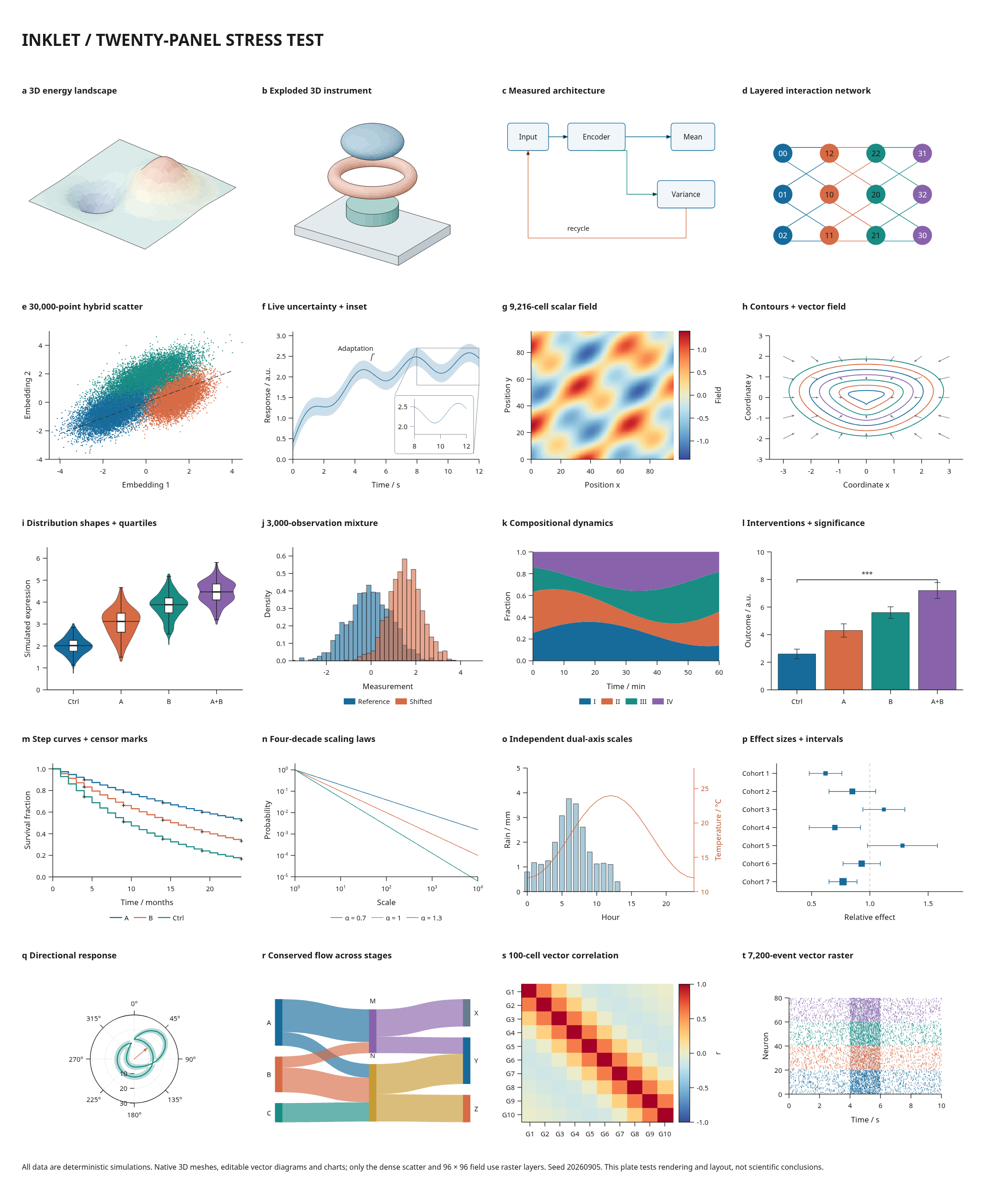
This twenty-panel stress test includes 30,000 scatter points, 5,580 mesh triangles and 7,200 vector events. Its data are simulated. Only the dense scatter and scalar field are rasterized; the other artwork remains vector.
Start with plots from CSV, then combine them with measured diagrams, images and 3D in one figure. Shared scales keep panels comparable; physical dimensions keep type and strokes consistent when you change the page size. The plot guide helps choose a representation, while layout and export review cover the finished page.
4.0 development preview
4.0.0.dev16 adds compact dense-field PDF exports and reusable figure projects with verified input files, saved editor choices and shared entity identities.
python -m pip install "inklet==4.0.0.dev16"
Preview guide · Figure project tutorial · 4.0 roadmap · Release notes
This is an opt-in development release. Experimental APIs and saved-state schemas may change; 3.1.0 remains the stable release. General browser editing, depth-aware 3D selection and the remaining 4.0 release gates are still open. Animation and presentation authoring remain in the 5.0 direction.
Install
Python 3.11 or later is required. Install from PyPI:
python -m venv .venv
source .venv/bin/activate
python -m pip install inklet
SVG/PDF output and the built-in 3D renderer need no browser or external rendering
engine. Text needs an installed font. For PNG output and visual review, install
python -m pip install 'inklet[render]'. Poppler adds independent PDF previews;
use compare_pdf=False or --no-pdf-preview for a review without it.
See installation for system packages, Windows activation,
optional dependencies and environment checks.
Your first figure
Save this as first_figure.py and run python first_figure.py:
import inklet as i


def make_document():
    data = i.dataset(
        {'time': [0, 1, 2, 3], 'signal': [1, 3, 2, 4]},
        name='response',
        source=i.Source('Quickstart demonstration', method='simulated'),
    )
    plot = i.plot_spec(x=(0, 3), y=(0, 5))
    plot.line(data.points('time', 'signal'), name='Signal', stroke='#176b9b')
    plot.axes(x='Time / s', y='Signal / mV').legend(side='bottom')

    doc = i.publication('single-column').document()
    doc.add('response', plot, min_height=55)
    return doc


if __name__ == '__main__':
    figure = make_document().compile()
    figure.save('response.svg', 'response.pdf')
    print(figure.report())
The document measures axis labels and the legend, fits the plot to an 89 mm page, and saves SVG and PDF with embedded text. It does not shrink the font to make the plot fit. The quickstart continues with live data edits, multiple panels and review exports.
Build, inspect, revise
With the preview dependencies installed:
inklet doctor
inklet build first_figure.py --output out/review
inklet watch first_figure.py --output out/review
build writes the vector files, PNG previews, diagnostics, a provenance manifest
and a local HTML review page. watch serves a preview at
http://127.0.0.1:8765/ and rebuilds when the authoring code changes. Review pages
support diagnostic filters, SVG highlights and comparisons with a saved revision.
For an environment without preview tools, use
inklet build first_figure.py --output out/review --vectors-only.
What you can build
| Task | Main tools | Guide |
|---|---|---|
| Scientific, educational and branded styles | preset, independent formats, live switching |
Presets |
| Multi-panel figures | document, subfigure, weighted columns, spans, panel letters |
Layout |
| Scientific plots | plot_spec, axes, bands, distributions, heatmaps, insets, polar plots |
Plotting |
| Data-driven revisions | Dataset, Series, shared scales, categories, derive, source records |
Live data |
| Architecture and flow diagrams | composition, module, named ports, measured connections, graph |
Diagrams |
| 3D and image panels | solid, model, scene, asset, explicit file dependencies |
3D and images |
| Publication exports | Physical presets, embedded or outlined text, SVG/PDF, review bundles | Export and review |
How Inklet works
A Document holds live definitions. compile() measures their contents, places
them, routes connections and produces a snapshot used by both export backends.
Updating a dataset or named instruction invalidates dependent components;
unchanged definitions can reuse their cached geometry. Earlier snapshots remain
unchanged.
Numeric lengths, including low-level text sizes, are millimetres. Use
i.pt(8) for an 8-point text size; publication profile options such as
font_pt=8 take points explicitly. Plot coordinates follow their data scales.
The direct Figure, Panel and Diagram APIs remain supported for fixed
drawings. See the authoring model for when to use each layer.
Scope and limits
- Layout respects physical constraints. Impossible fits raise
LayoutError; changing page width does not automatically rearrange the number of columns. - Diagnostics help find collisions, small type and other print issues. Review the rendered figure as well; a clean report does not establish scientific accuracy.
- Rasterization keeps dense exports compact, but dense-scatter rebuilds can still be expensive. The stress report records the workload, timings and remaining limitations.
- Reproducible appearance requires consistent inputs, fonts and dependencies. The export manifest records dataset and font hashes for comparison.
Scene rendering
Inklet combines complete Blender scenes with vector plots, labels and measurements. Cycles uses an available GPU and falls back to CPU when none is found. Render queues provide progress, cancellation and bounded concurrency. Saved camera projection and numeric passes support depth-tested paths, object masks and world-space dimensions without rerendering an annotation change.
Three editable templates cover laboratory apparatus, product presentation and architecture. The annotated laboratory combines 265 objects, twelve callouts, a measured footprint, two detail views and an analytic response plot.
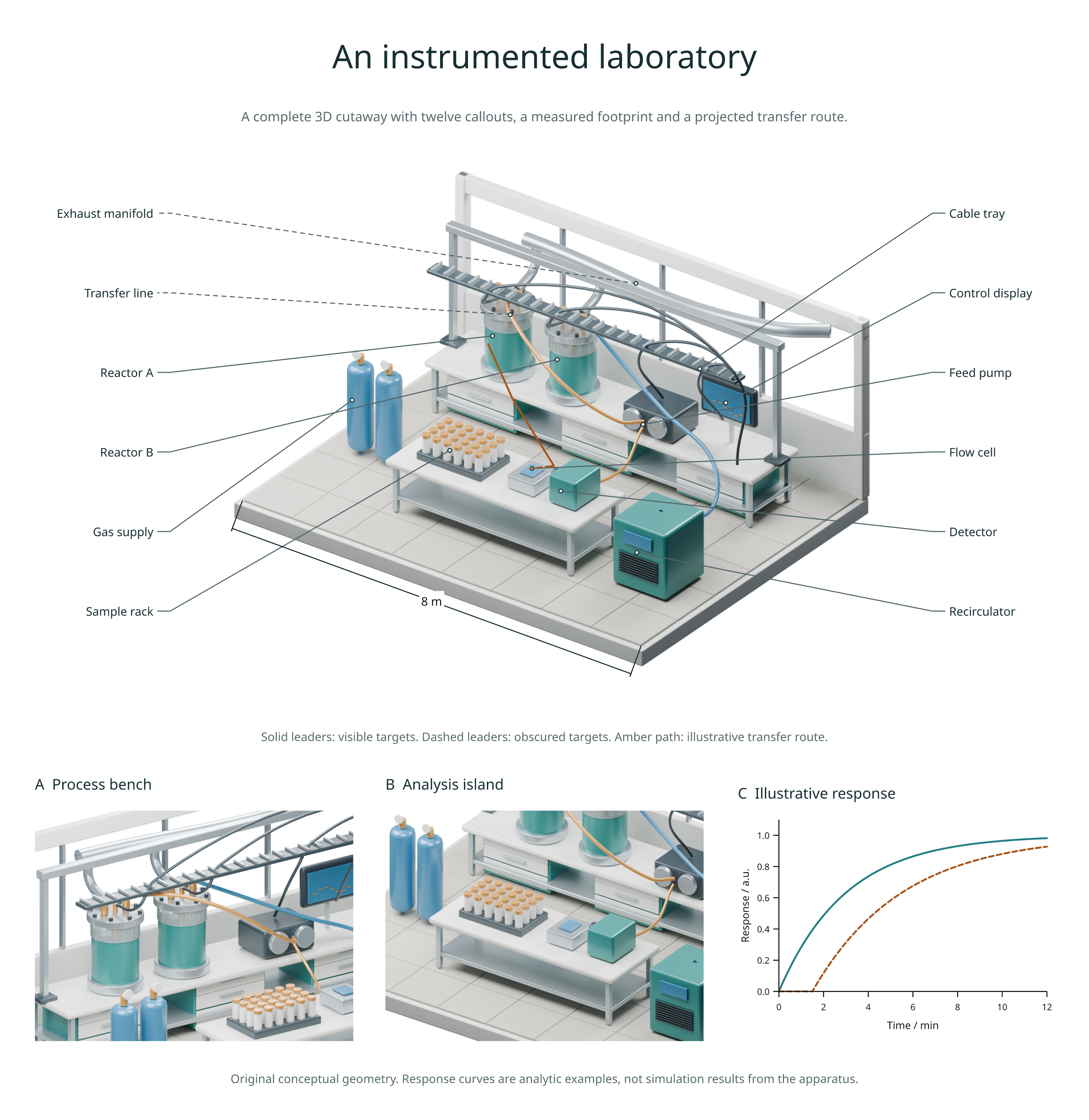
PNG export uses resvg and needs no browser. Gradients, hatching and group blending remain vector in SVG/PDF. Masks and explicit rasterization create image layers; keep editable text outside them. Blender is installed separately and remains optional for ordinary plots and native vector 3D.
Rendering guide · Scene templates · Showcase library · Upgrade from 2.6 · Compatibility
Documentation and development
Read the documentation on Read the Docs. The latest documentation follows the development branch. The source Markdown is also readable on GitHub, and contributors can serve the site from a checkout:
python -m pip install -e '.[docs]'
python -m mkdocs serve
See contributing for tests, documentation checks and visual regressions. Existing users can consult migration, historical guides and the changelog.
License
Inklet code is available under the MIT license. Included third-party meshes and structural data retain their own terms; see third-party notices.
1 maintainer

Release files for inklet 4.0.0.dev16
For a detailed explanation of source distributions (sdists) and built distributions (wheels), please see the package formats documentation.
Source distribution (sdist)
| File | Size | Uploaded | |
|---|---|---|---|
| inklet-4.0.0.dev16.tar.gz | 82.3 MB | Details |
Built distribution (wheel)
| File | Interpreter | ABI | Platform | Reset |
|---|---|---|---|---|
| inklet-4.0.0.dev16-py3-none-any.whl | Python 3 | none | any | Details |
Total release size: 83.4 MB
Release files / inklet-4.0.0.dev16.tar.gz
| Download URL | inklet-4.0.0.dev16.tar.gz |
|---|---|
| Size | 82.3 MB |
| Tags | Source |
|
SHA-256 checksum How to use checksums |
86af2ee9acd422e97acb703025254858d25742afb68bc06d11603becc99577ab
|
|
BLAKE2b-256 checksum How to use checksums |
4782f618ca47d56a630f34b9fe12dcefe977e5a5e0406b5c2524f04c09fe219c
|
| Upload date | |
|
Uploaded using Trusted Publishing? What is trusted publishing? |
Yes |
| Uploaded via |
twine/7.0.0 CPython/3.13.14
|
Provenance
Provenance describes where a file came from. On PyPI, provenance is shared via attestations, which provide a verifiable record of the build or publishing details. View details, limitations and caveats.


PyPI Publish Attestation
PyPI verified that this artifact, at this checksum, originated from the publisher listed below.
Signed by GitHub Actions, verified by PyPI on Sep 14, 2026.
Transparency logRelease files / inklet-4.0.0.dev16-py3-none-any.whl
| Download URL | inklet-4.0.0.dev16-py3-none-any.whl |
|---|---|
| Size | 1.1 MB |
| Tags | Python 3 |
|
SHA-256 checksum How to use checksums |
2bb45d09861ee03f41796e4784667055c3aef19e4197cc500e15ad7cbab47930
|
|
BLAKE2b-256 checksum How to use checksums |
e62b80c180162059e65370459c1df8d8b2eacd6814de35645c146d1e7eb43d0a
|
| Upload date | |
|
Uploaded using Trusted Publishing? What is trusted publishing? |
Yes |
| Uploaded via |
twine/7.0.0 CPython/3.13.14
|
Provenance
Provenance describes where a file came from. On PyPI, provenance is shared via attestations, which provide a verifiable record of the build or publishing details. View details, limitations and caveats.
PyPI Publish Attestation
PyPI verified that this artifact, at this checksum, originated from the publisher listed below.
Signed by GitHub Actions, verified by PyPI on Sep 14, 2026.
Transparency log













