

inklight
See documents. Understand meaning. Take action.
A local-first, OCR-powered document agent for Python — fast on a laptop CPU, and it shows its evidence.





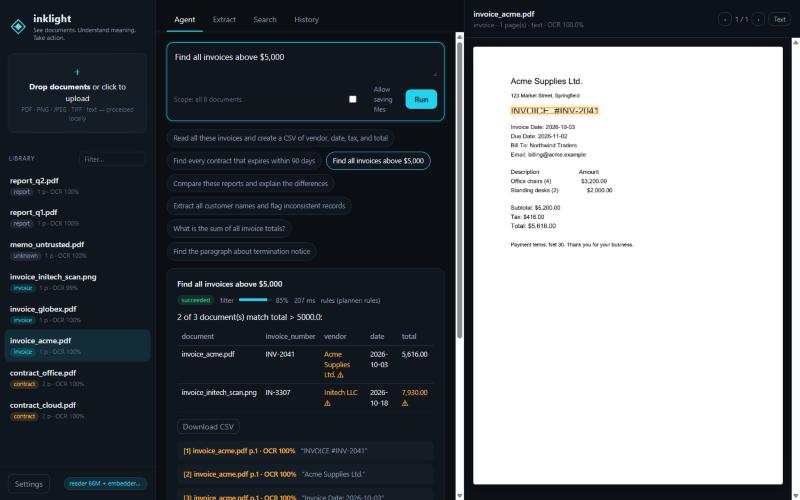
Point Inklight at a folder of PDFs, scans or photos and ask for what you need, in plain language:
inklight ask ./invoices "Read all these invoices and create a CSV of vendor, date, tax, and total" --out ./out
inklight ask ./contracts "Find every contract that expires within 90 days"
inklight ask ./reports "Compare these reports and explain the differences"
You get an answer plus the page, line and bounding box it came from, a confidence score, warnings when something looks off, and a trace of every step the agent took.
Why Inklight
- Real OCR, on CPU. Built on Indra OCR: 43 ms per digital PDF page, 98 ms per scanned page on a laptop (benchmarks). Digital PDFs use their text layer first, and OCR runs only where needed.
- An agent, not a chatbot wrapper. It works out the intent, then runs a minimal plan of typed tools (search, extract, filter, calculate, compare, find inconsistencies, summarise, write). Every run has step limits, time budgets, retries and cancellation.
- Shows its work, and its limits. Every result says how your request was understood ("vendor contains
Acme; total > 5,000 USD") and lists anything it could not apply, instead of quietly answering a broader
question. Values come from labelled fields, extractive spans or quoted sentences with page and position.
A citation proves where a value came from, not that it answers your question, so confidence is reported
twice: understood (did it read your request right) and evidence (OCR, labels,
subtotal + tax = total). Amounts in different currencies are never added or compared to each other. - Small-model intelligence, measured. Optional models are each under 200M parameters: a 66M reader that can only point at text in your document, a 33M embedder for search, and an optional 135M writer whose output must be grounded. Calculations and filters are exact Python, not model guesses.
- Local and private by default. No API key needed. Nothing leaves your machine unless you configure a remote model.
- Safe with untrusted documents. "Ignore previous instructions" inside a PDF is treated as data and flagged. The agent has no shell, no code execution, and writes files only where you allow. See SECURITY.md.
Install
pip install inklight            # Python 3.11+, Windows / Linux / macOS, CPU only
inklight models pull            # optional: 66M reader + 33M embedder (~100 MB, once)
Indra's OCR models (~76 MB) download automatically on the first OCR run. After that, everything works offline.
60-second tour
inklight process ./documents/                                   # OCR, classify and index (incremental)
inklight ask ./documents/ "Find all invoices above $5,000"
inklight extract invoice.pdf --schema invoice.json --format csv
inklight serve                                                  # web workspace on http://127.0.0.1:8765
inklight watch ./inbox -r "extract vendor and total as csv" -o ./out   # automation
from inklight import DocumentAgent

agent = DocumentAgent()
result = agent.ask("Extract the invoice number, date, and total", files=["invoice.pdf"])

print(result.answer)        # human-readable answer
print(result.table())       # [{'document': 'invoice.pdf', 'invoice_number': 'INV-2041', 'date': '2026-10-03', 'total': 5616.0}]
print(result.sources[0])    # name='invoice.pdf' page=1 bbox=(200.4, 325.0, 667.6, 359.5) excerpt='INVOICE #INV-2041' ocr_conf=1.0
print(result.warnings, result.confidence, result.trace)
More: typed extraction without natural language (agent.extract(files, fields=[...]) or schema=), ask_async,
library management (agent.library.search/remove/reindex), and the HTTP API at /api/docs when serving.
See docs/API.md.
What it can do
| You say | Inklight does | Tools |
|---|---|---|
| "create a CSV of vendor, date, tax and total" | Typed extraction with provenance, then writes the CSV (with permission) | extract_fields → write_output |
| "contracts that expire within 90 days" | Extracts expiry dates, filters by date window | extract_fields → filter_records |
| "invoices above $5,000" | Exact numeric filter | extract_fields → filter_records |
| "sum of all invoice totals" | Decimal arithmetic, reports missing values | extract_fields → calculate |
| "compare these reports" | Field and line diffs, changed figures (6% → 17%) |
compare_documents |
| "flag inconsistent customer names" | Fuzzy grouping of variants, arithmetic and date checks | extract_fields → find_inconsistencies |
| "find the paragraph about termination" | Retrieval, then the exact block with its box on the page | search → cite |
| "what was revenue growth in Q2?" | Field shortcut, extractive reader, or best sentence, with citation | search → answer |
| "summarize the reports" | Extractive summaries with page citations | summarize |
How it works
request ─► planner (typed plan, from your words only) ─► bounded runner ─► tools ─► cited answer + what it understood
                                                                   │
            library: SQLite + FTS5 (+ vectors) ◄── ingest ◄── Indra OCR (text layer first, OCR where needed)
Details in docs/ARCHITECTURE.md. The short version of the "200M-parameter" story: we measured a 135M model as a planner and it was right 27.5% of the time, so the small models do what small models are good at (pointing at evidence, ranking passages) and deterministic code does the rest.
Configuration
~/.inklight/config.toml (see config.example.toml) or environment variables such as
INKLIGHT_LIMITS__MAX_PAGES=50. Brain modes:
rules: no models.auto(default): use the small models if they are installed.local: require the small models.models.remote_*: optional stronger model behind an OpenAI-compatible API, for low-confidence questions.
Limits, honestly
- OCR quality is Indra's. It is weaker on handwriting, degraded scans, complex tables and some scripts (Indra's notes). Low OCR confidence is surfaced on every value.
- Field labels are English. Ambiguous dates like
03/04/2026are read month-first. - The rule planner covers common document tasks. Unusual phrasing falls back to question answering, or to a remote model if you configured one.
- Semantic search scans vectors in memory, which suits libraries up to tens of thousands of chunks.
⚠ License notice — read before commercial use
Inklight's code is Apache-2.0. The Indra OCR model weights (downloaded by indra-ocr, not
bundled) use a modified OpenRAIL-M license. It is free for research, personal use, and organisations
under $20M revenue and under $20M funding. It restricts commercial use that competes with Datalab.
A commercial document-AI product built on Inklight + Indra needs a license from
Datalab, or a different OCR engine (the OCR layer is pluggable).
Full audit: THIRD_PARTY_LICENSES.md.
Development
pip install -e ".[dev]"
pytest                      # 128 tests, about 1 minute on CPU (downloads Indra models on first run)
ruff check src tests && mypy src
python bench/run.py         # reproduces docs/BENCHMARKS.md
See CONTRIBUTING.md, CHANGELOG.md, CODE_OF_CONDUCT.md and, for maintainers, docs/PUBLISHING.md.
1 maintainer

Metadata
1 maintainer
Release files for inklight 0.1.0
For a detailed explanation of source distributions (sdists) and built distributions (wheels), please see the package formats documentation.
Source distribution (sdist)
| File | Size | Uploaded | Provenance | |
|---|---|---|---|---|
| inklight-0.1.0.tar.gz | 167.6 kB | With provenance | Details |
Built distribution (wheel)
| File | Interpreter | ABI | Platform | Reset |
|---|---|---|---|---|
| inklight-0.1.0-py3-none-any.whl | Python 3 | none | any | Details |
Total release size: 285.7 kB
Release files / inklight-0.1.0.tar.gz
| Download URL | inklight-0.1.0.tar.gz |
|---|---|
| Size | 167.6 kB |
| Tags | Source |
|
SHA-256 checksum How to use checksums |
1f19dcdf3141d13e1125831b49d4ae2751f2faa0e5d3475511c302fa655da47c
|
|
BLAKE2b-256 checksum How to use checksums |
fd3c7e9ea3b0216136079d7e58cb7f7ee447455c411dfbabfa215a76de2211b7
|
| Upload date | |
|
Uploaded using Trusted Publishing? What is trusted publishing? |
Yes |
| Uploaded via |
twine/7.0.0 CPython/3.13.16
|
Provenance
Provenance describes where a file came from. On PyPI, provenance is shared via attestations, which provide a verifiable record of the build or publishing details. View details, limitations and caveats.


PyPI Publish Attestation
PyPI verified that this artifact, at this checksum, originated from the publisher listed below.
Signed by GitHub Actions, verified by PyPI on Oct 23, 2026.
Transparency logRelease files / inklight-0.1.0-py3-none-any.whl
| Download URL | inklight-0.1.0-py3-none-any.whl |
|---|---|
| Size | 118.1 kB |
| Tags | Python 3 |
|
SHA-256 checksum How to use checksums |
4922dc132df4743e4bf6b29ad34e35bcf2717f0eefa45acda7921801e68f4b14
|
|
BLAKE2b-256 checksum How to use checksums |
5bf3f74ca3ef447798d36c41fcc0211a947433252131b55c2fdccd33378f7048
|
| Upload date | |
|
Uploaded using Trusted Publishing? What is trusted publishing? |
Yes |
| Uploaded via |
twine/7.0.0 CPython/3.13.16
|
Provenance
Provenance describes where a file came from. On PyPI, provenance is shared via attestations, which provide a verifiable record of the build or publishing details. View details, limitations and caveats.
PyPI Publish Attestation
PyPI verified that this artifact, at this checksum, originated from the publisher listed below.
Signed by GitHub Actions, verified by PyPI on Oct 23, 2026.
Transparency logSecurity for inklight 0.1.0
Provenance
Provenance describes where a file came from. On PyPI, provenance is shared via attestations, which provide a verifiable record of the build or publishing details. View details, limitations and caveats.
Full provenance
All 2 files in this release have been uploaded with provenance metadata.
Attestation for inklight-0.1.0.tar.gz
PyPI Publish Attestation
PyPI verified that this artifact, at this checksum, originated from the publisher listed below.
Signed by GitHub Actions, verified by PyPI on Oct 23, 2026.
Transparency logA note on package security
PyPI is a repository for distributing packages, not a service for auditing them. While third-party security researchers and our staff do their best to detect and remove malicious packages, PyPI cannot guarantee the quality, security or suitability of any given package.
To learn more about protecting yourself from malicious actors, visit our package security documentation.













