
Inkscape MCP
Let your AI agent design, edit, and analyze vector graphics through Inkscape — live alongside a running Inkscape window, or headless from the command line.









With Inkscape MCP, your coding agent can do everything a designer does in Inkscape — sketch and reshape paths, apply effects and filters, render LaTeX equations, generate barcodes and QR codes, convert between formats, query and rewrite document structure — through plain conversation instead of menu clicks.
Pair it with a running Inkscape window and the agent works alongside you — it sees what you have selected, opens property dialogs on your behalf, applies edits that appear on the canvas in real time (each one a normal undo entry you can roll back), and rasterizes its own work to inspect and refine the result. Or run it headlessly to batch-convert artwork, automate exports, and build pipelines around vector assets — no GUI required. The full Inkscape feature surface, including its hundreds of bundled extensions, is reachable as tool calls.
How it works
- The agent calls one of eight portmanteau tools —
inkscape_file,inkscape_vector,inkscape_analysis,inkscape_system,inkscape_extension,inkscape_gradient,inkscape_metadata, orinkscape_live— with anoperationstring that picks the actual behavior. - For headless work the server dispatches through
InkscapeCliWrapper, which builds and runs aninkscape --actions=...(or--export-...) command. For live-canvas work it talks to a running Inkscape window over D-Bus and stages SVG fragments through the clipboard. - Inkscape reads your input file (or the open document), runs the operation, and writes the output.
- The server returns dimensions, file paths, validation results, or whatever the operation produces — typed and trimmed for the agent's context window.
No external network. Just the Inkscape binary, an optional running Inkscape window, and your local files.
Getting started
Tested with Inkscape 1.4.4 on Ubuntu 24.04.
# 1. Install Inkscape + system headers for pycairo / pygobject
sudo add-apt-repository ppa:inkscape.dev/stable
sudo apt update
sudo apt install inkscape libcairo2-dev libgirepository-2.0-dev libgirepository1.0-dev \
pkg-config python3-dev xclip
# xclip stages SVG fragments for clipboard-based insert into the canvas.
# Clipboard ops auto-detect the backend. On Wayland (the Ubuntu 24.04 default)
# wl-clipboard is preferred if installed; otherwise xclip is used, which works
# because Inkscape runs as an XWayland client. Either package is sufficient.

# 2. Register with Claude Code (uvx fetches inkscape-mcp from PyPI on first run)
claude mcp add inkscape_mcp -s user -- uvx inkscape_mcp
claude mcp list | grep inkscape_mcp   # → ✓ Connected

# 3. (Re)start Inkscape so it picks up the bundled extensions
# The MCP server auto-installs its inkex extensions to
# ~/.config/inkscape/extensions/inkscape_mcp/ on first boot. Inkscape only
# scans the extensions dir at startup, so close + reopen Inkscape once.
# Verify via:
#   inkscape_system(operation="diagnostics")  → bridge.needs_restart should be false
That's it. Ask the agent to convert an SVG, query an object's bounding box, run a boolean union — it'll pick the right tool.
Alternative install paths
# Plain pip into a venv
pip install inkscape-mcp

# uv into a project
uv add inkscape-mcp
The PyPI name is inkscape-mcp (hyphen). The Python import name is inkscape_mcp (underscore — PEP 8 / valid identifier). Both pip install inkscape-mcp and pip install inkscape_mcp resolve to the same project (PEP 503 name normalization).
Windows
The headless tools install and run exactly as above. The live bridge (inkscape_live) needs one extra piece: a Windows dbus-daemon, which isn't part of a stock Windows install. The simplest source is MSYS2 — install it, then:
pacman -S mingw-w64-x86_64-dbus # provides dbus-daemon.exe; MCP auto-discovers it
gdbus.exe itself already ships with Inkscape, and the daemon's dependency DLLs are covered by Inkscape's, so MSYS2 is only the delivery vehicle for that one dbus-daemon.exe. If you already have one elsewhere, point INKSCAPE_MCP_DBUS_DAEMON at it (and INKSCAPE_MCP_GDBUS if gdbus.exe isn't found automatically).
On Windows the live bridge launches and manages its own Inkscape instance — a hand-launched Inkscape isn't on the bus, so have the agent open_file a document to work on it. Tested on Inkscape 1.4.x.
Configuration
The Claude Code entry the install command above creates looks like:
{
  "mcpServers": {
    "inkscape_mcp": {
      "command": "uvx",
      "args": ["inkscape_mcp"]
    }
  }
}
Pin a non-default Inkscape with INKSCAPE_BIN=/path/to/inkscape in the server env; the server only falls back to searching $PATH when nothing pins it. Inspect from the agent via inkscape_system(operation="diagnostics") — its config_sources block reports each tracked setting's effective value alongside where it came from (env_var, config_file, cli_flag, auto_detected or default).
Try asking your agent to…
Editing the file you have open
- "Recolor everything blue to red"
- "Open document properties — I can't find the DPI setting"
- "Select the pen tool so I can draw a curve"
- "Show me the XML editor"
- "Hide the snap controls bar"
- "Add a drop shadow to all the rectangles"
- "Convert this monogram to a single compound path"
- "Run a boolean union on the two selected shapes"
Generating SVG content
- "Drop in an isometric grid into this document"
- "Generate a calendar for the current month and paste it here"
- "Make me a 24×24 settings cog icon — currentColor stroke, round caps"
Inspection & format conversion
- "Export this to a 4× PNG and a print-ready PDF"
- "What's the bounding box of #logo-mark?"
- "Optimize this SVG — strip Inkscape namespace cruft"
- "List every object in the file with its type and size"
Live-canvas workflows (Inkscape running)
- "Read what I have selected"
- "Align these three icons horizontally with equal spacing"
- "Swap the whole palette to a warmer earth-tone scheme"
- "Add a 3-stop gradient to the rect with id
hero"
The agent picks the right tool. It can drive over 1,000 of Inkscape's actions over D-Bus (1,083 app-scope plus 163 window-scope on Inkscape 1.4.4 — ask for the exact figure with inkscape_live(operation="ping")), fall back to headless CLI when the GUI isn't running, and run inkex extensions for things D-Bus doesn't cover.
Available tools
inkscape_file— load, save, convert (PDF/PNG/EPS/PS/…), validate, batch convert.inkscape_vector— 49 ops covering boolean, tracing, path simplification, optimization, alignment, layer export, geometry mutation, barcodes, LPE chains, tile clones.inkscape_analysis— quality scoring, statistics, object lists, layer structure.inkscape_system— server status, diagnostics, extension discovery and execution.inkscape_extension— discover and invoke any installed inkex extension (headless or on the live canvas).inkscape_gradient— gradient-stop manipulation; linear↔radial conversion.inkscape_metadata— read/write Dublin-Core RDF metadata.inkscape_live— drive the running GUI over D-Bus: live edits, paste-in-place, XML edits,rasterizeso the agent can see the canvas (preserves undo).
Full operation list in docs/TOOLS.md.
How the agent learns to use it
An agent that just installed this server doesn't know your workflow, so the server teaches it. MCP's InitializeResult.instructions is pushed into the client's system prompt on connect, and this server uses it to establish the working method rather than just the mechanics: compose procedurally instead of hand-writing SVG (place primitives, then let Inkscape align, distribute, boolean and clone them), rasterize and actually look at the result before declaring it done, ask you to select the objects you want help with, and open the dialog or tool you're asking about instead of describing a menu path.
Deeper material is pull-based — resource://inkscape/mcp-workflow (operational guide, recipes, and the Inkscape rendering pitfalls that silently ruin output), resource://inkscape/cli-actions (the full verb catalog), plus prompt://inkscape/design-workflow for the step-by-step design loop, which most clients surface as a slash command. The pushed instructions name those explicitly so the agent knows to fetch them.
Learn more
- docs/INSTALL.md — full install walkthrough.
- docs/TOOLS.md — every operation per tool.
- docs/TROUBLESHOOTING.md — when things break.
- src/inkscape_mcp/reference/ — captured Inkscape 1.4.4
--action-listand--help; ships in the wheel and is served asresource://inkscape/cli-actions/cli-help.
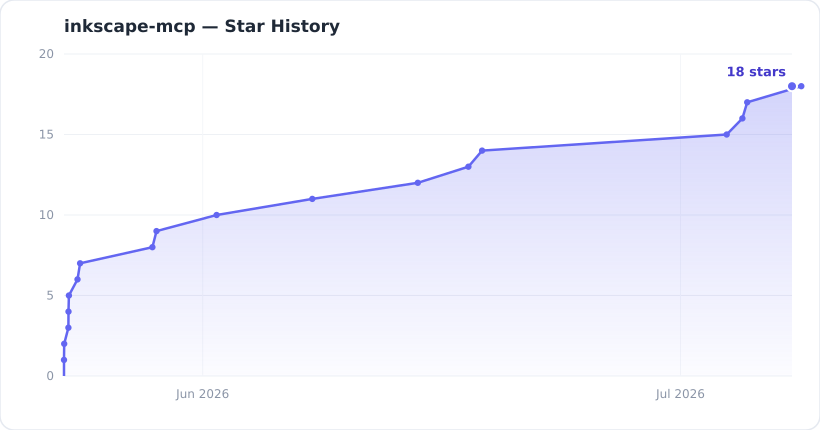
Star history
Support
If you like my work and found this useful, feel free to support me at buymeacoffee.com/aravindev.

License
MIT — see LICENSE. This project is a fork of upstream MIT-licensed work; attribution and lineage details are in NOTICE.md.
1 maintainer

Download files
Download the file for your platform. If you're not sure which to choose, learn more about installing packages.
Source Distribution
Built Distribution
Filter files by name, interpreter, ABI, and platform.
If you're not sure about the file name format, learn more about wheel file names.
Copy a direct link to the current filters
File details
Details for the file inkscape_mcp-1.3.1.tar.gz.
File metadata
- Download URL: inkscape_mcp-1.3.1.tar.gz
- Upload date:
- Size: 1.0 MB
- Tags: Source
- Uploaded using Trusted Publishing? Yes
- Uploaded via:
twine/7.0.0 CPython/3.13.14
File hashes
| Algorithm | Hash digest | |
|---|---|---|
| SHA256 |
50f09f0c9d2850024c17127e1f8e2a36dd1f298338b3d5f5fde948eca2d841e7
|
|
| MD5 |
fed186adcdfec5b36c93c3b260a60087
|
|
| BLAKE2b-256 |
1531d58b19626a546873b28b561ac5f82bf0432c7bc97b930f95d22612d94630
|
Provenance
The following attestation bundles were made for inkscape_mcp-1.3.1.tar.gz:
Publisher:
publish.yml on aravindev/inkscape_mcp
-
Statement:
-
Statement type:
https://in-toto.io/Statement/v1 -
Predicate type:
https://docs.pypi.org/attestations/publish/v1 -
Subject name:
inkscape_mcp-1.3.1.tar.gz -
Subject digest:
50f09f0c9d2850024c17127e1f8e2a36dd1f298338b3d5f5fde948eca2d841e7 - Sigstore transparency entry: 2663683953
- Sigstore integration time:
-
Permalink:
aravindev/inkscape_mcp@5a53f769fc33a5c3b5e6e7049797d74bcb67bc51 -
Branch / Tag:
refs/heads/main - Owner: https://github.com/aravindev
-
Access:
public
-
Token Issuer:
https://token.actions.githubusercontent.com -
Runner Environment:
github-hosted -
Publication workflow:
publish.yml@5a53f769fc33a5c3b5e6e7049797d74bcb67bc51 -
Trigger Event:
workflow_dispatch
-
Statement type:
File details
Details for the file inkscape_mcp-1.3.1-py3-none-any.whl.
File metadata
- Download URL: inkscape_mcp-1.3.1-py3-none-any.whl
- Upload date:
- Size: 187.4 kB
- Tags: Python 3
- Uploaded using Trusted Publishing? Yes
- Uploaded via:
twine/7.0.0 CPython/3.13.14
File hashes
| Algorithm | Hash digest | |
|---|---|---|
| SHA256 |
b2569980b953579553fb8bd009d4e807a3c6ad8aa1272bbf4dbd34d567e5ec9d
|
|
| MD5 |
e7b11af5b64948e4c72f709bf3fd10d3
|
|
| BLAKE2b-256 |
0816336cdd0fd3a79ada19b43b3642a9ad6022b6795e064ffef9c76ad12cd0f5
|
Provenance
The following attestation bundles were made for inkscape_mcp-1.3.1-py3-none-any.whl:
Publisher:
publish.yml on aravindev/inkscape_mcp
-
Statement:
-
Statement type:
https://in-toto.io/Statement/v1 -
Predicate type:
https://docs.pypi.org/attestations/publish/v1 -
Subject name:
inkscape_mcp-1.3.1-py3-none-any.whl -
Subject digest:
b2569980b953579553fb8bd009d4e807a3c6ad8aa1272bbf4dbd34d567e5ec9d - Sigstore transparency entry: 2663683992
- Sigstore integration time:
-
Permalink:
aravindev/inkscape_mcp@5a53f769fc33a5c3b5e6e7049797d74bcb67bc51 -
Branch / Tag:
refs/heads/main - Owner: https://github.com/aravindev
-
Access:
public
-
Token Issuer:
https://token.actions.githubusercontent.com -
Runner Environment:
github-hosted -
Publication workflow:
publish.yml@5a53f769fc33a5c3b5e6e7049797d74bcb67bc51 -
Trigger Event:
workflow_dispatch
-
Statement type:














