
inksep
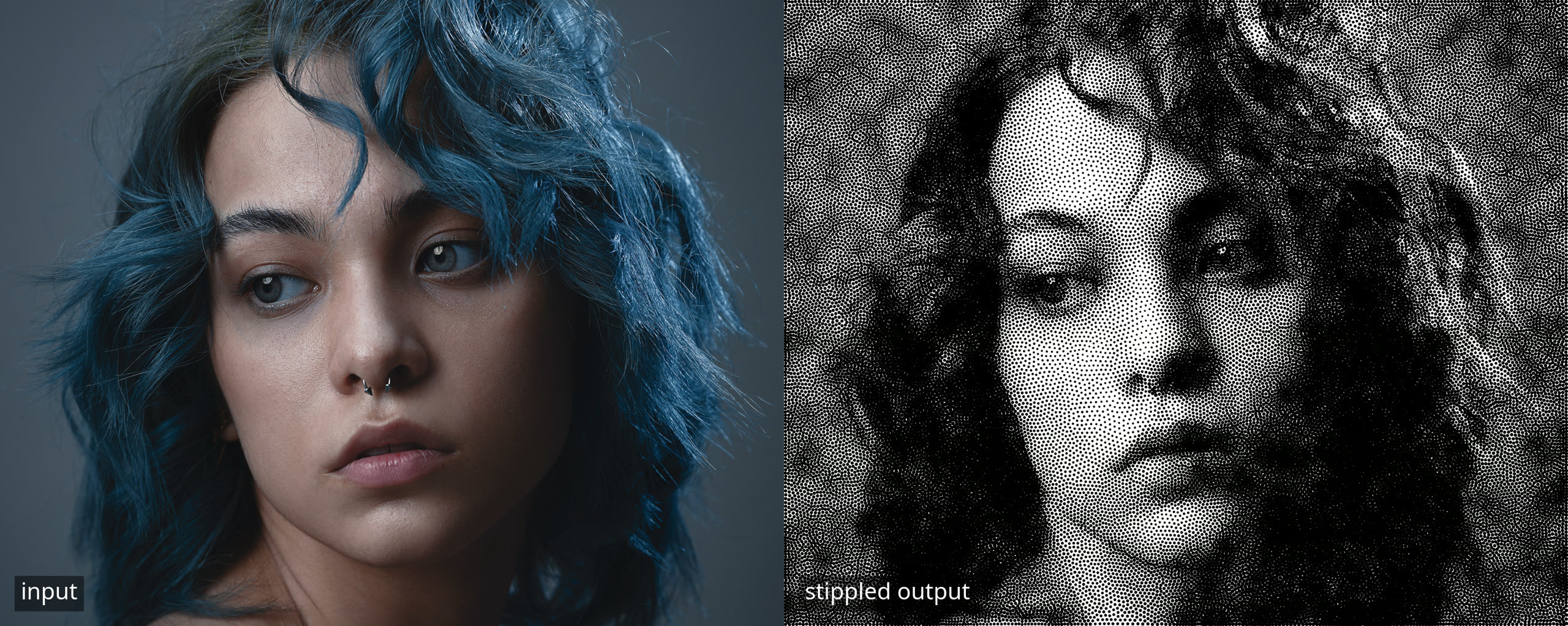
Separation-constrained weighted Voronoi stippling: turns a raster image into a plotter-ready stippled SVG with mm-accurate dot diameter and enforced dot spacing.
Standard weighted Voronoi stippling (Secord 2002) ignores dot size and happily overlaps points. That is fine on screen, but on physical media, pen plotter dots bleed, laser spots burn, and tattoo ink spreads; overlaps may ruin the result. inksep adds a repulsion phase inside each Lloyd step that pushes violating pairs apart before damping is applied, so separation and tonal convergence happen together.
Enforcement is brightness-gated: shadow dots enforce minimum clearance against each other; midtone and highlight dots pack freely, preserving shading gradients.
Background
inksep started as a one-file script for one specific print job. I had been using StippleGen, a Processing sketch from a decade ago, and it was too slow on my machine for how I actually work: experimental and iterative, retouching the input image and re-running a lot. I tried other stippling websites too, and after multiple rounds of retouching I still couldn't tell why the output wasn't coming out right. I couldn't find a Linux option that fit my workflow, so I wrote inksep and brute-forced stipple counts and dot-size ranges against a specific print size until I got something reasonable. Then I forgot about it.
Recently I dug the monolith back up and refactored it into a proper project, because I felt the implementation was worth making accessible. Physical accuracy had always been the point of this project: every dot carries its physical size, and the output is meant for physical media.
Installation
pip install inksep
Usage
inksep input.png output.svg
The knobs that matter most are below; inksep --help has the full list.
Key parameters
| Flag | Default | Meaning |
|---|---|---|
--stipples |
2000 | Total number of dots |
--min-dot |
0.463 mm | Smallest dot diameter (millimetres; px is rejected) |
--dot-range |
4.0 | How much bigger dark dots get: largest = smallest × (1 + F) |
--generations |
100 | Relaxation iterations (a hard maximum with --tol) |
--tol |
off | Stop early once dots barely move (below TOL px for 3 generations) |
--sep-factor |
0.85 | Minimum distance between dark dots, as a fraction of their radii added together; 0 disables. Raising it slightly can improve tonal coherence even while the report still counts violations. |
--sep-dark-threshold |
0.50 | Only dots darker than this are held apart; lighter dots pack freely |
--border |
1.587 mm | Clear margin at the image edge |
--dpi |
96 | Size dial: lower dpi = larger print, higher dpi = smaller |
--cutoff |
0.0 | Suppress dots brighter than this (0–1) |
--invert |
off | White dots on black background |
--damping |
0.0 | Fraction of each move to skip (0 = take every step; higher = calmer) |
--step |
1.0 | Sampling grid size in source pixels (larger = faster, coarser) |
--stroke-width |
off | Pen tip diameter in mm; draws outline circles instead of filled discs |
--optimize-travel |
off | Reorder dots so the pen lifts and travels less |
--preset NAME |
off | Load a preset section from ./inksep.ini (repeatable) |
--seed |
random | RNG seed for reproducible output |
--no-preview |
off | Disable the preview window/snapshots |
Reading the separation report
Every run with separation on ends with a quality report. A dense example (45,000 dots on a small print):
Min dot spacing  : 0.4957 mm
Mean dot spacing : 0.8290 mm
Max dot diameter : 1.0500 mm
Spacing/max-dot  : 0.4721  (overlap possible)
Overlapping dots  : 34,103 / 45,000 (75.8%) touch ≥1 neighbor
  from 86,881 pairs, max merge depth 0.5484 mm
Darkest 10% mean spacing : 0.7546 mm
Darkest 10% min  spacing : 0.4957 mm

Total time : 543.9s (4532ms/generation)
- Min / Mean dot spacing: the closest and the average centre-to-centre gap between neighbouring dots, in millimetres.
- Max dot diameter: the biggest dot your settings produce (the darkest areas).
- Spacing/max-dot: min spacing divided by max dot diameter. At 1.0 or above the report says CLEAN: even the closest pair of full-size dots won't touch. Below 1.0 overlaps are possible; here 0.47 means the closest pair of centres sits at less than half a dot's diameter apart.
- Overlapping dots: how many dots actually touch at least one neighbour. At
very high dot counts separation can't win everywhere at once, so you get a wide
field of shallow overlaps rather than clumps. Fewer stipples, or a larger print
(
--dpidown), gives it room to work. - max merge depth: how many overlapping pairs there are, and how deeply the worst pair sinks into each other, in millimetres. Depth is the number that matters for laser and other physical media: shallow grazes may be fine, deep merges eat detail.
- Darkest 10% ...: the same spacing stats for just the darkest tenth of the dots, which is where separation is actually enforced.
The Total time line is just the wall clock for the run.
Presets
Optional: put an inksep.ini in the working directory and stack its sections with
--preset NAME. See examples/inksep.ini for an example.
Library
from inksep import InkSep

gen = InkSep("photo.jpg", n_stipples=8000, dpi=300, seed=42, show_preview=False)
gen.run(generations=120)
gen.save_svg("out.svg")
report = gen.separation_report()  # same numbers as the printed report
How it works
Each generation runs three phases:
- Weighted Lloyd centroid: pixels in the clip region are assigned to their nearest particle; the brightness-weighted centroid of each Voronoi cell becomes the new target position.
- Separation repulsion: any pair closer than
sep_factor × (r_i + r_j)receives a corrective push on their centroid targets, weighted by darkness. Lighter dots yield more to darker dots. - Damping:
new = damping × old + (1 − damping) × adjusted_centroid.
The relaxation itself is numpy/scipy vectorised with KD-tree neighbour queries, so
even tens of thousands of dots run fast. And the only randomness is the seeded start:
with the same --seed and input, you get a byte-identical SVG every time.
Preview vs. output
The live preview draws every dot with the same radius formula as the SVG, so sizes and positions match what will be exported. The SVG is still the ground truth for physical size: millimetres at your chosen DPI. The preview window is scaled to fit your screen, so don't calibrate print size off the window itself.
Development
uv sync
uv run pytest --cov=inksep --cov-fail-under=90
uv run ruff check src tests
uv run mypy            # strict on src/inksep
Credits
- Weighted Voronoi stippling algorithm by Adrian Secord (NPAR 2002) (Google Scholar)
- StippleGen (Evil Mad Scientist Laboratories) as prior art and inspiration; inksep is an independent implementation with no code shared with it
- Demo photo: "A woman with blue hair is posing for a picture" by seeplus on Unsplash
License
MIT; see LICENSE.
1 maintainer

Metadata
1 maintainer
Release files for inksep 1.0.0
For a detailed explanation of source distributions (sdists) and built distributions (wheels), please see the package formats documentation.
Source distribution (sdist)
| File | Size | Uploaded | Provenance | Actions |
|---|---|---|---|---|
| inksep-1.0.0.tar.gz | 41.7 kB | With provenance | Details for inksep-1.0.0.tar.gz |
Built distribution (wheel)
| File | Interpreter | ABI | Platform | Actions Reset |
|---|---|---|---|---|
| inksep-1.0.0-py3-none-any.whl | Python 3 | none | any | Details for inksep-1.0.0-py3-none-any.whl |
Total release size: 72.2 kB
Release files / inksep-1.0.0.tar.gz
| Download URL | inksep-1.0.0.tar.gz |
|---|---|
| Size | 41.7 kB |
| Tags | Source |
|
SHA-256 checksum How to use checksums |
44054bbe2f78c67a0231466522a548a4895f865455ee0f296ee7015742de930a
|
|
BLAKE2b-256 checksum How to use checksums |
d1434e7b7c77b3e8baec049a65f316b288b06fd31f1883044b9ff4b458dc4325
|
| Upload date | |
|
Uploaded using Trusted Publishing? What is trusted publishing? |
Yes |
| Uploaded via |
twine/7.0.0 CPython/3.13.14
|
Provenance
Provenance describes where a file came from. On PyPI, provenance is shared via attestations, which provide a verifiable record of the build or publishing details. View details, limitations and caveats.


PyPI Publish Attestation
PyPI verified that this artifact, at this checksum, originated from the publisher listed below.
Signed by GitHub Actions, verified by PyPI on Oct 20, 2026.
Transparency logRelease files / inksep-1.0.0-py3-none-any.whl
| Download URL | inksep-1.0.0-py3-none-any.whl |
|---|---|
| Size | 30.6 kB |
| Tags | Python 3 |
|
SHA-256 checksum How to use checksums |
cd5bf6dd92fb27d9cf6209d11b48a7bc641f87c7942d16f554c8bad35c6b6e7b
|
|
BLAKE2b-256 checksum How to use checksums |
9d772b9428d360f1a439463352281eeb34cb33eb3efd85dfbcb3294c682fb92a
|
| Upload date | |
|
Uploaded using Trusted Publishing? What is trusted publishing? |
Yes |
| Uploaded via |
twine/7.0.0 CPython/3.13.14
|
Provenance
Provenance describes where a file came from. On PyPI, provenance is shared via attestations, which provide a verifiable record of the build or publishing details. View details, limitations and caveats.
PyPI Publish Attestation
PyPI verified that this artifact, at this checksum, originated from the publisher listed below.
Signed by GitHub Actions, verified by PyPI on Oct 20, 2026.
Transparency logSecurity for inksep 1.0.0
Provenance
Provenance describes where a file came from. On PyPI, provenance is shared via attestations, which provide a verifiable record of the build or publishing details. View details, limitations and caveats.
Full provenance
All 2 files in this release have been uploaded with provenance metadata.
Attestation for inksep-1.0.0.tar.gz
PyPI Publish Attestation
PyPI verified that this artifact, at this checksum, originated from the publisher listed below.
Signed by GitHub Actions, verified by PyPI on Oct 20, 2026.
Transparency logA note on package security
PyPI is a repository for distributing packages, not a service for auditing them. While third-party security researchers and our staff do their best to detect and remove malicious packages, PyPI cannot guarantee the quality, security or suitability of any given package.
To learn more about protecting yourself from malicious actors, visit our package security documentation.













