
Inky



Python library for Inky pHAT, Inky wHAT and Inky Impression e-paper displays for Raspberry Pi.
Get Inky
Inky pHAT is a 250x122 pixel e-paper display, available in red/black/white, yellow/black/white and black/white. It's great for nametags and displaying very low frequency information such as a daily calendar or weather overview.
Inky wHAT is a 400x300 pixel e-paper display available in red/black/white, yellow/black/white and black/white. It's got tons of resolution for detailed daily to-do lists, multi-day weather forecasts, bus timetables and more.
Inky Impression is our line of glorious colour eInk displays, available in various sizes from the petite 4.0" up to the mighty 13.3". They're packed with strong colours and perfect for displaying striking graphics or lots of data.
Installation
We'd recommend using this library with Raspberry Pi OS Bookworm or later. It requires Python ≥3.7.
Full install (recommended)
We've created an easy installation script that will install all pre-requisites and get you up and running with minimal efforts. To run it, fire up Terminal which you'll find in Menu -> Accessories -> Terminal on your Raspberry Pi desktop, as illustrated below:
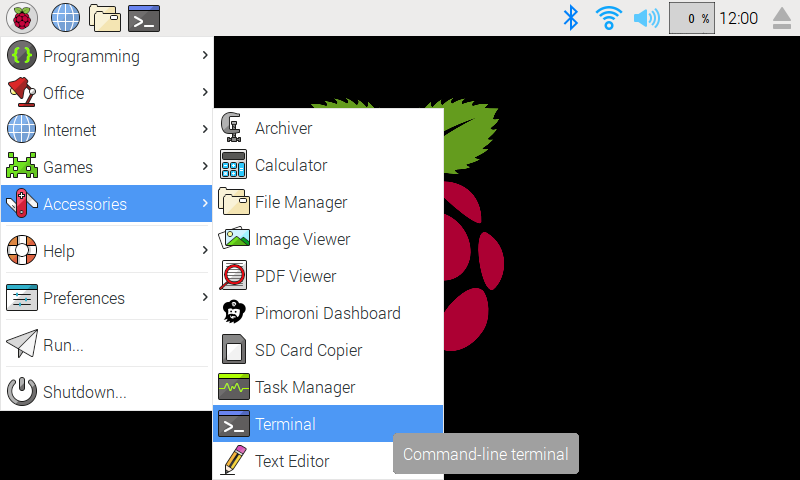
In the new terminal window type the commands exactly as it appears below (check for typos) and follow the on-screen instructions:
git clone https://github.com/pimoroni/inky
cd inky
./install.sh
Note Libraries will be installed in the "pimoroni" virtual environment, you will need to activate it to run examples:
source ~/.virtualenvs/pimoroni/bin/activate
Development
If you want to contribute, or like living on the edge of your seat by having the latest code, you can install the development version like so:
git clone https://github.com/pimoroni/inky
cd inky
./install.sh --unstable
Install stable library from PyPi and configure manually
- Set up a virtual environment:
python3 -m venv --system-site-packages $HOME/.virtualenvs/pimoroni - Switch to the virtual environment:
source ~/.virtualenvs/pimoroni/bin/activate - Install the library:
pip install inky
This will not make any configuration changes, so you may also need to enable:
- i2c:
sudo raspi-config nonint do_i2c 0 - spi:
sudo raspi-config nonint do_spi 0
You can optionally run sudo raspi-config or the graphical Raspberry Pi Configuration UI to enable interfaces.
Additionally you may need to disable SPI's chip-select to avoid the error:
Woah there, some pins we need are in use!
  ⚠️   Chip Select: (line 8, GPIO8) currently claimed by spi0 CS0
This requires the addition of dtoverlay=spi0-0cs to /boot/firmware/config.txt.
Usage
The library should be run with Python 3.
Auto Setup
Inky can try to automatically identify your board (from the information stored on its EEPROM) and set up accordingly. This is the easiest way to work with recent Inky displays.
from inky.auto import auto
display = auto()
You can then get the colour and resolution from the board:
display.colour
display.resolution
Manual Setup
If you have an older Inky without an EEPROM, you can specify the type manually. The Inky library contains modules for both the pHAT and wHAT, load the Inky pHAT one as follows:
from inky import InkyPHAT
You'll then need to pick your colour, one of 'red', 'yellow' or 'black' and instantiate the class:
display = InkyPHAT('red')
If you're using the wHAT you'll need to load the InkyWHAT class from the Inky library like so:
from inky import InkyWHAT
display = InkyWHAT('red')
Once you've initialised Inky, there are only three methods you need to be concerned with:
Set Image
Set a PIL image, numpy array or list to Inky's internal buffer. The image dimensions should match the dimensions of the pHAT or wHAT you're using.
display.set_image(image)
You should use PIL to create an image. PIL provides an ImageDraw module which allow you to draw text, lines and shapes over your image. See: https://pillow.readthedocs.io/en/stable/reference/ImageDraw.html
Set Border
Set the border colour of you pHAT or wHAT.
display.set_border(colour)
colour should be one of inky.RED, inky.YELLOW, inky.WHITE or inky.BLACK with available colours depending on your display type.
Update The Display
Once you've prepared and set your image, and chosen a border colour, you can update your e-ink display with:
display.show()
Migrating
If you're migrating code from the old inkyphat library you'll find that much of the drawing and image manipulation functions have been removed from Inky. These functions were always supplied by PIL, and the recommended approach is to use PIL to create and prepare your image before setting it to Inky with set_image().
Troubleshooting
ModuleNotFoundError: No module named 'inky'
Assuming you've run ./install.sh already, make sure you have your virtual environment active. If you're using the one set up by our installer, that looks like this:
source ~/.virtualenvs/pimoroni/bin/activate
ModuleNotFoundError: No module named 'font_hanken_grotesk'
You're missing some dependencies that the example code needs to run. A list of dependencies can be found here, and you can install them like this (make sure you have your virtual environment active):
pip install font-hanken-grotesk
RuntimeError: No EEPROM detected! You must manually initialise your Inky board.
Check that I2C and SPI are enabled. You can do this using sudo raspi-config - they're under 'Interfacing Options'. You may need to reboot your Pi after you've enabled them (sudo reboot).
Chip Select: (line 8, GPIO8) currently claimed by spi0 CS0
Check you have the following line present in your /boot/firmware/config.txt:
dtoverlay=spi0-0cs
You can edit the config file using sudo nano boot/firmware/config.txt, and it's Ctrl-X, then 'Y' and Enter to save your changes. You'll need to reboot your Pi after you've made this change (sudo reboot)
Other Resources
Links to community projects and other resources that you might find helpful can be found below. Note that these code examples have not been written/tested by us and we're not able to offer support with them.
- InkyPi (customisable eInk display) - Youtube / Github
- Using Pimoroni Inky displays with CircuitPython
- Inky Draw - a fun drawing project for Inky pHAT using Flask and React
- I built an E-Ink Calendar with a Raspberry Pi
- Spectra-Qualified Uncomplicated Inky Rendering Tools - one-shot Python scripts to display web content
- phpSimpleInkyImageServer - a simple python + php script to supply Inky with images
- Inky Star Map - displays a map of the night sky generated with starplot
- Inky Photo Frame
- Wall-E - an interactive picture frame powered by Google Gemini
- inky-image-display - control one or more Inky displays using a single service, with image sync from Immich and optional Gemini image generation.
2.5.0
- New: Support for Red/Yellow wHAT boards using the SSD2683 driver.
- Packaging: modernise to uv/hatchling with trusted publishing
- Lint: general modernisation pass under a wider ruff ruleset
- Internal: busy/refresh waits use gpiodevice edge helpers and time.monotonic()
2.4.0
- New: Support for the new AC Waveform Spectra 6 displays.
2.3.0
- New: Support for Spectra 4.0" boards.
2.2.1
- BugFix: Correct palette count for new boards, so 4-colour prepared images are not dithered.
2.2.0
- New: Support for 4-colour (Black/White/Red/Yellow) Inky and Inky wHAT boards.
- BugFix: Fixed Spectra6 colour constants (swapped green and blue)
- Enhancement: Improve Spectra6 handling of palette mode images.
2.1.0
- New: Support for Spectra 13.3" and 7.3" boards.
2.0.0
- Rewrite to gpiod/gpiodevice.
- Repackage to hatch/pyproject.toml.
- Breaking: Fixes to chip-select behaviour across all boards
1.5.0
- New: inky impression 7.3" support.
- BugFix: WIDTH / HEIGHT set on uc8159.
1.4.0
- New: inky SSD1683 support for WHAT variant
1.3.2
- BugFix: (ish) handle busy_wait failure cases for UC8159 (Inky Impression)
1.3.1
- BugFix: unbreak UC8159
1.3.0
- New: inky UC8159 support for 4" 640x400 display variant
- BugFix: fix set_image so it doesn't break set_pixel
- New: Added --simulate to "auto()", so auto examples can simulate a chosen board
1.2.2
- BugFix: Raise Impression/7Color/UC8159 busy wait timeout from 15s to 30s
1.2.1
- BugFix: inky high-temp red fix
- Enhancement: SSD1608 (250x122) set_border support
1.2.0
- New: inky impression set_border support
- BugFix: inky impression orange colour
- BugFix: inky impression invalid arg bug for Python 2
- New: inky impression simulator
1.1.1
- Enhancement: drive UC81559 CS with GPIO to avoid conflict with Grow workaround
- Add 7-colour/UC8159 specifics to EEPROM
- BugFix: define UC8159 colour and size constants in class
- BugFix: fix auto to grab args properly, support UC8159 and fallback gracefully
1.1.0
- New: Support for UC8159-based 7-colour 600x448 display
- Enhancement: auto now includes options for fallback
- Enhancement: EEPROM can now give text string for display variant
1.0.2
- Enhancement: Always install Pi dependencies
1.0.1
- Enhancement: Tweak setup.py extras for easier dependency install
1.0.0
- New: Support for SSD1608-based displays
- New: Mock Inky pHAT and wHAT displays
- New: Automatic Inky detection and class constructor
- Enhancement: Support for alternate i2c_bus when reading eeprom
- Enhancement: Support for alternate spi_bus
- Enhancement: Support for alternate GPIO driver
- Enhancement: Replaced sys.exit calls with ImportError
- Enhancement: Improved docstrings
0.0.5
- Enhancement: Added support for red/b/w high-temp Inky wHAT
0.0.4
- BugFix: Reverted normal red LUTs to correct values
0.0.3
- Enhancement: Added support for display variant detection
- Enhancement: Added DocStrings
- BugFix: Fixed set_border for all colours
0.0.2
- BugFix: Yellow Inky pHAT now yellow instead of brown/black
- Enhancement: Performance tweak for set_image
0.0.1
- Initial Release


Release files for inky 2.5.0
For a detailed explanation of source distributions (sdists) and built distributions (wheels), please see the package formats documentation.
Source distribution (sdist)
| File | Size | Uploaded | |
|---|---|---|---|
| inky-2.5.0.tar.gz | 16.2 MB | Details |
Built distribution (wheel)
| File | Interpreter | ABI | Platform | Reset |
|---|---|---|---|---|
| inky-2.5.0-py3-none-any.whl | Python 3 | none | any | Details |
Total release size: 16.2 MB
Release files / inky-2.5.0.tar.gz
| Download URL | inky-2.5.0.tar.gz |
|---|---|
| Size | 16.2 MB |
| Tags | Source |
|
SHA-256 checksum How to use checksums |
42327c936c609c3f7513f7b6d7fbb649c015cc314507e15dafa5adb553840d97
|
|
BLAKE2b-256 checksum How to use checksums |
8bcc9301bb2b16f620c64aee7c0e9f23cc30caa93bd3a9cf299dfb5282bc349e
|
| Upload date | |
|
Uploaded using Trusted Publishing? What is trusted publishing? |
Yes |
| Uploaded via |
uv/0.12.13 {"installer":{"name":"uv","version":"0.12.13","subcommand":["publish"]},"python":null,"implementation":{"name":null,"version":null},"distro":{"name":"Ubuntu","version":"24.04","id":"noble","libc":null},"system":{"name":null,"release":null},"cpu":null,"openssl_version":null,"setuptools_version":null,"rustc_version":null,"ci":true}
|
Release files / inky-2.5.0-py3-none-any.whl
| Download URL | inky-2.5.0-py3-none-any.whl |
|---|---|
| Size | 61.0 kB |
| Tags | Python 3 |
|
SHA-256 checksum How to use checksums |
8589ad753b094ec5da482c090f88d5e8560457f15502221517993dc01b021573
|
|
BLAKE2b-256 checksum How to use checksums |
54fbb8a07dfc1bfa4dc606d8d68f8718698e609f9ebdc6eafd0ca37ec92f653c
|
| Upload date | |
|
Uploaded using Trusted Publishing? What is trusted publishing? |
Yes |
| Uploaded via |
uv/0.12.13 {"installer":{"name":"uv","version":"0.12.13","subcommand":["publish"]},"python":null,"implementation":{"name":null,"version":null},"distro":{"name":"Ubuntu","version":"24.04","id":"noble","libc":null},"system":{"name":null,"release":null},"cpu":null,"openssl_version":null,"setuptools_version":null,"rustc_version":null,"ci":true}
|














