

Healthcare Model Context Protocol (HMCP)




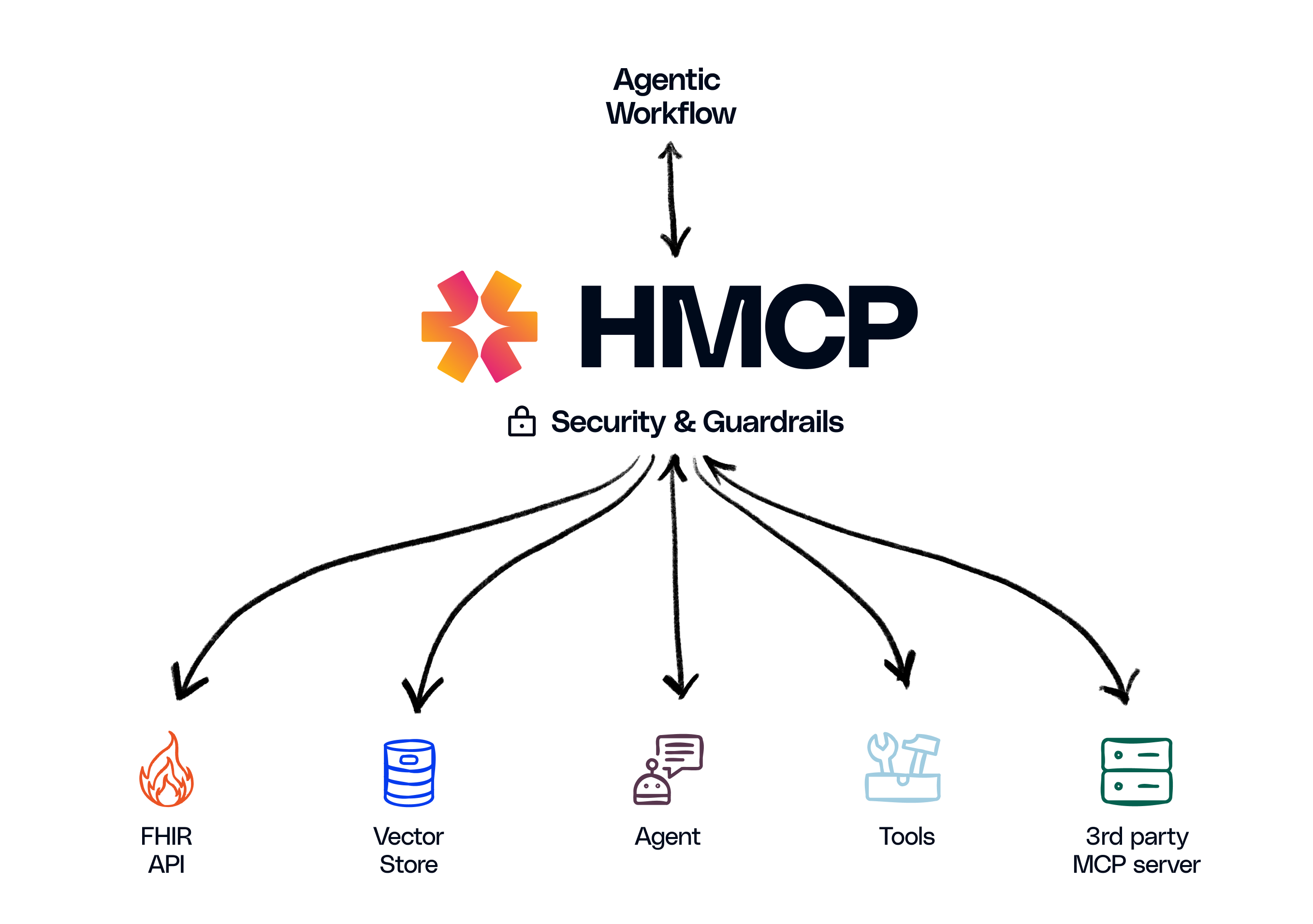
HMCP is an open protocol that enables communication and interoperability between healthcare agentic applications.
Healthcare organizations are adopting generative AI agents across care delivery and operations. Connecting those agents to healthcare data, tools and workflows raises questions that general-purpose protocols leave open: which patient a request is about, which checks ran on the data that was returned, and how access is authorized.
Innovaccer developed the Healthcare Model Context Protocol (HMCP). HMCP is a specialized extension of the Model Context Protocol (MCP) designed to integrate healthcare AI agents with data, tools and workflows within a standards-based framework. HMCP offers building blocks for these questions; how they are configured, validated and operated is the responsibility of the implementer (see the Disclaimer).
Project status
HMCP is alpha (0.x) software. The public API may change between minor versions; dependents should pin a version range.
What HMCP 0.1.0 is
HMCP 0.1.0 targets base MCP spec 2026-07-28 and ships the Python SDK in this repository. It adds two reverse-DNS extensions and authentication guidance on top of the base protocol.
HMCP 0.1.0 provides the following capabilities:
- Patient context extension (
com.innovaccer/hmcp-patient-context, revision"1"): a server-minted, opaque handle for a single patient. The host opens it, and every patient-scoped tool call carries it in the request_meta. See Patient context. - Guardrails extension (
com.innovaccer/hmcp-guardrails, revision"1") with four reference guardrails: declarative, best-effort checks that the server applies to tool calls and reports in the result_meta. See Guardrails. - OAuth 2.1 client (OAuth 2.0 + PKCE) (
hmcp.shared.auth.OAuthClient): client credentials, authorization code with PKCE, refresh and revocation; usable in a SMART on FHIR deployment. Server-side enforcement is opt-in (token_verifierorauth_server_provider; the default isNone). - Audience-bound auth defaults: when an
AuthSettingsobject is supplied, RFC 8707 audience binding is enforced by default. - Patient-context audit events: open/get/close, tool calls and lifecycle changes emit
AuditEvents through a pluggableAuditSink(defaultLoggingAuditSink). - Transports:
streamable-httpandstdio(the default).
HMCP 0.1.0 removed the bidirectional sampling feature (@server.sampling(), HMCPClient, create_message) and the HTTP+SSE transport. MCP 2026-07-28 deprecated both, and HMCP 0.1.0 no longer offers either. See Migrating to 0.1 for the replacement patterns.
Quick start
Install
HMCP is published on PyPI as innovaccer-hmcp and requires Python 3.11 or newer:
pip install innovaccer-hmcp
The import name is hmcp (for example, from hmcp.server import HMCPServer). The
unrelated PyPI project named hmcp is not this
SDK; install innovaccer-hmcp.
To work from a clone of this repository instead, install it in editable mode with the development extras:
git clone https://github.com/innovaccer/Healthcare-MCP.git
cd Healthcare-MCP
pip install -e ".[dev]"
A minimal server
HMCPServer builds on the MCP SDK's MCPServer and authenticates every request with a TokenVerifier. Patient context and guardrails are configured, and patient-scoped tools are registered with @server.tool(patient_scope=...):
from mcp.server.auth.provider import AccessToken, TokenVerifier
from mcp.server.auth.settings import AuthSettings

from hmcp.server.guardrails import GuardrailsConfig
from hmcp.server.hmcp_server import HMCPServer
from hmcp.server.patient_context import PatientContextConfig
from hmcp.shared.guardrails import (
    patient_context_consistency,
    redaction_placeholder_writeback,
)
from hmcp.shared.types import require_patient_context

SERVER_URL = "http://127.0.0.1:8050/mcp"
DEMO_TOKEN = "demo-token-test-0001"


class DemoTokenVerifier(TokenVerifier):
    """DEMO ONLY: accept one static token and reject everything else.

    A real deployment validates a signed token here. The token's ``patient``
    claim is the SMART launch context the default policy checks.
    """

    async def verify_token(self, token: str) -> AccessToken | None:
        if token != DEMO_TOKEN:
            return None
        return AccessToken(
            token=token,
            client_id="demo-app",
            scopes=["patient/*.rs"],
            resource=SERVER_URL,
            subject="dr-demo",
            claims={"iss": "https://auth.example.com", "patient": "test-0001"},
        )


server = HMCPServer(
    name="patient-demo",
    version="0.1.0",
    token_verifier=DemoTokenVerifier(),
    auth=AuthSettings(
        issuer_url="https://auth.example.com",
        resource_server_url=SERVER_URL,
        validate_token_resource=True,
    ),
    patient_context=PatientContextConfig(default_tool_scope="patient"),
    guardrails=GuardrailsConfig(
        definitions=[patient_context_consistency(), redaction_placeholder_writeback()],
    ),
)


@server.tool(patient_scope="patient")
def get_observations() -> dict:
    context = require_patient_context()
    return {"patient": context.patient.reference}


if __name__ == "__main__":
    server.run(transport="streamable-http", host="127.0.0.1", port=8050)
A minimal client
HMCPClientConnector sends the bearer token, opens the patient context and calls a patient-scoped tool. It advertises the patient-context and guardrails extensions by default:
import asyncio
from typing import Any

from hmcp.client.client_connector import HMCPClientConnector
from hmcp.shared.constants import GUARDRAILS_EXTENSION, META_REPORT

DEMO_TOKEN = "demo-token-test-0001"


def _report_entries(result: Any) -> list[str]:
    guardrails = (result.meta or {}).get(GUARDRAILS_EXTENSION) or {}
    report = guardrails.get(META_REPORT) or []
    return [f"{e['id']}/{e['stage']}={e['verdict']}" for e in report]


async def run(connector: HMCPClientConnector) -> None:
    handle = await connector.open_patient_context(
        "Patient/test-0001", purpose_of_use="TREAT"
    )
    try:
        result = await connector.call_tool(
            "get_observations",
            patient_context=handle,
            require_guardrails=[
                "com.innovaccer.hmcp.guardrails/patient-context-consistency"
            ],
        )
        print(result.content[0].text)
        for entry in _report_entries(result):
            print(f"guardrail report: {entry}")
    finally:
        await connector.close_patient_context(handle)


async def main() -> None:
    async with HMCPClientConnector(
        url="http://127.0.0.1:8050/mcp",
        headers={"Authorization": f"Bearer {DEMO_TOKEN}"},
    ) as connector:
        await run(connector)


if __name__ == "__main__":
    asyncio.run(main())
Important:
SmartLaunchPolicy(the default) refuses everyopenwhen no token carries a SMARTpatientclaim, failing closed. Production deployments supply tokens from a SMART authorization server (or a customAccessPolicy); the static token above is demo-only.
A full runnable example is in examples/ehr_patient_context.
Examples
The examples directory holds runnable, synthetic-data examples:
ehr_patient_context: a demo EHR server and client that open a patient context and call a patient-scoped tool.custom_guardrails: writing and registering custom guardrail definitions.gravity_guardrails: classifier (SLM) guardrails backed by Gravity guardrail configs, with an offline stand-in for the Gravity service.quickstart: a minimal end-to-end server and client.
Security and compliance
To report a vulnerability, follow SECURITY.md. Do not open a public issue, discussion or pull request.
HMCP provides building blocks for handling patient data: patient-context binding designed to fail closed, a guardrails extension that can redact or block tool traffic, and audience-bound OAuth 2.1 defaults. These building blocks do not by themselves make a deployment secure or compliant with HIPAA or any other regulation. That depends on the environment, identity provider, TLS, auditing, retention and operating policies of the deployment, and responsibility rests with the implementer (see the Disclaimer). HMCP 0.1.0 does not provide encryption at rest or rate limiting. Deployments must run the server behind TLS and supply a production TokenVerifier.
Documentation
- Specification overview
- Patient context
- Guardrails
- Authentication and scopes
- Migrating to 0.1
- HMCP SDK
- Examples
Contributing
See CONTRIBUTING.md for details on how to contribute to this project.
License
This project is licensed under the MIT License. See the LICENSE file for details.
Disclaimer
HMCP is provided "as is", without warranty of any kind, under the MIT License. Innovaccer makes no guarantee of accuracy, completeness, regulatory compliance or patient safety. The guardrails are best-effort checks that can miss protected health information, and a pass verdict does not mean that content is free of it. HMCP does not by itself make a system compliant with HIPAA or any other regulation, and it is not intended for use as a medical device or for clinical decision-making. The implementer is solely responsible for validation, compliance, security and outcomes; to the maximum extent permitted by law, Innovaccer and the contributors accept no liability for any use of HMCP.
1 maintainer

Metadata
1 maintainer
Release files for innovaccer-hmcp 0.1.0
For a detailed explanation of source distributions (sdists) and built distributions (wheels), please see the package formats documentation.
Source distribution (sdist)
| File | Size | Uploaded | Provenance | Actions |
|---|---|---|---|---|
| innovaccer_hmcp-0.1.0.tar.gz | 210.8 kB | With provenance | Details for innovaccer_hmcp-0.1.0.tar.gz |
Built distribution (wheel)
| File | Interpreter | ABI | Platform | Actions Reset |
|---|---|---|---|---|
| innovaccer_hmcp-0.1.0-py3-none-any.whl | Python 3 | none | any | Details for innovaccer_hmcp-0.1.0-py3-none-any.whl |
Total release size: 284.9 kB
Release files / innovaccer_hmcp-0.1.0.tar.gz
| Download URL | innovaccer_hmcp-0.1.0.tar.gz |
|---|---|
| Size | 210.8 kB |
| Tags | Source |
|
SHA-256 checksum How to use checksums |
6a7a19429f68ffc58c96e9311253525b4bc6d1bbe67b6c176515e4869bd46fc9
|
|
BLAKE2b-256 checksum How to use checksums |
780f3b88badade92cfd1951f3a38be6f41299fa521f4c7833cbb984795829514
|
| Upload date | |
|
Uploaded using Trusted Publishing? What is trusted publishing? |
Yes |
| Uploaded via |
twine/7.0.0 CPython/3.13.16
|
Provenance
Provenance describes where a file came from. On PyPI, provenance is shared via attestations, which provide a verifiable record of the build or publishing details. View details, limitations and caveats.


PyPI Publish Attestation
PyPI verified that this artifact, at this checksum, originated from the publisher listed below.
Signed by GitHub Actions, verified by PyPI on Nov 10, 2026.
Transparency logRelease files / innovaccer_hmcp-0.1.0-py3-none-any.whl
| Download URL | innovaccer_hmcp-0.1.0-py3-none-any.whl |
|---|---|
| Size | 74.1 kB |
| Tags | Python 3 |
|
SHA-256 checksum How to use checksums |
a5c081d96c4942df643597a1319f43e582e908c0f1a4a675991af39533761ae8
|
|
BLAKE2b-256 checksum How to use checksums |
8af73240f82b833b62635b3e87653714af2aeedebd007d3ba21c8f24024dc8b2
|
| Upload date | |
|
Uploaded using Trusted Publishing? What is trusted publishing? |
Yes |
| Uploaded via |
twine/7.0.0 CPython/3.13.16
|
Provenance
Provenance describes where a file came from. On PyPI, provenance is shared via attestations, which provide a verifiable record of the build or publishing details. View details, limitations and caveats.
PyPI Publish Attestation
PyPI verified that this artifact, at this checksum, originated from the publisher listed below.
Signed by GitHub Actions, verified by PyPI on Nov 10, 2026.
Transparency logSecurity for innovaccer-hmcp 0.1.0
Provenance
Provenance describes where a file came from. On PyPI, provenance is shared via attestations, which provide a verifiable record of the build or publishing details. View details, limitations and caveats.
Full provenance
Both files in this release have been uploaded with provenance metadata.
Attestation for innovaccer_hmcp-0.1.0.tar.gz
PyPI Publish Attestation
PyPI verified that this artifact, at this checksum, originated from the publisher listed below.
Signed by GitHub Actions, verified by PyPI on Nov 10, 2026.
Transparency logA note on package security
PyPI is a repository for distributing packages, not a service for auditing them. While third-party security researchers and our staff do their best to detect and remove malicious packages, PyPI cannot guarantee the quality, security or suitability of any given package.
To learn more about protecting yourself from malicious actors, visit our package security documentation.













