
A fast and beautiful CLI tool for finding nearest InPost points.

Project description
InPost Locker Finder
Author
- Name: Jan Barchanowicz
- Email: barchanowiczjan@gmail.com
Overview
InPost Locker Finder (ilf) is a high-speed Python CLI application that enables users to
locate InPost points and lockers directly from their terminal. The tool
streamlines searches by city or postal code, featuring filters for 24/7 availability,
specific streets, and Easy Access Zones. By eliminating complex menu navigation,
ilf provides power users with a friction-free, terminal-based alternative to existing solutions.
Demo & Description
What does it do:
At its core, ilf (InPost Locker Finder) brings the InPost search experience directly into the terminal. Specifically, it allows users to:
- Search by Location: Find operating lockers using either a city name (e.g.,
Kraków) or a postal code (e.g.,31-876). - Filter Results: Narrow down the search by specifying a street name (
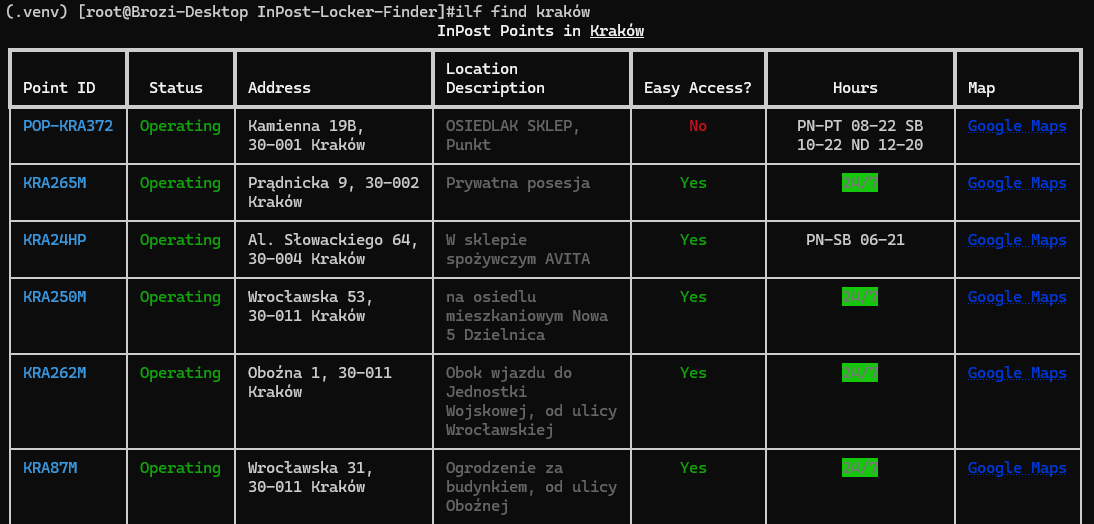
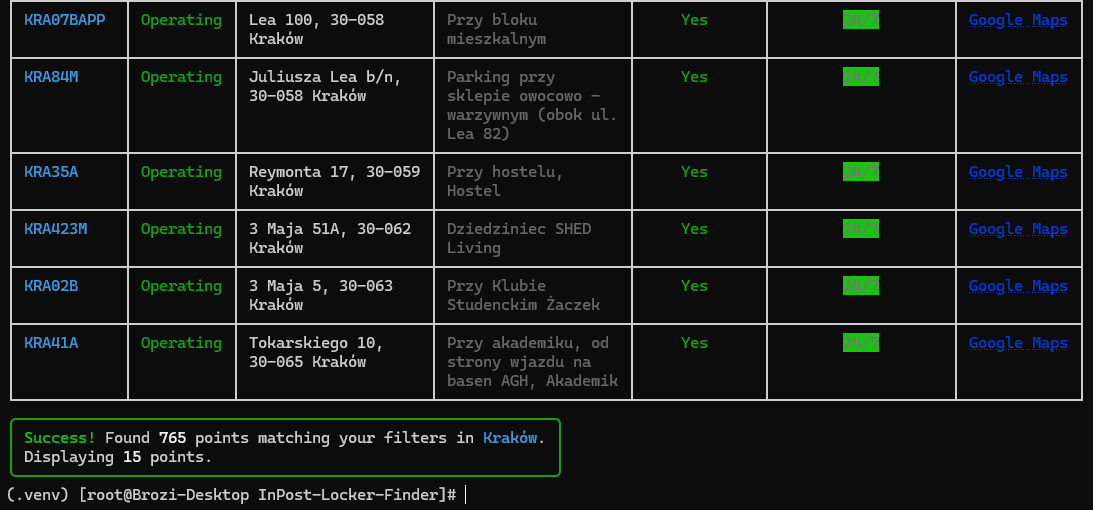
--street), postal code (--post-code), requiring 24/7 availability (--24h), or filtering for Easy Access Zones (--easy-access-zone). The street and postal code filters support partial matching—for example, filtering by--post-code 31-returns all lockers in that postal district, and--street Karmeleasily matches "Karmelicka". - View Beautiful Data: Display key point details (including the Locker ID, exact address, location description, opening hours as well as a Google Maps link) in a clean, color-coded, and responsive terminal table.
- Limit the output: Specify how many points to display using
--limit x, or display all using--all: for example--limit 20. - Integrate & Pipe: Output raw data in JSON format (
--json), allowing developers to easily pipe the results into other command-line tools likejqorgrep.
See it in action
1. Basic Search
Finding lockers in a city is as simple as typing its name. The app automatically handles formatting and crops the output to a default of 15 available points to avoid flooding the terminal. The points are sorted by the postal code and 24/7 availability.
2. Smart Filtering & Partial Matches
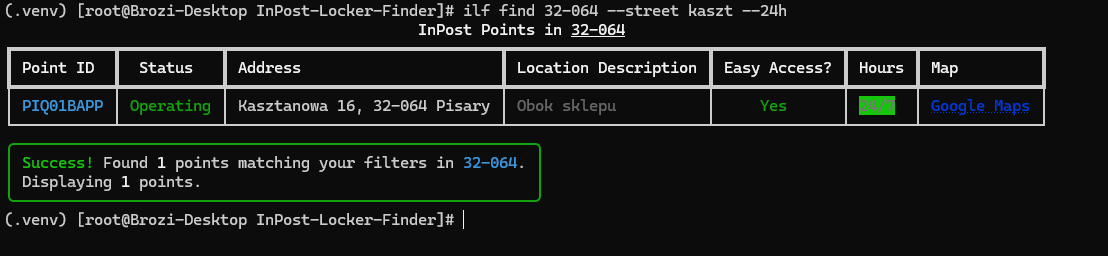
You can chain multiple filters together. Here, we are searching within a specific postal code area (31-064), looking for a partial street name (kaszt), and filtering for 24/7 availability.
3. Graceful Error Handling
If a city doesn't exist or the API fails, the app doesn't crash with an ugly Python traceback. It provides a clean, human-readable error panel.

How it works:
- Input Parsing: The user types a simple command (e.g.,
ilf find Kraków). The app determines if the input is a postal code or a city name. - API Communication: It communicates with the official global InPost API (
api-global-points.easypack24.net), handling pagination to reliably download all operating lockers for the requested area. - Data Processing: The raw JSON data is converted into strongly typed
LockerPython objects. The app then applies any requested filters (like--street,--24h, or--easy-access-zone) and sorts the results locally. - Presentation: The final list is rendered as a beautiful, responsive terminal table. Alternatively, the user can pass the
--jsonflag to output raw JSON, making the tool easily pipeable into other bash commands (likejq).
Project Structure
.
├── .github/
│   └── workflows/
│       ├── build-execs.yml    # PyInstaller auto-builds
│       ├── publish.yml        # PyPI auto-publishing (on release & auto versioning)
│       └── tests.yml          # Auto unit testing
├── src/
│   └── ilf/                   # Main application package
│       ├── __init__.py
│       ├── __main__.py        # Package entry point
│       ├── api.py             # InPost API fetching & error handling
│       ├── cli.py             # Typer CLI commands & filtering/sorting logic
│       ├── format.py          # Rich table formatting and JSON output
│       └── locker.py          # Locker data model/class and data transformation
├── tests/                     # Pytest suite with API mocking
│   ├── __init__.py
│   ├── test_api.py            # Tests for network errors and bad data
│   ├── test_cli.py            # Tests for CLI exit codes and outputs
│   └── test_locker.py         # Tests for data parsing
├── pyproject.toml             # Python package metadata and dependencies
├── requirements.txt           # Project requirements
├── requirements_dev.txt       # Project requirements + pytest and pyinstaller
└── README.md                  # Project documentation
Key Technical Choices:
- Strict Error Handling: The app gracefully handles network errors, API downtime, and empty search results, displaying human-readable error panels and returning appropriate system exit codes for scripting.
- Modular Design: The CLI logic, API fetching, data models, and output formatting are completely separated into different files, adhering to the Single Responsibility Principle.
- CLI framework Choice: The app uses Typer instead of Click, as the former enables much more rapid development and integrates extremely well with Rich tables and formatting. Moreover, it's a more modern solution, and it supports type hinting, making the code self documenting as well as easier to read.
Technologies
- Python (3.9+): The core programming language.
- Typer: Chosen for building the CLI interface. It is built on top of Click but leverages Python type hints, making the code much cleaner and self-documenting.
- Rich: Used for terminal formatting. It makes rendering tables, colored error panels, and loading spinners incredibly easy, significantly improving the User Experience.
- Requests: Used for synchronous HTTP communication with the InPost API.
- Pytest: Used for unit testing. Combined with
unittest.mock.patch, it allowed me to effectively test network failures and bad API responses without making real HTTP calls. - PyInstaller & GitHub Actions: Used to automatically compile the Python code into standalone executables for Windows, macOS, and Linux, as well as automatically publish package releases to PyPI making distribution effortless.
How to run
Prerequisites
- Python 3.9 or higher installed on your system.
Build & run
1. Clone the repository
git clone https://github.com/Brozi/inpost-locker-finder.git
cd inpost-locker-finder
2. Create and activate a virtual environment (Recommended) To keep the dependencies isolated, create a virtual environment inside the project folder:
On Windows:
python -m venv .venv
.venv\Scripts\activate
On macOS/Linux:
python3 -m venv .venv
source .venv/bin/activate
3. Install the application
Install the package in editable mode. This automatically
installs all required dependencies (Typer, Rich, Requests) and
registers the global ilf command.
pip install -e .
Running the Application
Once installed, you can use the ilf command directly in your terminal.
Search for lockers:
ilf find Kraków
ilf find 32-064
View the help menu:
ilf --help
Running the Tests
To verify the application logic, you can run the automated test
suite using pytest.
# Install the testing framework
pip install -r requirements_dev.txt

# Run all tests
pytest tests/
PyPI Package
If you prefer installation from PyPI (for example with pip install), the app is available on PyPI too.
Installation steps
1. Create a separate project folder for the virtual environment
mkdir inpost-locker-finder
cd inpost-locker-finder
On macOS/Linux:
mkdir inpost-locker-finder
cd inpost-locker-finder
2. Create and activate a virtual environment (Recommended) To keep the dependencies isolated, create a virtual environment inside the project folder:
On Windows:
python -m venv .venv
.venv\Scripts\activate
On macOS/Linux:
python3 -m venv .venv
source .venv/bin/activate
3. Install the application
Install the package in editable mode. This automatically installs all
required dependencies (Typer, Rich, Requests) and
registers the global ilf command.
pip install inpost-locker-finder
4. Running the application
Once installed, you can use the ilf command directly in your terminal, provided that the virtual environment is active.
Search for lockers:
ilf find Kraków
ilf find 32-064
View the help menu:
ilf --help
Standalone Executables
If you prefer not to install the Python package, you can run the application as a compiled, standalone executable.
Using Pre-built Releases
Pre-built binaries are generated automatically via GitHub Actions. You can download them from the Releases page.
On Windows: Open Command Prompt or PowerShell, navigate to the folder with the downloaded file, and run:
.\ilf.exe find Kraków
On macOS / Linux: You must grant execute permissions to the file before running it from the terminal:
# Rename the file (use mv ilf-macos ilf if on Mac)
mv ilf-linux ilf

# Make it executable
chmod +x ilf

# Run the app directly!
./ilf find Kraków
Building Your Own Executable
You can bundle the application into a single executable file
yourself using PyInstaller. Ensure you are inside your activated
virtual environment.
1. Install PyInstaller:
pip install pyinstaller
2. Build the binary:
pyinstaller --name ilf --onefile src/ilf/__main__.py
3. Run your built executable:
The compiled file will be generated inside the dist/ folder.
On Windows:
.\dist\ilf.exe find Kraków
On macOS/Linux:
./dist/ilf find Kraków
What I would do with more time
If I had another week to work on this, I would prioritize the following:
- On my way route optimizer (highest priority): I suspect most users would prefer to be searching for points along the routes they take during the day Right now the only possibility is to search by city/postal code and street. My idea is to let the user input a start point and an end point of their route, and use the app along with open source mapping api (like OpenStreetMap) to get the route geometry. Based on this, the app would calculate which InPost points are the closest to that line. The calculation would use coordinates provided in the InPost API, as well as the Haversine formula. This change would massively improve the usefulness of the app, as stated before.
- Polish character support: Some terminals unfortunately don't support certain polish characters. As the InPost API includes the polish characters in the city names, this situation causes a problem for the user where they can't search the city of their choice (For example
ŁódźbecomesLodz). This causes the API to return no points. I'd like to use OpenStreetMap API to instantly resolve any string into an actual city. This would probably require a confirmation of some sort, as a user could just make a typo in their query, or try to find a city that does not exist. This change would remove a common frustration that I anticipate many users having over the course of using the app. - Deployment: Originally I was planning on building a website that could help in finding InPost points, however after evaluating my skills and experience in such projects I've decided to focus on building the CLI app first, and then, potentially later down the line move the existing logic onto a new frontend, possibly using Django or Flask. This change would enable the app to be shipped to a much wider target group, as well as make it much easier to demonstrate how the tool works.
- Personal Settings & Batch processing: Currently the app doesn't support any configuration files, or batch processing from a text input, which is a huge waste in terms of CLI apps - from my knowledge, batch processing and configuration files are an industry standard for CLI solutions. I believe this change would greatly improve the UX of regular users of the app.
- Small UX/Quality of Life upgrades: For example more filtering options, more sorting options... There are many small ideas that come to mind for this category, and all of them are worth implementing eventually, as they will improve the UX drastically.
- Code refactor: I believe it's not very surprising that during rapid development code clarity often becomes an issue... Despite me doing my best to keep the code as clean as possible, I believe some changes are in order, to make it more readable, and avoid repeating the same fragments.
AI usage
I used AI tools (Gemini / GitHub Copilot) during the development of this project. Specifically, they helped me with:
- Brainstorming some ideas: During the development I relied mainly on my own ideas for features or algorithms, however sometimes the support of LLMs proved invaluable in generating ideas.
- Getting familiar with the frameworks: As this was my first time using frameworks such as Rich and Typer, I've decided to use LLMs to quickly show me the basics of the syntax used in both of them.
- CI/CD Pipelines: Assisting with the syntax for GitHub Actions workflows to automatically build PyInstaller binaries for different operating systems.
- Verification: I verified all AI-generated code by reading the documentation for the suggested libraries (like Typer and Rich), running the test suite, and manually testing edge cases in the terminal to ensure the UX felt right.
Anything else?
Standalone Executables (CI/CD)
While CLI tools are usually for developers, I wanted to make this tool accessible to anyone. I set up a GitHub Actions workflow that automatically compiles the Python code into standalone binaries (ilf.exe for Windows, and binaries for macOS/Linux) on every release. This allows non-technical users to download and use the app instantly without needing to install Python, pip, or virtual environments.
Distribution as a PyPI package
In addition to standalone binaries, I structured the project using modern Python packaging standards (pyproject.toml). By configuring the project.scripts entry point, installing this package via pip automatically registers the ilf command globally on the user's system. This provides a seamless, native experience for developers, allowing them to install the tool and instantly use it from any directory without worrying about script paths or executable permissions.
Automated Testing Pipeline (CI)
To ensure code reliability and prevent regressions, I set up a Continuous Integration (CI) pipeline using GitHub Actions. On every push and pull request to the main branch, the pipeline automatically sets up the Python environment, installs dependencies, and runs the entire pytest suite. This guarantees that any new features or refactors do not break existing functionality or API error-handling logic.
Release history Release notifications | RSS feed


Download files
Download the file for your platform. If you're not sure which to choose, learn more about installing packages.
Source Distribution
Built Distribution
Filter files by name, interpreter, ABI, and platform.
If you're not sure about the file name format, learn more about wheel file names.
Copy a direct link to the current filters
File details
Details for the file inpost_locker_finder-0.1.9.tar.gz.
File metadata
- Download URL: inpost_locker_finder-0.1.9.tar.gz
- Upload date:
- Size: 26.1 kB
- Tags: Source
- Uploaded using Trusted Publishing? Yes
- Uploaded via: twine/6.1.0 CPython/3.13.12
File hashes
| Algorithm | Hash digest | |
|---|---|---|
| SHA256 |
57fedca357ac043c9bae243b0bf2b3fb26f0cccac4529cbaf01e93dc76b3b5f1
|
|
| MD5 |
92e19dc61305b531b7fc49fda81e4198
|
|
| BLAKE2b-256 |
a43bd69efc40b2d0c5c92417082ad7f117dfe2871c89269dc6ed24daad883cff
|
Provenance
The following attestation bundles were made for inpost_locker_finder-0.1.9.tar.gz:
Publisher:
publish.yml on Brozi/inpost-locker-finder
-
Statement:
-
Statement type:
https://in-toto.io/Statement/v1 -
Predicate type:
https://docs.pypi.org/attestations/publish/v1 -
Subject name:
inpost_locker_finder-0.1.9.tar.gz -
Subject digest:
57fedca357ac043c9bae243b0bf2b3fb26f0cccac4529cbaf01e93dc76b3b5f1 - Sigstore transparency entry: 1443765383
- Sigstore integration time:
-
Permalink:
Brozi/inpost-locker-finder@50d29bc22adfa7f2be11f7ba858246405e180fa1 -
Branch / Tag:
refs/tags/v0.1.9 - Owner: https://github.com/Brozi
-
Access:
public
-
Token Issuer:
https://token.actions.githubusercontent.com -
Runner Environment:
github-hosted -
Publication workflow:
publish.yml@50d29bc22adfa7f2be11f7ba858246405e180fa1 -
Trigger Event:
release
-
Statement type:
File details
Details for the file inpost_locker_finder-0.1.9-py3-none-any.whl.
File metadata
- Download URL: inpost_locker_finder-0.1.9-py3-none-any.whl
- Upload date:
- Size: 16.3 kB
- Tags: Python 3
- Uploaded using Trusted Publishing? Yes
- Uploaded via: twine/6.1.0 CPython/3.13.12
File hashes
| Algorithm | Hash digest | |
|---|---|---|
| SHA256 |
e24b54c66699956a8473dc1fac5a615ffb7541608626f5f4b73d6e7cf6386721
|
|
| MD5 |
715eca5c6c54a9de5a729f43518c4123
|
|
| BLAKE2b-256 |
02727f4e796501f6be0ed2379033cf2db8373e132f1626b37bf3cd5c14cb193f
|
Provenance
The following attestation bundles were made for inpost_locker_finder-0.1.9-py3-none-any.whl:
Publisher:
publish.yml on Brozi/inpost-locker-finder
-
Statement:
-
Statement type:
https://in-toto.io/Statement/v1 -
Predicate type:
https://docs.pypi.org/attestations/publish/v1 -
Subject name:
inpost_locker_finder-0.1.9-py3-none-any.whl -
Subject digest:
e24b54c66699956a8473dc1fac5a615ffb7541608626f5f4b73d6e7cf6386721 - Sigstore transparency entry: 1443765829
- Sigstore integration time:
-
Permalink:
Brozi/inpost-locker-finder@50d29bc22adfa7f2be11f7ba858246405e180fa1 -
Branch / Tag:
refs/tags/v0.1.9 - Owner: https://github.com/Brozi
-
Access:
public
-
Token Issuer:
https://token.actions.githubusercontent.com -
Runner Environment:
github-hosted -
Publication workflow:
publish.yml@50d29bc22adfa7f2be11f7ba858246405e180fa1 -
Trigger Event:
release
-
Statement type:






