
InputFormDialog provides a simple multi-type input dialog for Qt5

Project description
InputFormDialog
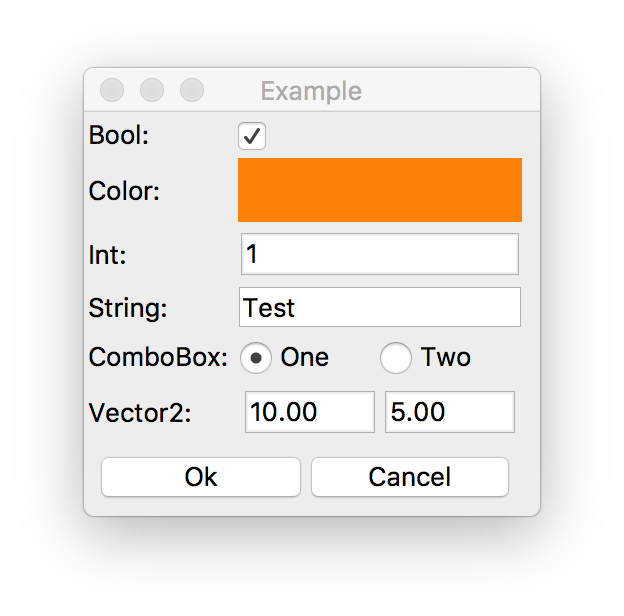
InputFormDialog is a simple module that provides a multi-type input dialog for Qt5.
The purpose of the InputFormDialog is to compliment the static get methods of the QInputDialog such as QInputDialog.getText or QInputDialog.getInt.
Details
Using InputFormDialog is simple. First create a dictionary that will define the form entries and their default values. If the order of input widgets is important, use OrderedDict.
Currently the following input queries are supported:
- boolean
- color
- numeric
- text
- options list
- 2d/3d vector
Second, call the get_input() function and pass the data object as an argument. If the user accepts the dialog then the data object will hold the new values chosen by the user.
Additionally, you might want to create FormOptions object and specify some of the options that control the properties of widgets used by the dialog.
Currently the following options are available:
- set numeric limits, step and decimal precision
- set whether combo box or radio button group is used
- set whether the combo box / radio button group returns current item text or index
Example
# QApplication must be running prior to calling get_input
from collections import OrderedDict
from Qt import QtGui, QtWidgets

from input_form_dialog import FormOptions, get_input

# Define form inputs
data = OrderedDict()
data["Bool"] = True
data['Color'] = QtGui.QColor('red')
data['Int'] = 1
data['String'] = 'Test'
data['ComboBox'] = ['One', 'Two']
data['Vector2'] = QtGui.QVector2D(10.0, 5.0)

# Define form options
options = FormOptions()
options.list_displays_as_radios = True
options.list_returns_index = True

# Ask user for input and retrieve data
if get_input('Example', data, options):
    print(data['Bool'])
    print(data['Color'])
    print(data['Int'])
    print(data['String'])
    print(data['ComboBox'])
    print(data['Vector2'])
Release history Release notifications | RSS feed


Download files
Download the file for your platform. If you're not sure which to choose, learn more about installing packages.
Source Distribution
Built Distribution
Filter files by name, interpreter, ABI, and platform.
If you're not sure about the file name format, learn more about wheel file names.
Copy a direct link to the current filters
File details
Details for the file input_form_dialog-1.0.1.tar.gz.
File metadata
- Download URL: input_form_dialog-1.0.1.tar.gz
- Upload date:
- Size: 4.1 kB
- Tags: Source
- Uploaded using Trusted Publishing? No
File hashes
| Algorithm | Hash digest | |
|---|---|---|
| SHA256 |
f6d4470cff9692dbdc4deeb1e015680162ff27a2d2cdacdcfce4c072a1d84769
|
|
| MD5 |
81b183977a792642483166d3f8e1c59f
|
|
| BLAKE2b-256 |
06c0cb40b59e98fa88fc76df5995d925ee649a8fb0863260d94e3eb57fac32c6
|
File details
Details for the file input_form_dialog-1.0.1-py2-none-any.whl.
File metadata
- Download URL: input_form_dialog-1.0.1-py2-none-any.whl
- Upload date:
- Size: 4.4 kB
- Tags: Python 2
- Uploaded using Trusted Publishing? No
File hashes
| Algorithm | Hash digest | |
|---|---|---|
| SHA256 |
46f36e18beb5a1d595dbaad34c3ebee3527b50a93811eb97b343c776b4abb03f
|
|
| MD5 |
8d0e3c994faa283cb7e93bdde6278334
|
|
| BLAKE2b-256 |
c2e87213888cbb5124e5e218450473a195635275cf6ee5628359ea63d93ddead
|






