
Generates Insights from text pieces such as Documents or Articles

Project description
InsiGEN
A state of the art NLP model to generate insights from a text piece
Features of topic modelling
- Generating a distribution of generalized topics covered in a document/articler
- Extracting contextualized keywords from the text piece
- Generating a summary of the text
- Trained on a corpus of 6000 wikipedia articles for generalized topics
- Can be trained on custom data for more specific topics
How to use the model
- Clone this repository
- Install the dependencies from the
requirements.txt - Basic Usage:
Get a topic distribution
from insigen import insigen
model = insigen()
topic_distribution = model.get_distribution(document)
Important parameters for insigen:
-
use_pretrained_embeds: Setting this parameter to False will allow you to train your own embeddings. Further parameters need to be specified for training -
embed_file: This parameter should be used when you've trained your own embeddings. Specify the path to your sentence embeddings. -
dataset_file: This parameter should be used when you've trained your own embeddings. Specify the path to your own dataset. -
embedding_model: (Default = all-mpnet-base-v2) Insigen uses sentence bert models to train it's embeddings. Valid models are:all-distilroberta-v1 all-mpnet-base-v2 all-MiniLM-L12-v2 all-MiniLM-L6-v2
Important parameters for get_distribution
document: The text for which the topic distribution is to be generatedmetric: This metric defines how the topics will be found. Can be set to 'threshold', to get all the topics above a similarity threshold. Defaults to 'max'. 'Max' metric gets the top "n" topicsmax_count: This argument should be used with max metric. It specifies the top x amount of topics that get fetched. Defaults to 1.threshold: This argument should be used with threshold metric. It specifies the threshold similarity over which all topics will be fetched. Defaults to 0.5.
Get keyword frequency
frequency = model.get_keyword_frequency(document, min_len=2, max_len=3)

#Generate a wordcloud using the frequency
cloud = model.generate_wordcloud(frequency)
Important parameters for get_keyword_frequency
document: The text for which the keyword frequency is to be generatedfrequency_threshold: minimum frequency of a n-gram to be considered in the keywords (min_lenandmax_lenare also used to adjust the length of n-grams in the text)
Generate Summary
summary = model.generate_summary(article, topic_match=relevant_topic))

# To get a list of topics, use this
#print(model.unique_topics)
Import parameters for generate_summary
document:The text for which the summary is to be generatedtopic_match: a topic that can match with the text. This adds additional weight to sentences that are more related to the topic. usemodel.unique_topicsto get a list of topics that can match. Defaults to None, in which case weightage to related sentence will not be given.topic_weight: Adds weightage to the topic similarity score. Increasing this parameter results to more topic oriented summary. Defaults to 1.similarity_weight: Adds weightage to sentence similarity score. Increasing this parameter results in extracting more co-related sentences. Defaults to 1.position_weight: Adds weightage to the position of the sentences. Increasing this parameter results to more position oriented summary; i.e Texts present early in the document are given more weightatge. Defaults to 10.num_sentences: This specifies the number of sentences that are to be included in the summary. Defaults to 10.
Train on your dataset
embeddings = model.train_embeds(dataset)
Important parameters for train_embeds
dataset: A pandas dataframe for the dataset to be trainedbatch_size: Batches to divide the dataset into. Defaults to 32.
How does the model work?
Topic Distribution
-
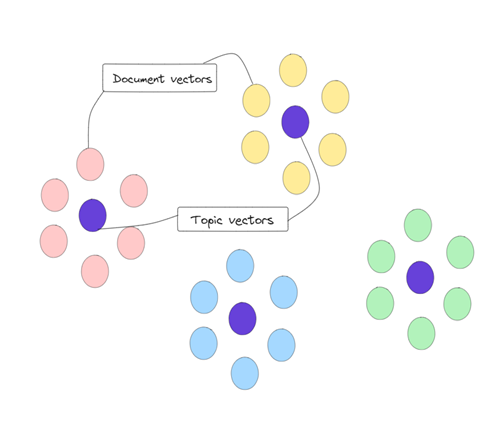
Create embedded vectors of labelled training articles
-
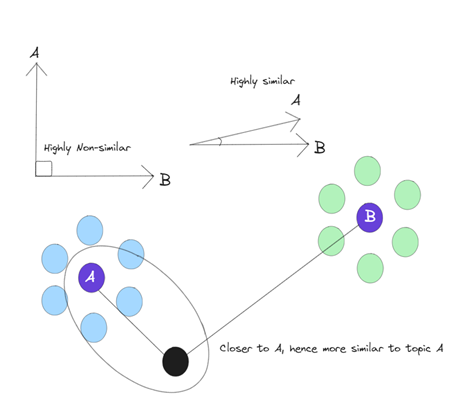
Find mean embeddings of each topic in the corpus to create topic vectors and create clusters of articles
-
Use KNN to place new articles in the topic vector cluster
-
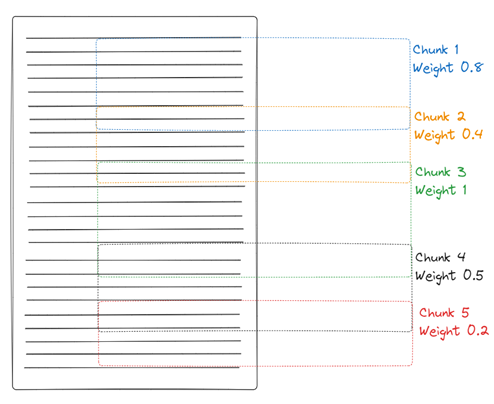
Chunking each article and finding relevant topic from the topic vectors
Keyword extraction
- N-grams and keywords are filtered from the text
- Contextually similar keywords to the article are given higher scoring
- A threshold is applied to the filtered list of keywords to get the final list of keywords
Summary Extraction
- The PageRank algorithm is used to create a similarity matrix for sentences in the text
- Additionally, sentences are scored based on their position in the text and their similarity to a relevant topic
- Top N sentences from the similarity matrix are extracted to create a summary.
Release history Release notifications | RSS feed


Download files
Download the file for your platform. If you're not sure which to choose, learn more about installing packages.
Source Distribution
Built Distribution
Filter files by name, interpreter, ABI, and platform.
If you're not sure about the file name format, learn more about wheel file names.
Copy a direct link to the current filters
File details
Details for the file insigen-0.1.3.tar.gz.
File metadata
- Download URL: insigen-0.1.3.tar.gz
- Upload date:
- Size: 9.3 kB
- Tags: Source
- Uploaded using Trusted Publishing? No
- Uploaded via: twine/5.1.1 CPython/3.11.4
File hashes
| Algorithm | Hash digest | |
|---|---|---|
| SHA256 |
e486745776a38d9ef0666bfb4200f4fd6e8fb5dd44aaf20db1058c67481fc882
|
|
| MD5 |
ce2c07df97c5e69ae8f759263f2b061d
|
|
| BLAKE2b-256 |
d9006cb88e21bb9854e7ede639b28cda820c62438d69545f038c1112eb5e49b7
|
File details
Details for the file insigen-0.1.3-py3-none-any.whl.
File metadata
- Download URL: insigen-0.1.3-py3-none-any.whl
- Upload date:
- Size: 11.3 kB
- Tags: Python 3
- Uploaded using Trusted Publishing? No
- Uploaded via: twine/5.1.1 CPython/3.11.4
File hashes
| Algorithm | Hash digest | |
|---|---|---|
| SHA256 |
cccda6f94c7ace014078c566a7375e7f0a204cba15d28652a2c833fe6fd13f07
|
|
| MD5 |
406177b653208e543ba08901c1c3af84
|
|
| BLAKE2b-256 |
9884f1b636cf8038009427fbbb61e197d7981573443170cfd8aa8658439e35f4
|






