
Package introducing the InSituPy framework to analyze single-cell spatial transcriptomics data.

Project description

InSituPy: A framework for histology-guided, multi-sample analysis of single-cell spatial transcriptomics data

InSituPy is a Python package designed to facilitate the analysis of single-cell spatial transcriptomics data. With InSituPy, you can easily load, visualize, and analyze the data, enabling and simplifying the comprehensive exploration of spatial gene expression patterns within tissue sections and across multiple samples. Currently the analysis is focused on data from the Xenium In Situ methodology but a broader range of reading functions will be implemented in the future.
Latest changes
!!!Warning: This repository is under very active development and it cannot be ruled out that changes might impair backwards compatibility. If you observe any such thing, please feel free to contact us to solve the problem. Thanks!
For the latest developments check out the releases.
Getting started
Overall data structure
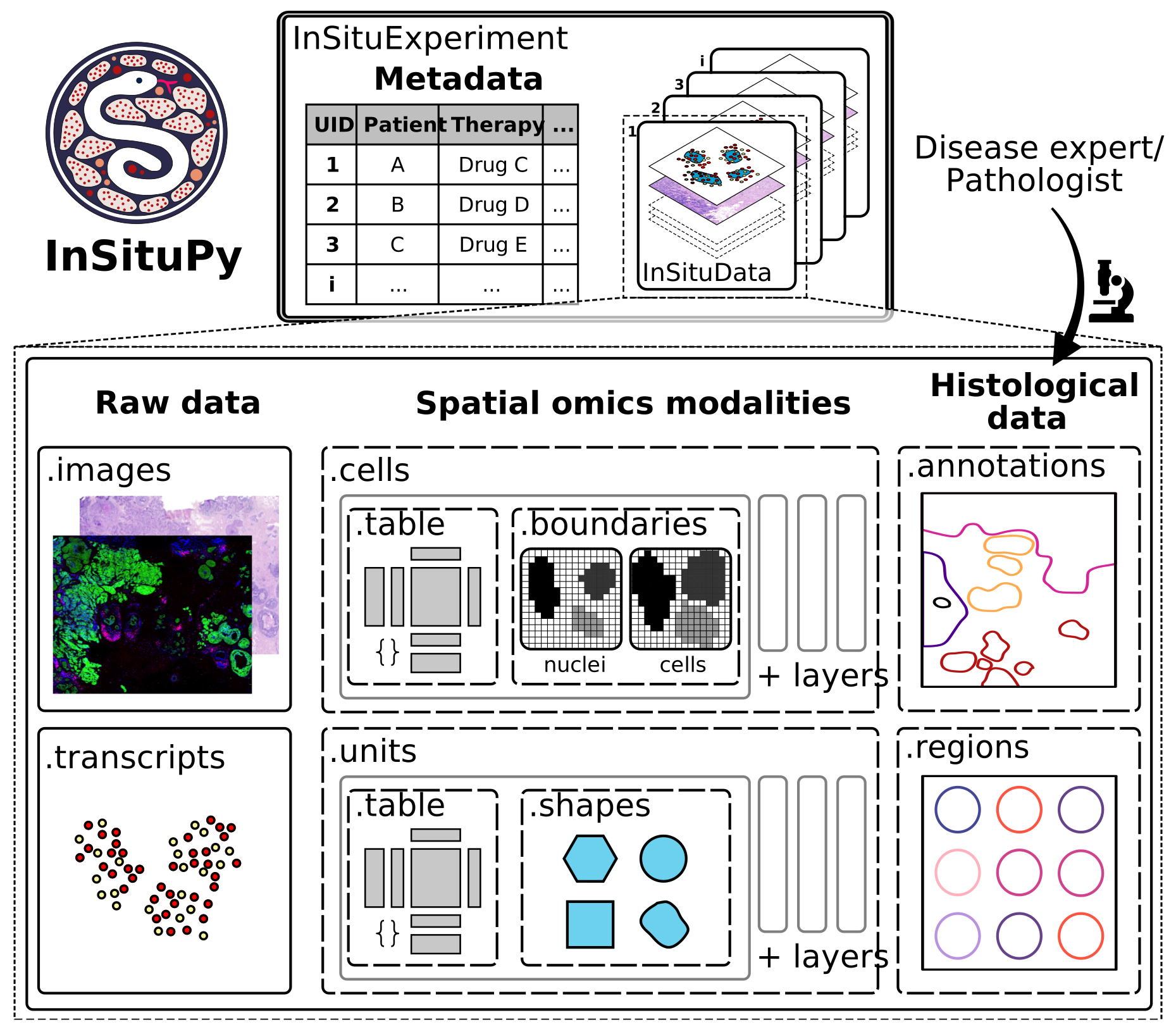
A key feature of InSituPy is its hierarchical data structure, centered around the InSituExperiment and InSituData objects:
InSituData: Represents and manages at the individual sample level. It integrates all modalities of spatial omics datasets, including cellular readouts, cellular boundaries, images, transcripts, regions, and annotations.InSituExperiment: Aggregates multipleInSituDatainstances and links them with associated metadata, enabling cross-sample analysis and organization.
AI Assistant Integration (MCP Server)
InSituPy ships an MCP server that gives AI assistants live access to the API, source code, and workflow examples. Supported clients include Claude Desktop, Claude Code, Cursor, Windsurf, Continue.dev, and Cline.
The easiest way to activate the server in Claude Desktop is to add the following to your claude_desktop_config.json — no separate installation or repository clone required:
{
  "mcpServers": {
    "insitupy": {
      "command": "uvx",
      "args": ["--python", "3.12", "--from", "insitupy-spatial[mcp]", "insitupy-mcp"]
    }
  }
}
uvx (part of uv) handles downloading and running the server automatically in an isolated environment. Install uv first if you haven't already (curl -LsSf https://astral.sh/uv/install.sh | sh on macOS/Linux, or see installation options).
See MCP_TUTORIAL.md for step-by-step setup instructions for all supported clients.
Documentation
For detailed instructions on using InSituPy, refer to the official documentation.
InSituPy works best within Jupyter Lab or Jupyter Notebook sessions. If you are not familiar with these platforms, see the documentation of Project Jupyter.
Installation
Make sure you have Conda installed on your system before proceeding with these steps. If not, you can install Miniconda or Anaconda from https://docs.conda.io/en/latest/miniconda.html.
Create and activate a conda environment:
When using InSituPy with SpatialData, python version 3.13 is mandatory. Otherwise all python version >=3.10 should work.
conda create --name insitupy python=3.13
conda activate insitupy
Install from PyPi:
pip install insitupy-spatial
This base installation includes napari and related visualization dependencies.
InSituPy currently requires zarr>=3.0.0 and targets the zarr v3 format. Legacy zarr v2 workflows are only partially supported and not tested.
Optional: install with SpatialData support (spatialdata>=0.7.2):
pip install insitupy-spatial[spatialdata]
To ensure that the InSituPy package is available as a kernel in Jupyter notebooks within your conda environment, you can follow the instructions here.
For alternative installation strategies see the documentation.
Features
- Data storage: Store data on both the single sample level and the multi-sample level using the
InSituDataandInSituExperimentobjects. - Data Preprocessing: InSituPy provides functions for normalizing, filtering, and transforming raw in situ transcriptomics data.
- Interactive Visualization: Create interactive plots using napari to easily explore spatial gene expression patterns.
- Annotation: Annotate Xenium In Situ data in the napari viewer or import annotations from external tools like QuPath.
- Multi-sample analysis: Perform analysis on an experiment-level, i.e. with multiple samples at once.
QuPath
We try to develop InSituPy alongside the Bioimage Analysis tool QuPath. QuPath has great functionalities to visualize whole slide image data, add annotations, generate segmentations or analyze signal intensities. Scripts to simplify the connection between QuPath and InSituPy, we collect here. This includes:
- Export of annotations as GEOJSON from QuPath
- Export of images as OME-TIFF from QuPath
- Collected export of data from a multiplexed IF image to be imported into InSituPy. Import can be performed using either
read_qupathorread_qupath_project. For cell and nucleus segmentation of multiplexed IF images we recommend using Instanseg.
Contributing
Contributions are welcome! If you find any issues or have suggestions for new features, please open an issue, submit a pull request or contact us via our zulip chat.
Citation
If you use InSituPy in your work, please cite the preprint as follows:
InSituPy – A Framework for Histology-Guided, Multi-Sample Analysis of Single-Cell Spatial Transcriptomics Data.
Wirth, Johannes, Anna Chernysheva, Birthe Lemke, Isabel Giray, Aitana Egea Lavandera, and Katja Steiger.
bioRxiv, March 12, 2025. https://doi.org/10.1101/2025.03.07.641860.
License
InSituPy is licensed under the BSD-3-Clause.
InSituPy is developed and maintained by Johannes Wirth and Anna Chernysheva. Feedback is highly appreciated and hopefully InSituPy helps you with your analysis of spatial transcriptomics data. The package is thought to be a starting point to simplify the analysis of in situ sequencing data in Python and it would be exciting to integrate functionalities for larger and more comprehensive data structures. Currently, the framework focuses on the analysis of Xenium In Situ data but it is planned to integrate more methodologies and any support on this is highly welcomed.
Release history Release notifications | RSS feed


Download files
Download the file for your platform. If you're not sure which to choose, learn more about installing packages.
Source Distribution
Built Distribution
Filter files by name, interpreter, ABI, and platform.
If you're not sure about the file name format, learn more about wheel file names.
Copy a direct link to the current filters
File details
Details for the file insitupy_spatial-0.12.0b3.tar.gz.
File metadata
- Download URL: insitupy_spatial-0.12.0b3.tar.gz
- Upload date:
- Size: 350.1 kB
- Tags: Source
- Uploaded using Trusted Publishing? No
- Uploaded via: poetry/2.3.2 CPython/3.13.12 Linux/6.14.0-1017-azure
File hashes
| Algorithm | Hash digest | |
|---|---|---|
| SHA256 |
f47418ffb69c8e45161c0b200d4d515bb0ccf468ff11851f928cfc5ceb15d5e9
|
|
| MD5 |
fbf3dc694ded01756b052bbf923b2b26
|
|
| BLAKE2b-256 |
9c3c0d8968e27d39f22738c7c81cf706cde9185c9c321f0a567f63767495e857
|
File details
Details for the file insitupy_spatial-0.12.0b3-py3-none-any.whl.
File metadata
- Download URL: insitupy_spatial-0.12.0b3-py3-none-any.whl
- Upload date:
- Size: 404.3 kB
- Tags: Python 3
- Uploaded using Trusted Publishing? No
- Uploaded via: poetry/2.3.2 CPython/3.13.12 Linux/6.14.0-1017-azure
File hashes
| Algorithm | Hash digest | |
|---|---|---|
| SHA256 |
b7ae349d0fc9efb2ad6beae2da0c22d78436345c86dfa4a26adbf7980fe71fe6
|
|
| MD5 |
177165adf83db1002b97c95ec1a917e6
|
|
| BLAKE2b-256 |
8ffbb4ebd782ddc0898882e6de4f368d2f9d8c7fd43a4b320edc55df9a3f78ab
|






