



Inspectus
Inspectus is a versatile visualization tool for machine learning. It runs smoothly in Jupyter notebooks via an easy-to-use Python API.
Content
- Installation
- Attention Visualization
- Token Visualization
- Distribution Plot
- Setting up for Development
- Citing
Installation
pip install inspectus
Attention Visualization
Inspectus provides visualization tools for attention mechanisms in deep learning models. It provides a set of comprehensive views, making it easier to understand how these models work.
Preview
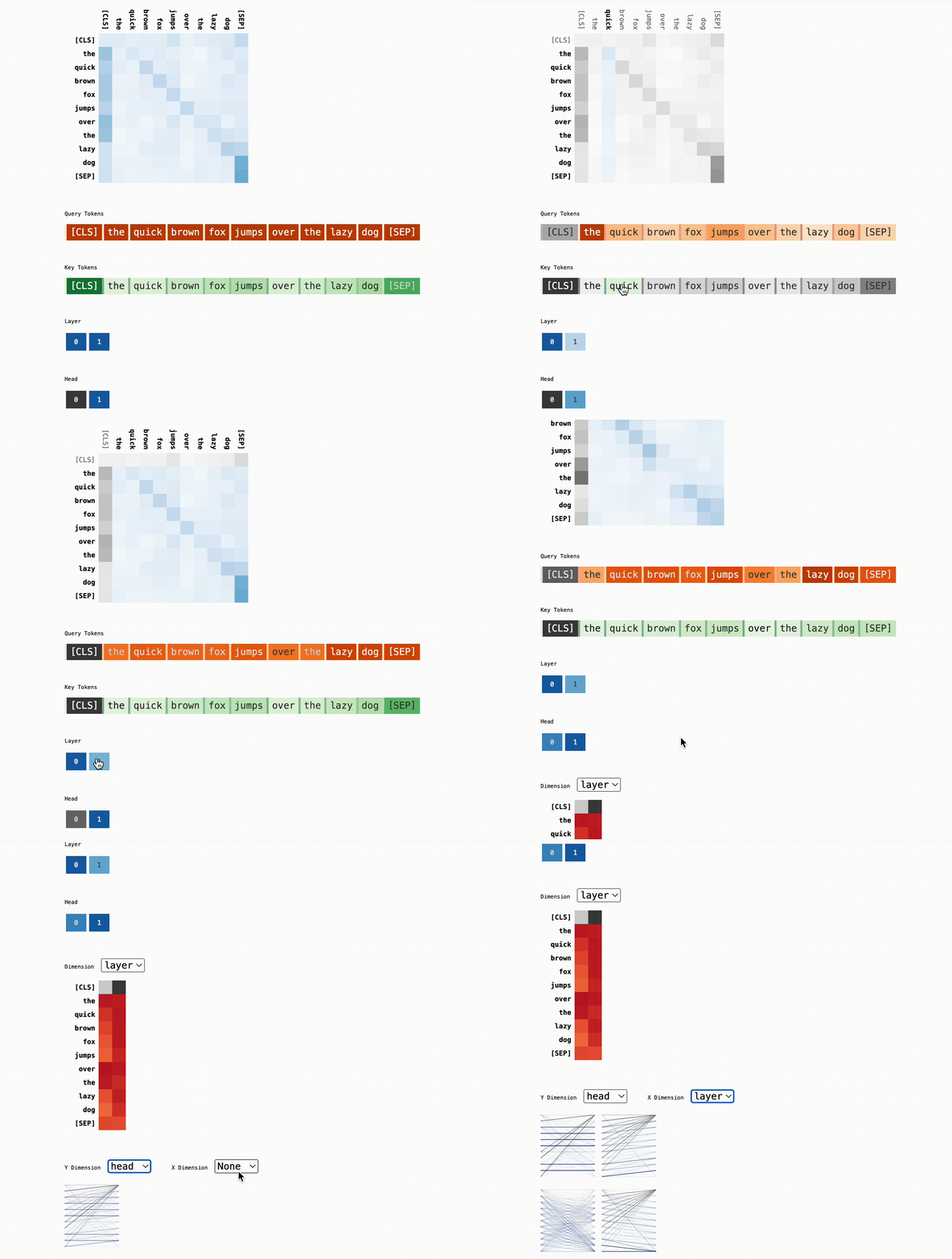
Click a token to select it and deselect others. Clicking again will select all again. To change the state of only one token, do shift+click
Components
Attention Matrix: Visualizes the attention scores between tokens, highlighting how each token focuses on others during processing.
Query Token Heatmap: Shows the sum of attention scores between each query and selected key tokens
Key Token Heatmap: Shows the sum of attention scores between each key and selected query tokens
Dimension Heatmap: Shows the sum of attention scores for each item in dimensions (Layers and Heads) normalized over the dimension.
Usage
Import the library
import inspectus
Simple usage
# attn: Attention map; a 2-4D tensor or attention maps from Huggingface transformers
inspectus.attention(attn, tokens)
For different query and key tokens
inspectus.attention(attns, query_tokens, key_tokens)
For detailed API documentation, please refer to the official documentation.
Tutorials
Huggingface model
from transformers import AutoTokenizer, GPT2LMHeadModel, AutoConfig
import torch
import inspectus

# Initialize the tokenizer and model
context_length = 128
tokenizer = AutoTokenizer.from_pretrained("huggingface-course/code-search-net-tokenizer")

config = AutoConfig.from_pretrained(
    "gpt2",
    vocab_size=len(tokenizer),
    n_ctx=context_length,
    bos_token_id=tokenizer.bos_token_id,
    eos_token_id=tokenizer.eos_token_id,
)

model = GPT2LMHeadModel(config)

# Tokenize the input text
text= 'The quick brown fox jumps over the lazy dog'
tokenized = tokenizer(
    text,
    return_tensors='pt',
    return_offsets_mapping=True
)
input_ids = tokenized['input_ids']

tokens = [text[s: e] for s, e in tokenized['offset_mapping'][0]]

with torch.no_grad():
    res = model(input_ids=input_ids.to(model.device), output_attentions=True)

# Visualize the attention maps using the Inspectus library
inspectus.attention(res['attentions'], tokens)
Check out the notebook here: Huggingface Tutorial

Custom attention map
import numpy as np
import inspectus

# 2D attention representing attention values between Query and Key tokens
attn = np.random.rand(3, 3)

# Visualize the attention values using the Inspectus library
# The first argument is the attention matrix
# The second argument is the list of query tokens
# The third argument is the list of key tokens
inspectus.attention(arr, ['a', 'b', 'c'], ['d', 'e', 'f'])
Check out the notebook here: Custom attention map tutorial
Token Visualization
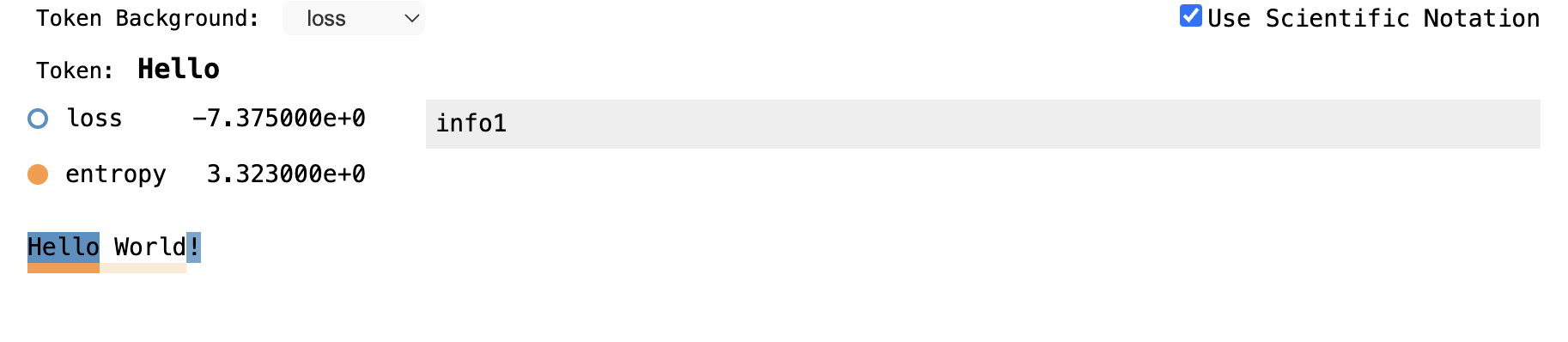
This tool is used to visualize some metric related to tokens. This supports multiple metrics and the metric used for the visualization can be selected using the dropdown. Along with metrics, any aditional information can be added to tokens.
Preview
Usage
import inspectus

inspectus.tokens(['hello', 'world'], np.random.rand(2))
Distribution Plot
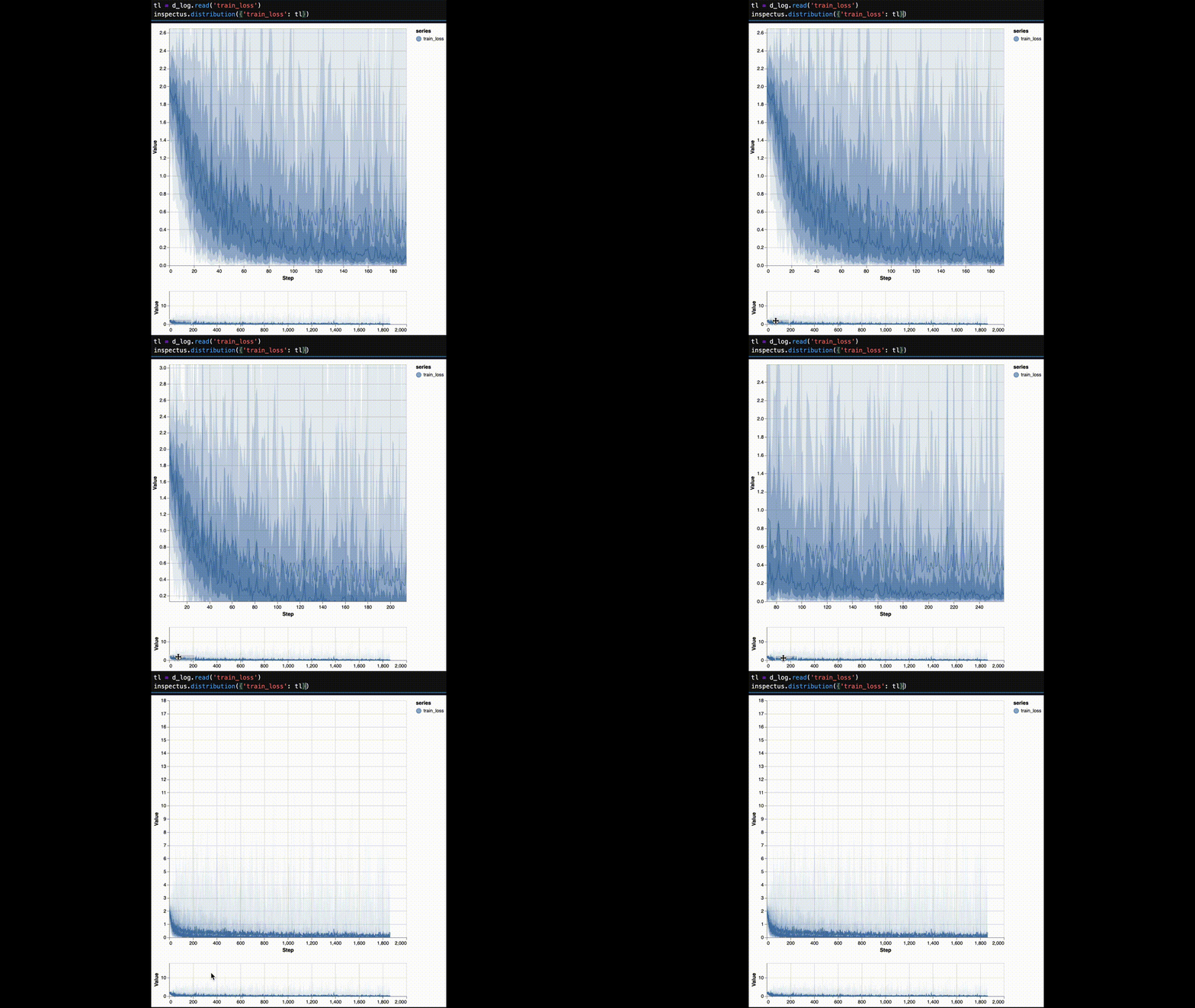
The distribution plot is a plot that shows the distribution of a series of data. At each step, the distribution of the data is calculated and maximum of 5 bands are drawn from 9 basis points. (0, 6.68, 15.87, 30.85, 50.00, 69.15, 84.13, 93.32, 100.00)
Preview
Usage
import inspectus

inspectus.distribution({'x': [x for x in range(0, 100)]})
To focus on parts of the plot and zoom in, the minimap can be used. To select a single plot, use the legend on the top right.
For comprehensive usage guide please check the notebook here: Distribution Plot Tutorial
Sample Use case
This plot can be used to identify the existence of outliers in the data. Following notebooks demonstrate how to use the distribution plot to identify outliers in the MNIST training loss.
Setting up for Development
Citing
If you use Inspectus for academic research, please cite the library using the following BibTeX entry.
@misc{inspectus,
 author = {Varuna Jayasiri, Lakshith Nishshanke},
 title = {inspectus: A visualization and analytics tool for large language models},
 year = {2024},
 url = {https://github.com/labmlai/inspectus},
}
1 maintainer

Metadata
1 maintainer
Release files for inspectus 0.2.0
For a detailed explanation of source distributions (sdists) and built distributions (wheels), please see the package formats documentation.
Source distribution (sdist)
| File | Size | Uploaded | |
|---|---|---|---|
| inspectus-0.2.0.tar.gz | 116.3 kB | Details |
Built distribution (wheel)
| File | Interpreter | ABI | Platform | Reset |
|---|---|---|---|---|
| inspectus-0.2.0-py3-none-any.whl | Python 3 | none | any | Details |
Total release size: 233.5 kB
Release files / inspectus-0.2.0.tar.gz
| Download URL | inspectus-0.2.0.tar.gz |
|---|---|
| Size | 116.3 kB |
| Tags | Source |
|
SHA-256 checksum How to use checksums |
3df62655bffe1d19fa24c8adfe7584665488da2c79475c3b3694486293117a30
|
|
BLAKE2b-256 checksum How to use checksums |
03baacd5fffcebe025af59871d4045a80341eb9a81ced709779fe5aa593af244
|
| Upload date | |
|
Uploaded using Trusted Publishing? What is trusted publishing? |
No |
| Uploaded via |
twine/4.0.2 CPython/3.10.11
|
Release files / inspectus-0.2.0-py3-none-any.whl
| Download URL | inspectus-0.2.0-py3-none-any.whl |
|---|---|
| Size | 117.2 kB |
| Tags | Python 3 |
|
SHA-256 checksum How to use checksums |
159a6cf1f8883c6059992865d8911879d21c87f47ccafc9fe1044752fd9de979
|
|
BLAKE2b-256 checksum How to use checksums |
18d8347e16cd7743722aeb2b1dfa0edc2bd46bfe0f1188dd03b9d43e88270e44
|
| Upload date | |
|
Uploaded using Trusted Publishing? What is trusted publishing? |
No |
| Uploaded via |
twine/4.0.2 CPython/3.10.11
|














