
InstaAddict
Looking for Instagram automation? I'm proud to present you a 100% free and open source Instagram bot. This bot will allow you to grow your following and engagement by liking, following, commenting and sending PMs automatically with your Android phone/tablet/emulator. No root required.









Table of contents
- About this project
- Why automate your Instagram?
- Why InstaAddict over other bots?
- How it works
- Compatibility / known working versions
- Features
- Quick start
- Common setup issues
- Support this project
- Community
About This Project
InstaAddict is a fork and continuation of GramAddict, an open-source Instagram automation bot originally created and maintained by mastrolube and the GramAddict community. The original project is no longer actively maintained — Instagram keeps changing its app's UI, and without ongoing fixes those changes silently break automation over time.
We're deeply grateful to the GramAddict team for building such a solid foundation. Their dedication to keeping the bot free, open source, and community-driven made this project possible. InstaAddict picks up where GramAddict left off — actively tracking Instagram's UI changes, fixing compatibility as things break, and keeping the bot alive for the community.
This project is licensed under the same terms as the original. All credit for the core architecture and original features goes to the GramAddict contributors.
Maintained by



Why should I automate my Instagram account?
It's hard to grow an account organically these days. Instagram's explore/discovery surfaces mostly favor accounts you already interact with — nobody sees your posts unless you're already getting engagement. InstaAddict helps close that gap by handling the repetitive interaction work (liking, following, watching stories) so real people are more likely to discover and engage with your actual content.
So do I still need to post good content?
Yes, absolutely. This bot gets you visibility — it doesn't replace having something worth looking at once people arrive.
I don't know where to start...
That's fine — this README walks you through the whole setup. If you get stuck anywhere, the Discord community is there to help.
I've seen a lot of similar projects on GitHub — why this one?
Most competing bots use direct API requests, which is exactly what gets accounts banned (1–30 days) — Instagram actively watches for that traffic pattern. There are also several closed-source "premium" bots that strip features out of the free tier and charge a subscription to unlock them back, while running encrypted code so you can't verify what it's actually doing on your account.
InstaAddict is free to use and open source, full stop. No paywalled features, no encrypted execution, no subscription. If you want to verify exactly what it does, the code is right here.
So this bot doesn't use the API?
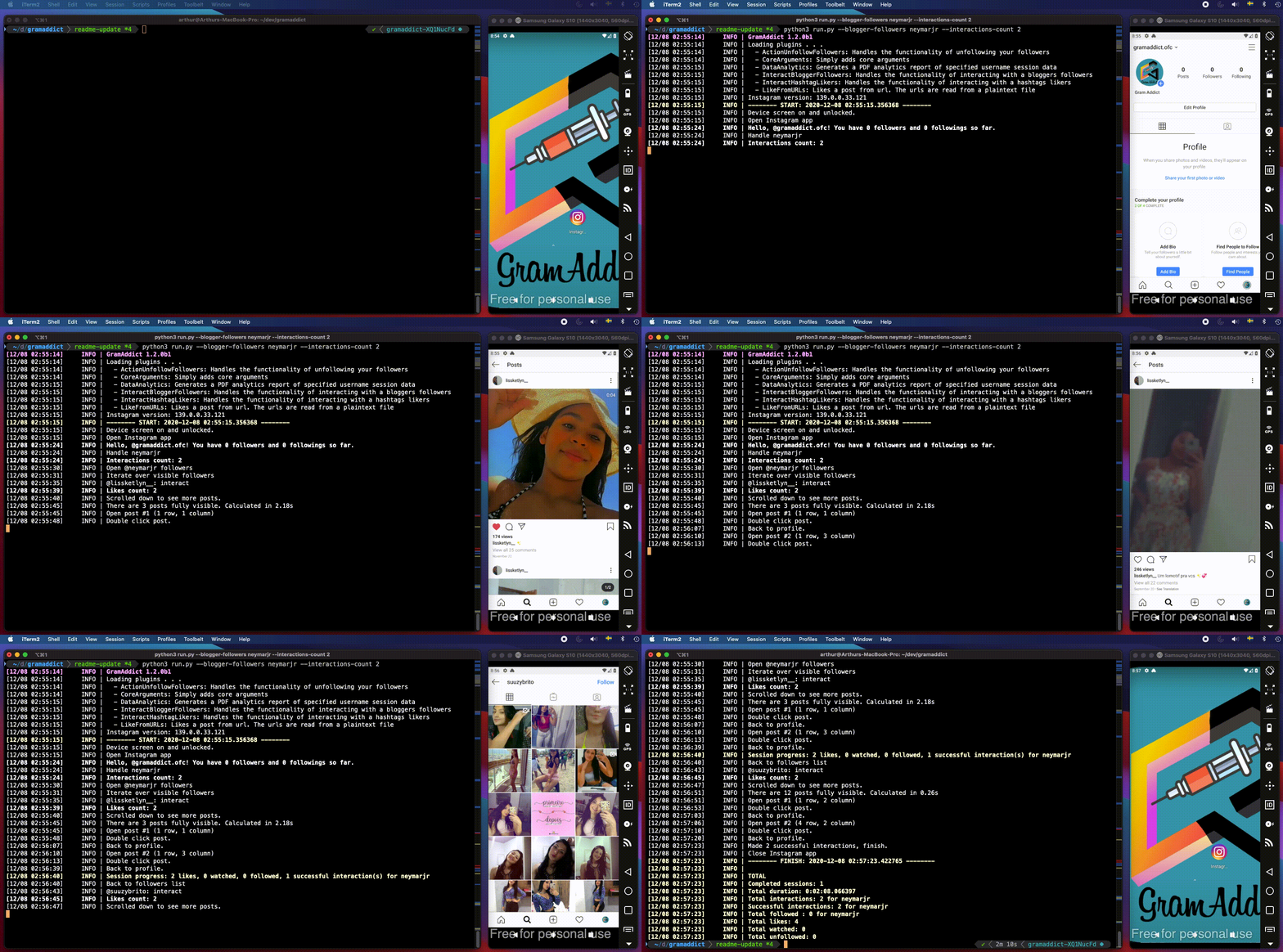
Correct — it drives the real Instagram app through adb and uiautomator2, an Android UI-testing framework. Your device (or emulator) is literally used to tap through the app the way a person would, which is far harder for Instagram to distinguish from real usage than API-based bots.
Does that mean I'll never get banned?
No — please configure sensible limits. Real humans don't scroll and interact with hundreds of accounts nonstop all day, and neither should your bot. Aggressive limits (too many follows/likes in a row, spammy PMs) get flagged whether a bot or a person does them. Keep it modest, keep it paced, and it'll stay under the radar.
Do I need a computer?
Yes for the initial setup, but the bot itself can run directly on your phone via Termux once configured. You can host it on:
- your computer (Windows, macOS, or Linux)
- a Raspberry Pi (a cheap, low-power Linux box that can run this unattended)
Choosing between a physical device or an emulator
Both work. If you're going the emulator route, there's one thing that trips people up: Instagram's APK is ARM-only, so your emulator needs either a native ARM system image or built-in ARM translation. Recommended:
- Windows: MEmu or LDPlayer — both include ARM translation out of the box.
- macOS: Android Studio (installable via
brew install --cask android-studio), but make sure you pick an ARM64 system image in the AVD manager, not the default x86_64 one — an x86-only image will fail to install or crash Instagram.
Compatibility / known working versions
InstaAddict actively tracks Instagram's UI changes. This is updated as fixes land — see CHANGELOG.md for the full history.
| Component | Verified working |
|---|---|
| 440.0.0.46.86 | |
| uiautomator2 | 2.16.26 |
| Python | 3.13.14 |
| Platforms | Windows, macOS, Termux (Android) |
Python 3.13.14 is the version currently tested and verified with InstaAddict. Other Python versions may work, but they are not officially tested at this time.
If something breaks on a newer Instagram version, please open an issue — we treat "this stopped working" reports as our highest-priority bugs, not an afterthought.
Cool! What can I do with this bot?
-
Works without rooting
-
Works with both emulators and physical devices
-
Can run stand-alone (no computer required after setup, via Termux)
-
Realistic, randomized human-like delays and actions
-
Auto-creates your account config folder from a template on first run
-
Watches stories while interacting
-
Comments with emojis and spintax logic
-
Sends PMs
-
Types like a human (suggestion-faking rather than key-by-key typing)
-
Browses carousels and watches their contents
-
Watches videos for a configurable duration
-
Session scheduling
-
Telegram activity reports
-
Multiple actions per session
-
Extensive, customizable limits to keep your account safe from soft bans
-
Available interaction jobs:
- a user's followers or following
- a hashtag's top or recent post likers
- a hashtag's top or recent posts
- a place's top or recent post likers
- a place's top or recent posts
- a specific user's post likers
- a single blogger
- your own feed
- a list of users from a
.txtfile - posts from a list of links in a
.txtfile - unfollow any followers
- unfollow followers the bot itself followed
- unfollow followers the bot followed who don't follow back
- unfollow from a
.txtlist - scrape mode — collect usernames without interacting, for later use
-
Extensive filters for who gets interacted with:
- blacklist / whitelist
- biography character set and language
- profile name character set
- private / public / business / non-business accounts
- post count / follower count / following count
- ...and more
Full documentation: docs.gramaddict.org (shared with the upstream project — most configuration concepts still apply directly).
Telegram reports
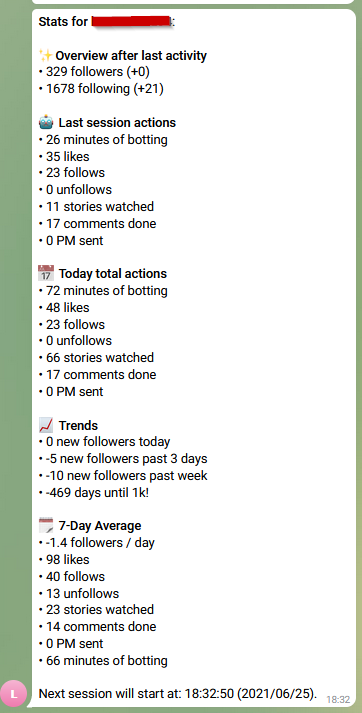
Get session activity reports sent straight to Telegram. Setup guide here.
Quick start
What you need
- A computer (Windows, macOS, or Linux)
- Python 3.13.14
- adb (Android Debug Bridge)
- A physical Android device or an emulator (Android 4.4+)
Step 1: Install Python
InstaAddict is currently tested and verified with Python 3.13.14.
We recommend using Python 3.13.14 for the most reliable installation and runtime experience.
- macOS/Linux: install Python 3.13.14 and verify with
python3 --version - Windows: download Python 3.13.14 and make sure to check "Add Python to PATH" during installation.
Verify your installation:
python3 --version
You should see:
Python 3.13.14
On Windows, you can also use:
python --version
or:
py --version
Check that pip is installed:
pip3 --version
On Windows, pip --version may be used instead.
Step 2: Install InstaAddict
Using a virtual environment is strongly recommended — it isolates this project's dependencies from everything else on your machine.
python3 -m venv .venv
Activate it:
- Linux/macOS:
source .venv/bin/activate
- Windows cmd:
.venv\Scripts\activate.bat
- Windows PowerShell:
.venv\Scripts\Activate.ps1
You'll see (.venv) at the start of your prompt once it's active.
With pip (recommended)
pip3 install instaaddict
Verify:
pip3 show instaaddict
With git
git clone https://github.com/joeahkim/InstaAddict.git
cd InstaAddict
pip3 install -r requirements.txt
Step 3: Install adb
-
Download platform-tools and unzip it somewhere permanent — not
Downloads, since that folder tends to get cleared out and will quietly break your setup later. -
Add the
platform-toolsfolder to yourPATH:- Linux/macOS: add
export PATH=~/Library/Android/sdk/platform-tools/:$PATH(adjust the path to wherever you unzipped it) to~/.bash_profileor~/.zshrc, then restart your terminal. - Windows: System Properties → Advanced → Environment Variables → edit
Path, add the fullplatform-toolsfolder path. Open a brand-new terminal window afterward — an already-open terminal won't pick up the change.
- Linux/macOS: add
-
Verify:
adb version
Step 4: Set up your device
Physical device
- Enable developer options and USB debugging.
- Connect via USB, and tap "Allow" when prompted on the device.
Emulator
- Install an ARM-compatible emulator (see emulator notes above) and install Instagram inside it via its Play Store.
- Enable Developer Options + USB debugging inside the emulated Android the same way as a physical device.
- Connect adb over TCP (port varies by emulator — check its settings panel):
adb connect localhost:21503
Verify the connection either way:
adb devices
You should see a device listed:
List of devices attached
A0B1CD2345678901    device
That identifier is your device ID — only needed if multiple devices are connected at once.
Step 5: Start the bot
InstaAddict requires Instagram to be set to English.
- Initialize uiautomator2 on your device:
python3 -m uiautomator2 init
If you have multiple devices/emulators connected, target a specific one:
python3 -m uiautomator2 init <device-id>
- Run the bot, pointing at a new account config:
python3 run.py --config accounts/your_ig_username/config.yml
If the accounts/your_ig_username/ folder doesn't exist yet, it's created automatically from the template in config-examples/ on first run — review the generated config.yml (especially the device: field) before running again.
- Configuration reference: docs.gramaddict.org
Still stuck? See Common setup issues, or ask in Discord.
Common setup issues
These come up on fresh installs regardless of OS — worth checking here before opening an issue.
ModuleNotFoundError: No module named 'pkg_resources'
setuptools removed pkg_resources starting at v82.0.0. Install the standalone replacement:
pip3 install standard-pkg-resources
ModuleNotFoundError: No module named 'distutils'
distutils was removed from Python's standard library in 3.12+. This usually means your packaging library is outdated. Upgrade it:
pip3 install --upgrade packaging
Both errors on the same fresh install?
Run this once to resolve the whole chain in one shot:
pip3 install --upgrade setuptools packaging standard-pkg-resources adbutils uiautomator2
ModuleNotFoundError for configargparse, imageio, or websocket-client
pip3 install -r requirements.txt
pip install --break-system-packages
On some Linux distros and Termux, pip refuses to install into the system Python ("externally managed environment"). Add --break-system-packages to the install command, or better, make sure you're inside an activated virtual environment first.
adb not recognized after adding it to PATH (Windows)
Close and reopen your terminal — PATH changes don't apply to already-open sessions. Also double check you're actually in PowerShell (PS in the prompt) vs. Command Prompt, since the two don't share environment state.
Support This Project
InstaAddict is 100% free and open source, and maintaining it takes real time — tracking every Instagram UI change, fixing what breaks, and helping people in Discord. If it's helped you grow your account, consider chipping in. ☕

Bot crashed — what do I do?
This isn't a perfect science — Instagram's UI shifts under us regularly, so things do break sometimes. Open a ticket in #crash-reports on Discord rather than posting your Instagram username publicly on GitHub. Attach the crash zip from your crashes/ folder — that's usually enough for us to pin down what changed.
Talk botty with us
Join the Discord community — support, dev discussion, a #showcase channel for your growth results, and a live feed of what's happening on the repo.
Can I help this project grow?
- ⭐ Star the repo — it's a small thing that genuinely helps visibility.
- 🐛 File an issue if something's broken, especially "this used to work and now it doesn't."
- 🛠 If you want to contribute code — see CONTRIBUTING.md.
Disclaimer: This project comes with no guarantee or warranty. You are responsible for what happens as a result of using it. It is possible to get soft- or hard-banned by using this project if you're not careful with your limits.
1 maintainer

Download files
Download the file for your platform. If you're not sure which to choose, learn more about installing packages.
Source Distribution
Built Distribution
Filter files by name, interpreter, ABI, and platform.
If you're not sure about the file name format, learn more about wheel file names.
Copy a direct link to the current filters
File details
Details for the file instaaddict-1.0.3.tar.gz.
File metadata
- Download URL: instaaddict-1.0.3.tar.gz
- Upload date:
- Size: 101.3 kB
- Tags: Source
- Uploaded using Trusted Publishing? No
- Uploaded via:
python-requests/2.34.2
File hashes
| Algorithm | Hash digest | |
|---|---|---|
| SHA256 |
ffa0c727722eb7ab377666df27b6c1422e9d77c72ff2a71229ba3f442c3f931b
|
|
| MD5 |
f90ebb7e1a2db363d2f32bf8800d2abb
|
|
| BLAKE2b-256 |
9bf9387b4bec17f7382efeec647479c1124d5108bb4e300df36cbd2ab0e7ef6d
|
File details
Details for the file instaaddict-1.0.3-py3-none-any.whl.
File metadata
- Download URL: instaaddict-1.0.3-py3-none-any.whl
- Upload date:
- Size: 124.8 kB
- Tags: Python 3
- Uploaded using Trusted Publishing? No
- Uploaded via:
python-requests/2.34.2
File hashes
| Algorithm | Hash digest | |
|---|---|---|
| SHA256 |
d1ecf323861c38d753a852f47ae70259ed3c51ec1a6c7304adb69c74e54df4f0
|
|
| MD5 |
ac8ee45e7901f2800e1e5cc0b19d22bb
|
|
| BLAKE2b-256 |
4a80095ff09525f547a43e3c5f159bcd6eae809e9d44675d9544733898ccc585
|














