
A python package for generate your certificates/ID cards instantly!

Project description
🎓 instacerty – Instant Certificate & ID Card Generator!
instacerty is a powerful and modular Python package designed for the instant generation of professional certificates and ID cards. With built-in support for customization, dynamic design elements, and flexible layout handling, it empowers educators, HR teams, and developers to quickly generate PDF-based certificates and image-based employee ID cards.
✨ Features
🔖 1. Certificate Generator (PDF-Based)
- Purpose: Instantly generate A4-sized landscape certificates in PDF format.
- Core Fields: Name, Course, Instructor
- Optional Elements:
- Background Image
- Signature
- Badge
- Certificate Number
- Issue Date (default or custom)
- QR Code (auto-generated and encoded with key info)
- Output Format: Professional PDF
- Default Handling: If optional assets are not provided, default elements are used.
🪪 2. Employee ID Card Generator (Image-Based)
- Purpose: Generate front and back images for employee ID cards.
- Core Fields: Name, Designation, Employee ID, Profile Image
- Customizations:
- Template images (front & back)
- Profile image shape (Rounded, Square; default: Circle)
- Fonts (Regular, Bold, Medium, Light)
- Company Logo
- Barcode (auto-generated based on Employee ID)
- Output Directory
- Back-side toggle for extra branding/logo
- Output Format: Image files (e.g., PNG/JPEG)
- Validation: Automatically falls back to default assets if custom ones are not provided.
📆 Installation
Install the Package:
pip install instacerty
🚀 Quick Start Usage
✅ Certificate Generator
from instacerty import generate_certificate

# Certificate details(this 3 field is mandatory)
name = "Madhanraj"
course = "Python Django Master Course"
instructor = "Youtube"

# Generate the certificate
generate_certificate(
    name=name,
    course=course,
    instructor=instructor
)
📑 Output

⚙️ Custom Certificate Generator
from instacerty import generate_certificate

# Certificate details
name = "Madhanraj"
course = "Python Django Master Course"
instructor = "Youtube"

#Change custom bg
bg_image_path = "path/to/background.jpg"
#Change custom badge
badge_image_path = "path/to/badge.png"
#Change custom signature
signature_image_path = "path/to/signature.png"
#Where you want to save the PDF Certificates
custom_save_path="certificates/"
#Custom certificate number
custom_certificate_number="CERT123456"
#Custom issue date
custom_issue_date="15-08-2024"

# Generate the certificate
generate_certificate(
    name=name,
    course=course,
    instructor=instructor,
    bg=bg_image_path,
    is_badge=True,
    badge_img=badge_image_path,
    is_signature=True,
    signature_img=signature_image_path,
    save_path=custom_save_path,
    certificate_number=custom_certificate_number,
    issue_date=custom_issue_date
)
✅ Employee ID Card Generator
from instacerty.id_card_generator.employee_card import Employee, CompanyInfo
from instacerty.id_card_generator.generator import EmployeeIDCardGenerator
from datetime import*

# Employee details
employee_name = "Madhanraj S"
employee_id="EMP123457"
designation = "Software Engineer"
dob = "15/04/2000"
phone = "+91 2345678900"
email = "madhanreigns312@gmail.com"
join_date = "21/03/2022"

#Company detailes
company_name="XYZ Enterprises"
company_website="www.xyzenterprises.com"
company_location='''XYZ Enterprises;Plot No. 52,
 3rd Floor;Sector 12, Industrial Area;
 Chennai - 600119; Tamil Nadu, India'''

id1=EmployeeIDCardGenerator(
    employee=Employee(
        name=employee_name,
        employee_id=employee_id,
        designation=designation,
        phone=phone,
        email=email,
        join_date=join_date,
        emegency_number="1234567890", #None
    ),
    company=CompanyInfo(
        company_name=company_name,
        company_address=company_location,
        company_website=company_website #None
    )
)

front_output_path, back_output_path = id1.generate_id_card() # Generate ID card(front and back)

print(f"✅ ID Card Front saved at: {front_output_path}") # return path of front side
print(f"✅ ID Card Back saved at: {back_output_path}") # return path of back side


#Note: compnay location should be separa te by ';' it writes data in new line separated by ';' symbol
#Example:
'''
XYZ Enterprises
Plot No. 52, 3rd Floor
Sector 12, Industrial Area
Chennai - 600119
Tamil Nadu, India
'''
📑 Output
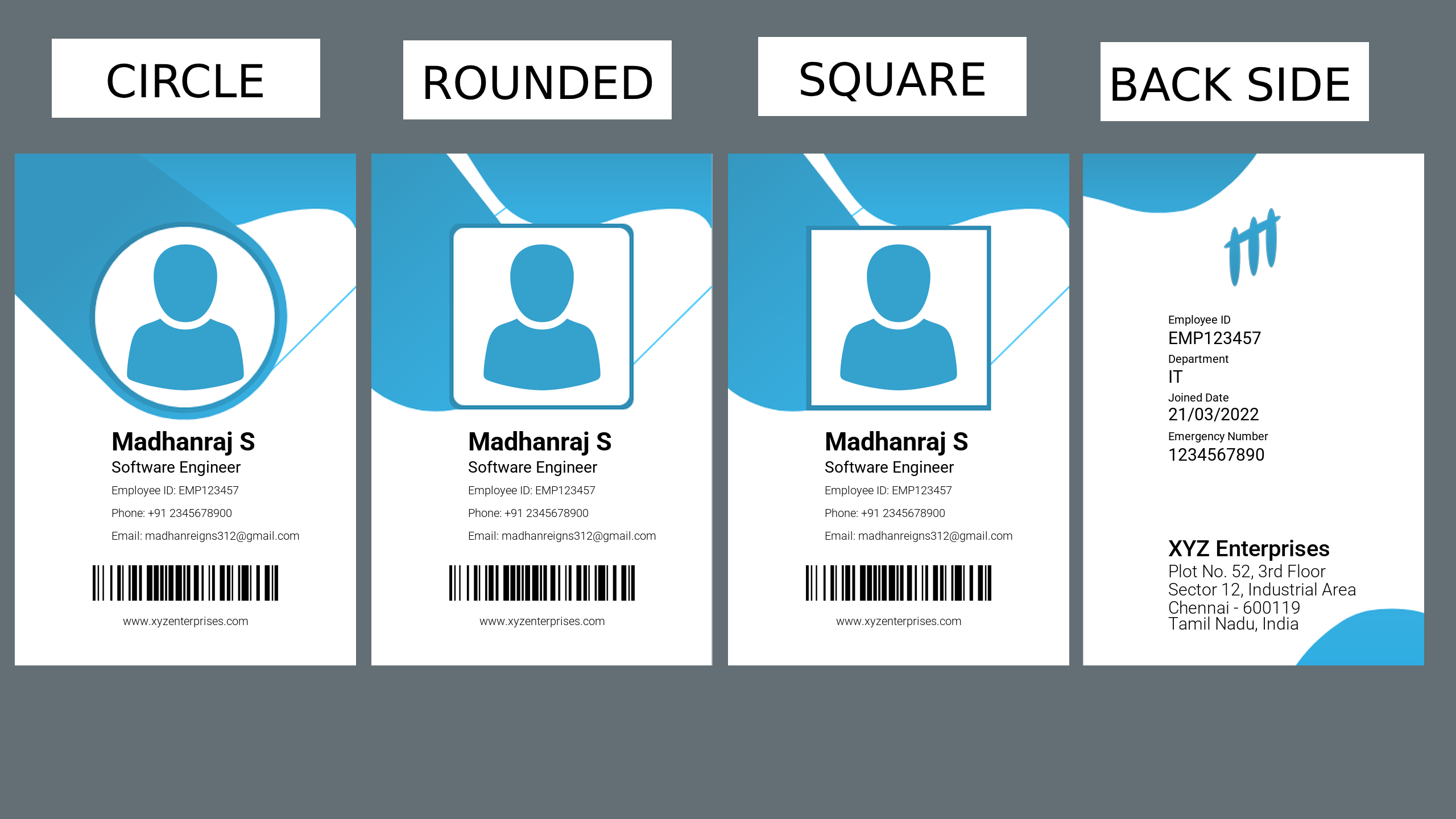
⚙️ Custom ID Card Generator
from instacerty.id_card_generator.enums import ProfileShape
from instacerty.id_card_generator.employee_card import Employee, CompanyInfo, EmpCardCustomization
from instacerty.id_card_generator.generator import EmployeeIDCardGenerator
from datetime import*
import os

# Employee details
employee_name = "Madhanraj S"
employee_id="EMP123457"
designation = "Software Engineer"
dob = "15/04/2000"
phone = "+91 2345678900"
email = "madhanreigns312@gmail.com"
join_date = "21/03/2022"
company_location="XYZ Enterprises;Plot No. 52, 3rd Floor;Sector 12, Industrial Area;Chennai - 600119; Tamil Nadu, India;"


id1=EmployeeIDCardGenerator(
    employee=Employee(
        name=employee_name,
        employee_id=employee_id,
        designation=designation,
        phone=phone,
        email=email,
        department="IT",
        profile_pic_path= "D:\\Custom\\Pictures\\profile.png",#use sqaure shaped images (320p*320p)
        join_date=join_date,
        emegency_number="1234567890",
        blood_group="M+ve",
    ),
    company=CompanyInfo(
        company_name="XYZ Enterprises",
        company_address=company_location,
        company_website="www.xyzenterprises.com"
    ),
    customization=EmpCardCustomization(
        logo_path=LOGO_PATH,
        profile_shape=ProfileShape.CIRCLE.value,
        font_paths = {
              "font_bold": os.path.join(DEFAULT_FONTS_PATH, "Roboto-Bold.ttf"),
              "font_regular": os.path.join(DEFAULT_FONTS_PATH, "Roboto-Regular.ttf"),
              "font_medium": os.path.join(DEFAULT_FONTS_PATH, "Roboto-Medium.ttf"),
              "font_light": "D:\\Custom_Fonts\\Poppins\\Poppins-Light.ttf",
        }
        template_front="D:\\Custom_\\Pictures\front_side_1.png",
        output_directory="D:\\ID_Cards\\Outputs",
        display_elements={
            "front_logo": False,
        },
    )
)

front_output_path, back_output_path = id1.generate_id_card()

print(f"✅ ID Card Front saved at: {front_output_path}")
print(f"✅ ID Card Back saved at: {back_output_path}")
⚠️ Note: DEFAULT_FONTS_PATH is root folder where fonts exists
🔒 Internal Logic
- Fallback to default backgrounds, logos, fonts if user-provided assets are invalid or missing.
- Input validation includes:
- Shape check (Rounded, Square, else fallback to Circle)
- Font folder integrity check
- Directory existence (auto-create if not exists)
🧾 Course Certificate Generation:
📌 generate_certificate() Parameters:
This is the main function used to generate course completion certificates in PDF format.
| Parameter | Type | Required | Description |
|---|---|---|---|
name |
str |
✅ Yes | The full name of the individual receiving the certificate. |
course |
str |
✅ Yes | The name of the course completed by the user. |
instructor |
str |
✅ Yes | The instructor name or issuer of the certificate. |
bg |
str |
❌ No | Path to a custom background image. If not provided, a default background will be used. |
is_badge |
bool |
❌ No | Whether to include a badge icon on the certificate. Default is True. |
badge_img |
str |
❌ No | Path to a custom badge image. If not provided, default badge will be used. |
is_signature |
bool |
❌ No | Whether to include a signature on the certificate. Default is True. |
signature_img |
str |
❌ No | Path to a custom signature image. If not provided, default signature will be used. |
save_path |
str |
❌ No | Custom directory path to save the generated PDF certificate. Defaults to current working directory. |
certificate_number |
str |
❌ No | If provided, uses this value as a unique certificate number. If not, one will be auto-generated. |
issue_date |
str |
❌ No | Custom issue date in dd-mm-yyyy format. Defaults to today’s date. |
#️⃣ get_certy_number
This function for generate unique 12-Digit Alphanumeric Number
🆔 Employee ID Card Generator – Parameters Explained
🚹 Employee Class Parameters
| Parameter | Type | Required | Description |
|---|---|---|---|
| name | str |
✅ | Full name of the employee (e.g., "Madhanraj S"). |
| employee_id | str |
✅ | Unique identifier for the employee (e.g., "EMP12345"). |
| designation | str |
✅ | Job title or role of the employee (e.g., "Software Engineer"). |
| phone | str |
✅ | Phone number of the employee (e.g., "+91 2345678900"). |
str |
✅ | Email address issued to the employee by the organization. | |
| department | str |
❌ | Department the employee belongs to (e.g., "Engineering"). Optional. |
| join_date | str |
❌ | Date of joining in the organization (e.g., "21-03-2022"). Optional. |
| profile_pic_path | str |
❌ | Path to the employee's profile picture (JPG/PNG). Optional. Defaults to a placeholder. #use sqaure shaped images (320p*320p) |
| emegency_number | str |
❌ | Emergency contact number of the employee. Optional. |
| blood_group | str |
❌ | Blood group of the employee (e.g., "O+, "B-"). Optional. |
🏢 CompanyInfo Class Parameters
| Parameter | Type | Required | Description |
|---|---|---|---|
company_name |
str |
✅ Yes | The name of the company (e.g., "OpenAI Pvt Ltd"). |
company_address |
str |
✅ Yes | The full company address to be printed on the ID card. |
company_front_logo |
str |
❌ No | Path to a custom front-side company logo. If not provided, none is used. |
company_back_logo |
str |
❌ No | Path to a custom back-side logo (usually smaller or watermark-style). |
company_website |
str |
❌ No | A company website URL (e.g., "https://github.com"), shown on the back. |
🎨 EmpCardCustomization(Customization) Class Parameters
This class handles appearance-level customizations for Employee ID Cards like templates, logos, fonts, and output paths.
| Parameter | Type | Required | Description |
|---|---|---|---|
| profile_shape | str |
❌ | Shape of the profile image. Supported: "circle" (default), "rounded", or "square". Invalid values fallback to "circle". |
| logo_path | str |
❌ | File path to the front-side logo image (PNG/JPG). |
| back_logo_path | str |
❌ | File path to the back-side logo image (PNG/JPG). |
| font_paths | dict |
❌ | Dictionary of custom font file paths. See 🗂️ font_paths . Defaults to system fonts. |
| template_front | str |
❌ | File path to the front-side template (PNG/JPG). Based on profile_shape, default template changes automatically. |
| template_back | str |
❌ | File path to the back-side template. |
| display_elements | dict |
❌ | Dictionary to show/hide logos, barcode, etc. See 🧩 display_elements. Defaults to all elements shown. |
| output_directory | str |
❌ | Path to save the generated ID card images. Defaults to current working directory. |
📝 Create Own Templates(Front, Back)
Download and Use this Template for create your own templates front and back side, use photopea(Free) or Photoshop to edit this template
🧩 display_elements (dict, optional)
This dictionary allows fine-grained control over visibility of visual elements on the ID card. Each key controls a specific element's display on either the front or back of the card.
✅ Structure:
display_elements={
            "front_logo": False,
            "back_logo": False,
            "front_template": True,
            "back_template": False,
            "barcode": False,
            "company_website": False,
        }
| Key | Type | Default | Description |
|---|---|---|---|
| front_logo | bool |
True |
Show or hide the company logo on the front side of the card. |
| back_logo | bool |
True |
Show or hide the company logo on the back side of the card. |
| front_template | bool |
True |
Whether to apply a back template layout (if provided). If False, front will be plain white with text/barcode. |
| back_template | bool |
True |
Whether to apply a back template layout (if provided). If False, back will be plain white with text/barcode. |
| barcode | bool |
True |
Show or hide the barcode on the back of the card (only works if show_barcode=True). |
| company_website | bool |
True |
Show or hide the company website field (if provided separately in template customization). |
🗂️ font_paths (dict, optional)
The font_paths parameter allows you to customize font styles used throughout the Employee ID Card, such as bold titles, regular info text, or medium/light fonts for aesthetic tuning. If not provided, default fonts bundled within the package will be used.
✅ Structure:
font_paths = {
    "font_bold": os.path.join(DEFAULT_FONTS_PATH, "Roboto-Bold.ttf"),
    "font_regular": os.path.join(DEFAULT_FONTS_PATH, "Roboto-Regular.ttf"),
    "font_medium": os.path.join(DEFAULT_FONTS_PATH, "Roboto-Medium.ttf"),
    "font_light": "D:\\Custom_Fonts\\Poppins\\Poppins-Light.ttf),
}
| Key | Type | Description |
|---|---|---|
| font_bold | str |
Path to a .ttf font file for highlighted or bold texts, such as the employee name or headings. |
| font_regular | str |
Path to a .ttf font used for standard text like employee ID, company website, etc. |
| font_medium | str |
Path to a .ttf font with medium weight for labels or sub-headings. |
| font_light | str |
Path to a .ttf font used for minimal or helper text, like address or designation. |
⚠️ Note: All keys are optional. If a particular font type is missing, the system automatically uses the default packaged fonts. also you give font path directly like "font_light"
📊 Dependencies
The following Packages are dependencies for instacerty!
- chardet
- colorama
- pillow
- qrcode
- reportlab
- python-barcode
👥 Contributors & Community
Pull requests are welcome! For major changes, please open an issue first to discuss what you would like to change.
📗 GitHub Repository

🔧 Support
For any issues, please create a GitHub Issue
Developed and maintained by @iammadhanraj
Release history Release notifications | RSS feed


Download files
Download the file for your platform. If you're not sure which to choose, learn more about installing packages.
Source Distribution
Built Distribution
Filter files by name, interpreter, ABI, and platform.
If you're not sure about the file name format, learn more about wheel file names.
Copy a direct link to the current filters
File details
Details for the file instacerty-2.0.0.tar.gz.
File metadata
- Download URL: instacerty-2.0.0.tar.gz
- Upload date:
- Size: 1.9 MB
- Tags: Source
- Uploaded using Trusted Publishing? No
- Uploaded via: twine/6.1.0 CPython/3.11.7
File hashes
| Algorithm | Hash digest | |
|---|---|---|
| SHA256 |
18c0dbd9d6f91cd73ec3aee552a626d15281cb2dd7facceb1ea0177c3fe9076a
|
|
| MD5 |
031505c95ed810507b1374ae616f87b3
|
|
| BLAKE2b-256 |
b0c67121c1552c19f92b1fee71b1b8409f937239e2b0adfa2901385e285572a6
|
File details
Details for the file instacerty-2.0.0-py3-none-any.whl.
File metadata
- Download URL: instacerty-2.0.0-py3-none-any.whl
- Upload date:
- Size: 1.8 MB
- Tags: Python 3
- Uploaded using Trusted Publishing? No
- Uploaded via: twine/6.1.0 CPython/3.11.7
File hashes
| Algorithm | Hash digest | |
|---|---|---|
| SHA256 |
09009bdd8700bb2976641f43915a793a58155430c015c244cf5060830d23a823
|
|
| MD5 |
f75c43ca24836f59c41dc134890eb037
|
|
| BLAKE2b-256 |
c3b9b350008db7fb2b5c56706444f6b050d6053e326153bd1fcb6728d78f32e2
|






