
Use Instagram in the terminal, the end of brainrot is here

Project description
Instagram CLI (Python, Legacy)
This is the legacy Python client documentation.
The ultimate weapon against brainrot. Shown experimentally to effectively reduce screentime.





https://github.com/user-attachments/assets/e9206e14-8141-49b2-8e2c-17c76402e3cb
[!WARNING] This project is not affiliated with, authorized, or endorsed by Instagram. This is an independent and unofficial project. Using it might violate Meta's Terms of Service. Use at your own risk.
What does it do?
- We transform Instagram from a brainrot hell into productivity tool
- We allow you to focus on meaningful conversations
- We celebrate the art and simplicity of terminal UI
- We extend Instagram with powerful plugins like latex, chat summarisation
[!TIP] Use Instagram with 100% keyboard control - no mouse clicks or touchscreen taps needed! Perfect for developers and Linux users who love staying on the keyboard 🤣
Need a break and have some brainrot?
Want to watch Instagram Reels right from your terminal? Check out reels-cli. It’s a great way to enjoy some light entertainment without leaving your keyboard. (Not affiliated and not maintained by us, but highly recommended for terminal fans.)
Python Client
The simplest way to get started is to install the package from PyPI if you have Python installed:
pip install instagram-cli
If you do not have Python installed, you can download and install it from the official website.
Installation from Source
git clone https://github.com/k4ran909/insta-cli.git
cd instagram-cli
pip install .
[!NOTE] The Python client is no longer maintained for Windows due to incompatibilities between the
cursesandwindows-curseslibraries. We recommend using WSL / Docker, or better, just use the TypeScript client on Windows.
Commands
The following commands will be available after installing the package:
instagram                                  # display title art
instagram --help                           # view available commands

# Authentication
instagram auth login -u                    # login with username and password
instagram auth logout                      # logout and removes session

# Chat Features
instagram chat start                       # start chat interface
instagram chat search -u <username>        # search and open chat by username
instagram chat search -t <text>           # search and open chat by chat title

# Utility Commands
instagram notify                           # view notifications (inbox, followers, mentions)
instagram schedule ls                      # view scheduled messages
instagram schedule cancel <index>          # cancel scheduled message
instagram stats --days <last_n_days>       # view usage analytics (default: 14 days)
instagram config --get --set --edit        # manage custom configuration
instagram cleanup -t                       # cleanup media and session cache files
Chat
The chat interface is the main feature of this package. It allows you to interact with your Instagram chats in a terminal-based interface.
In the chat list page, use arrow keys (or 'j', 'k') + Enter to select a chat. You can also search for user by username using @user_name + Enter.
[!NOTE] All searches in the package uses a custom fuzzy matching based on ratcliff/obershelp similarity algorithm. This means chat search and emoji search will be more flexible and forgiving.
After entering the chat page, you can type messages as usual and send them with Enter. You can also use chat commands to supercharge your chat experience.
[!TIP] Press Enter in the middle of a message to insert a line break, and at the very end to send it.
Chat Commands
All chat commands have the following syntax:
:command <args> <long-args>
[!IMPORTANT] Long arguments should have special enclosures such as
"..."for strings with spaces and$...$for LaTeX code.
:help: view available commands:quit: quit the application:back: back to chat menu for selecting chat:reply: reply mode to select and reply to messages:scrollupor:k: scroll up in chat messages:scrolldownor:j: scroll down in chat messages:schedule <time> "<message>": schedule a message, see scheduling messages:delay <seconds> "<message>": delay sending the message, similar as schedule:cancel: cancel the latest scheduled/delayed message:upload: upload media using the file navigator:upload <path?>: upload media (photo or video) directly from path:config <key?>=<value?>: an in-chat version ofinstagram config:view <index>: view and download media at index or open URL directly in browser:latex $<expr>$: render and send LaTeX code as image, see latex:summarize <depth?>: generate a summary of chat history using an LLM, see chat summarization
Emoji
Text with emoji syntax will be rendered as emoji. For example,
This is an emoji :thumbsup:
will be rendered as
This is an emoji 👍
[!TIP] This does not have to be an exact match with the emoji name. For example,
:thumbsup:can also be written as:thumbs_up:.
LaTeX
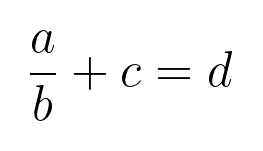
We support LaTeX rendering and sending as images in the chat. For example,
:latex $\frac{a}{b} + c = d$
:latex $\left( \begin{bmatrix} a & b \\ c & d \end{bmatrix} \cdot \begin{bmatrix} e & f \\ g & h \end{bmatrix} \right) + \begin{bmatrix} i & j \\ k & l \end{bmatrix}^{-1} \times \left( \int_0^1 x^2 \, dx \right) + \begin{bmatrix} \sin(\theta) & \cos(\theta) \\ \tan(\phi) & \ln(\psi) \end{bmatrix}$

Please note that the LaTeX code MUST be enclosed in $ symbols.
You can choose to render with online API (default) or local LaTeX installation such as TeX Live, MiKTeX, etc. You can set the rendering method with instagram config --set latex_rendering_method <online|local>.
Chat Summarization
You can generate a summary of the chat history using the :summarize command. This will create a concise summary of the conversation, highlighting key points and important information.
Local LLMs are first-class citizens here, allowing for maximum privacy and flexibility. All you need is a local LLM inferencing server like Ollama, LM Studio. You will need to specify llm.endpoint (OpenAI-compatible) and llm.model in the config. For example, for Ollama, this would likely be http://localhost:11434/v1/.
[!IMPORTANT] You are responsible for setting up the LLM server and ensuring that you have the right model pulled. You can configure the endpoint and model using the
instagram configcommand, e.g.instagram config --set llm.endpoint <URL>andinstagram config --set llm.model <MODEL_NAME>.
Once inside a chat conversation, you can summarize the chat history using:
:summarize
This will process all messages fetched in the current chat.
To limit (or expand) the summarization to the n most recent messages:
:summarize n
You can also turn on streaming mode with instagram config --set llm.stream True to see the summary being generated in real-time.
[!TIP] If you don't mind giving your data to AI companies, you may set the
llama.endpointandllm.modelconfigs to a remote endpoint, e.g.https://api.openai.com/v1/,gpt-5.
Scheduling Messages
You can schedule messages to be sent at a later time. The syntax is as follows:
:schedule <Optional[Y-m-d] HH:MM> "<message>"
If the date is not provided, the message will be scheduled for the current day. Input format must be either YYYY-MM-DD HH:MM or HH:MM. The time must be in 24-hour format, otherwise you might run into warnings for scheduling messages in the past.
[!IMPORTANT] If you exit the app, the scheduled messages will not be sent but will be restored when you open the app again. You will be prompted by a notification to decide whether to send the scheduled messages or not. We might include system background service in the future to send scheduled messages even when the app is closed.
Contributing
We welcome contributors! Please see the comprehensive CONTRIBUTING.md file for details on how to get started, create issues, and submit pull requests.
Release history Release notifications | RSS feed


Download files
Download the file for your platform. If you're not sure which to choose, learn more about installing packages.
Source Distribution
Built Distribution
Filter files by name, interpreter, ABI, and platform.
If you're not sure about the file name format, learn more about wheel file names.
Copy a direct link to the current filters
File details
Details for the file instag_cli-1.4.1.tar.gz.
File metadata
- Download URL: instag_cli-1.4.1.tar.gz
- Upload date:
- Size: 54.9 kB
- Tags: Source
- Uploaded using Trusted Publishing? No
- Uploaded via: twine/6.2.0 CPython/3.12.9
File hashes
| Algorithm | Hash digest | |
|---|---|---|
| SHA256 |
c390cfbadb13ef3d971401fa83b10d132fec364d0e66dda7309d5a8503fe4ba2
|
|
| MD5 |
7695064269bbe93a6e166b92cb758028
|
|
| BLAKE2b-256 |
f86a78c816cfd43b6da19498d22fb9b61f22845d807b5072e5a7daeed7293a38
|
File details
Details for the file instag_cli-1.4.1-py3-none-any.whl.
File metadata
- Download URL: instag_cli-1.4.1-py3-none-any.whl
- Upload date:
- Size: 62.5 kB
- Tags: Python 3
- Uploaded using Trusted Publishing? No
- Uploaded via: twine/6.2.0 CPython/3.12.9
File hashes
| Algorithm | Hash digest | |
|---|---|---|
| SHA256 |
b4d93bd8f666092bde87c4af1ad49d0480c65e092a595fe4e6f17205b5f99ae4
|
|
| MD5 |
3e02962b2960323ec3d711474f53d5a9
|
|
| BLAKE2b-256 |
5e984e5e53d4233a8d78f90b687df0e4f1733c5c4b632c16d77faebee296e882
|






