

A de novo protein sequencing workflow



Table of Contents
- Introduction
- Features
- Workflow Diagram
- Repository Structure
- Installation
- Command-Line Usage
- Hyperparameter Optimization
- License
- Acknowledgments
- References
- Citation
Introduction
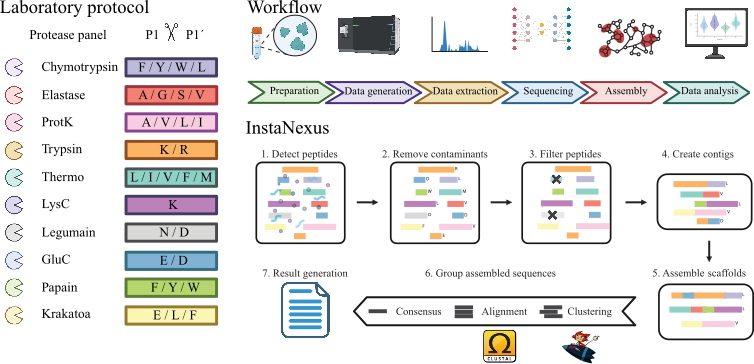
InstaNexus is a generalizable, end-to-end workflow for direct protein sequencing, tailored to reconstruct full-length protein therapeutics such as antibodies and nanobodies. It integrates AI-driven de novo peptide sequencing with optimized assembly and scoring strategies to maximize accuracy, coverage, and functional relevance.
This pipeline enables robust reconstruction of critical protein regions, advancing applications in therapeutic discovery, immune profiling, and protein engineering.
Features
- 🧬 Supports De Bruijn Graph and Greedy-based assembly
- ⚗️ Handles multiple protease digestions (Trypsin, LysC, GluC, etc.)
- 🧹 Integrated contaminant removal and confidence filtering
- 🧩 Clustering, alignment, and consensus sequence reconstruction
- 🎛️ Parallel hyperparameter optimization via the
instanexus-optimizegrid-search CLI - 🔗 Integrates with external tools:
- MMseqs2 for fast clustering
- Clustal Omega for high-quality alignment
- 📦 Reproducible environments via uv or conda
- 📊 Output-ready for downstream analysis and visualization
Workflow Diagram
Repository Structure
| Folder / File | Description |
|---|---|
docs/ |
Sphinx documentation, tutorials, and images |
fasta/ |
FASTA reference and contaminant sequences |
inputs/ |
Example input CSV files |
json/ |
Metadata and parameter configuration files |
outputs/ |
Generated results (created during execution) |
src/instanexus/ |
Core InstaNexus package |
src/instanexus/main.py |
Runs the full pipeline |
src/instanexus/preprocessing.py |
Module for data cleaning |
src/instanexus/assembly.py |
Module for sequence assembly |
src/instanexus/clustering.py |
Module for clustering (mmseqs2) |
src/instanexus/alignment.py |
Module for alignment (clustalo) |
src/instanexus/consensus.py |
Module for consensus generation |
src/instanexus/optimize.py |
Entry point for the instanexus-optimize CLI |
scripts/optimization/ |
Grid-search and optimization workflows |
tests/ |
Pytest unit and integration tests |
pyproject.toml |
Package metadata, dependencies, and entry point |
environment.yml |
Conda environment with Python, MMseqs2, and Clustal Omega (Linux and macOS) |
.pre-commit-config.yaml |
Pre-commit hook configuration |
Installation
InstaNexus requires Python 3.10+, MMseqs2, and Clustal Omega. You can manage the environment with either uv or conda (the conda environment bundles MMseqs2 and Clustal Omega for you).
- uv — fast Python package manager
- conda / mamba — cross-platform package and environment manager
- MMseqs2
- Clustal Omega
Getting Started
Option 1: Install from PyPI
pip install instanexus
Option 2: Install from Source with uv (for Developers)
Clone the repository:
git clone git@github.com:Multiomics-Analytics-Group/InstaNexus.git
cd InstaNexus
Install uv (if not already installed):
curl -LsSf https://astral.sh/uv/install.sh | sh
Sync the environment:
uv sync --all-extras creates a .venv/ and installs the runtime plus all optional
(docs, lint, dev) dependencies from pyproject.toml/uv.lock.
uv sync --all-extras
Note: MMseqs2 and Clustal Omega are not Python packages. With uv, install them separately (e.g. via your system package manager) or use the conda option below, which bundles them.
Set up pre-commit hooks:
uv run pre-commit install --hook-type pre-commit --hook-type commit-msg
Verify the installation:
uv run instanexus --help
Option 3: Install from Source with conda
environment.yml provides Python and the external tools (MMseqs2 and Clustal Omega from
bioconda); pip then installs InstaNexus and its Python
dependencies from pyproject.toml. The same file works on Linux and macOS, on both x86_64
and arm64 (Apple Silicon). bioconda has no Windows builds, so on Windows use
WSL.
git clone git@github.com:Multiomics-Analytics-Group/InstaNexus.git
cd InstaNexus

conda env create -f environment.yml
conda activate instanexus

# install InstaNexus and its Python dependencies into the environment
pip install -e .

# optional: development, linting, and docs tools
pip install -e ".[dev,lint,docs]"
Verify the installation:
instanexus --help
Command-line usage
After installation (and adding the [project.scripts] entry point), you can run the entire InstaNexus pipeline using the instanexus command.
All parameters for preprocessing, assembly, clustering, and consensus are provided in a single call. The pipeline will automatically create a unique, timestamped output folder for that specific combination of parameters.
instanexus --help
Example: Run the full pipeline This command runs the complete workflow:
Preprocesses the input CSV.
Assembles using dbg (De Bruijn graph).
Clusters the resulting scaffolds.
Aligns the clusters.
Generates consensus sequences.
instanexus \
    --input-csv inputs/bsa.csv \
    --folder-outputs outputs \
    --metadata-json-path json/sample_metadata.json \
    --contaminants-fasta-path fasta/contaminants.fasta \
    --assembly-mode dbg \
    --conf 0.9 \
    --kmer-size 7 \
    --size-threshold 12 \
    --min-overlap 3 \
    --min-seq-id 0.85 \
    --coverage 0.8
The results for this specific run will be saved in a unique directory, such as:outputs/bsa/dbg_c0.9_ks7_mo3_ts12/
Hyperparameter Optimization
InstaNexus ships with a parallel grid-search optimizer, exposed as the instanexus-optimize
command (entry point for scripts/optimization/grid_search.py). It sweeps assembly
parameters across a grid, evaluates each combination against a reference, and ranks them
with a normalized Composite Score combining Coverage, N50, scaffold count, and maximum
contig length (see scripts/optimization/README.md for
the exact formula).
The search space for each assembly mode (greedy, dbg_weighted, multimodal_dbg) is
defined in json/gridsearch_params.json.
Run a grid search:
instanexus-optimize \
    --input-csv inputs/ma1_cleaned.csv \
    --metadata-json json/sample_metadata.json \
    --grid-json json/gridsearch_params.json \
    --mode dbg_weighted \
    --chain light \
    --workers 16
| Flag | Description |
|---|---|
--input-csv |
Raw or cleaned input CSV (preprocessing runs automatically if no cleaned file exists in --output-dir) |
--metadata-json |
Path to sample_metadata.json (required for reference protein lookup) |
--grid-json |
Path to gridsearch_params.json defining the parameter grid |
--mode |
Assembly mode (greedy, dbg_weighted, multimodal_dbg) |
--chain |
Chain type for antibodies (light / heavy); omit for single-chain samples |
--workers |
Number of parallel worker processes (default: 8) |
--output-dir |
Directory to save results (default: outputs/_grid_search) |
To sweep multiple samples and modes at once, see scripts/optimization/run_all_gridsearch.sh.
Results can be summarized and visualized with scripts/optimization/analyze_optimization.py.
License
This project is licensed under the MIT License.
Acknowledgments
InstaNexus was developed at DTU Biosustain and DTU Bioengineering.
We are grateful to the DTU Bioengineering Proteomics Core Facility for maintenance and operation of mass spectrometry instrumentation.
We also thank the Informatics Platform at DTU Biosustain for their support during the development and optimization of InstaNexus.
Special thanks to the users and developers of:
References
- Hauser, M., et al. MMseqs2: ultra fast and sensitive sequence searching. Nature Biotechnology 35, 1026–1028 (2016). https://doi.org/10.1038/nbt.3988
- Sievers, F., et al. Fast, scalable generation of high-quality protein multiple sequence alignments using Clustal Omega. Molecular Systems Biology 7, 539 (2011). https://doi.org/10.1038/msb.2011.75
- Eloff, K., Kalogeropoulos, K., Mabona, A., Morell, O., Catzel, R., Rivera-de-Torre, E., ... & Jenkins, T. P. (2025). InstaNovo enables diffusion-powered de novo peptide sequencing in large-scale proteomics experiments. Nature Machine Intelligence, 1-15.
Citation
If you find this project useful in your research or work, please cite our publication in Molecular & Cellular Proteomics: Generalizable direct protein sequencing with InstaNexus.
@article{reverenna2026generalizable,
  title={Generalizable direct protein sequencing with InstaNexus},
  author={Reverenna, Marco and Nielsen, Maike Wennekers and Wolff, Darian Stephan and Daniel, Jemma and Lytra, Elpida and
          Thumtecho, Suthimon and Colaianni, Pasquale D and Ljungars, Anne and Laustsen, Andreas H and Schoof, Erwin M and
          Van Goey, Jeroen and Jenkins, Timothy P and Lukassen, Marie V and Santos, Alberto and Kalogeropoulos, Konstantinos},
  journal={Molecular \& Cellular Proteomics},
  volume={25},
  number={4},
  pages={101547},
  year={2026},
  doi={10.1016/j.mcpro.2026.101547},
  publisher={Elsevier}
}
1 maintainer

Metadata
1 maintainer
Release files for instanexus 0.3.1
For a detailed explanation of source distributions (sdists) and built distributions (wheels), please see the package formats documentation.
Source distribution (sdist)
| File | Size | Uploaded | |
|---|---|---|---|
| instanexus-0.3.1.tar.gz | 54.5 kB | Details |
Built distribution (wheel)
| File | Interpreter | ABI | Platform | Reset |
|---|---|---|---|---|
| instanexus-0.3.1-py3-none-any.whl | Python 3 | none | any | Details |
Total release size: 107.2 kB
Release files / instanexus-0.3.1.tar.gz
| Download URL | instanexus-0.3.1.tar.gz |
|---|---|
| Size | 54.5 kB |
| Tags | Source |
|
SHA-256 checksum How to use checksums |
eee7c55f9002e6969ede68804cbfd3657a0ee4b6c883c72c204fee4c9ba0cec5
|
|
BLAKE2b-256 checksum How to use checksums |
2ce3d11142c76f664603e5fe253bb90fe125b9648c931ad0f8ddedb2e8fa4cae
|
| Upload date | |
|
Uploaded using Trusted Publishing? What is trusted publishing? |
Yes |
| Uploaded via |
twine/6.1.0 CPython/3.12.8
|
Provenance
Provenance describes where a file came from. On PyPI, provenance is shared via attestations, which provide a verifiable record of the build or publishing details. View details, limitations and caveats.


PyPI Publish Attestation
PyPI verified that this artifact, at this checksum, originated from the publisher listed below.
Signed by GitHub Actions, verified by PyPI on Oct 2, 2026.
Transparency logRelease files / instanexus-0.3.1-py3-none-any.whl
| Download URL | instanexus-0.3.1-py3-none-any.whl |
|---|---|
| Size | 52.7 kB |
| Tags | Python 3 |
|
SHA-256 checksum How to use checksums |
c1d71cc7bd01b64f1f78fb6ff63515765b9f23802605d5983075a12f474c9e5a
|
|
BLAKE2b-256 checksum How to use checksums |
70eb20730608bff4b4ec145fb947ae567e49b84b5d623586b85b7e68dbf51530
|
| Upload date | |
|
Uploaded using Trusted Publishing? What is trusted publishing? |
Yes |
| Uploaded via |
twine/6.1.0 CPython/3.12.8
|
Provenance
Provenance describes where a file came from. On PyPI, provenance is shared via attestations, which provide a verifiable record of the build or publishing details. View details, limitations and caveats.
PyPI Publish Attestation
PyPI verified that this artifact, at this checksum, originated from the publisher listed below.
Signed by GitHub Actions, verified by PyPI on Oct 2, 2026.
Transparency log













