

A declarative framework for building multi-agent LLM systems in YAML



Status: IntaGrin is under active development.
🎯 Why IntaGrin?
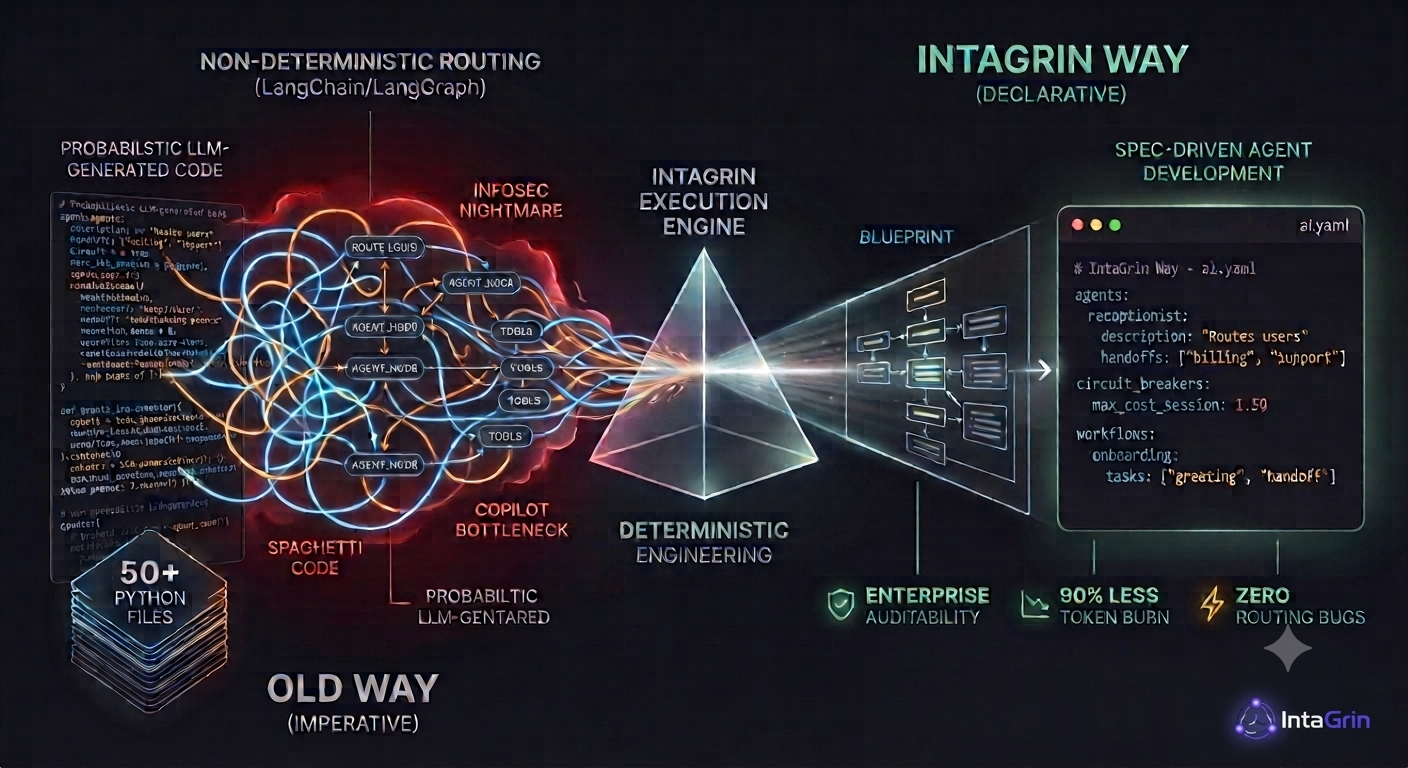
- Declarative, not programmatic. Routing, guardrails, and memory live in
ai.yaml, not in hand-wired Python graph code or agent/crew objects. Less boilerplate to write and review — and, increasingly relevant, easier for an AI coding assistant to generate and validate than a sprawling graph definition, since the whole surface is a schema-checked config file instead of arbitrary code. - Governance built in, not bolted on. Circuit breakers with an honest bounded/unbounded cost accounting, human-in-the-loop approval scoped to the exact call that needs it (not just the tool), a content-provenance guardrail for the "lethal trifecta" pattern (untrusted input + data access + a way to exfiltrate), and sandboxed code execution — all declared in config, not assembled by hand from separate libraries.
- Static verification before runtime.
inta verifycatches routing cycles, unbounded cost paths, and misconfigured guardrails before you ever run the agent — and tells you exactly which parts of your graph it can't verify (semantic routing, dynamic agent spawning), instead of a blanket "all good." - Honesty over marketing. Every tool in this repo says what it doesn't cover, not just what it does — the fuzzer calls its own checks "keyword-heuristic," the sandbox tool documents that it isn't a filesystem/network security boundary. A claim only ships if the code actually backs it.
Summary
IntaGrin is a declarative framework for building multi-agent LLM systems. Instead of wiring
routing logic in Python (as you would with a hand-built graph), you describe agents, handoffs,
tools, and guardrails in a single ai.yaml file, and the runtime engine executes that
configuration directly.
It includes a static verifier for the parts of your routing graph that are statically analyzable (handoffs and deterministic routers), circuit breakers for cost/loop protection, Pydantic-backed schema validation for shared state and structured agent output, an adversarial prompt fuzzer, and a diagnostics command that runs real test batches and reports the metrics it actually measured. Where a mechanism has real limits — semantic (LLM-routed) handoffs can't be statically verified, the fuzzer's defense checks are keyword-heuristic rather than a full security audit — the tool says so directly rather than rounding up.
🌟 Core Capabilities
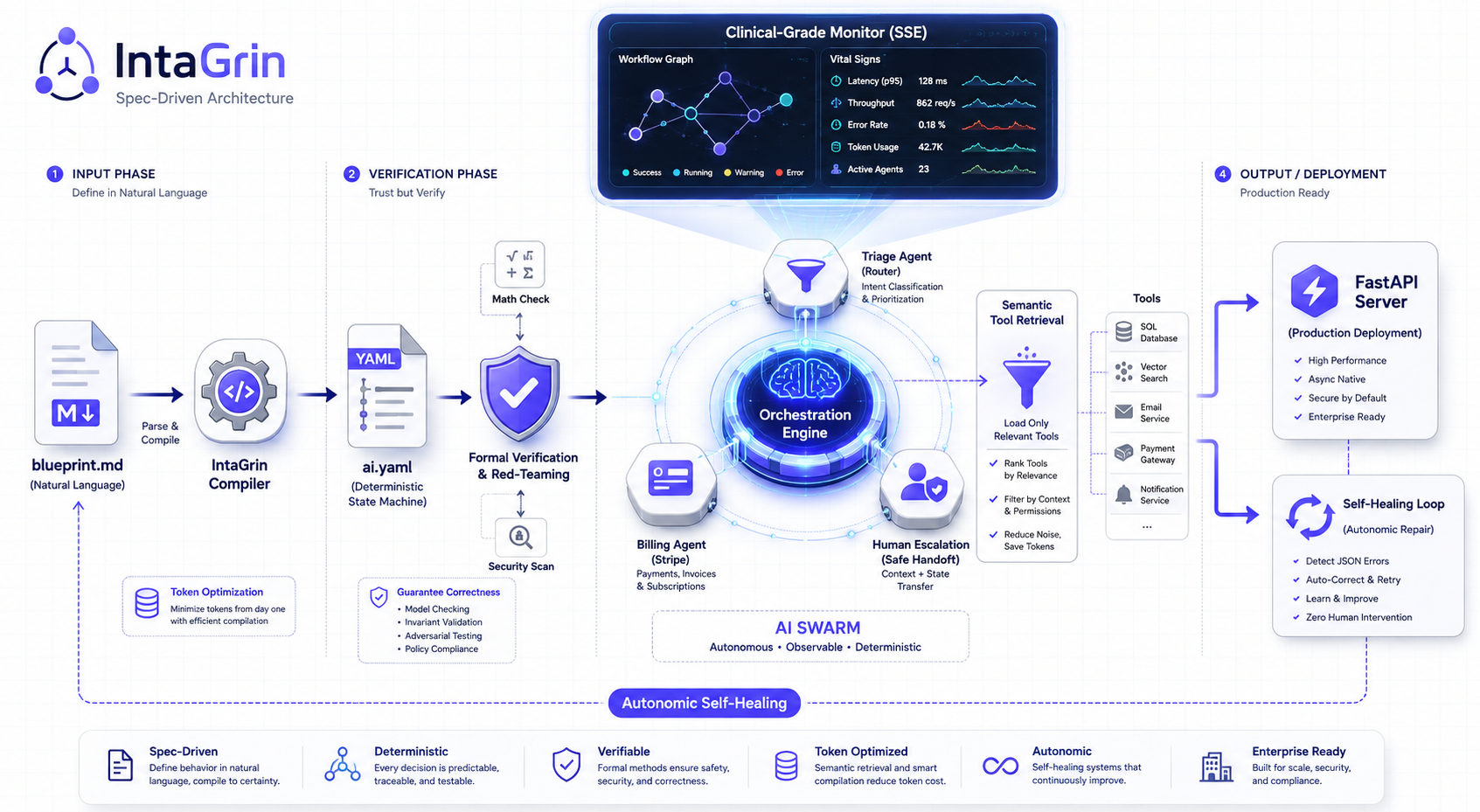
1. Spec-Driven Architecture (Natural Language to Production)
Describe the desired swarm topology in a plain-English blueprint.md file, then run inta compile
to generate a structured ai.yaml from it. This is meant to reduce hand-wiring routing logic in
Python for common patterns — it's a starting point to review and edit, not a black box.
2. Argument & Schema Self-Healing
When a tool call arrives with malformed JSON or arguments that fail validation, IntaGrin retries by
asking a fast corrector model to fix the arguments (up to 2 attempts) before surfacing the error.
The same mechanism validates structured agent responses against a response_schema and shared
state writes against a state_schema — both are real Pydantic models loaded and validated at
runtime, not just declared. Healing is scoped to fixing arguments/output in memory; it never
modifies source code, prompts, or your declared routing.
3. Reducing Tool-Schema Bloat
lazy_load_tools: true on an agent uses a fast model call to select which tool schemas are
actually relevant to the current conversation before sending them to the primary model — useful
when an agent has many tools but only needs a few per turn. That selection call is debounced: an
unchanged recent-message trajectory reuses the last selection instead of re-querying the router
model every tool-call round. Building the ai.yaml/prompt/tool-file structure with an AI coding
assistant also tends to need less back-and-forth than wiring the same logic in a general-purpose
graph framework, since there's less boilerplate to review.
4. Static Verification & Adversarial Fuzzing
inta verify performs real cycle detection across declared handoffs and deterministic routers,
reports delegation depth/turn bounds, and gives an explicit worst-case cost accounting that lists
which cost paths are bounded and which aren't. Self-healing retries, memory-compression input
size, and per-turn parallel tool calls are all capped by dedicated circuit_breakers settings
(max_corrector_tokens, max_compression_batch_messages, max_parallel_tool_calls_per_turn) —
the report shows their configured bound rather than a blanket "unbounded."
Semantic (auto_route) handoffs are an LLM decision at runtime and are reported separately as
non-deterministic, bounded only by the hard turn cap, not by graph acyclicity. inta fuzz generates
adversarial prompts (prompt injection, PII extraction, boundary overflows) and runs them against
your live agents; its pass/fail check is keyword-heuristic today, so treat the score as a smoke test
rather than a substitute for a real security review.
5. Observability & Diagnostics
inta monitor launches a local SSE-backed dashboard showing live agent handoffs, tool calls, and
token/cost telemetry as your swarm runs. inta diagnose runs a batch of real requests — your
tests/evals.yaml if present, or a small generated probe battery otherwise — and reports metrics
computed from those actual runs: context-window utilization, tool error rate, cost, and latency,
with a rules-based explanation of whichever metric crossed its threshold.
🛠️ The AI-Native Developer Experience
IntaGrin provides a unified, deeply integrated Command Line Interface (CLI) that manages the entire lifecycle of an AI application.
Project Initialization & Compilation
inta new(orinit) — Scaffold a new IntaGrin project structure.inta compile— Compile a natural languageblueprint.mdinto a diff-mergedai.yamlconfiguration.inta import— Import an OpenAPI/Swagger spec and generate a startingai.yamlwith tools wired to its endpoints.inta copilot— Generate IDE rule/skill files (e.g..cursor/rules/) describing IntaGrin's conventions to your AI coding assistant.inta architect— Launch a built-in AI assistant to iteratively refactor and modify your swarm architecture directly from the terminal.
Quality Assurance & Security
inta fuzz— Generates adversarial prompts (prompt injection, PII extraction, boundary overflows) and runs them against your live agents. Pass/fail detection is keyword-heuristic — a useful smoke test, not a substitute for a real security review.inta verify— Static cycle detection across handoffs and deterministic routers, delegation depth/turn bounds, and an explicit worst-case cost accounting that lists what's bounded vs. not.inta simulate --config <candidate.yaml>— Shadow Replay: re-evaluates a candidateai.yaml's routers, circuit breakers, andrequires_approvalflags against real checkpointed sessions — zero new LLM calls, zero re-executed tools — and reports what would actually change before you deploy it. Limited to config changes that can't alter what the LLM itself generates (prompts/models/tool identity); anything else is reported as not-yet-simulatable rather than guessed at.inta synth— Generates boundary-case test inputs (numeric/string edge cases, handoff transitions) from your tool signatures and agent config intotests/evals.yaml.inta eval— Runs the cases intests/evals.yamlagainst your live agents and checks expected agent/tool/output assertions, with optional LLM-as-judge scoring.inta tune— Iteratively repairs failing prompts againsttests/evals.yaml. Snapshots every prompt it touches first and rolls back to the original if it doesn't converge within the iteration limit.
Runtime, Debugging, & Observability
inta dev— Launch the local developer environment with hot-reloading.inta run <workflow>— Execute a named autonomous workflow directly from the terminal.inta monitor— Launch the local Web Dashboard to watch agent handoffs, tool calls, and token/cost telemetry live over SSE.inta diagnose— Run a batch of real requests (yourtests/evals.yaml, or a small generated probe battery) and report computed metrics: context-window utilization, tool error rate, cost, and latency.inta replay— Rewind and replay the recorded sequence of events from a past checkpointed session.
Deployment
inta export— Export your default agent's prompt and local tools (with a real tool-calling loop) to a standalone FastAPI application with no IntaGrin runtime dependency. Single-agent scope — handoffs, routers, guardrails, and HITL aren't reproduced; keep usinginta servefor the full swarm.inta deploy— Generate aDockerfileanddocker-compose.ymlfor the project, running as a non-root user.inta worker— Start a background worker that pulls jobs from a local SQLite queue (atomic, concurrency-safe) or a Redis queue if--redis-urlis configured. Tool connections and the RAG index are built once and reused across every job, not rebuilt per job.inta serve— Start the FastAPI production server (SSE streaming,/resumefor human-in-the-loop,/ws/voice). MCP connections, tool schemas, and the RAG index are pooled per project across requests — see Runtime Resource Pooling.
🚀 Getting Started
1. Installation
pip install intagrin # or: uv add intagrin
If a project sets memory.type: postgres or memory.type: redis, install the matching extra —
these client libraries are optional (not pulled in by default) so a plain SQLite/in-process project
stays lightweight:
uv sync --extra postgres   # or: pip install -e ".[postgres]"
uv sync --extra redis      # or: pip install -e ".[redis]"
2. Scaffold Your Project
Initialize your project scaffolding and navigate into it:
inta new my-first-swarm
cd my-first-swarm
3. The Coding Agent Workflow (The "IntaGrin Way")
Because IntaGrin's routing, tools, and guardrails are declared in ai.yaml rather than wired in
Python, an AI coding assistant working in this repo generally has less boilerplate to read and
write per agent than it would with a hand-built Python graph. We recommend building your
application using the Spec-Driven approach.
Instead of writing code manually, simply describe what you want your swarm to do in plain English inside blueprint.md:
# blueprint.md

## Vision
Build a highly resilient Customer Support Swarm that processes incoming tickets, handles billing, and seamlessly escalates complex issues.

## Constraints
- The Billing Agent must strictly require human approval before issuing any Stripe refunds.
- Simple triage must use a lightweight model (e.g. Gemini 1.5 Flash) to save costs.
- The swarm must never enter an infinite loop if a refund fails.

## Agents
1. **Triage Agent:** Reads incoming emails and routes them based on the customer's intent.
2. **Billing Agent:** Securely interfaces with the Stripe API to process refunds.
3. **Human Escalation:** A fallback agent that halts the swarm if an API error occurs.
Now, compile your English blueprint into a production-ready Swarm Architecture using the IntaGrin compiler:
inta compile
(Your AI coding assistant — or IntaGrin's built-in compiler — reads the Markdown and generates a structured ai.yaml. Review the output; treat it as a first draft, not a final architecture.)
4. Launch & Monitor
Start the live visual dashboard and run your swarm!
inta monitor
inta run daily_audit
Open http://localhost:3000 to watch your swarm light up in real-time.
🏗️ Architectural Paradigm: Declarative Orchestration
IntaGrin gives you both routing styles under one config, and you choose per agent: deterministic
routers (a Python condition evaluated against state, no LLM call involved) for logic you want
statically verifiable, and LLM-driven handoffs (transfer_agent) for decisions that genuinely
need the model's judgment. State reducers, tool scoping, and circuit breakers are all declared in
the same ai.yaml.
# ai.yaml
name: "SaaS Customer Support Swarm"
version: "1.0"
default_agent: "TriageAgent"       # Entry point for the Swarm

circuit_breakers:
  max_usd_cost_per_session: 0.50   # Hard stop if API costs exceed 50 cents
  max_handoffs_per_session: 3      # Caps handoff ping-pong (defaults to 25 if unset)

reducers:
  - key: "customer_context"
    strategy: "deep_merge"         # Automatically merge CRM data into state

model:
  primary: "openai/gpt-4o"
  fallback: "gemini/gemini-3.5-flash"

agents:
  TriageAgent:
    description: "Reads incoming support tickets and classifies the user intent."
    lazy_load_tools: true          # Cost Cutter: Dynamically injects only needed tools
    model_override: "gemini/gemini-3.5-flash-lite"  # Cost Cutter: Use cheap model for simple triage
    routers:
      - target: BillingAgent
        condition: "'refund' in intent"
      - target: TechnicalAgent
        condition: "'bug' in intent"
    tools:
      - name: "zendesk_mcp"
        type: "mcp"
        command: "npx"
        args: ["@modelcontextprotocol/server-zendesk"]
      - name: "fetch_user_profile"
        module: "tools.crm"

  BillingAgent:
    description: "Handles subscription changes and issues refunds."
    tools:
      - name: "stripe_mcp"
        type: "mcp"
        command: "npx"
        args: ["@modelcontextprotocol/server-stripe"]
      - name: "issue_refund"
        module: "tools.billing"
        requires_approval: true    # Enterprise Safety: Halts for Human-in-the-Loop approval before sending money!
📖 Full Documentation
The hosted docs site — https://docs.intagrin.com/ — covers the ai.yaml reference,
tools/MCP integration, RAG, human-in-the-loop, deployment, and the API. The docs/ folder
in this repository is the source those pages are built from, and is the source of truth for what
the current code does if the two ever drift.
🧪 Testing This Repository
uv run pytest tests/       # full suite (SQLite/mocked backends only, no external services needed)
uv run ruff check .        # lint, matches CI
The Postgres and Redis checkpointer backends additionally have real-instance integration tests
(tests/test_memory_integration.py, tests/test_auto_migrate_postgres.py) that are not part
of the default suite above — they skip themselves cleanly when no instance is reachable. To run
them against local Docker containers:
uv sync --extra postgres --extra redis
docker compose -f docker-compose.test.yml up -d
uv run pytest tests/test_memory_integration.py tests/test_auto_migrate_postgres.py -q
docker compose -f docker-compose.test.yml down
📚 Example Use Cases
These are illustrative patterns — designs you'd build with IntaGrin's handoffs/tools/MCP, not templates that ship with the framework:
| Example Swarm | Description |
|---|---|
| Autonomous DevOps Engineer | Monitors Datadog alerts, pulls distributed traces, and safely restarts Kubernetes pods via MCP servers. |
| Customer Support Triage | An asynchronous swarm that routes complex tickets, validates Stripe refunds, and drafts personalized apology emails. |
| Cybersecurity SOC Analyst | An event-driven swarm that ingests real-time threat intel, cross-references CVE databases, and executes firewall IP quarantines. |
1 maintainer

Metadata
1 maintainer
Release files for intagrin 0.1.0
For a detailed explanation of source distributions (sdists) and built distributions (wheels), please see the package formats documentation.
Source distribution (sdist)
| File | Size | Uploaded | |
|---|---|---|---|
| intagrin-0.1.0.tar.gz | 1.5 MB | Details |
Built distribution (wheel)
| File | Interpreter | ABI | Platform | Reset |
|---|---|---|---|---|
| intagrin-0.1.0-py3-none-any.whl | Python 3 | none | any | Details |
Total release size: 3.0 MB
Release files / intagrin-0.1.0.tar.gz
| Download URL | intagrin-0.1.0.tar.gz |
|---|---|
| Size | 1.5 MB |
| Tags | Source |
|
SHA-256 checksum How to use checksums |
e77b41747369853a1886107f2a356476014a1c6d41026ebdedb6a47633f79e64
|
|
BLAKE2b-256 checksum How to use checksums |
af0cd6d134d4ba5af22515d52ba99382f51e97866dfe671afea10c87475dd9e0
|
| Upload date | |
|
Uploaded using Trusted Publishing? What is trusted publishing? |
No |
| Uploaded via |
uv/0.11.25 {"installer":{"name":"uv","version":"0.11.25","subcommand":["publish"]},"python":null,"implementation":{"name":null,"version":null},"distro":{"name":"Ubuntu","version":"24.04","id":"noble","libc":null},"system":{"name":null,"release":null},"cpu":null,"openssl_version":null,"setuptools_version":null,"rustc_version":null,"ci":null}
|
Release files / intagrin-0.1.0-py3-none-any.whl
| Download URL | intagrin-0.1.0-py3-none-any.whl |
|---|---|
| Size | 1.5 MB |
| Tags | Python 3 |
|
SHA-256 checksum How to use checksums |
48acc6d86620aae2e79cb22040b7fc1db3f5af803c00fcfd56daf980e257d7c4
|
|
BLAKE2b-256 checksum How to use checksums |
c79c0810484d5683a3817420fc5bb0ecde45197d7250bac43b41caa0a97d795c
|
| Upload date | |
|
Uploaded using Trusted Publishing? What is trusted publishing? |
No |
| Uploaded via |
uv/0.11.25 {"installer":{"name":"uv","version":"0.11.25","subcommand":["publish"]},"python":null,"implementation":{"name":null,"version":null},"distro":{"name":"Ubuntu","version":"24.04","id":"noble","libc":null},"system":{"name":null,"release":null},"cpu":null,"openssl_version":null,"setuptools_version":null,"rustc_version":null,"ci":null}
|














