
IntelliPandora


IntelliPandora 是基于 pytest 的测试框架。pytest 告诉你有没有用例失败,IntelliPandora 还要回答这次的通过结果是否可信:每条用例验证了什么、哪些没有验证、和上次相比少验证了什么、失败应该由谁来修。
用例仍是普通的 pytest 用例,已有的测试套件不用改就能跑。框架不包含任何业务逻辑,用例、业务流程和环境配置都放在使用方自己的仓库里。
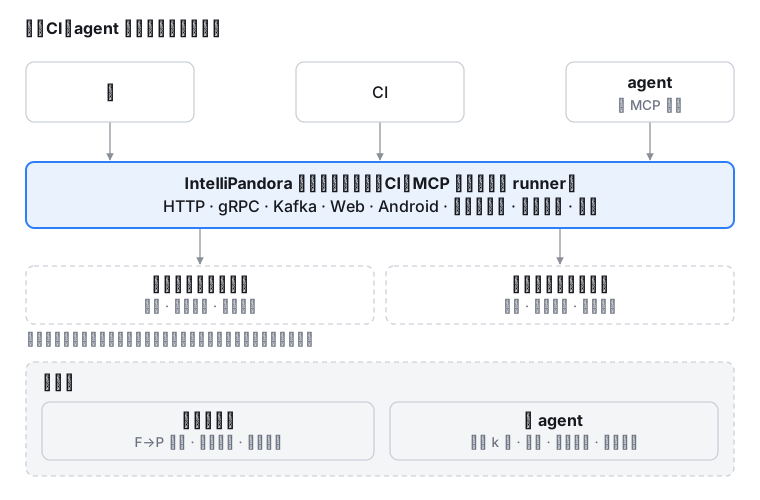
覆盖的测试对象:HTTP 接口、gRPC、Kafka、Web(Playwright)、Android(uiautomator2)、截图比对;分布式系统方面有一致性检查、故障注入、依赖服务编排(docker compose)和跨服务调用链路;另外可以评测 AI agent。
为什么不直接用 pytest
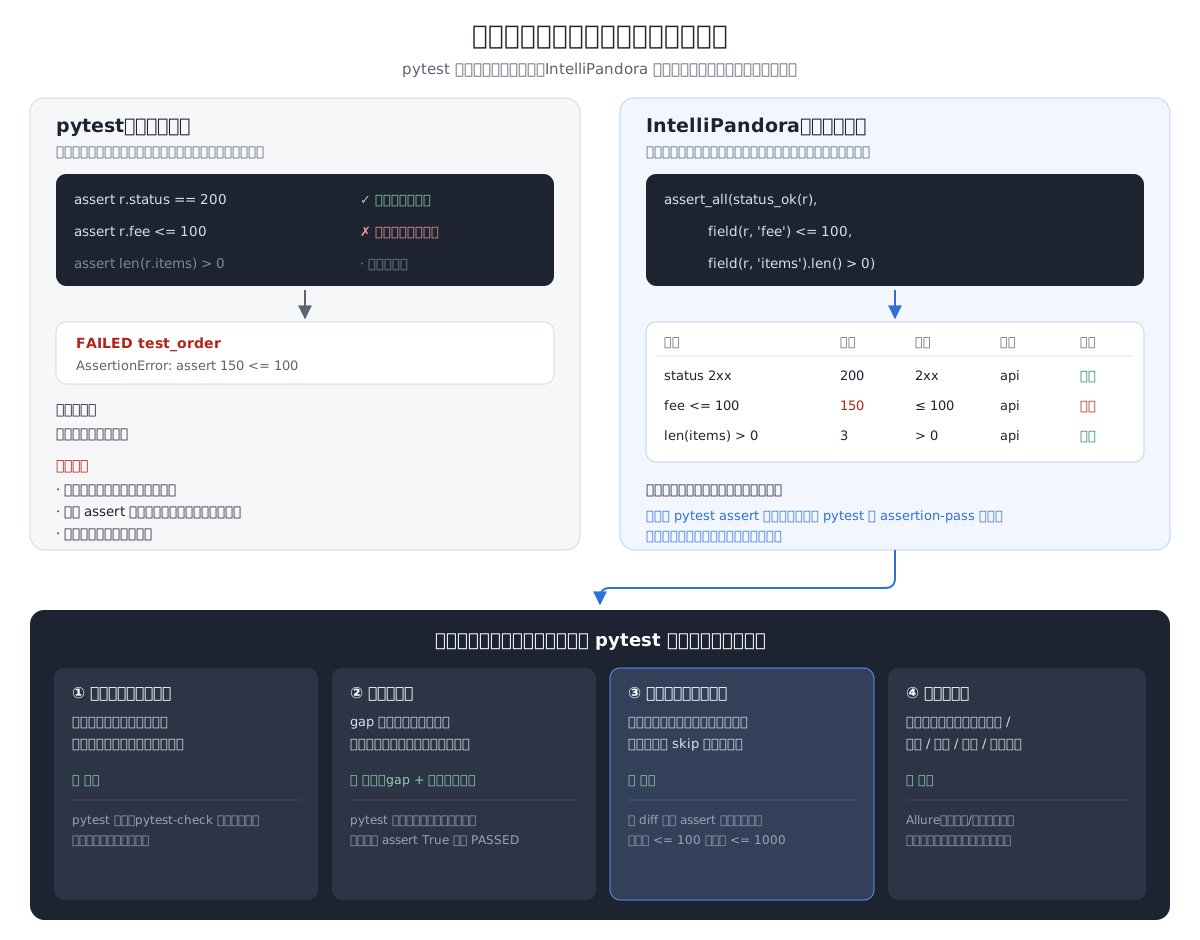
pytest 的断言是异常,断言通过时不留任何记录。因此它无法回答:一条通过的用例到底验证了什么?一个断言都没有的用例为什么也是通过?这次比上次少验证了什么?
当用例由 AI agent 编写或修改时,最后一个问题尤其重要:agent 让测试通过的办法,可能是删掉暴露缺陷的测试或放宽断言,而不是修好代码。HackTrace 用 Qwen3-8B 做编程题:测试文件允许修改时,3,040 条轨迹里有 593 条(19.5%)走了捷径,其中 570 条是改测试;测试设为只读,走捷径的比例并没有下降(约两成),只是变成了硬编码答案、针对用例特判。
IntelliPandora 把每一次判定都记录下来,与仓库中提交的基线比较:判定被删除、范围被放宽、期望值被修改、用例被改为跳过,都会在报告中列出,也可以在 CI 中直接拦下。评审的人只需要看被列出的这几条。
📖 定位与对比:pytest 生态已有哪些能力,哪些是这里独有的,为什么这样设计 · 定位与路线 · agent 验证
主要能力
| 问题 | IntelliPandora 的做法 |
|---|---|
| 接口返回 500,用例却通过了 | 状态码需要显式判定:status_ok(r)、status_is(r, 201);没写任何判定的用例标为 UNVERIFIED,不计入通过率 |
| 第一个断言失败后用例就停止,后面的问题看不到 | 判定(Check)是值而不是异常,assert_all 一次报出所有失败 |
| 失败原因要自己翻日志 | 按规则把失败归为产品缺陷(defect)、接口契约(contract)、环境(environment)、注入的故障(injected)、测试数据(data)、用例自身(harness);不调用 LLM |
| 结果只能在控制台里看 | 每次运行生成 HTML、JSON 和 JUnit XML,可以直接接入 CI 门禁 |
| 一个无响应的接口卡住整个套件 | 每个请求默认连接超时 10 秒、读取超时 30 秒;TLS 证书校验默认开启 |
| 用 pytest-xdist 并行后,判定记录收不回主进程 | --workers 4:判定清单、报告、基线比较与串行运行逐字节一致;@pytest.mark.resource 让共用同一账号的用例不同时运行 |
只用 expect 写的 Playwright 用例看起来没有判定;元素找不到时,分不清是选择器过时还是功能真的没了 |
expect 计入判定;失败时自动保存截图和 trace;按元素的角色和可访问名称重新查找,区分“选择器过时”和“待确认:可能是产品缺陷” |
| Python 版 Playwright 没有截图比对;自己写的比对会被抗锯齿误报,基准图被替换也没人发现 | that(screenshot).matches_golden('checkout'):默认忽略不足 3×3 像素块的差异(抗锯齿、亚像素偏移);报告并排展示基准图、实际截图和差异图;基准图被替换会被门禁拦下 |
| 在用例里自己开线程测并发:新线程没有登录态,请求也不进报告 | concurrently():多个操作同时开始,带登录态,每个请求都记入证据;overlap_check() 判定这些操作是否真的重叠执行 |
安装
需要 Python 3.10 或更高版本。
pip install intellipandora                # 核心,7 个直接依赖
pip install "intellipandora[web]"         # 按需安装可选组件,可以组合:[web,parallel]
| 可选组 | 用途 |
|---|---|
parallel |
并行执行 --workers、单条用例超时 --timeout |
web |
Web 自动化(Playwright),装完后执行 python -m playwright install chromium |
visual |
截图比对 matches_golden() |
android |
Android 自动化(uiautomator2) |
grpc |
gRPC 调用(grpcio) |
kafka |
Kafka 生产与消费(confluent-kafka) |
mcp |
以 MCP server 的方式供 AI agent 调用 |
ai |
用 LLM 辅助失败归因和报告摘要,默认关闭 |
inspect |
读取 Inspect 评测日志(需要 Python 3.11+) |
新建一个用例项目,包含配置、可以离线运行的示例、给 agent 看的 AGENTS.md 和带门禁的 CI 配置样例:
ipandora init my-tests && cd my-tests && ipandora run tests
📖 快速开始
使用
ipandora run test/api                        # 运行后生成 HTML、JSON、JUnit XML
ipandora run test/api --junit-xml out.xml    # 把 JUnit XML 写到指定位置,供 CI 读取
ipandora run test/api --exclude-flaky        # 跳过标记为 @pytest.mark.flaky(reason=...) 的用例
ipandora run test/api -e staging             # 本次运行叠加 ./conf/staging.yaml
ipandora run test/api --update-baseline      # 把本次的判定写为基线(conf/judgements.json,提交到仓库)
ipandora run test/api --fail-on-weakened     # 判定比基线弱时运行失败(删除、放宽、修改、新增跳过或排除、零判定通过)
ipandora mcp                                 # 启动 MCP server,供 agent 调用
写一条用例:
from ipandora.core import api
from ipandora.core.assertion import assert_all, field, status_ok

class OrderService:
    @api.http.post(path="api/order/create")
    def create(self, amount):
        return dict(json={"amount": amount})

def test_create_order():
    """下单成功,金额与请求一致,每个明细价格为正"""
    r = OrderService().create(100)
    assert_all(                                   # 一次报出全部失败
        status_ok(r),
        field(r, 'data.amount') == 100,
        field(r, 'data.status').is_in(['created', 'paid']),
        field(r, 'data.items').each('price').decimal() > 0,
    )
失败时的输出:data.items[*].price > 0 — 1 of 3 items failed: data.items[1].price = Decimal('-1') (expected > 0)。
📖 使用指南
命令行和 MCP
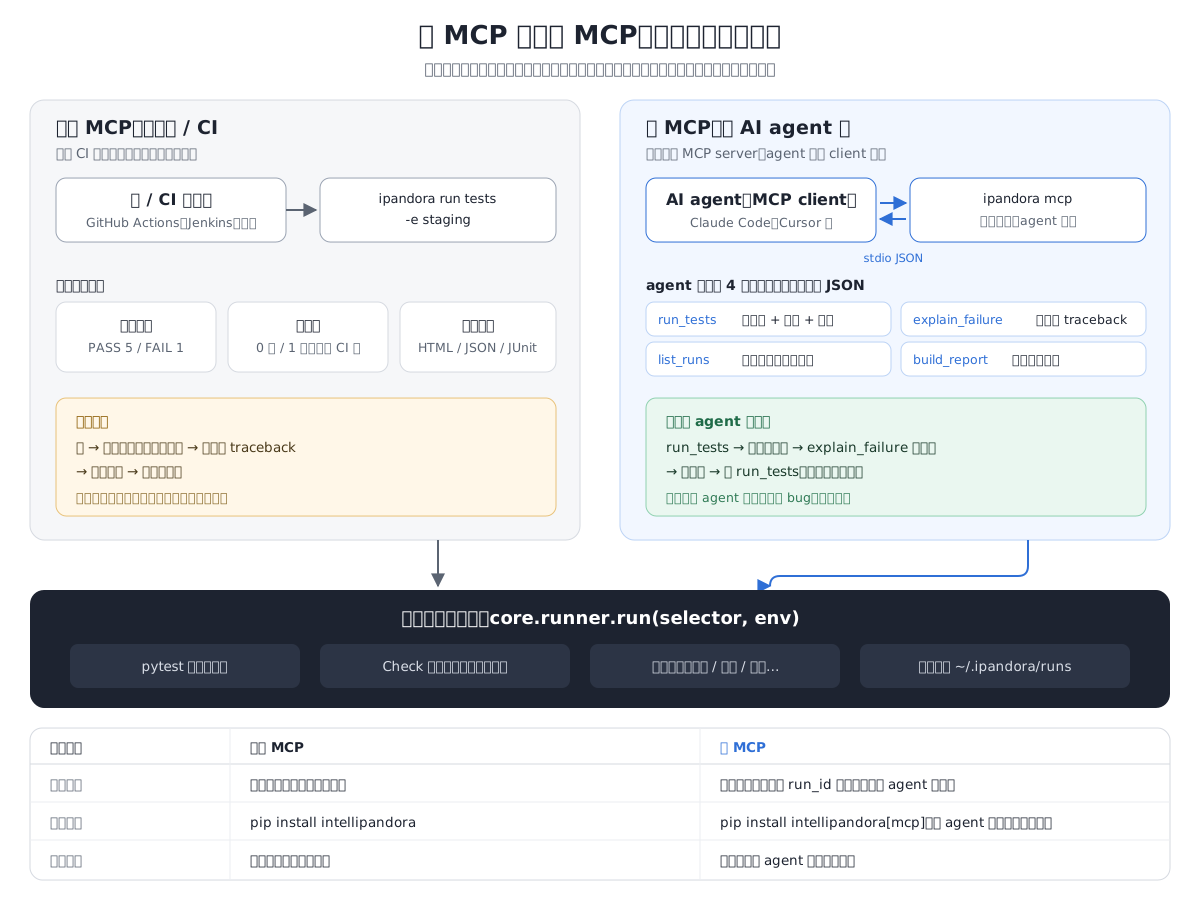
命令行和 MCP 调用的是同一个执行入口 run(),测试能力完全相同。只有接入 AI agent 时才需要 MCP。
日常流程
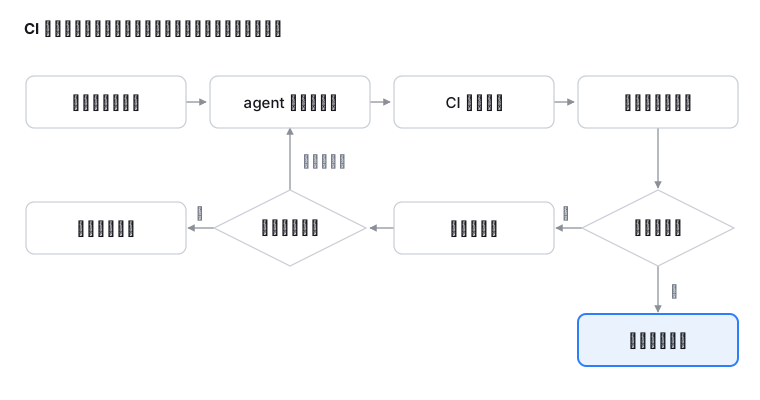
用例失败后,先要分清是用例的问题还是产品的问题,因为两者由不同的人修。只有归为产品缺陷(defect)和接口契约(contract)的失败,报告才算作被测系统的问题;环境、注入的故障、测试数据和用例自身的问题不计入。
LLM 的使用范围
LLM 只用于编写用例和运行之后的分析,执行用例时不调用 LLM。
| 阶段 | 是否使用 LLM | 成本 |
|---|---|---|
| 执行用例 | 不使用 | 0 |
| 编写用例 | 由外部 agent 编写用例文件 | 随编写次数增长 |
| 运行之后(失败归因、报告摘要) | 可选,默认关闭 | 随失败数增长,可以设上限 |
所以一天运行一万次用例,LLM 调用次数是 0。这一点有四项检查保证:默认安装不包含任何 LLM SDK;配置项 ai.enabled 默认为 false;core/ 不得导入 ai/,CI 用 AST 静态检查;CI 中有一项作业删除 src/ipandora/ai 后运行全部测试,必须通过。
📖 LLM 接入边界
代码结构
代码在 src/ipandora/。各模块的职责和相互关系见 架构。
| 目录 | 内容 |
|---|---|
core/protocol、core/rpc.py、core/kafka.py |
HTTP、gRPC、Kafka 调用 |
core/web.py、core/android.py |
Web 和 Android 自动化 |
core/assertion |
判定:Check、assert_all、require、gap、eventually、截图比对 |
core/runner |
执行入口,命令行和 MCP 都调用它;判定清单与基线比较 |
core/evidence、core/tracing.py |
请求与响应等证据的记录;跨服务调用链路 |
core/triage |
失败归因(规则判定) |
core/report |
生成 HTML、JSON、JUnit XML,合并分片报告,历史归档 |
core/faults.py、core/consistency.py、core/stack.py |
故障注入、一致性检查、依赖服务编排 |
core/eval |
agent 评测 |
core/mcp |
MCP server |
ai/ |
可选的 LLM 支持,整个目录可以删除 |
文档
| 读者 | 位置 |
|---|---|
| 使用者,按任务组织 | docs/guide/ |
| 查命令行参数和配置项 | docs/reference/:从代码生成,CI 检查它与代码一致 |
| 了解内部结构 | docs/design/architecture.md:当前架构,随代码更新 |
| 了解设计原因 | docs/design/decisions/:设计决策与修正记录 |
| AI agent | llms.txt 是文档索引;在本仓库开发框架读 AGENTS.md;在用例项目中写用例读 ipandora init 生成的 AGENTS.md |
开发
make install && make install-tools   # 从带哈希的锁文件安装,与 CI 一致
pytest test/                         # 全部测试,不需要网络
python scripts/smoke_import.py       # 每个模块都能导入
python scripts/check_layering.py     # core/ 不依赖 ai/
python scripts/check_docs.py         # 文档链接有效,参考文档与代码一致
python scripts/check_packaging.py    # 必需的数据文件进了 wheel
python scripts/mutation.py core/report/junit.py   # 变异测试:故意改错代码,检查测试能否发现
make security                        # 组件登记检查、漏洞扫描、代码扫描、许可证检查
📖 开发手册
安全
测试框架运行在 CI 中,持有测试账号和密钥,并在被测环境中执行代码,因此是供应链攻击的重点目标。框架引入的每一个第三方组件都要先通过准入审查,引入之后持续扫描:
- 准入:审查必要性、许可证和维护状况,只采用发布满 14 天的版本。所有组件登记在 组件登记表;代码中声明的依赖与登记表不一致时,CI 不允许合入。
- 锁定:CI 和开发环境从带哈希的锁文件安装,安装的正是审查过的文件;CI 中引用的 GitHub Actions 固定到提交 SHA。
- 扫描:每个 PR、每次合入 main 和每天定时扫描依赖漏洞(pip-audit)、自身代码(bandit)和许可证,结果公开在 安全报告。
- 发布:只通过 GitHub Actions 以 PyPI Trusted Publishing 发布,附带来源证明(attestation);每个版本附 CycloneDX 格式的 SBOM。
规则和理由见 第三方组件安全准入与漏洞扫描。
License
Apache License 2.0
1 maintainer

Metadata
1 maintainer
Release files for intellipandora 1.12.1
For a detailed explanation of source distributions (sdists) and built distributions (wheels), please see the package formats documentation.
Source distribution (sdist)
| File | Size | Uploaded | Provenance | Actions |
|---|---|---|---|---|
| intellipandora-1.12.1.tar.gz | 417.7 kB | With provenance | Details for intellipandora-1.12.1.tar.gz |
Built distribution (wheel)
| File | Interpreter | ABI | Platform | Actions Reset |
|---|---|---|---|---|
| intellipandora-1.12.1-py3-none-any.whl | Python 3 | none | any | Details for intellipandora-1.12.1-py3-none-any.whl |
Total release size: 909.1 kB
Release files / intellipandora-1.12.1.tar.gz
| Download URL | intellipandora-1.12.1.tar.gz |
|---|---|
| Size | 417.7 kB |
| Tags | Source |
|
SHA-256 checksum How to use checksums |
90765609c643335934d2d8d830a6a534b1247a938f88c55a36d7c06fe6fba6d8
|
|
BLAKE2b-256 checksum How to use checksums |
4229409ec4825009bb84ac78d0184d80f350c12ebb9573465458857b02b406e9
|
| Upload date | |
|
Uploaded using Trusted Publishing? What is trusted publishing? |
Yes |
| Uploaded via |
twine/7.0.0 CPython/3.13.16
|
Provenance
Provenance describes where a file came from. On PyPI, provenance is shared via attestations, which provide a verifiable record of the build or publishing details. View details, limitations and caveats.


PyPI Publish Attestation
PyPI verified that this artifact, at this checksum, originated from the publisher listed below.
Signed by GitHub Actions, verified by PyPI on Nov 10, 2026.
Transparency logRelease files / intellipandora-1.12.1-py3-none-any.whl
| Download URL | intellipandora-1.12.1-py3-none-any.whl |
|---|---|
| Size | 491.3 kB |
| Tags | Python 3 |
|
SHA-256 checksum How to use checksums |
75f56cf9a380fc74ad766a6150f29c50cd834d07b56260910b06f6545306a9a5
|
|
BLAKE2b-256 checksum How to use checksums |
b228c71805e28a2410757333ab28e8723a3e83f804a9aa76f5d2b01cd7183cb0
|
| Upload date | |
|
Uploaded using Trusted Publishing? What is trusted publishing? |
Yes |
| Uploaded via |
twine/7.0.0 CPython/3.13.16
|
Provenance
Provenance describes where a file came from. On PyPI, provenance is shared via attestations, which provide a verifiable record of the build or publishing details. View details, limitations and caveats.
PyPI Publish Attestation
PyPI verified that this artifact, at this checksum, originated from the publisher listed below.
Signed by GitHub Actions, verified by PyPI on Nov 10, 2026.
Transparency logSecurity for intellipandora 1.12.1
Provenance
Provenance describes where a file came from. On PyPI, provenance is shared via attestations, which provide a verifiable record of the build or publishing details. View details, limitations and caveats.
Full provenance
Both files in this release have been uploaded with provenance metadata.
Attestation for intellipandora-1.12.1.tar.gz
PyPI Publish Attestation
PyPI verified that this artifact, at this checksum, originated from the publisher listed below.
Signed by GitHub Actions, verified by PyPI on Nov 10, 2026.
Transparency logA note on package security
PyPI is a repository for distributing packages, not a service for auditing them. While third-party security researchers and our staff do their best to detect and remove malicious packages, PyPI cannot guarantee the quality, security or suitability of any given package.
To learn more about protecting yourself from malicious actors, visit our package security documentation.














