
interaction-harness
A voice agent whose interaction model is visible and swappable: when it decides you've finished talking, how it lets you cut in, and how it keeps the conversation going while a second model works on something hard and then brings the answer up on its own.
Every model it uses is an OpenAI-compatible endpoint you choose: speech-to-text, text-to-speech, the foreground model that holds the conversation, and the background model it hands work to. Speech can also run in-process, on Apple Silicon (MLX) or anywhere else (ONNX). And when you want to compare against a model that does all of it natively, full-duplex mode hands the microphone to one speech-to-speech model that listens and talks at once.
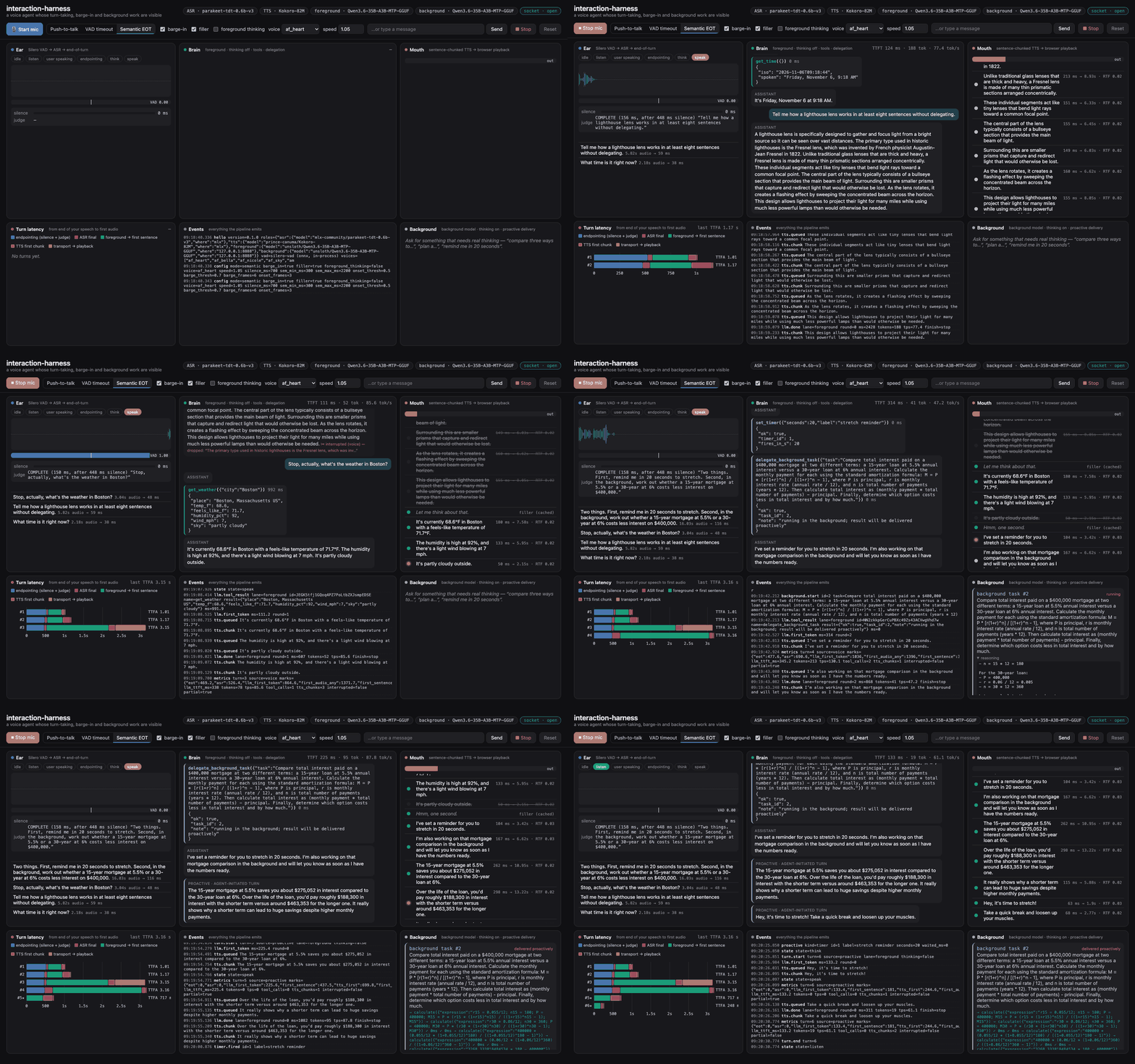
A real session on one Mac, every model live: Parakeet and Kokoro in-process, Qwen3.6-35B-A3B on llama.cpp as both foreground and background. The user's lines are spoken by Kokoro through Chrome's fake microphone. Real time, no cuts.
https://github.com/user-attachments/assets/d6cbe4ec-d2e1-42f4-988e-713cda2e2066
With sound: a person talking to it, recorded with the dashboard's record button. First the cascade (semantic end-of-turn): the weather, a mortgage question handed to the background model with a question about the time in between, and the background answer brought up on its own, then cut off. Then full-duplex: a name for a goldfish, and a timer. The recording is cut at the end, where the full-duplex model started talking about cities nobody had mentioned (see docs/duplex.md).
What it shows
- Turn-taking you can switch mid-conversation. Push-to-talk, a VAD silence timeout, or semantic end-of-turn: after 300 ms of silence the foreground model reads the transcript and answers COMPLETE or INCOMPLETE, so "I was wondering whether…" keeps the floor with you.
- Barge-in that keeps the history honest. About 190 ms of confident speech over the agent stops the model, the TTS queue and playback. The history keeps only what you actually heard, so the model never quotes a reply it didn't finish.
- A foreground and a background model. The foreground answers in a sentence or two and hands real work (analysis, planning, research with web search) to the background model, then keeps chatting. When the background result is ready and you go quiet, the agent takes its own turn to tell you. Timers work the same way.
- Every step on screen. VAD probability, partial and final transcripts, the judge's verdicts, streamed tokens and reasoning, tool calls, the TTS queue (struck through when you interrupt), background tasks, and a per-turn latency waterfall from the end of your speech to the first audio.
- A native full-duplex model to compare against. Switch to Full-duplex and NVIDIA's NemotronLabs VoiceChat 11B takes the floor: it decides when to speak and when to stop, and still calls tools and hands work to the background model. The harness measures it the same way: how fast it answers, and how fast it stops when you cut in. See docs/duplex.md.
Four model roles, four endpoints
| Role | What it does | OpenAI-compatible API | If left blank |
|---|---|---|---|
ASR |
speech → text | POST /v1/audio/transcriptions |
Parakeet TDT 0.6B v3, in-process |
TTS |
text → speech | POST /v1/audio/speech |
Kokoro-82M, in-process |
FOREGROUND |
holds the conversation, calls quick tools, hands off; also judges end-of-turn | POST /v1/chat/completions |
required |
BACKGROUND |
works on handed-off tasks with thinking on; can browse | POST /v1/chat/completions |
the foreground's server and model |
DUPLEX (optional) |
full-duplex mode: one speech-to-speech model in place of ASR, foreground and TTS | WebSocket /v1/realtime |
the mode is off |
Each role takes <ROLE>_BASE_URL, <ROLE>_API_KEY and <ROLE>_MODEL, so you can mix them freely. For
example, run ASR on a GPU box, TTS on your laptop, the foreground on a small fast local model, and the
background on a large model in the cloud. A key is only ever sent to the host it was set for.
Voice activity detection is the one model that is not a role. It runs on every 32 ms of microphone audio, so a network round trip would break endpointing, and there is no OpenAI API for it. Silero VAD runs in-process on onnxruntime, on every platform, with no torch.
Quickstart
You need:
- Python 3.11–3.13 and uv
- Chrome or Safari
- an OpenAI-compatible chat server that streams and supports tool calls, such as llama.cpp's
llama-server --jinja, vLLM, LM Studio, Ollama, or a hosted API
Headphones make barge-in reliable.
All speech local (Mac or Linux). In-process speech is MLX on Apple Silicon and ONNX everywhere else, picked automatically. Models download on first use.
uv tool install interaction-harness
interaction-harness doctor --foreground-base-url http://127.0.0.1:8080/v1   # checks every role
interaction-harness serve  --foreground-base-url http://127.0.0.1:8080/v1 --open
On a remote GPU box. Browsers only allow the microphone on localhost or HTTPS. Either tunnel the
port (ssh -L 8765:localhost:8765 gpu-box) and open http://localhost:8765, or pass
--ssl-certfile/--ssl-keyfile.
Every role on an endpoint.
export FOREGROUND_BASE_URL=http://127.0.0.1:8080/v1           # fast model, thinking off
export BACKGROUND_BASE_URL=http://gpu-box:8000/v1  BACKGROUND_MODEL=your/reasoning-model
export ASR_BASE_URL=http://speech-box:8000/v1      ASR_MODEL=your/transcription-model
export TTS_BASE_URL=http://speech-box:8000/v1      TTS_MODEL=your/speech-model  TTS_VOICE=af_heart
interaction-harness serve --open
Settings come from flags, then the environment, then .env in the working directory, then
interaction-harness.toml. .env.example lists every setting, and
examples/interaction-harness.toml shows a config file.
Try this
- Start the mic and say "What time is it?" Watch the VAD bar, the partial transcript, the judge's
COMPLETE, theget_timetool card, the first TTS chunk, and the waterfall row. - Say "I was wondering whether…" and pause. The judge answers
INCOMPLETEand the floor stays with you. - Ask for a long story, then talk over it. The reply stops, the sentences you didn't hear are struck through, and the Brain panel marks the message ✂.
- Say "In the background, compare a 15-year and a 30-year mortgage on 400k and tell me which costs less in interest. Also remind me in 20 seconds to stretch." Keep chatting. The Background panel streams the background model's reasoning, and when it's done and you go quiet, the agent brings it up on its own.
- Switch to VAD timeout and repeat step 1, then compare the endpointing segment in the waterfall.
To record a session with sound, open the dashboard at /?record (for example http://localhost:8765/?record),
press ⏺ Record and share this tab. It saves a .webm of the tab with your microphone and the agent's
voice mixed in.
Commands
| Command | What it does |
|---|---|
interaction-harness serve |
the dashboard and voice server (default http://localhost:8765) |
interaction-harness doctor |
checks each role on its own: streaming, tool calls, the end-of-turn judge, a TTS → ASR round trip, VAD; reports latency |
interaction-harness selftest |
talks to the agent with synthesized speech and checks endpointing, tools, barge-in, background delivery, timers, push-to-talk and typed turns |
interaction-harness warmup |
downloads and loads the in-process speech models, then exits |
interaction-harness duplex-server |
serves the full-duplex model for DUPLEX_BASE_URL (Apple Silicon; the duplex extra) |
They all take the same settings flags (--foreground-base-url, --asr-model, --backend onnx, …).
interaction-harness serve --help lists them.
Your own tools
# my_tools.py, loaded with: interaction-harness serve --tools my_tools.py
from typing import Annotated
from interaction_harness.tools import tool

@tool
def stock_level(sku: Annotated[str, "the product code"]) -> dict:
    """How many of a product are in stock."""
    return {"sku": sku, "in_stock": 12}

@tool(lanes=["background"])          # only the background model may call this one
async def search_tickets(query: str, limit: int = 5) -> list[dict]:
    """Search the support ticket system."""
    ...
The JSON schema comes from the signature and the description from the docstring. See docs/tools.md.
Measured latency
Latency here is the time from the end of your speech to the first audio, as the waterfall measures it. That includes 300 ms of silence before the judge is asked, then the judge, ASR, the foreground model's first sentence, and the first TTS chunk.
The numbers below are the median of 10 short spoken turns with no tools, in semantic mode. They were measured on an M5 Max MacBook Pro, plugged in and otherwise idle, with Qwen3.6-35B-A3B (UD-Q8_K_XL, llama.cpp via Unsloth Studio) as the foreground model.
| Speech | Median | Range |
|---|---|---|
| In-process MLX | 908 ms | 741–1,780 ms |
| In-process ONNX on CPU (int8) | 909 ms | 795–1,571 ms |
| ASR + TTS on an endpoint (mlx-audio server, same machine) | 787 ms | 734–1,060 ms |
On a machine this fast the three are within noise of each other. About 500 ms of a typical turn is deciding that you've finished: the 300 ms of silence, then the judge. That is the place to tune first. Turns that call a tool add a model round trip; the waterfall shows each segment.
Tested with
| Role | Server or backend | Status |
|---|---|---|
| foreground, background | llama.cpp (Unsloth Studio), Qwen3.6-35B-A3B | tested: doctor, selftest |
| background | vLLM, GLM-5.3-Flash (FP4) on a DGX Spark | tested: doctor, selftest |
| ASR, TTS | mlx-audio 0.6.4 server (Parakeet, Kokoro) | tested: doctor, selftest |
| in-process speech | MLX on Apple Silicon (macOS) | tested: doctor, selftest |
| in-process speech | ONNX on CPU, macOS arm64 | tested: doctor, selftest |
| in-process speech | ONNX on CPU, Linux x86_64 | tested in CI: warmup round trip |
| in-process speech | ONNX on CPU, Linux arm64 (DGX Spark) | not yet tested |
| duplex | duplex-server: NemotronLabs VoiceChat 11B (4-bit) on mlx-vlm 0.7.12 |
tested: doctor, selftest |
| foreground, background | Ollama, LM Studio | built on llama.cpp, the engine tested above |
| any role | OpenAI, Speaches, Kokoro-FastAPI, other servers | untested; should work if they implement the endpoint. Run doctor, and please report what you find |
How a server switches thinking on and off varies. Set FOREGROUND_THINKING / BACKGROUND_THINKING to
chat_template_kwargs (vLLM, llama.cpp, SGLang with Qwen- or GLM-style templates), reasoning_effort, or
off. See docs/endpoints.md.
Where this fits
Pipecat and LiveKit Agents are production frameworks for shipping voice agents. This is a harness for studying and tuning the interaction model:
- the whole turn-taking policy is one readable state machine
(
session.py) - every decision streams to the dashboard
- every model is swappable through the same OpenAI API you already run
Use it to choose an end-of-turn policy, measure what barge-in or a background model costs, or try a new model in a real conversation before you build it into something bigger.
docs/interaction-models.md covers the background: what "interaction model" means, the turn-taking regimes in use today, and the latency budgets people cite.
Where it stops short
The three cascade modes have limits that a native full-duplex model doesn't:
- no backchannel while you talk
- no overlapping speech
- no reaction to how you said something, because ASR drops prosody
- the end-of-turn judge only sees text
In exchange you get a swappable brain, reliable tools, auditability, and a latency budget you can see. Full-duplex mode lets you measure that trade on your own voice: on this Mac the duplex model answers a plain question in 0.7–0.9 s, about what the cascade takes, but needs over 5 s for a tool question, and its tool use is less reliable.
Docs
- docs/endpoints.md: the four roles, keys, thinking switches, and server notes
- docs/backends.md: in-process speech on MLX and ONNX, model variants, GPUs
- docs/protocol.md: the WebSocket protocol, if you want your own front end
- docs/tools.md: writing tools, and how the background hand-off and timers work
- docs/duplex.md: full-duplex mode, its tool protocol, and what it measures
- docs/interaction-models.md: background reading
- CONTRIBUTING.md
Credits
| Component | By | License |
|---|---|---|
| Parakeet TDT 0.6B v3 | NVIDIA | CC-BY-4.0 |
| Kokoro-82M | hexgrad | Apache-2.0 |
| Silero VAD (its ONNX model ships in this package) | Silero Team | MIT |
| parakeet-mlx | senstella | Apache-2.0 |
| mlx-audio | Blaizzy | MIT |
| onnx-asr | istupakov | MIT |
| kokoro-onnx | thewh1teagle | MIT |
| NemotronLabs VoiceChat 11B (full-duplex mode; downloaded, not shipped) | NVIDIA | OpenMDW-1.1 |
| mlx-vlm | Blaizzy | MIT |
The web tools follow the design of Unsloth Studio's, re-implemented from scratch.
License
MIT. See LICENSE.
1 maintainer

Metadata
1 maintainer
Release files for interaction-harness 0.2.1
For a detailed explanation of source distributions (sdists) and built distributions (wheels), please see the package formats documentation.
Source distribution (sdist)
| File | Size | Uploaded | Provenance | Actions |
|---|---|---|---|---|
| interaction_harness-0.2.1.tar.gz | 10.1 MB | Without provenance | Details for interaction_harness-0.2.1.tar.gz |
Built distribution (wheel)
| File | Interpreter | ABI | Platform | Actions Reset |
|---|---|---|---|---|
| interaction_harness-0.2.1-py3-none-any.whl | Python 3 | none | any | Details for interaction_harness-0.2.1-py3-none-any.whl |
Total release size: 12.2 MB
Release files / interaction_harness-0.2.1.tar.gz
| Download URL | interaction_harness-0.2.1.tar.gz |
|---|---|
| Size | 10.1 MB |
| Tags | Source |
|
SHA-256 checksum How to use checksums |
a55288cae68c5c9e026570eee88deb04b33263e68249e2d013ce95aff01f9672
|
|
BLAKE2b-256 checksum How to use checksums |
fa67b83669fb12ad4da2cd96674ba34770e2d971e654c11e48fac5b8d4b63326
|
| Upload date | |
|
Uploaded using Trusted Publishing? What is trusted publishing? |
Yes |
| Uploaded via |
uv/0.13.7 {"installer":{"name":"uv","version":"0.13.7","subcommand":["publish"]},"python":null,"implementation":{"name":null,"version":null},"distro":{"name":"Ubuntu","version":"24.04","id":"noble","libc":null},"system":{"name":null,"release":null},"cpu":null,"openssl_version":null,"setuptools_version":null,"rustc_version":null,"ci":true}
|
Release files / interaction_harness-0.2.1-py3-none-any.whl
| Download URL | interaction_harness-0.2.1-py3-none-any.whl |
|---|---|
| Size | 2.0 MB |
| Tags | Python 3 |
|
SHA-256 checksum How to use checksums |
0d3cdf8c5c26e21412324751eb1e4ad14e60c03546cddc75560aa1832ac12d1b
|
|
BLAKE2b-256 checksum How to use checksums |
77586e8ef8fe731289121c6f97b86e32a4ca5eb4afee7f9e42a719ebe1082c40
|
| Upload date | |
|
Uploaded using Trusted Publishing? What is trusted publishing? |
Yes |
| Uploaded via |
uv/0.13.7 {"installer":{"name":"uv","version":"0.13.7","subcommand":["publish"]},"python":null,"implementation":{"name":null,"version":null},"distro":{"name":"Ubuntu","version":"24.04","id":"noble","libc":null},"system":{"name":null,"release":null},"cpu":null,"openssl_version":null,"setuptools_version":null,"rustc_version":null,"ci":true}
|
Security for interaction-harness 0.2.1
Provenance
Provenance describes where a file came from. On PyPI, provenance is shared via attestations, which provide a verifiable record of the build or publishing details. View details, limitations and caveats.
No provenance found
None of the files in this release were uploaded with provenance metadata.
A note on package security
PyPI is a repository for distributing packages, not a service for auditing them. While third-party security researchers and our staff do their best to detect and remove malicious packages, PyPI cannot guarantee the quality, security or suitability of any given package.
To learn more about protecting yourself from malicious actors, visit our package security documentation.














