
intern-decision-mlx
Screenshot + questions in, calibrated typed decisions out. Locally, on Apple silicon.
0.9 s per decision on a 1080p screenshot on an 8 GB M2 MacBook Air, 2.1 GB of memory, $0 per call. The same screenshot costs $5.38 per 1,000 decisions in image tokens alone on Claude Sonnet 5.
This runs Shanghai AI Lab's Intern-Decision-0.8B
(Apache-2.0) through mlx-vlm, which does the model port.
This package adds the part that makes it a decision model: the typed readout, the calibration,
and a local POST /v1/systemone endpoint. Its answers match the lab's own PyTorch reference.
pip install intern-decision-mlx
intern-decision-mlx decide --brief        # first run downloads 1.7 GB of weights
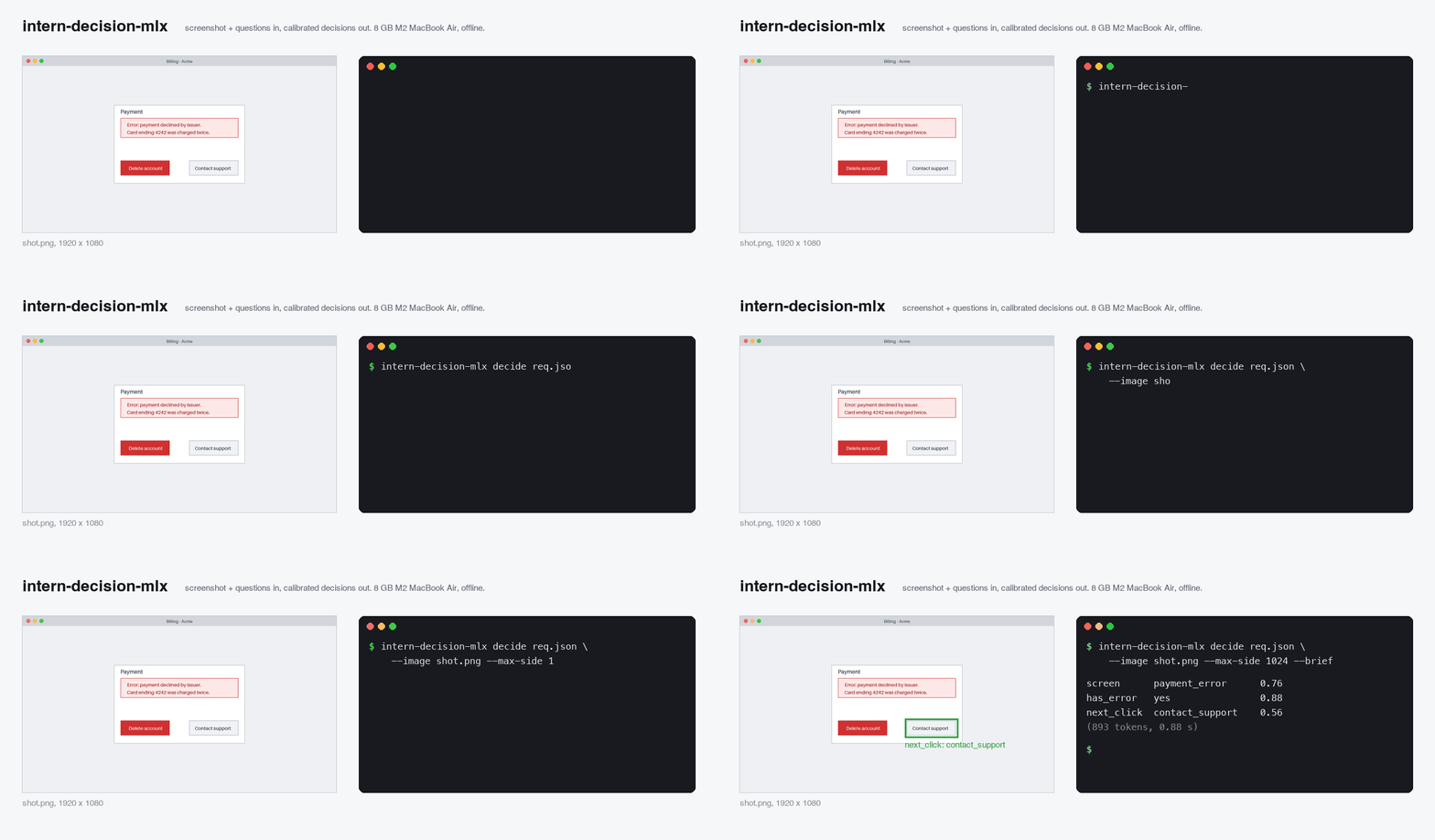
The bundled example is a payment-error dialog with a red "Delete account" button and a grey "Contact support" button, and the goal "Get the double charge refunded":
screen      payment_error      0.74
has_error   yes                0.89
next_click  contact_support    0.61
(509 tokens, 0.58 s)
Every answer comes with a probability for every option, so you can act on the confident ones and send the rest to a bigger model.
Requirements: an Apple silicon Mac (M1 or later) on macOS 14 or newer, Python 3.10+. pip pulls in about 750 MB of dependencies through mlx-vlm, and the weights are 1.7 GB.
What it is for
A cheap first pass for agents that look at screens: classify the screen, check a condition, pick between options. Escalate when the model is unsure.
from intern_decision_mlx import Decider

decider = Decider(max_side=1024)        # loads once, about 2 s
out = decider.predict({
    "state": {"user_goal": "Get the double charge refunded"},
    "questions": {
        "next_click": {"type": "choice", "instructions": "Which button pursues the user's goal?",
                       "criteria": {"delete_account": "The 'Delete account' button",
                                    "contact_support": "The 'Contact support' button"}},
    },
    "images": ["shot.png"],             # a path, or a base64 data URI
})
answer = out["answers"]["next_click"]
if answer["confidence"] < 0.8:
    ...  # ask your frontier model instead
confidence is the calibrated probability of the chosen answer. It is not the same statistic as
Jev's confidence field, so do not reuse Jev thresholds.
What it is good at, and what it is not
Measured on the bundled screenshot. It sees well. Its judgement, at 0.8B parameters, is weak.
| Question | Answer | Confidence | Correct |
|---|---|---|---|
| What does this screen show? | payment_error | 0.74 | yes |
| Does the screen show an error message? | yes | 0.89 | yes |
| Which button pursues the goal "get the double charge refunded"? | contact_support | 0.61 | yes |
| Colour of the left button, number of buttons | red, two | yes (and wrong without the image) | |
| Is the "Delete account" button destructive? | no | 0.51 | no |
| With no goal given: which control should the agent click? | delete_account | 0.68 | no |
Do not use it as a safety gate. The lab's own card agrees: 64.48 on WildJailBreak against 96.29 for Jev. Its calibration is its strength (ECE 0.066 in the lab's table, lower than Jev's 0.095), which is what makes the escalate-when-unsure pattern work.
Speed
8 GB M2 MacBook Air, macOS, Python 3.12, mlx-vlm 0.7.3, bf16 weights, warm. Latency grows by about
1.2 ms per input token, and a 1920×1080 screenshot is about 2,300 tokens, so shrinking images is the
main speed control. max_side (--max-side on the CLI) caps the long edge; it is off by default so
outputs match the lab's reference exactly.
| 1920×1080 screenshot, long edge | Tokens | p50 | Example questions correct |
|---|---|---|---|
| full size | 2,357 | 3.6 s | 5 of 5 |
| 1280 | 1,197 | 1.7 s | 5 of 5 |
| 1024 | 893 | 0.9 s | 5 of 5 |
| 768 | 653 | 0.6 s | 5 of 5 |
| 512 | 461 | 0.4 s | 5 of 5 |
That is one synthetic dialog with large text. Real interfaces with small print need more pixels, so start at 1024 and check on your own screens.
| Text only, 3 questions (310 tokens) | p50 204 ms |
| Peak Metal memory | 2.1 GB |
| Model load | 1.4 to 2.0 s |
The model card's 34 ms was measured on an RTX 4090. intern-decision-mlx bench reproduces the
numbers on your machine.
The cost it replaces
Per 1,000 decisions on a 1920×1080 screenshot, image tokens only, at published input prices on 2026-09-26. Visual tokens follow Anthropic's formula ceil(w/28) × ceil(h/28).
| Input price | Visual tokens per shot | Per 1,000 decisions | |
|---|---|---|---|
| Claude Haiku 4.5 | $1.00 / M | 1,560 (downsized) | $1.56 |
| Claude Sonnet 5 | $2.00 / M | 2,691 | $5.38 |
| This, on your Mac | $0 |
A computer-use agent taking one screenshot a second for an eight-hour day spends $155 on Sonnet 5. The local model is not as good, so the point is to pay the frontier model only for the answers it is unsure about.
Local server
Run intern-decision-mlx decide once first, so the 1.7 GB download happens before you serve.
intern-decision-mlx serve --max-side 1024 # POST http://127.0.0.1:8765/v1/systemone
IMG=$(base64 -i shot.png)
curl -s localhost:8765/v1/systemone -H 'Content-Type: application/json' -d '{
  "state": "An agent is looking at this screen.",
  "questions": {"has_error": {"type": "noul", "instructions": "Does the screen show an error?"}},
  "images": ["data:image/png;base64,'"$IMG"'"]
}'
Request
| Field | Meaning |
|---|---|
state |
Any JSON: text, an object, app state. |
questions |
1 to 16 named questions. |
images |
0 to 8 PNG, JPEG, WEBP, GIF or BMP images as base64 data URIs. Local paths only with --allow-paths DIR. URLs are never fetched. |
The whole request must fit in 8,192 tokens, the lab's limit. Longer requests are refused rather than truncated, because truncation would move the positions the answers are read from.
Question types
type |
criteria |
Answer field |
|---|---|---|
noul |
optional {"yes": "...", "no": "..."} |
noul = P(yes) |
choice |
{"value": "description", ...}, up to 62 options |
choice |
score |
a list (index is the score) or {"number": "description"} |
score = expected value |
Every answer also carries decision, probabilities for every option, and confidence. The
response has answers, usage, timing, calibration, model and backend. Bad requests get
422 with an error message. GET /health reports the model, revision and load time.
The endpoint follows the shape of TypeSafe's Jev /v1/systemone, with differences: Jev is text only,
so images is an extension; Jev allows up to 255 options; and confidence means something else
(see above).
Security. The server binds to localhost and handles one request at a time, because MLX calls
are not thread-safe. It refuses requests from web pages (it checks Host, Origin and
Content-Type), decodes only the five image formats above, refuses images over 8.4 megapixels
before decoding them, drops idle connections after 30 seconds, and rejects bodies over 32 MB.
If you pass --host 0.0.0.0, anyone who can reach the port can use it: there is no authentication.
How it works
- Prompt. The lab's own prompt compiler builds a system message, a user message (images,
state, and a schema mapping each option to a one-character symbol) and an assistant JSON
skeleton with one
<decision>placeholder per field. It is vendored verbatim in_ref.py, and the tests diff it against the model repo's original. - One forward pass through mlx-vlm. No generation, no sampling, no KV cache.
- Readout. For each field, the logits at the token before its placeholder, softmaxed over only that field's symbols. The 248k-row output head runs on those few rows instead of every token: identical probabilities (asserted in the tests), 1.2 to 1.4 times faster.
- Calibration. Temperature scaling with the lab's T = 2.7478. It never changes which answer wins.
There is no extra decision head: the readout is the language model's own head.
Checked against the lab's reference
The lab's PyTorch implementation, run unmodified on CPU, against this package, on 30 varied requests (67 fields: every question type, 1 to 6 fields, 0 to 2 images from 100×60 to 1280×720, unicode, up to 4,107 tokens):
| Same chosen answer | 67 of 67 fields |
| Max probability difference, calibrated | 0.023 (mean 0.006) |
| Max probability difference, uncalibrated | 0.052 (mean 0.011) |
| Input tokens, read positions, image grid | identical on 30 of 30 requests |
| The reference's own bf16 vs fp32 difference | 0.049 max, the same size |
The differences are bf16 rounding, the same the lab's model shows against itself. One consequence: bf16 can make two options tie exactly, and a tie goes to the option whose label sorts first, as in the reference.
The tests also check that the image is actually read (3 of 3 grounded facts with it, different
answers without it) and that the fast readout equals the full logits. pip install -e ".[test]",
then IDMLX_MODEL_TESTS=1 pytest runs all of it.
Limitations
- 0.8B only. The 2B (4.4 GB) may fit an 8 GB Mac later; the 4B (9.1 GB) does not at bf16.
- No 4-bit build. On an M2 it was no faster (466 vs 468 ms) and it flipped a near-tie answer.
- Judgement and safety questions are weak (see above). Calibration tells you when to escalate; it does not make the model smarter.
- Apple silicon only.
- The model revision is pinned to the one the prompt code was vendored from. Other revisions, or
checkpoints without the lab's
inference.py, print a warning.
中文
在 Apple Silicon 上本地运行上海人工智能实验室的 Intern-Decision-0.8B:输入截图和问题,输出带校准概率的类型化决策 (是/否、选择、评分)。8 GB M2 MacBook Air 上,1080p 截图缩放到 1024 像素后每次决策约 0.9 秒,内存 2.1 GB, 无需任何 API 费用;结果与官方 PyTorch 参考实现一致(67/67)。看图能力强,判断能力弱:不要把它当作安全闸门, 置信度低时交给更大的模型。
Licence and credits
Apache-2.0. _ref.py is vendored from Intern-Decision's inference.py (Apache-2.0, Shanghai AI
Laboratory); its header lists the changes. The model port is mlx-vlm's (MIT). The model weights
are downloaded from Hugging Face under their own Apache-2.0 licence. See NOTICE.
1 maintainer

Metadata
1 maintainer
Release files for intern-decision-mlx 0.1.0
For a detailed explanation of source distributions (sdists) and built distributions (wheels), please see the package formats documentation.
Source distribution (sdist)
| File | Size | Uploaded | |
|---|---|---|---|
| intern_decision_mlx-0.1.0.tar.gz | 37.9 kB | Details |
Built distribution (wheel)
| File | Interpreter | ABI | Platform | Reset |
|---|---|---|---|---|
| intern_decision_mlx-0.1.0-py3-none-any.whl | Python 3 | none | any | Details |
Total release size: 67.8 kB
Release files / intern_decision_mlx-0.1.0.tar.gz
| Download URL | intern_decision_mlx-0.1.0.tar.gz |
|---|---|
| Size | 37.9 kB |
| Tags | Source |
|
SHA-256 checksum How to use checksums |
ac1a9494d1f693ad9801003e47200ae93ae02e65bb180482402b86f635aa15ea
|
|
BLAKE2b-256 checksum How to use checksums |
b37e0514a77d469a1f09d84f86af8d3c8bdb76853294a94058966b9be490d156
|
| Upload date | |
|
Uploaded using Trusted Publishing? What is trusted publishing? |
No |
| Uploaded via |
twine/7.0.0 CPython/3.12.4
|
Release files / intern_decision_mlx-0.1.0-py3-none-any.whl
| Download URL | intern_decision_mlx-0.1.0-py3-none-any.whl |
|---|---|
| Size | 29.9 kB |
| Tags | Python 3 |
|
SHA-256 checksum How to use checksums |
2533a5ac40dee38959f3fe3be8c38cd650cd7d6f5d13a555198e13cc13ea4950
|
|
BLAKE2b-256 checksum How to use checksums |
7ba9fc5759634f4fd8c9f322be11e3ef7f3dfab8cbba34cce0bc71634b27c4fb
|
| Upload date | |
|
Uploaded using Trusted Publishing? What is trusted publishing? |
No |
| Uploaded via |
twine/7.0.0 CPython/3.12.4
|













