
Pure Python Interoperability Productions using InterSystems IRIS

Project description
intersystems_pyprod
intersystems_pyprod, short for InterSystems Python Productions, is a library that allows you to build components for the InterSystems Productions framework entirely in Python. Productions provide the integration engine to connect systems that use different communication protocols and different message formats.
You can read this introductory article to learn how to use pyprod.
The following image shows all the production components that pyprod enables you to create:
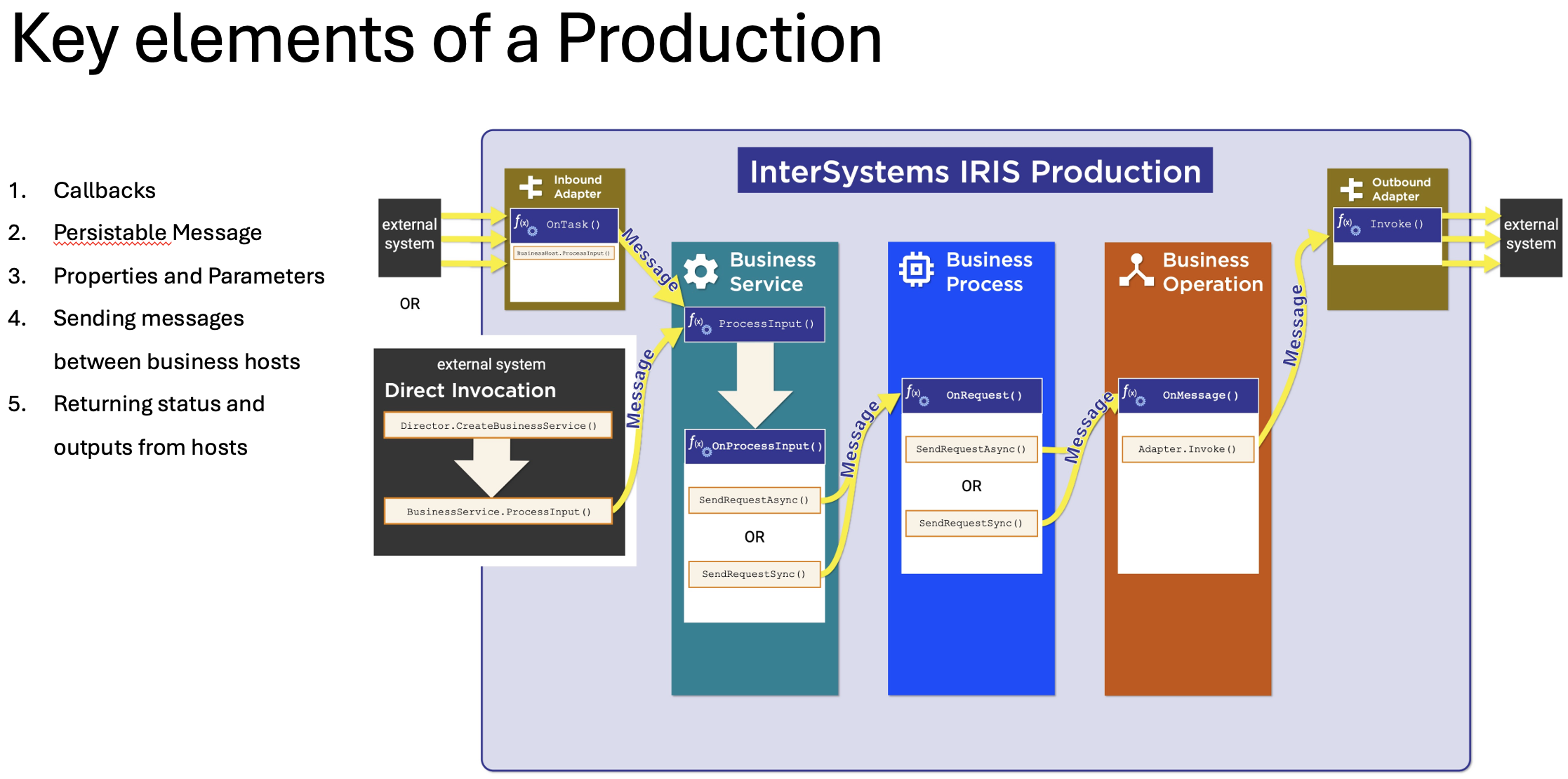
Example Workflow
Using pyprod is essentially a 3 step process. The following example shows a Production that uses a Business Process written using intersystems_pyprod. This Business Process simply returns the request it receives back to the sender.
Note: Before running the example, make sure you have configured the required environment variables to connect to a running IRIS instance.
Step 1: Create your production components
# save this as HelloWorld.py
from intersystems_pyprod import (BusinessProcess,Status)

class HelloWorldBP(BusinessProcess):
    def OnRequest(self, request):
        return Status.OK(), request
Step 2: Load your components to IRIS
From a command line session where you configured the environment variables, run the intersystems_pyprod command and provide the path to your script as an argument.
$ intersystems_pyprod /full/path/to/HelloWorld.py

    Loading HelloWorldBP to IRIS...
    ...
    ...
    Load finished successfully.
Step 3: Create a production using the UI
Create the production using the Production Configuration page, which you can access in the IRIS UI by navigating to Interoperability > Configure > Productions
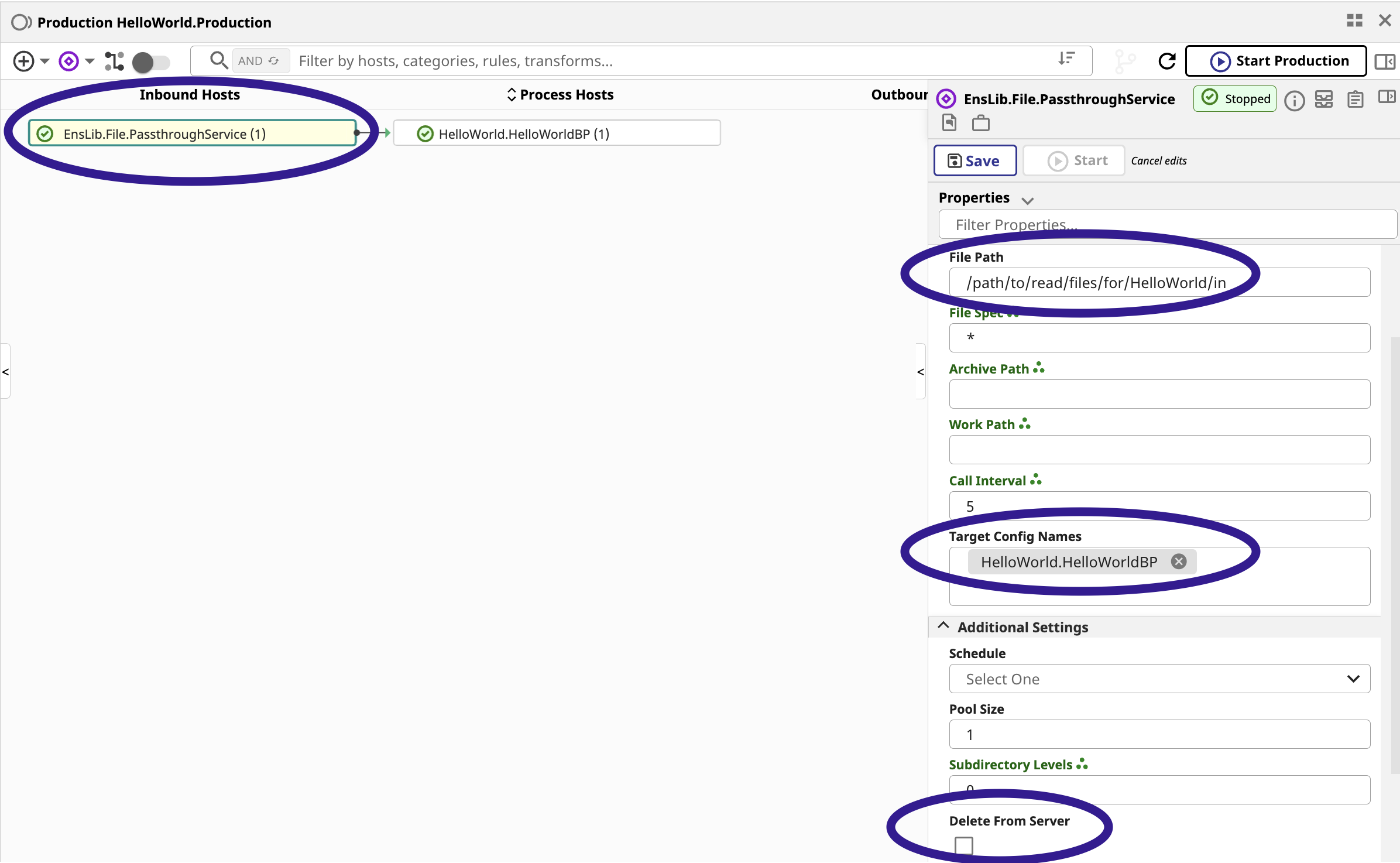
This production reads in a file from a defined path and then forwards it to a target Business Process.
We use a pre-existing Business Service called Enslib.File.PassthroughService. Configure the service by setting the file path from which it should read. Then select the Business Process you created as its target.
Note: The Business Process name includes the script name (
HelloWorld) appended to it. Read more about package names here
Test your Production
Start the Production, then place a text file in the configured file path for the Business Service. After refreshing the Production page, you should see the messages that were delivered.
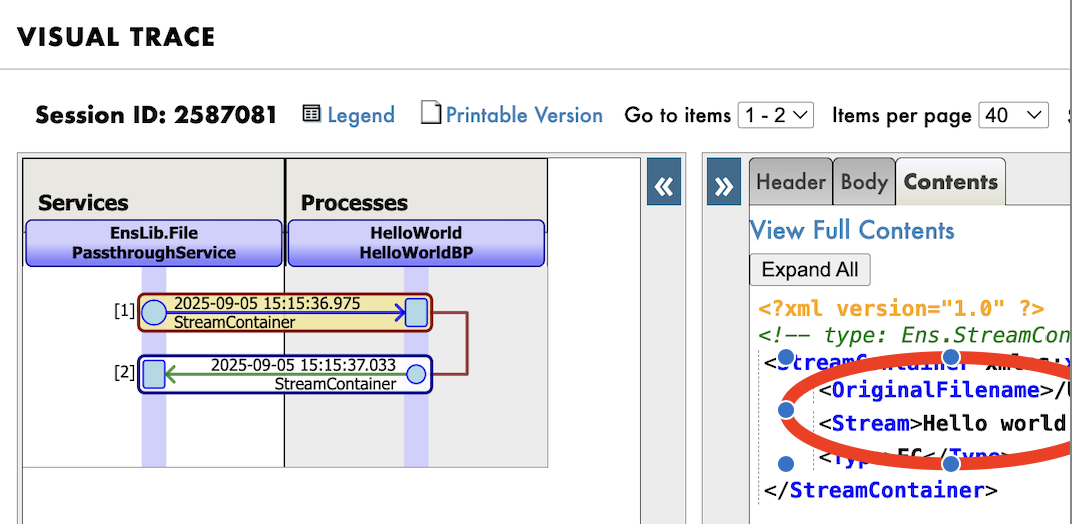
Note:
EnsLib.File.PassthroughServiceis an existing Business Service bundled with IRIS Productions. It loads a file from a specified location and forwards it to the configured target component.
Reporting Issues
Please report issues via GitHub Issues.
Contributing
Useful links
Release history Release notifications | RSS feed


Download files
Download the file for your platform. If you're not sure which to choose, learn more about installing packages.
Source Distribution
Built Distribution
Filter files by name, interpreter, ABI, and platform.
If you're not sure about the file name format, learn more about wheel file names.
Copy a direct link to the current filters
File details
Details for the file intersystems_pyprod-0.1.2.tar.gz.
File metadata
- Download URL: intersystems_pyprod-0.1.2.tar.gz
- Upload date:
- Size: 24.5 kB
- Tags: Source
- Uploaded using Trusted Publishing? No
- Uploaded via: twine/6.2.0 CPython/3.11.13
File hashes
| Algorithm | Hash digest | |
|---|---|---|
| SHA256 |
995376c137bb9596d5e27d71f65beb9c75a01692afc6ee68c6c04482bbe10321
|
|
| MD5 |
6d7b3288ccc8746bf68899ab28424d0f
|
|
| BLAKE2b-256 |
1a3714014d5963ae47db7dbd0508ea1f325595425fed421165ac98f55d5896cc
|
File details
Details for the file intersystems_pyprod-0.1.2-py3-none-any.whl.
File metadata
- Download URL: intersystems_pyprod-0.1.2-py3-none-any.whl
- Upload date:
- Size: 21.8 kB
- Tags: Python 3
- Uploaded using Trusted Publishing? No
- Uploaded via: twine/6.2.0 CPython/3.11.13
File hashes
| Algorithm | Hash digest | |
|---|---|---|
| SHA256 |
adb9e7886b0d71cc4d5a03aafcbee4fae367a354432c4e7558f9d0d53b5a20e4
|
|
| MD5 |
cad2d3b9d0dc9ae9b9d48d6413ed8f68
|
|
| BLAKE2b-256 |
3d21d5f7cac62784e4d9ef15e75b5a4135d5e5d01b1a0b616bfe9bffefe47920
|






