
intervals-ftp-update
Keeps the FTP on your intervals.icu profile in sync with the eFTP it estimates from your rides — without letting a quiet training block quietly drag your FTP down with it.
uvx intervals-ftp-update --api-key=YOUR_KEY
That is the whole install. uvx fetches it, runs it, and throws it away again.
No athlete id needed — the key already identifies you.
What it looks like
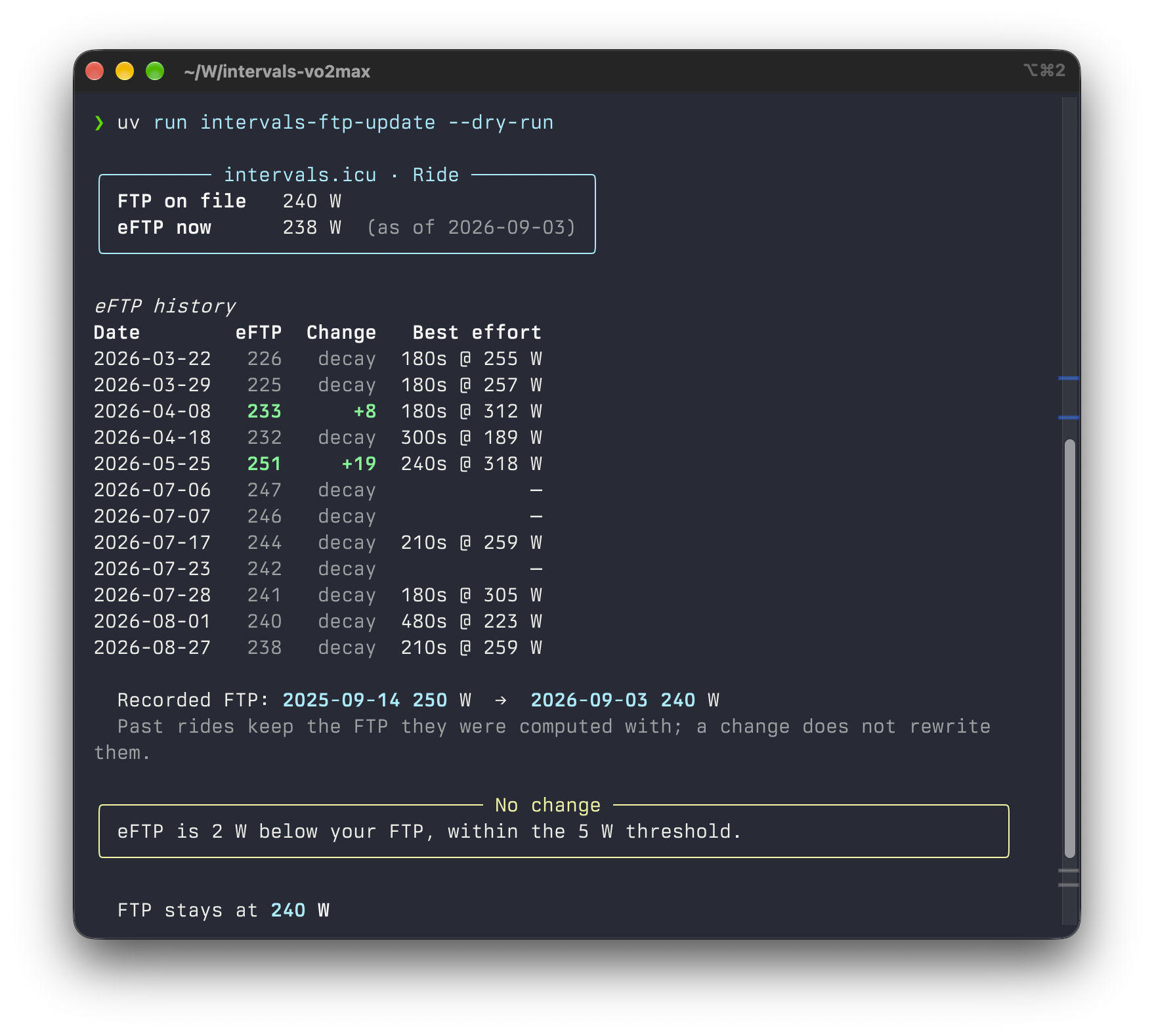
The Change column is the whole point: +8 means a ride actually pushed
the eFTP up that day, decay means the number drifted down on its own
because an older peak aged out. Only the former counts as evidence.
Why not just copy the eFTP across
The eFTP only moves up when a genuine best effort pushes it there. After that it decays on its own, because the peak that produced it slowly ages out of the 90-day window. Nothing about you got slower — the number just ran out of evidence.
A naive "set FTP to eFTP" job follows that decay down and quietly rewrites your training load with it. So this tool treats the two directions differently:
| Direction | Condition |
|---|---|
| Up | A ride within the last 30 days actually raised the eFTP. |
| Down | The eFTP stayed below your FTP for 45 days straight, across at least 5 rides, and never came back near it. |
Everything else is reported and left alone.
Why this matters: intervals.icu computes training load (TSS) from your recorded FTP, not the eFTP. Set it too low and every ride looks harder than it was, your CTL climbs, and you think you are fitter than you are. Too high and the reverse.
Usage
uvx intervals-ftp-update --api-key=KEY       # the key on its own is enough
uvx intervals-ftp-update                     # or take it from the environment / .env
uvx intervals-ftp-update --dry-run           # show the proposal, never write
uvx intervals-ftp-update --yes               # write without asking

# Only if you need to target someone other than the key's owner:
uvx intervals-ftp-update --api-key=KEY --athlete-id=123456
Nothing is written without a confirmation prompt unless you pass --yes.
Credentials
The API key sits at the bottom of https://intervals.icu/settings. Provide it
by flag, by environment variable, or in a .env file next to where you run it:
INTERVALS_ICU_API_KEY=your_key_here
INTERVALS_ICU_ATHLETE_ID=123456
INTERVALS_ICU_ATHLETE_ID is optional — left out, the tool acts on whoever owns
the key. If you do pass it, digits only: the web UI writes it as i123456 but
the API only accepts 123456. A leading i is stripped for you.
Options
| Flag | Default | Meaning |
|---|---|---|
--api-key |
$INTERVALS_ICU_API_KEY |
Your intervals.icu API key |
--athlete-id |
the key's own athlete | Digits only; a leading i is stripped |
--sport |
Ride |
Which sport settings to read the FTP from |
--threshold |
5 |
Minimum gap in watts before anything happens |
--confirm-days |
30 |
Window in which a rise must have been confirmed |
--decay-days |
45 |
Window that must stay low before lowering |
--min-rides |
5 |
Minimum rides in that window |
--lookback |
365 |
How far back to read history |
--dry-run |
Show the proposal, never write | |
--yes |
Skip the confirmation prompt |
What it does not touch
Changing your FTP does not rewrite past activities. Every ride on
intervals.icu stores the FTP it was computed with, so your fitness curve stays
intact. This tool never calls the sport-settings/{id}/apply endpoint, which is
the one that would retroactively recompute your history.
HR zones are left alone too — they hang off your LTHR, not your FTP.
Development
just test       # run the suite with coverage
just coverage   # the same, as a browsable HTML report
just check      # dry run against your own account
just update     # run for real, with the confirmation prompt
just build      # build the distribution
Releases are cut by tagging:
git tag v0.1.0 && git push --tags
CI runs the tests, refuses a tag that disagrees with the version in
pyproject.toml, and publishes to PyPI through Trusted Publishing — no
API token is stored in the repository.
License
MIT
1 maintainer

Metadata
1 maintainer
Release files for intervals-ftp-update 0.1.0
For a detailed explanation of source distributions (sdists) and built distributions (wheels), please see the package formats documentation.
Source distribution (sdist)
| File | Size | Uploaded | Provenance | Actions |
|---|---|---|---|---|
| intervals_ftp_update-0.1.0.tar.gz | 34.4 kB | With provenance | Details for intervals_ftp_update-0.1.0.tar.gz |
Built distribution (wheel)
| File | Interpreter | ABI | Platform | Actions Reset |
|---|---|---|---|---|
| intervals_ftp_update-0.1.0-py3-none-any.whl | Python 3 | none | any | Details for intervals_ftp_update-0.1.0-py3-none-any.whl |
Total release size: 43.8 kB
Release files / intervals_ftp_update-0.1.0.tar.gz
| Download URL | intervals_ftp_update-0.1.0.tar.gz |
|---|---|
| Size | 34.4 kB |
| Tags | Source |
|
SHA-256 checksum How to use checksums |
bd67a78108b4013180dae0f5b4efad80e59f134078707913e1d0cf677e9459f2
|
|
BLAKE2b-256 checksum How to use checksums |
e777d2093fb1f1239f73d190f2d0b97d629dc6a3af4a506c80f7badbe728e2a1
|
| Upload date | |
|
Uploaded using Trusted Publishing? What is trusted publishing? |
Yes |
| Uploaded via |
twine/7.0.0 CPython/3.13.14
|
Provenance
Provenance describes where a file came from. On PyPI, provenance is shared via attestations, which provide a verifiable record of the build or publishing details. View details, limitations and caveats.


PyPI Publish Attestation
PyPI verified that this artifact, at this checksum, originated from the publisher listed below.
Signed by GitHub Actions, verified by PyPI on Sep 4, 2026.
Transparency logRelease files / intervals_ftp_update-0.1.0-py3-none-any.whl
| Download URL | intervals_ftp_update-0.1.0-py3-none-any.whl |
|---|---|
| Size | 9.3 kB |
| Tags | Python 3 |
|
SHA-256 checksum How to use checksums |
b61571f7bf60bb938c8bc230c4291c9f4340d543b8be1c7de8705a4f7f8d87d8
|
|
BLAKE2b-256 checksum How to use checksums |
0c6aca547922ca6cffd2ccbce480e9f1783d6cba015f0083107b010c0a59ce7f
|
| Upload date | |
|
Uploaded using Trusted Publishing? What is trusted publishing? |
Yes |
| Uploaded via |
twine/7.0.0 CPython/3.13.14
|
Provenance
Provenance describes where a file came from. On PyPI, provenance is shared via attestations, which provide a verifiable record of the build or publishing details. View details, limitations and caveats.
PyPI Publish Attestation
PyPI verified that this artifact, at this checksum, originated from the publisher listed below.
Signed by GitHub Actions, verified by PyPI on Sep 4, 2026.
Transparency logSecurity for intervals-ftp-update 0.1.0
Provenance
Provenance describes where a file came from. On PyPI, provenance is shared via attestations, which provide a verifiable record of the build or publishing details. View details, limitations and caveats.
Full provenance
Both files in this release have been uploaded with provenance metadata.
Attestation for intervals_ftp_update-0.1.0.tar.gz
PyPI Publish Attestation
PyPI verified that this artifact, at this checksum, originated from the publisher listed below.
Signed by GitHub Actions, verified by PyPI on Sep 4, 2026.
Transparency logA note on package security
PyPI is a repository for distributing packages, not a service for auditing them. While third-party security researchers and our staff do their best to detect and remove malicious packages, PyPI cannot guarantee the quality, security or suitability of any given package.
To learn more about protecting yourself from malicious actors, visit our package security documentation.













