
intervals-icu-planner-mcp





Plan a whole training block with Claude and put it on your intervals.icu calendar in one go, safely.
What it's for
If you train with a plan, you know the routine: every week you open the calendar and drag in Tuesday's intervals, Wednesday's endurance ride, Saturday's long ride… for twelve weeks. Then you get sick, and all of it has to move.
With this, you ask Claude in plain words.
Build a plan for your goal and put it on your calendar
"I'm riding a 100 km sportive on 14 June. I have about 6 hours a week: short indoor rides Tuesday to Thursday, a long ride at the weekend. Build me a plan and put it on my calendar."
Or, if you already have one: "Put my 12-week winter base plan on my calendar, starting next Monday."
Claude shows you exactly what it's going to add, and nothing changes until you say yes. Then the whole block lands on your intervals.icu calendar, and from there each day's workout shows up in Zwift, MyWhoosh or on your Garmin, ready to ride.
See how you did
- "I raced on Sunday. How did I do?"
- "Review my rides this week. How did they go compared to the plan?"
Claude reads your completed rides from intervals.icu (time, power, heart rate, training load) and compares them with what was planned and with your fitness. Rides that reached intervals.icu through Strava can't be read (why).
Adjust when life gets in the way
- "Check my fitness. Should I rest, or change the plan?"
- "I was sick this week, push the rest of the plan back a week."
- "Move Thursday's sprints to Friday."
Claude looks at your fitness, fatigue and form, suggests what to change, and shows you the new calendar before changing anything.
It only ever touches the workouts it put there. Your races, notes and anything you added by hand are left alone.
What's an MCP server?
MCP is how apps like Claude get new abilities. This project is a small program that runs on your computer and gives Claude a few safe tools for your intervals.icu calendar. Claude decides when to use them, and asks you before writing anything.
Why plan-level
General intervals.icu MCP servers expose the API one event at a time: create an event, delete an event, list activities. That works for a single workout. For a 12-week block it means dozens of separate writes, with nothing tying them together and nothing that shows you what will change first.
This server works on whole plans:
- One file, one plan. You describe the block once in a
plan.yaml(week templates, per-week changes, recovery weeks) plus.zwoworkouts. Edit the file and push again: events are updated in place, never duplicated. - Diff before write. Every write tool is a dry run by default and returns
a per-date diff (
+new,~updated,=unchanged,!stale). - A plan only touches its own events. Each event carries a uid,
planner-<plan_id>-w<NN>-<day>, and the server never modifies an event without one. - Reversible.
delete_planremoves exactly the events a plan created, andpush_planwithprune=trueremoves the ones you took out of the plan.
It also reads your fitness (CTL / ATL / Form) and completed activities, so you can ask Claude how the block is going.
Quick start
-
Get an API key: intervals.icu → Settings → Developer Settings → API key. On a Mac, keep it in the Keychain rather than in a config file: see docs/setup.md.
-
Install uv, then add the server.
Claude Desktop (Settings → Developer → Edit Config):
{
  "mcpServers": {
    "intervals-icu-planner": {
      "command": "uvx",
      "args": ["intervals-icu-planner-mcp"],
      "env": { "INTERVALS_ICU_API_KEY": "your-key-here" }
    }
  }
}
Claude Code:
claude mcp add -s user intervals-icu-planner -e INTERVALS_ICU_API_KEY=your-key-here -- \
  uvx intervals-icu-planner-mcp
-
Restart Claude and check the
intervals-icu-plannertools are listed. If they aren't, see docs/troubleshooting.md.
Try it
Clone the repo for the example plan (12 weeks of winter base, all targets in % of FTP), then paste this into Claude:
Push
/path/to/intervals-icu-planner-mcp/examples/winter-base-12wk/plan.yamlstarting next Monday. Show me the dry run first and don't apply anything until I say so.
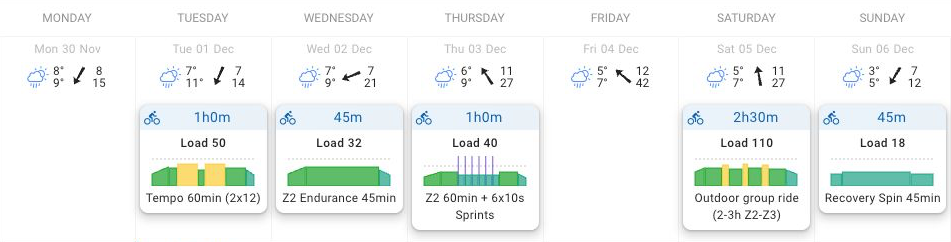
Claude calls push_plan as a dry run and shows you the diff:
Winter Base 12 Weeks (winterbase): 12 weeks, 2026-11-30 -> 2027-02-21

Week 1, 2026-11-30
  + 2026-12-01 Tue  WORKOUT  W09_Tempo_60_2x12.zwo
  + 2026-12-02 Wed  WORKOUT  W10_Z2_45.zwo
  + 2026-12-03 Thu  WORKOUT  W04_Z2_60_Neuromuscular_Sprints.zwo
  + 2026-12-05 Sat  WORKOUT  W12_Group_Ride_2h30_Placeholder.zwo
  + 2026-12-06 Sun  WORKOUT  W01_Recovery_Spin_45.zwo
...
60 new, 0 updated, 0 unchanged, 0 stale.
Dry run: nothing was written. Run again with dry_run=false to apply.
Say "apply it" and the plan lands on your calendar, as in the screenshot above. More things to ask:
- Plan:
- "What's planned for next week?"
- "What's in my workout library?"
- Review:
- "Review my race on Sunday: power, heart rate and load against my fitness. What went well and what should I work on?"
- "How did last week go? Compare what was planned with what I rode."
- Adjust:
- "Check my fitness and form over the last 6 weeks. Am I fresh enough for next week's plan, or should I rest or ease it off?"
- "Move week 3's Thursday session to Friday."
- "I was sick, push the rest of the plan back a week."
- "Remove the winterbase plan from my calendar."
Anything that writes shows you a dry run first and waits for your OK.
Building a plan from your goals
Claude learns the plan format from the server's plan_guide tool, then
writes the plan as files (a plan.yaml and .zwo workouts) and pushes them.
So it needs somewhere to save them: Claude Code can do that directly, and in
Claude Desktop, add a filesystem extension that can write to a folder of your
choice.
I'm riding a 100 km sportive on 14 June and have about 6 hours a week: short indoor rides Tuesday to Thursday, a long ride at the weekend. Build me a plan in
~/training/sportive, then do a dry-run push and show me the diff.
Claude will usually ask about your goal and week first. Workouts use % of FTP, so set your FTP in intervals.icu (or your training app).
Every plan and workout is checked before anything is sent, so a mistake in what Claude wrote is reported, not uploaded. Your answers about fitness and when to rest are Claude's suggestions from your intervals.icu numbers, not a coach's or doctor's advice.
Tools
| Tool | What it does | Writes? |
|---|---|---|
push_plan(plan_yaml, start_date?, dry_run=true, prune=false) |
Validate a plan, diff it against the calendar, upsert new and updated events; with prune=true also delete the plan's stale events |
only with dry_run=false |
get_planned(oldest, newest, plan_id?) |
List planned events; optionally only one plan's | no |
delete_plan(plan_id, dry_run=true, oldest?, newest?) |
Remove every event the plan created, nothing else | only with dry_run=false |
get_fitness(oldest, newest) |
CTL, ATL, Form (TSB = CTL − ATL) and Form as % of CTL, per day | no |
get_activities(oldest, newest) |
Completed activities: time, distance, load, avg/normalized power, IF, HR | no |
move_workout(plan_yaml, week, day, to_day, to_week?, swap=false, dry_run=true) |
Move one session to another day: edits plan.yaml, then syncs with prune | only with dry_run=false |
shift_plan(plan_yaml, weeks=1, from_week?, dry_run=true) |
Push the rest of the plan back N weeks (illness, travel); past weeks stay | only with dry_run=false |
list_library(folder?) |
Your intervals.icu workout library: folders and plans with their workouts | no |
plan_guide() |
How to write a plan: the plan.yaml format and schema, the .zwo rules, examples and steps. Claude reads it before writing a plan | no |
plan_yaml is a path to the file. Everything also works from the
command line: see docs/cli.md.
Writing your own plan
# yaml-language-server: $schema=https://raw.githubusercontent.com/gustavosoares/intervals-icu-planner-mcp/main/schemas/plan.schema.json
id: myblock
name: My 3-week block
start: 2026-11-30            # a Monday
templates:
  build:
    tue: W09_Tempo_60_2x12.zwo
    thu: W04_Z2_60_Neuromuscular_Sprints.zwo
    sat: { note: Long outdoor ride }
weeks:
  - { template: build }
  - { template: build, overrides: { thu: W06_Tempo_3x10.zwo } }
  - { template: build, overrides: { thu: null }, recovery: true }
Workouts are .zwo files in a workouts/ folder next to the plan. The first
line gives you validation and autocomplete in editors with the YAML language
server. The full reference (overrides, notes, re-pushing, pruning, moving and
shifting) is in docs/plan-reference.md.
Safety
This writes to your real training calendar, so it's built to be hard to misuse:
- Dry run first: every write returns a diff and waits for your OK.
- Only its own events: nothing without the plan's exact uid is touched or even shown.
- Validate before upload: the plan and every
.zwoare checked, and one error means nothing is sent. - The API key stays private: never logged, printed or put in error messages.
- Careful file edits: moves and shifts are previewed, never touch the past, and are written atomically.
Details in docs/safety.md.
Documentation
- Setup: API key, the macOS Keychain, Claude Desktop and Claude Code
- plan.yaml reference: fields, uids, pruning, moving and shifting, the example plan
- Training apps and activities: Zwift, MyWhoosh, Garmin, ERG mode, Strava limits
- CLI: every command
- Safety design
- How it works: architecture and intervals.icu API notes
- Troubleshooting
- Contributing and Changelog
Roadmap
- Activity analysis: planned vs completed, compliance per week
- OAuth and the streamable HTTP transport, for claude.ai custom connectors
- Writing to the workout library (import or remove workouts in one dedicated folder)
A note on AI assistance
This project is built with help from AI coding tools, which speed up writing code, tests and documentation. Every change is reviewed and tested by a human maintainer before it's merged, and the maintainer is responsible for what ships, including the safety rules above.
License
MIT, see LICENSE.
1 maintainer

Metadata
1 maintainer
Release files for intervals-icu-planner-mcp 0.2.0
For a detailed explanation of source distributions (sdists) and built distributions (wheels), please see the package formats documentation.
Source distribution (sdist)
| File | Size | Uploaded | Provenance | Actions |
|---|---|---|---|---|
| intervals_icu_planner_mcp-0.2.0.tar.gz | 209.3 kB | With provenance | Details for intervals_icu_planner_mcp-0.2.0.tar.gz |
Built distribution (wheel)
| File | Interpreter | ABI | Platform | Actions Reset |
|---|---|---|---|---|
| intervals_icu_planner_mcp-0.2.0-py3-none-any.whl | Python 3 | none | any | Details for intervals_icu_planner_mcp-0.2.0-py3-none-any.whl |
Total release size: 248.2 kB
Release files / intervals_icu_planner_mcp-0.2.0.tar.gz
| Download URL | intervals_icu_planner_mcp-0.2.0.tar.gz |
|---|---|
| Size | 209.3 kB |
| Tags | Source |
|
SHA-256 checksum How to use checksums |
3b75b8750fa385e1994714bfc54190728052d148de534528b1861eb1de07305a
|
|
BLAKE2b-256 checksum How to use checksums |
f404d9817bf5b32ca2e5cf3cca7d2398505e51306bf4046ddf1fad9069e024bc
|
| Upload date | |
|
Uploaded using Trusted Publishing? What is trusted publishing? |
Yes |
| Uploaded via |
twine/7.0.0 CPython/3.13.16
|
Provenance
Provenance describes where a file came from. On PyPI, provenance is shared via attestations, which provide a verifiable record of the build or publishing details. View details, limitations and caveats.


PyPI Publish Attestation
PyPI verified that this artifact, at this checksum, originated from the publisher listed below.
Signed by GitHub Actions, verified by PyPI on Nov 25, 2026.
Transparency logRelease files / intervals_icu_planner_mcp-0.2.0-py3-none-any.whl
| Download URL | intervals_icu_planner_mcp-0.2.0-py3-none-any.whl |
|---|---|
| Size | 38.8 kB |
| Tags | Python 3 |
|
SHA-256 checksum How to use checksums |
70011421f6ea8b9b58c2fd8ca870f9568a5df89bb1d5c9648441f7c2e00739e7
|
|
BLAKE2b-256 checksum How to use checksums |
ac15b636f372670aaf827fde12835d269a6d19a8248a1edecfd89f9d883a98dd
|
| Upload date | |
|
Uploaded using Trusted Publishing? What is trusted publishing? |
Yes |
| Uploaded via |
twine/7.0.0 CPython/3.13.16
|
Provenance
Provenance describes where a file came from. On PyPI, provenance is shared via attestations, which provide a verifiable record of the build or publishing details. View details, limitations and caveats.
PyPI Publish Attestation
PyPI verified that this artifact, at this checksum, originated from the publisher listed below.
Signed by GitHub Actions, verified by PyPI on Nov 25, 2026.
Transparency logSecurity for intervals-icu-planner-mcp 0.2.0
Provenance
Provenance describes where a file came from. On PyPI, provenance is shared via attestations, which provide a verifiable record of the build or publishing details. View details, limitations and caveats.
Full provenance
Both files in this release have been uploaded with provenance metadata.
Attestation for intervals_icu_planner_mcp-0.2.0.tar.gz
PyPI Publish Attestation
PyPI verified that this artifact, at this checksum, originated from the publisher listed below.
Signed by GitHub Actions, verified by PyPI on Nov 25, 2026.
Transparency logA note on package security
PyPI is a repository for distributing packages, not a service for auditing them. While third-party security researchers and our staff do their best to detect and remove malicious packages, PyPI cannot guarantee the quality, security or suitability of any given package.
To learn more about protecting yourself from malicious actors, visit our package security documentation.














