
InvenTree DC-bias curve plugin
Shows a capacitor's DC-bias (derating) curve on its InvenTree part page, in a DC bias panel below Notes. If the part has no curve, the panel says "No DC-bias curve available".
The curve comes from the part's Cbias Curve text parameter. It's read and interpolated exactly as
GroundTruth reads it (components/bias.py), so the plot shows the same
capacitance GroundTruth uses in a simulation.
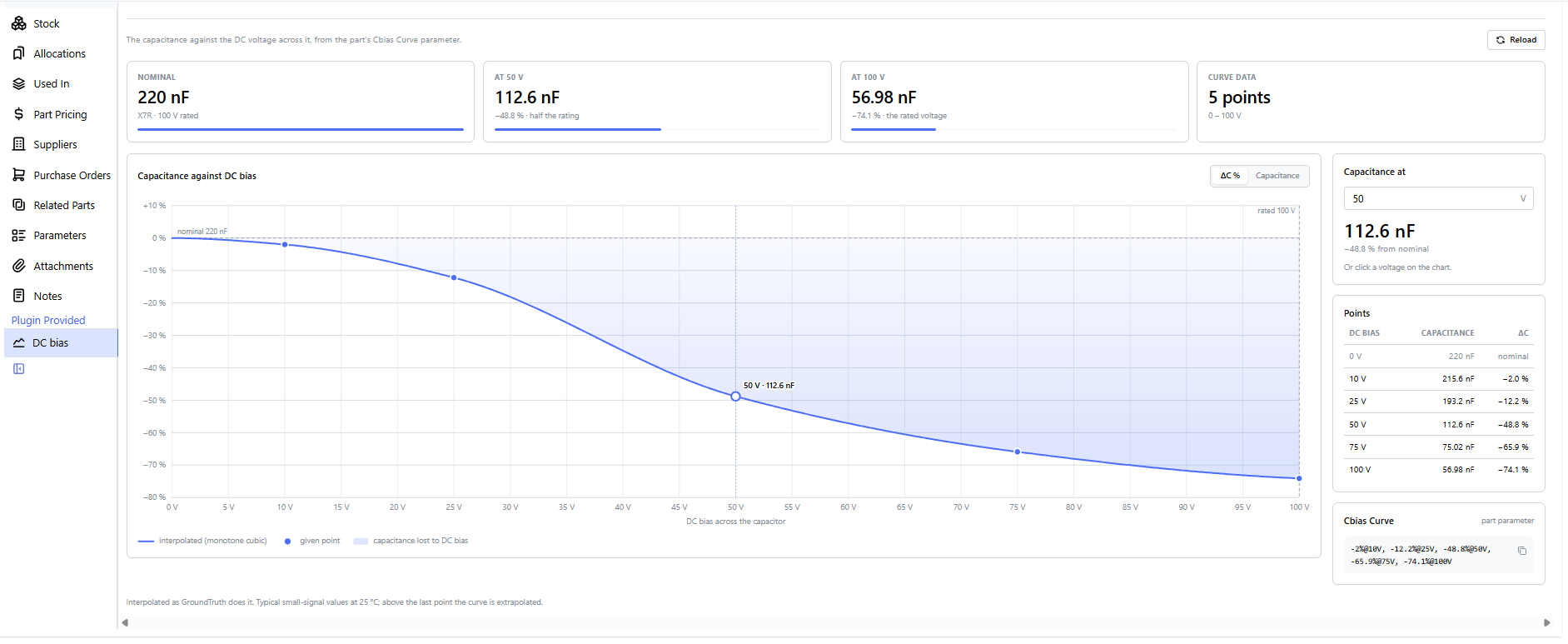
The panel
The screenshots show a 220 nF 100 V X7R 0805 whose Cbias Curve is
-2%@10V, -12.2%@25V, -48.8%@50V, -65.9%@75V, -74.1%@100V.
Tiles across the top, from left to right:
- Nominal: the capacitance at 0 V (the
Capacitanceparameter), with the dielectric and the rated voltage. - At 50 V: half the rated voltage. GroundTruth uses this voltage for a single
Cbiasvalue given without one. - At 100 V: the rated voltage.
- Curve data: how many points the curve has and the voltage range they cover.
The bar under a capacitance shows how much of the nominal is left: 112.6 nF at 50 V is about half the bar.
The chart
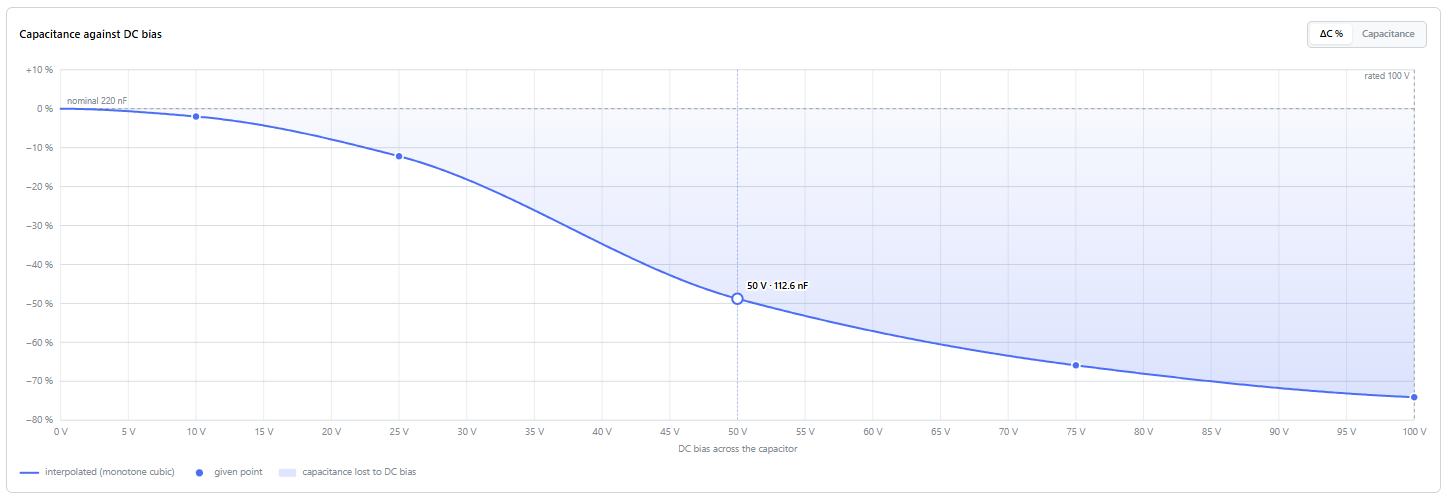
- The line is the capacitance against the DC voltage across the capacitor. Between the given points (the dots)
it is a monotone cubic (PCHIP) through (0 V, nominal) and the points, so it never overshoots between them. Above
the last point it continues dashed as
C0 / (1 + (V/V1)²)through that point (extrapolated). It's dashed only when the chart goes past the last point, which isn't the case here. - The shaded area between the line and the dashed nominal line is the capacitance lost to DC bias.
- "rated 100 V" marks the rated voltage. The chart runs up to it, or to 1.25 × the last point when the part has no rating.
- The ring and the dotted line (here at 50 V) mark the voltage chosen in "Capacitance at". Clicking the chart moves it there.
- Hovering shows the voltage, the capacitance and the change at the pointer.
- ΔC % / Capacitance at the top right switches the y-axis between the change from the nominal and the capacitance itself. The choice is remembered in the browser.
Reading off values
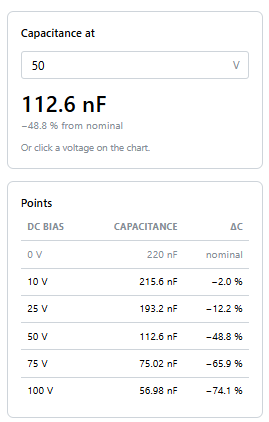
- Capacitance at: type a DC voltage to get the capacitance and its change from the nominal. It starts at half the rated voltage, and is marked "extrapolated" above the last point.
- Points: the curve's given points as capacitance and change, with the nominal at 0 V on top. Percent points are turned into capacitance against the nominal.
- Cbias Curve (below them, in the first screenshot): the parameter's text as written, with a copy button.
On a wide screen these cards sit to the right of the chart; in a narrow panel they move below it. The panel follows InvenTree's light and dark themes.
Which parameter is drawn
| The parameter holds | What is drawn |
|---|---|
-3.7%@0.63V, -16%@1.58V, -43%@3.15V or 95nF@10V, 66nF@30V |
a monotone cubic (PCHIP) through (0 V, nominal C) and the points; above the last point, C0 / (1 + (V/V1)²) through it (dashed) |
75nF@50V (one point) |
C0 / (1 + (V/V1)²) through the point |
no Cbias Curve, a Cbias of 750n (no voltage) |
the one-point curve, placed at Cbias Voltage, or else at half the Rated Voltage |
| nothing | "No DC-bias curve available" (C0G / NP0: "class I, no DC-bias derating") |
A bare number in the curve is read in µF, as in GroundTruth. Up to 12 points are allowed. A curve that can't be read shows what's wrong with each point instead of a chart. A point more than 1.2 × the nominal (a typo such as 750nF for 75nF) is drawn, with a warning above the tiles.
Install
- In Admin Center, Plugins, Install Plugin:
- Package Name:
inventree-cbias-plugin, with the Source URL left empty: the latest release from PyPI. (Orpip install inventree-cbias-pluginin InvenTree's environment, or add it toplugins.txt.) - To install the newest code on
maininstead, also set the Source URL togit+https://github.com/afkiwers/inventree_cbias.git. Withoutgit+, InvenTree passes the URL to pip as a package index (pip install -i ...), and pip finds nothing there. The Package Name must still beinventree-cbias-plugin;inventree_cbiasfails.
- Package Name:
- Activate CbiasPlugin: the ⋯ menu on its row, then Activate.
- Turn on Enable interface integration (Settings, Plugin settings). Panels need it.
- If the plugin's settings say "Error loading settings", or the panel says "Failed to load module
.../static/plugins/cbias/cbias_panel.js" (a 404), the server's processes haven't all loaded the new plugin yet.
Activation asks the background worker to copy
cbias_panel.jsinto the static files, and a worker that hasn't loaded the plugin skips the copy without an error. Deactivate and activate the plugin again, or runinvoke staticin the server container. Do the same after every upgrade of the plugin.
The panel appears on a part when its category path contains capacitor (case doesn't matter), or when the part has
a Capacitance, Cbias or Cbias Curve parameter. The parameter names and the category keyword can be changed in
the plugin's settings.
In use on an InvenTree 1.1+ server (Python 3.14); written against InvenTree's 0.18 plugin interface. On 1.1+ the
panel reads /api/parameter/ (parameters for every model), and on older servers it falls back to
/api/part/parameter/. It reads through the logged-in user's own API
session, so InvenTree's permissions apply. Parameter text is inserted only as text, never as HTML.
Development
The interpolation is a port of GroundTruth's Python. tests/reference.json holds GroundTruth's own answers, and the
JavaScript is checked against them, bit for bit at the time of writing:
node --test tests/test_curve.mjs
# after a change to GroundTruth's components/bias.py or components/values.py, regenerate the reference:
<GroundTruth>/.venv/Scripts/python tests/make_reference.py tests/reference.json
GitHub Actions run on every push and pull request (.github/workflows/checks.yaml): flake8, these curve tests, and
a test build of the package that checks cbias_panel.js is in the wheel.
Releasing
Publishing a GitHub release uploads the package to PyPI (.github/workflows/pypi.yaml):
- Set
CBIAS_PLUGIN_VERSIONininventree_cbias/version.py(e.g.0.3.0), merge it tomain. - On GitHub, Releases, Draft a new release, with a new tag of the same version (
0.3.0orv0.3.0), then Generate release notes and Publish release. The workflow stops if the tag andversion.pydiffer.
The upload uses PyPI's Trusted Publishing, so no API token is stored in the repository. Set it up once, before the
first release: on pypi.org, Your account, Publishing, Add a new pending publisher (GitHub): PyPI project name
inventree-cbias-plugin, owner afkiwers, repository inventree_cbias, workflow pypi.yaml, environment pypi.
The first release then creates the project on PyPI.
1 maintainer

Metadata
1 maintainer
Release files for inventree-cbias-plugin 0.2.0
For a detailed explanation of source distributions (sdists) and built distributions (wheels), please see the package formats documentation.
Source distribution (sdist)
| File | Size | Uploaded | Provenance | |
|---|---|---|---|---|
| inventree_cbias_plugin-0.2.0.tar.gz | 27.9 kB | With provenance | Details |
Built distribution (wheel)
| File | Interpreter | ABI | Platform | Reset |
|---|---|---|---|---|
| inventree_cbias_plugin-0.2.0-py3-none-any.whl | Python 3 | none | any | Details |
Total release size: 53.7 kB
Release files / inventree_cbias_plugin-0.2.0.tar.gz
| Download URL | inventree_cbias_plugin-0.2.0.tar.gz |
|---|---|
| Size | 27.9 kB |
| Tags | Source |
|
SHA-256 checksum How to use checksums |
ced384ce32618d1448bb99de2a3a4a54cdc7b580c8d58ed3d2f085cace5a9f98
|
|
BLAKE2b-256 checksum How to use checksums |
6c22ea3d7d6ed37bb78d2a5930c54a07812cea3c55fac3eb18e4a053e31b90ce
|
| Upload date | |
|
Uploaded using Trusted Publishing? What is trusted publishing? |
Yes |
| Uploaded via |
twine/7.0.0 CPython/3.13.16
|
Provenance
Provenance describes where a file came from. On PyPI, provenance is shared via attestations, which provide a verifiable record of the build or publishing details. View details, limitations and caveats.


PyPI Publish Attestation
PyPI verified that this artifact, at this checksum, originated from the publisher listed below.
Signed by GitHub Actions, verified by PyPI on Oct 22, 2026.
Transparency logRelease files / inventree_cbias_plugin-0.2.0-py3-none-any.whl
| Download URL | inventree_cbias_plugin-0.2.0-py3-none-any.whl |
|---|---|
| Size | 25.9 kB |
| Tags | Python 3 |
|
SHA-256 checksum How to use checksums |
030de958b428e9a892434b28146af88f1575ffaea3c40481411208a423915737
|
|
BLAKE2b-256 checksum How to use checksums |
5e4d845314e7dbb17824ebce559312740d3ed7aff5960c3498dd531beeeb1a8b
|
| Upload date | |
|
Uploaded using Trusted Publishing? What is trusted publishing? |
Yes |
| Uploaded via |
twine/7.0.0 CPython/3.13.16
|
Provenance
Provenance describes where a file came from. On PyPI, provenance is shared via attestations, which provide a verifiable record of the build or publishing details. View details, limitations and caveats.
PyPI Publish Attestation
PyPI verified that this artifact, at this checksum, originated from the publisher listed below.
Signed by GitHub Actions, verified by PyPI on Oct 22, 2026.
Transparency logSecurity for inventree-cbias-plugin 0.2.0
Provenance
Provenance describes where a file came from. On PyPI, provenance is shared via attestations, which provide a verifiable record of the build or publishing details. View details, limitations and caveats.
Full provenance
All 2 files in this release have been uploaded with provenance metadata.
Attestation for inventree_cbias_plugin-0.2.0.tar.gz
PyPI Publish Attestation
PyPI verified that this artifact, at this checksum, originated from the publisher listed below.
Signed by GitHub Actions, verified by PyPI on Oct 22, 2026.
Transparency logA note on package security
PyPI is a repository for distributing packages, not a service for auditing them. While third-party security researchers and our staff do their best to detect and remove malicious packages, PyPI cannot guarantee the quality, security or suitability of any given package.
To learn more about protecting yourself from malicious actors, visit our package security documentation.













