
inventree-mbom
Manufacturing BOM & Routings plugin for InvenTree


Overview
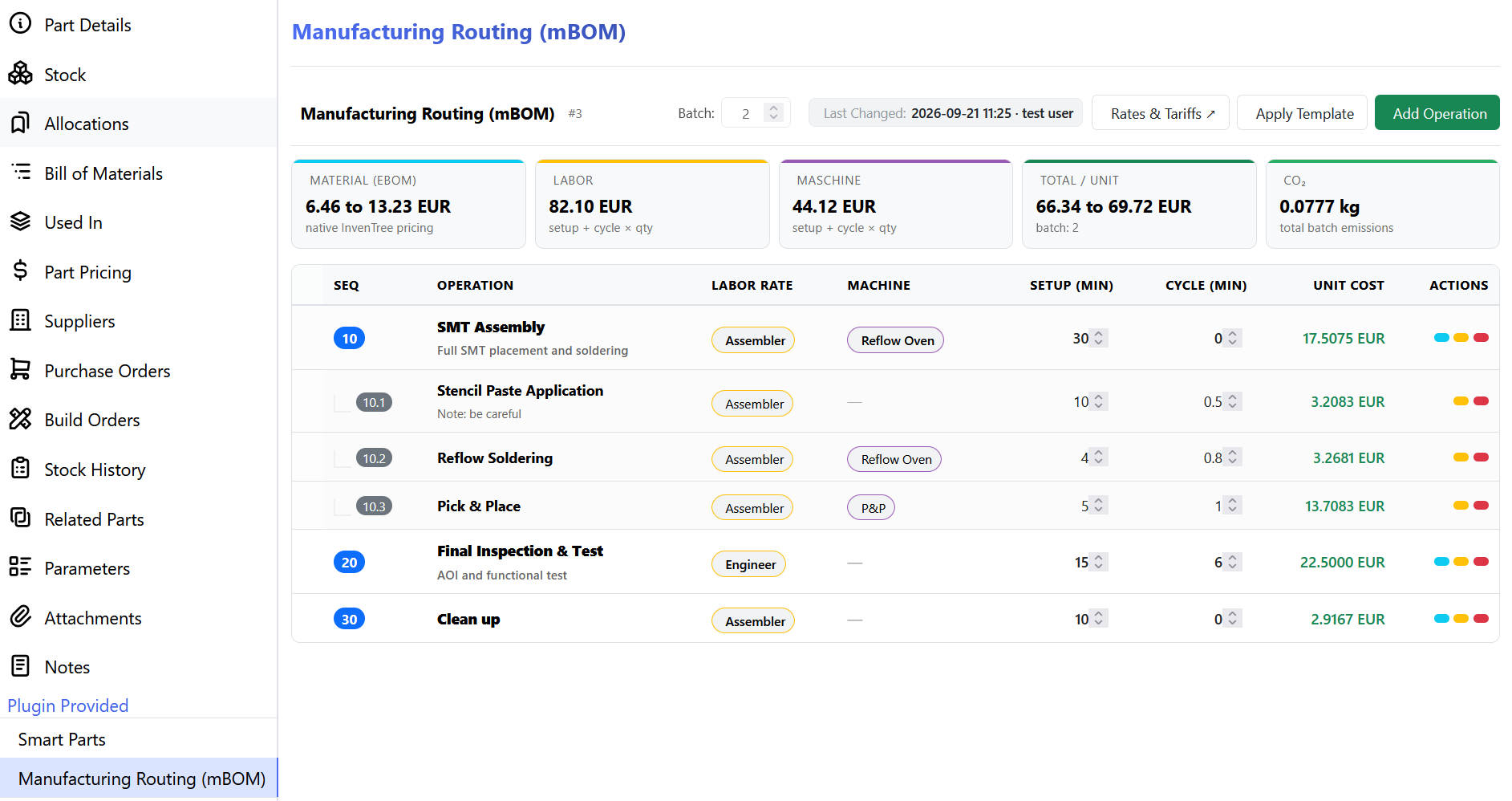
inventree-mbom extends InvenTree with a full Manufacturing BOM (mBOM) capability, adding a dedicated "Manufacturing Routing (mBOM)" tab to every assembly part. It supports:
- Hierarchical process steps (Op 10 → 10.1 Stencil → 10.2 Pick & Place → 10.3 Reflow)
- Central labor and machine rate catalog with dynamic cost propagation
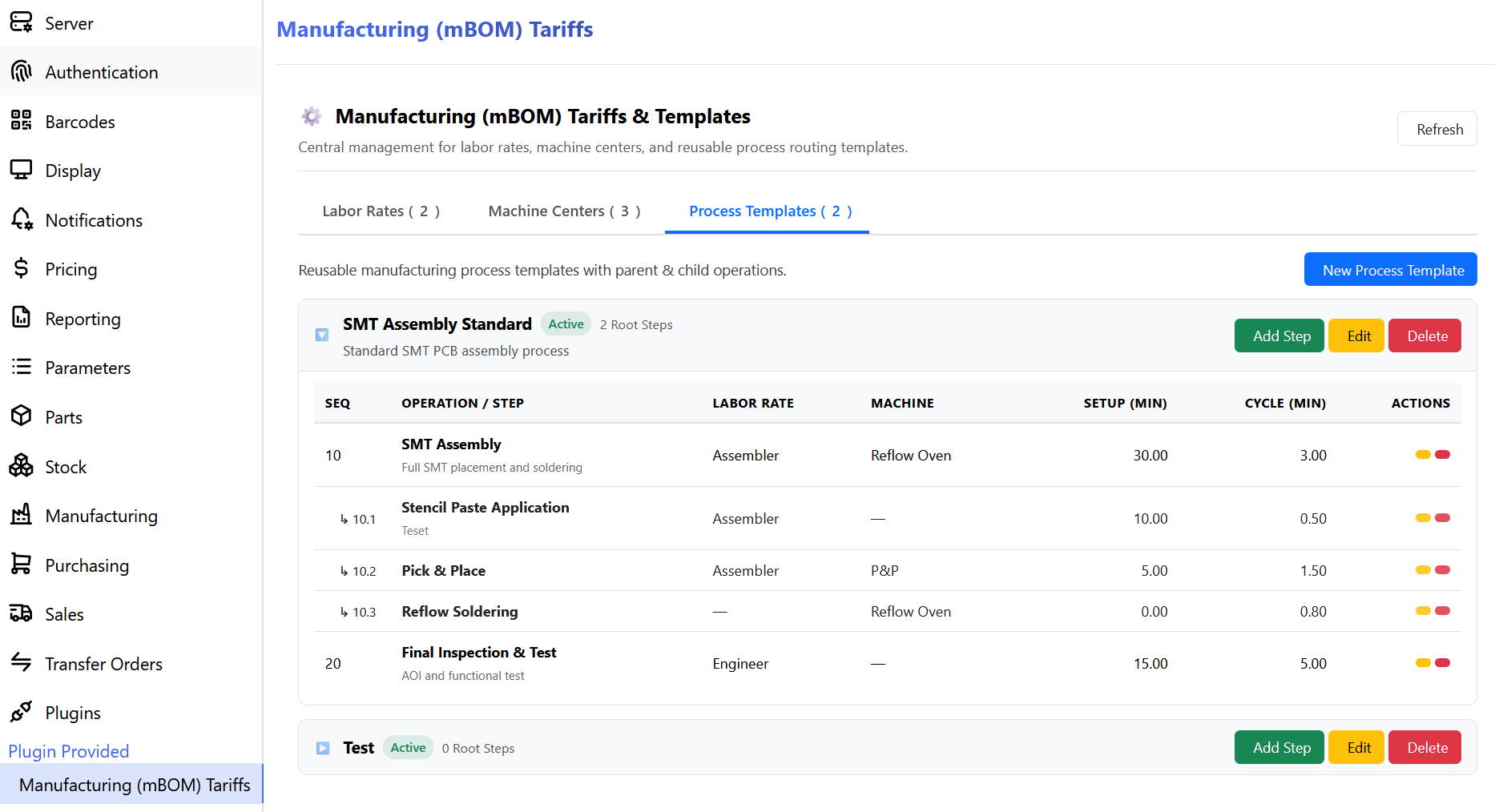
- Reusable process templates that can be applied to any assembly in one click
- Setup Time (fixed/batch) + Run/Cycle Time (per unit) tracked separately
- CO₂ emission factor tracking per machine center
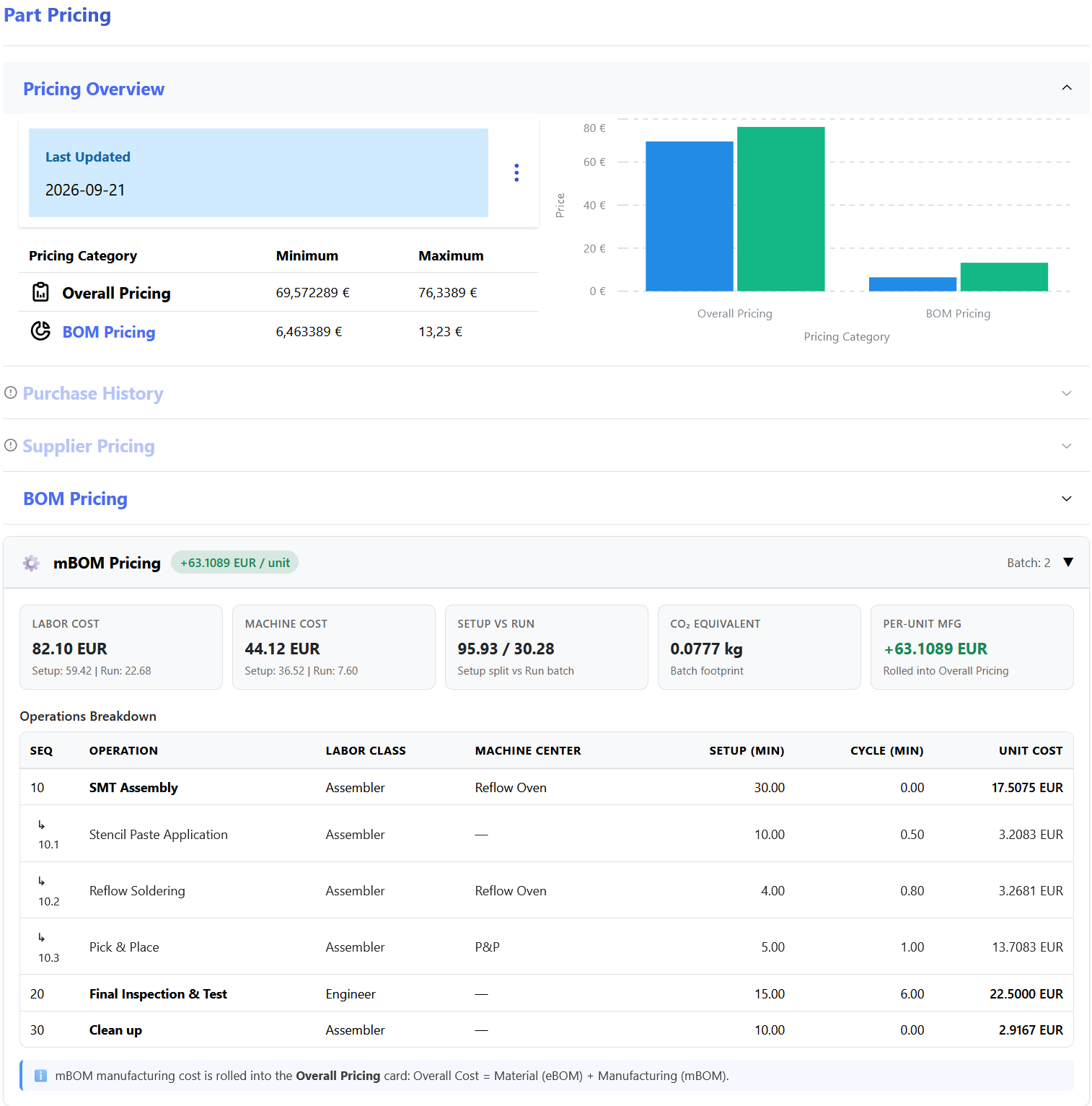
- Full pricing integration: manufacturing costs bridge into InvenTree's native
PartPricingsystem
Features
Central Tariff Catalog
| Model | Fields |
|---|---|
LaborRate |
Name, hourly rate, currency, description |
MachineCenter |
Name, hourly rate, currency, CO₂ factor/min |
Process Templates
Create reusable templates (e.g. "SMT Assembly Standard") with hierarchical steps. Apply them to any assembly with one click.
Part Routing (mBOM)
Each assembly gets a PartRouting containing RoutingOperation instances:
PartRouting (for Part: Widget PCB)
├── Op 10: SMT Assembly         [Labor: Assembler, Setup: 30min, Cycle: 2min/unit]
│   ├── Op 10.1: Stencil Paste
│   ├── Op 10.2: Pick & Place
│   └── Op 10.3: Reflow
└── Op 20: Final Inspection     [Labor: Engineer, Cycle: 5min/unit]
Cost Formula
Total Operation Cost (batch) = (Setup_min × Rate/min) + (Cycle_min/unit × Rate/min × batch_qty)
Per-Unit Cost = Total Cost ÷ batch_size
Total Assembly Cost = eBOM Material Cost + mBOM Labor Cost + mBOM Machine Cost
Pricing Bridge
When a LaborRate or MachineCenter hourly rate is updated, Django post_save signals automatically call PartPricing.schedule_for_update() on all affected assemblies — no InvenTree core modifications required.
Setup
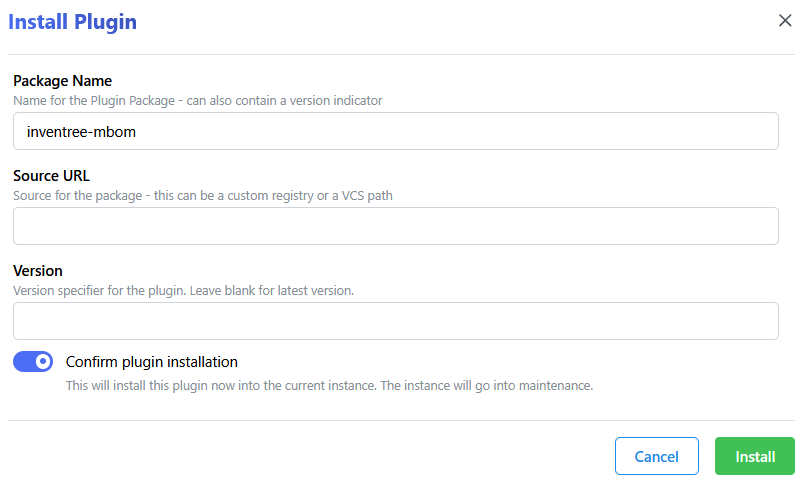
- Install Install this plugin in the webinterface with the packagename
inventree-mbom. Restart both the InvenTree server and worker after installation. - Enable Enable the plugin in the plugin settings. You need to be signed in as a superuser for this.
- Configure The following configuration options are available in plugin settings:
- Default Currency: Currency used for manufacturing cost calculations (default:
EUR). - Cost Decimal Places: Number of decimal places for cost display (default:
4). - Auto-Recalculate on Rate Change: Automatically recalculate part pricing when a labor or machine rate is updated.
- Include Setup Cost in Unit Cost: If enabled, setup (fixed) costs are amortised into the per-unit cost using the standard batch size defined on the routing.
- Default Currency: Currency used for manufacturing cost calculations (default:
REST API Endpoints
All endpoints are under /plugin/inventree-mbom/:
| Method | Endpoint | Description |
|---|---|---|
| GET/POST | labor-rate/ |
List/Create labor rates |
| GET/PUT/DELETE | labor-rate/<pk>/ |
Retrieve/Update/Delete labor rate |
| GET/POST | machine-center/ |
List/Create machine centers |
| GET/PUT/DELETE | machine-center/<pk>/ |
Retrieve/Update/Delete machine center |
| GET/POST | process-template/ |
List/Create process templates |
| GET/POST | process-template-step/ |
List/Create template steps |
| GET/POST | routing/ |
List/Create part routings |
| GET/PUT/DELETE | routing/<pk>/ |
Retrieve/Update/Delete routing |
| GET/POST | operation/ |
List/Create routing operations |
| GET/PUT/DELETE | operation/<pk>/ |
Retrieve/Update/Delete operation |
| POST | apply-template/ |
Apply a template to a part's routing |
| GET | cost-summary/<part_pk>/ |
Full cost breakdown for a part |
Running Tests
# From InvenTree root:
python manage.py test inventree_mbom
Architecture & Design Decisions
Why Not a Standalone SPA?
This plugin uses InvenTree's native UserInterfaceMixin + PanelMixin pattern to inject the mBOM tab. The panel renders server-side HTML with vanilla JS for API interactions, matching InvenTree's native look & feel without requiring a separate build pipeline.
Pricing Bridge Strategy
InvenTree's PartPricing.bom_cost only rolls up physical BOM items. Rather than patching InvenTree core, this plugin uses Django's post_save signal on LaborRate/MachineCenter to call PartPricing.schedule_for_update() on affected parts. The cost summary API endpoint provides the full breakdown (material + labor + machine) for display in the UI panel.
Template vs. Instance Pattern
Process Templates are reusable blueprints. When applied to a part, operations are copied (not linked) so engineers can customize times/notes per-part without mutating the global template. The source_template FK is informational only.
License
MIT License - see LICENSE
1 maintainer

Metadata
1 maintainer
Release files for inventree-mbom 1.1
For a detailed explanation of source distributions (sdists) and built distributions (wheels), please see the package formats documentation.
Source distribution (sdist)
| File | Size | Uploaded | |
|---|---|---|---|
| inventree_mbom-1.1.tar.gz | 72.9 kB | Details |
Built distribution (wheel)
| File | Interpreter | ABI | Platform | Reset |
|---|---|---|---|---|
| inventree_mbom-1.1-py3-none-any.whl | Python 3 | none | any | Details |
Total release size: 146.4 kB
Release files / inventree_mbom-1.1.tar.gz
| Download URL | inventree_mbom-1.1.tar.gz |
|---|---|
| Size | 72.9 kB |
| Tags | Source |
|
SHA-256 checksum How to use checksums |
e2240192dc077022438e01151cd7b60fdf28f28f30ff2cea0aab31442d5705ac
|
|
BLAKE2b-256 checksum How to use checksums |
d6f25414b4383e633b88f870bf50236c29db74268f170b5e0ec032907b9eb59f
|
| Upload date | |
|
Uploaded using Trusted Publishing? What is trusted publishing? |
Yes |
| Uploaded via |
twine/7.0.0 CPython/3.13.14
|
Provenance
Provenance describes where a file came from. On PyPI, provenance is shared via attestations, which provide a verifiable record of the build or publishing details. View details, limitations and caveats.


PyPI Publish Attestation
PyPI verified that this artifact, at this checksum, originated from the publisher listed below.
Signed by GitHub Actions, verified by PyPI on Sep 22, 2026.
Transparency logRelease files / inventree_mbom-1.1-py3-none-any.whl
| Download URL | inventree_mbom-1.1-py3-none-any.whl |
|---|---|
| Size | 73.5 kB |
| Tags | Python 3 |
|
SHA-256 checksum How to use checksums |
2459bf4e8469bed8f16d1ab984a96a81dcaa2617fbd1b0e6a3087e140ff4ffe7
|
|
BLAKE2b-256 checksum How to use checksums |
ee14f143e739710354f247c25ff2edd2be75932f289627433df4bfb5822fca1d
|
| Upload date | |
|
Uploaded using Trusted Publishing? What is trusted publishing? |
Yes |
| Uploaded via |
twine/7.0.0 CPython/3.13.14
|
Provenance
Provenance describes where a file came from. On PyPI, provenance is shared via attestations, which provide a verifiable record of the build or publishing details. View details, limitations and caveats.
PyPI Publish Attestation
PyPI verified that this artifact, at this checksum, originated from the publisher listed below.
Signed by GitHub Actions, verified by PyPI on Sep 22, 2026.
Transparency log













