
inventree-supplier-part-import
InvenTree plugin (>= 1.0) that searches parts on Mouser, DigiKey and Farnell and creates them in InvenTree: part, manufacturer part, supplier parts with prices, category, parameters, datasheet, image and RoHS / REACH declarations, with the import rules of Ki-nTree.
It requires inventree-part-pricing-update, which provides:
- the supplier API credentials and the linked supplier companies;
- the daily request quota: searches count in the same counter as the price updates;
- prices, availability and price history of the created supplier parts.
When Part Pricing Update is not active, the page only asks to activate it.
Screenshots
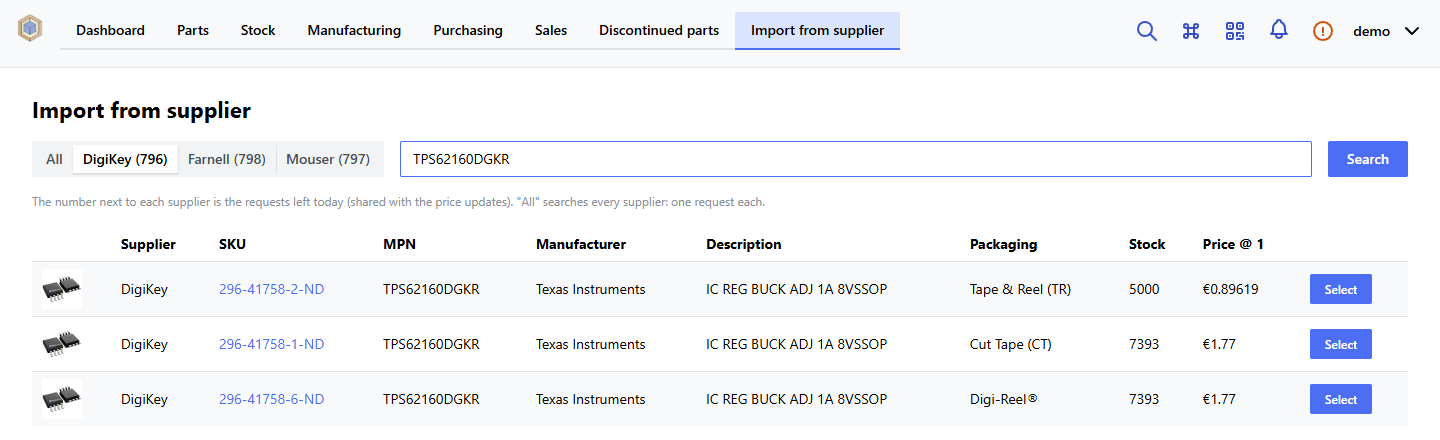
Search on one supplier (or all of them), with the requests left today:
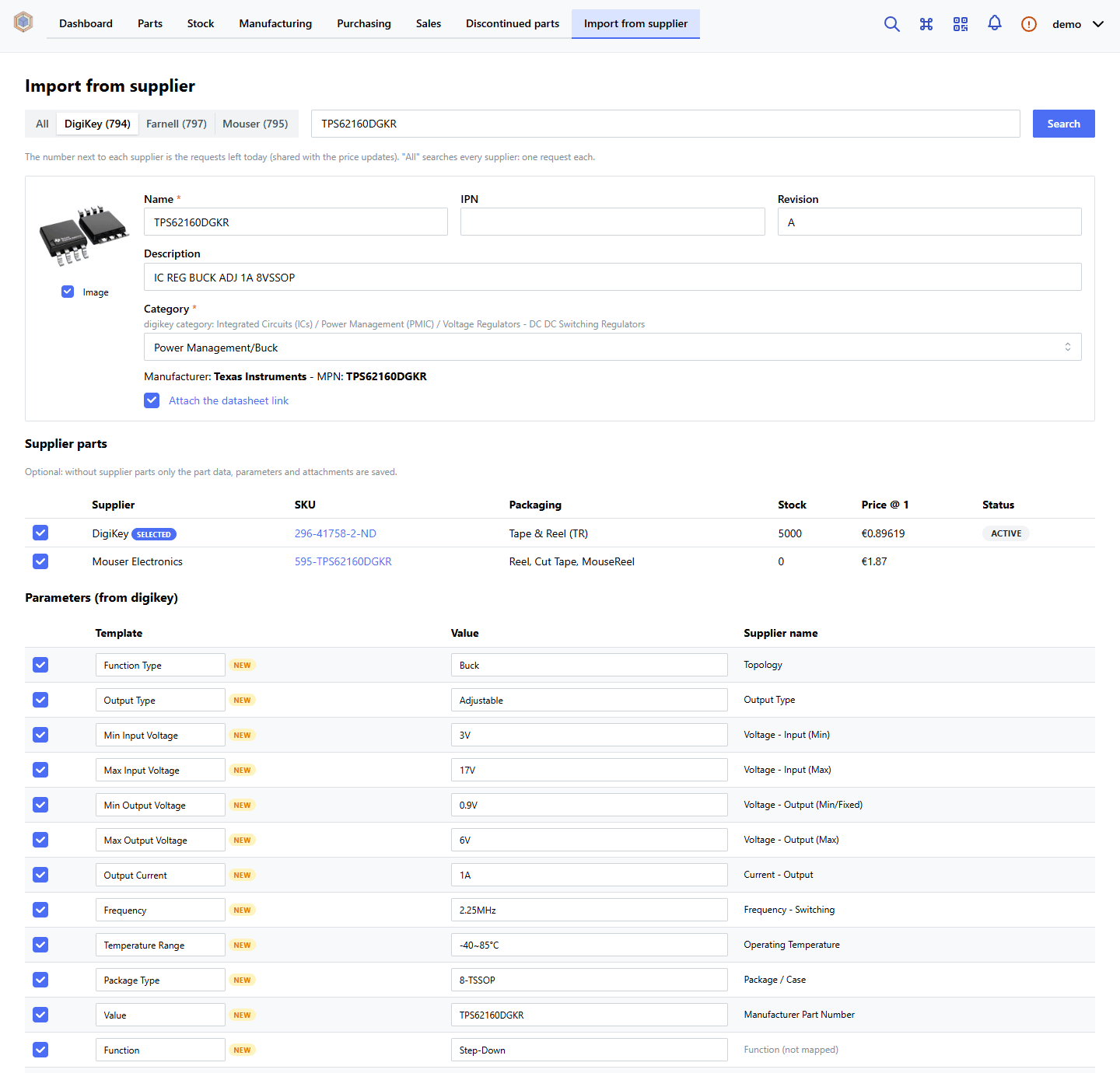
The form prepared from the selected product: category proposed from the mappings, supplier parts of the other suppliers, parameters mapped to the InvenTree templates and converted to their units, RoHS / REACH:
Usage
Menu Import from supplier, or /web/plugin/supplier-part-import/import.
- Search a supplier code, an MPN or keywords on one supplier (or all of them). Each supplier shows the requests left today. Results already in InvenTree are marked with their IPN.
- Select a result. The plugin prepares the form with these requests:
- the product details;
- the same MPN on the supplier with the best parameters (DigiKey, then Farnell, then Mouser: the Mouser API reports few technical parameters);
- the same MPN on the other suppliers, as alternate suppliers;
- the RoHS / REACH declarations of the manufacturer (DigiKey).
- Check and edit the form: name, description, category, IPN, revision, supplier parts to create, parameters (template, value, included or not), image, datasheet and declarations.
- Create the part, or update the existing part (see below). Supplier parts are optional: without them only the part data, parameters and attachments are saved. The plugin creates the part, the manufacturer part (and the manufacturer if missing), the supplier parts with prices and history, the parameters and the attachments, then opens the part.
Products already in InvenTree: no duplicates
Before creating a part the plugin looks for the product in InvenTree, comparing codes without case and separators
(8850-1210-7027 = 885012107027):
- the MPN of the manufacturer parts;
- the SKU of the supplier parts of any supplier (e.g. a part with only a Würth supplier part, whose SKU is the MPN);
- the part name, often the MPN;
- the old names of a renamed product, reported by DigiKey in
OtherNames(e.g. a search for 0402ZD224KAT2A returns KGM05AR51A224KH, and the part with the old MPN is still found); - the searched code: shown but not preselected, since a keyword search may return other products.
When a part is found, the form proposes to update it, with the suppliers it already has:
- only the missing supplier parts are added (the existing ones are marked and cannot be selected);
- the manufacturer part is created only if missing;
- optionally the missing parameters and attachments are added;
- parameters the part already has are marked already set. The ones with a placeholder value (
-,n/a, …) are preselected; the others can be selected to replace the current value (badge replaces), reported in the summary; - description, IPN and category of the existing part are never changed.
Creating a new part anyway needs the explicit choice Create a new part anyway (duplicate); otherwise the server refuses.
Rules
- Category: proposed from the mappings supplier category → InvenTree category.
- Ki-nTree subcategories with the
__prefix (e.g.__N-Channel FET) are filtered by function: among the ones of the same supplier category, the plugin picks the one whose name matches theFunction Typeparameter (e.g.FET Type=N-Channel→ N-Channel FET). If none matches, the parent category is proposed, as in Ki-nTree. - DigiKey v3 category names (
Transistors - FETs, MOSFETs - Single) are also matched on the v4 paths. - For an unmapped supplier category you choose the category; with Remember the choice becomes a new mapping. Changing the category recalculates parameters and IPN without new supplier requests.
- A mapped category which does not exist yet is proposed with the new badge and created only when the import is confirmed (see Default mappings).
- Ki-nTree subcategories with the
- Parameters: mapping per category as in Ki-nTree (
supplier_parameters.yaml, withparent) and the same value clean-up (clean_parameter_value): metric sizes, ranges-55~125°C, package without description. Difference from Ki-nTree: Package Height/Size keep the millimetres, not the inches. With Import all the parameters, the unmapped parameters are imported with the supplier name. As in Ki-nTree,Manufacturer Part Numberin the mappings means the MPN (e.g.Value← MPN for diodes, transistors and ICs). Farnell… Min/… Maxpairs become a range and the Farnell formats follow the DigiKey ones (10kohm→10K,0.02ohm→0.02R,± 10%→±10%). When updating an existing part the unmapped parameters start unselected. Ignored parameters are never imported. Missing templates are created with the units ofparameters.yaml. - Units: for templates with units InvenTree shows the unit in its own column, so the value is saved as a number in
the template units:
25V(unit V) →25,-55~85°C→-55~85,±20%→±20,20mR(unit mΩ) →20, with the InvenTree conversion. Templates without units keep the unit in the value, without space (22 µF→22µF). In the settings page, Parameter units applies the same conversion to the existing parameters: Check shows the changes, Convert applies them; values which cannot be converted are listed and left unchanged. - RoHS / REACH: the parameters
Stato RoHS,REACHand theRoHScheckbox, with Italian values (Conforme (RoHS3),Conforme (nessuna SVHC), …). Sources, in order: DigiKey, Farnell, Mouser (Mouser only RoHS). The declarations are attached as links with the noteDichiarazione RoHS/REACH - <title>. - Datasheet: attached as a link with the note
Datasheet. - IPN (can be disabled with Propose IPN): the first free number with the scheme
<type prefix><mounting digit>-<number>(e.g.PE061-0012):- the type prefix (letters + 2 digits,
PE06) is the most common one among the IPNs of the category, or of the parent categories when it is empty; - the mounting digit comes from the supplier Mounting Type (SMD 1, THD 2, panel 3, wire 6);
- the IPN stays editable. With other IPN schemes, disable Propose IPN.
- the type prefix (letters + 2 digits,
Installation
The plugin is on PyPI; the pricing plugin is installed with it as a dependency (activate both):
- from the InvenTree UI (Settings → Plugins → Install plugin): Package Name
inventree-supplier-part-import; - or with
plugins.txt(InvenTree data folder): a lineinventree-supplier-part-import.
It can also be installed from the repositories with version tags of the
releases (pricing plugin first):
inventree-supplier-part-import @ git+https://github.com/Kamaar/inventree-supplier-part-import@vX.Y.Z.
With Docker, install in both the server and the worker container and restart them (different versions cause the Plugin Registry Mismatch error, INVE-E20):
docker compose exec inventree-server invoke plugins
docker compose exec inventree-worker invoke plugins
docker compose restart inventree-server inventree-worker
Then activate Supplier Part Import (app, URL and interface integration must be enabled in Settings → Plugins) and
run the migrations (invoke migrate, or INVENTREE_AUTO_UPDATE=True in Docker).
Default mappings
The plugin ships default mappings in supplier_part_import/defaults, from the Ki-nTree configuration:
categories.yaml: category tree;digikey_categories.yaml: DigiKey categories → InvenTree categories, plus the v4 names of categories Ki-nTree did not cover (NTC, PMIC, batteries and holders, nuts and screws, RF shields, antennas, RF modules);mouser_categories.yamlandfarnell_categories.yaml: the same categories for Mouser and Farnell, so that a product sold only by them gets a proposed category. Farnell reports no category: the product type in the name is used (English store: Power Inductor (SMD)). The names come from sample parts;supplier_parameters.yaml: supplier parameters → InvenTree templates, with the Farnell names. Differences from Ki-nTree: the DC resistance of the inductors goes to DC Resistance (not ESR), Collector Gate Voltage has the same name as inparameters.yaml, and B Constant (NTC), Output Current and RDS On Voltage are mapped;parameters.yaml: template units.
On the first use (import page or plugin settings), if the mapping tables are empty, parameter scopes and units are loaded automatically; an existing configuration is never changed. Mappings to categories which do not exist in InvenTree stay pending (badge pending in the settings):
- when a product of that kind is imported, the category is proposed with the new badge and created, with its missing parents, only when the import is confirmed; choosing another category creates nothing;
- a category created by hand in InvenTree links its pending mappings automatically.
So the category tree grows only with the categories really needed. In the Default mappings section of the settings, Load default mappings can:
- add only the missing rows (your changes are kept);
- with Replace the existing rows, start again from the defaults;
- with Create the missing InvenTree categories, create at once all the missing categories of
categories.yaml.
Parameter scopes and category mappings can then be edited in the same page.
Inductor DC resistance (from ESR to DC Resistance)
Ki-nTree saved the DC resistance of the inductors in the ESR template; the default mappings use DC Resistance. To align a configuration imported from Ki-nTree and the existing values:
docker compose exec -w /home/inventree/src/backend/InvenTree inventree-server python manage.py shell \
    -c "from supplier_part_import.maintenance import move_inductor_dcr; move_inductor_dcr()"
Without apply=True nothing is written: it only shows what would change. With move_inductor_dcr(apply=True):
- in the Inductors parameter scope the DCR names move from ESR to DC Resistance;
- the DC Resistance template is created if missing (unit mΩ);
- for the parts of the Inductors category (and subcategories) the ESR parameter becomes DC Resistance, with the same value. Parts which already have DC Resistance are listed and left unchanged.
Running it again changes nothing. Back up the database before applying it.
Import from Ki-nTree
Ki-nTree users can load their own files from ~/kintree/user (Windows C:\Users\<user>\kintree\user) in the
Import from Ki-nTree section: digikey_categories.yaml, supplier_parameters*.yaml, parameters.yaml. Mappings to
missing categories stay pending, as above.
Settings
| Setting | Default | |
|---|---|---|
| Propose IPN | yes | Propose the next free IPN |
| IPN digits | 4 | Digits of the progressive number |
| Default revision | A | Revision of the new parts |
| Parameter sources | digikey, farnell, mouser | Suppliers used for parameters and category, in order |
| Farnell store for the parameters | uk.farnell.com | Farnell answers in the store language: the parameters are read from the English store (1 request), prices and stock from the store of the pricing plugin |
| Import all the parameters | yes | Import also the unmapped parameters |
| Ignored parameters | Farnell internal fields… | Never imported |
| Alternate suppliers | yes | Propose the supplier parts of the other suppliers |
| RoHS / REACH declarations | yes | Attach the manufacturer declarations (1 DigiKey request) |
Development
uv run --no-project --with pytest --with pyyaml pytest        # import rules (no Django)
cd frontend && npm install && npm run lint && npm run build   # frontend in supplier_part_import/static
Integration tests on a real InvenTree (default mappings, categories, duplicates, parameters, maintenance) are in
tests/integration. They need a migrated InvenTree with the pricing plugin installed and, besides the database
variables, INVENTREE_SRC (the src/backend/InvenTree folder), INVENTREE_PLUGINS_ENABLED=True,
INVENTREE_PLUGIN_TESTING=True, INVENTREE_PLUGIN_TESTING_SETUP=True and
INVENTREE_PLUGINS_MANDATORY=part-pricing-update,supplier-part-import:
python -m pytest tests/integration # with the Python of the InvenTree environment
Every test runs in a transaction which is rolled back. In CI they run on the inventree/inventree:stable image; a
weekly scheduled pipeline catches the changes of new InvenTree releases.
Code style: Ruff (Python) and Biome (frontend, biome.json); pip install pre-commit && pre-commit install runs them
at every commit. LF line endings (.gitattributes, .editorconfig).
Plugin metadata: PLUGIN_VERSION and PLUGIN_DATE in __init__.py, updated at every release.
MAX_VERSION = '1.99.99': on a new major InvenTree version the plugin is not loaded until it has been checked (it has
its own tables and migrations, AppMixin).
Release: update the version in supplier_part_import/__init__.py and frontend/package.json, tag vX.Y.Z and
publish a GitHub release: the publish.yml workflow uploads the package to PyPI (Trusted Publishing).
Credits
-
Ki-nTree (sparkmicro and contributors, GPL-3.0): the import rules are ported from Ki-nTree:
- parameter mapping per category, with the
parentinheritance ofsupplier_parameters.yaml; - value clean-up (
common/part_tools.clean_parameter_value); - supplier categories → InvenTree categories, with the
__subcategories filtered by function; - format of the configuration files and the default mappings.
This is why the plugin is GPL-3.0.
- parameter mapping per category, with the
-
InvenTree: plugin documentation and frontend structure from the plugin-creator template (MIT).
-
inventree-part-pricing-update: supplier API clients, credentials and daily quota.
-
Supplier APIs: Mouser Search API, DigiKey Product Information v4, element14 Product Search API. Mouser, DigiKey, Farnell and element14 are trademarks of their owners.
License
GPL-3.0-or-later, see LICENSE. Copyright (c) 2026 Simone Amadori.
1 maintainer

Metadata
1 maintainer
Release files for inventree-supplier-part-import 0.1.23
For a detailed explanation of source distributions (sdists) and built distributions (wheels), please see the package formats documentation.
Source distribution (sdist)
| File | Size | Uploaded | Provenance | Actions |
|---|---|---|---|---|
| inventree_supplier_part_import-0.1.23.tar.gz | 157.9 kB | With provenance | Details for inventree_supplier_part_import-0.1.23.tar.gz |
Built distribution (wheel)
| File | Interpreter | ABI | Platform | Actions Reset |
|---|---|---|---|---|
| inventree_supplier_part_import-0.1.23-py3-none-any.whl | Python 3 | none | any | Details for inventree_supplier_part_import-0.1.23-py3-none-any.whl |
Total release size: 322.5 kB
Release files / inventree_supplier_part_import-0.1.23.tar.gz
| Download URL | inventree_supplier_part_import-0.1.23.tar.gz |
|---|---|
| Size | 157.9 kB |
| Tags | Source |
|
SHA-256 checksum How to use checksums |
4df77303bc2832a6fa4957f99083394ec3443bcb9c55f6aa795693517fc1a8fb
|
|
BLAKE2b-256 checksum How to use checksums |
d825045c63ba249c3f5b66f867a19b006acf04b5f9c7adc0df4103c85de0f092
|
| Upload date | |
|
Uploaded using Trusted Publishing? What is trusted publishing? |
Yes |
| Uploaded via |
twine/7.0.0 CPython/3.13.16
|
Provenance
Provenance describes where a file came from. On PyPI, provenance is shared via attestations, which provide a verifiable record of the build or publishing details. View details, limitations and caveats.


PyPI Publish Attestation
PyPI verified that this artifact, at this checksum, originated from the publisher listed below.
Signed by GitHub Actions, verified by PyPI on Nov 19, 2026.
Transparency logRelease files / inventree_supplier_part_import-0.1.23-py3-none-any.whl
| Download URL | inventree_supplier_part_import-0.1.23-py3-none-any.whl |
|---|---|
| Size | 164.6 kB |
| Tags | Python 3 |
|
SHA-256 checksum How to use checksums |
0396d1204a90c47c93d6eb8d171f07908972d791afb42ec74a1c6f3cbb0cf215
|
|
BLAKE2b-256 checksum How to use checksums |
82fe7e494909c7bf876ec4a313128f238ea248e7a3d95bedfcbe834bd601f943
|
| Upload date | |
|
Uploaded using Trusted Publishing? What is trusted publishing? |
Yes |
| Uploaded via |
twine/7.0.0 CPython/3.13.16
|
Provenance
Provenance describes where a file came from. On PyPI, provenance is shared via attestations, which provide a verifiable record of the build or publishing details. View details, limitations and caveats.
PyPI Publish Attestation
PyPI verified that this artifact, at this checksum, originated from the publisher listed below.
Signed by GitHub Actions, verified by PyPI on Nov 19, 2026.
Transparency logSecurity for inventree-supplier-part-import 0.1.23
Provenance
Provenance describes where a file came from. On PyPI, provenance is shared via attestations, which provide a verifiable record of the build or publishing details. View details, limitations and caveats.
Full provenance
Both files in this release have been uploaded with provenance metadata.
Attestation for inventree_supplier_part_import-0.1.23.tar.gz
PyPI Publish Attestation
PyPI verified that this artifact, at this checksum, originated from the publisher listed below.
Signed by GitHub Actions, verified by PyPI on Nov 19, 2026.
Transparency logA note on package security
PyPI is a repository for distributing packages, not a service for auditing them. While third-party security researchers and our staff do their best to detect and remove malicious packages, PyPI cannot guarantee the quality, security or suitability of any given package.
To learn more about protecting yourself from malicious actors, visit our package security documentation.














