
inventree-template-editor-plugin


A visual editor to quickly build InvenTree label templates.
⚙️ Installation
Install this plugin as follows:
-
Goto the Admin Center > Plugins > Plugin Settings and make sure to enable the "Enable interface integration" switch.
-
Click on "Install Plugin" at the top of the Plugins table on that page and enter
inventree-template-editor-pluginas package name. Enable the "Confirm plugin installation" switch and click "Install". -
Search for the plugin in the table and activate it
[!IMPORTANT] At least InvenTree v0.18 is required to use this plugin.
🏃 Usage
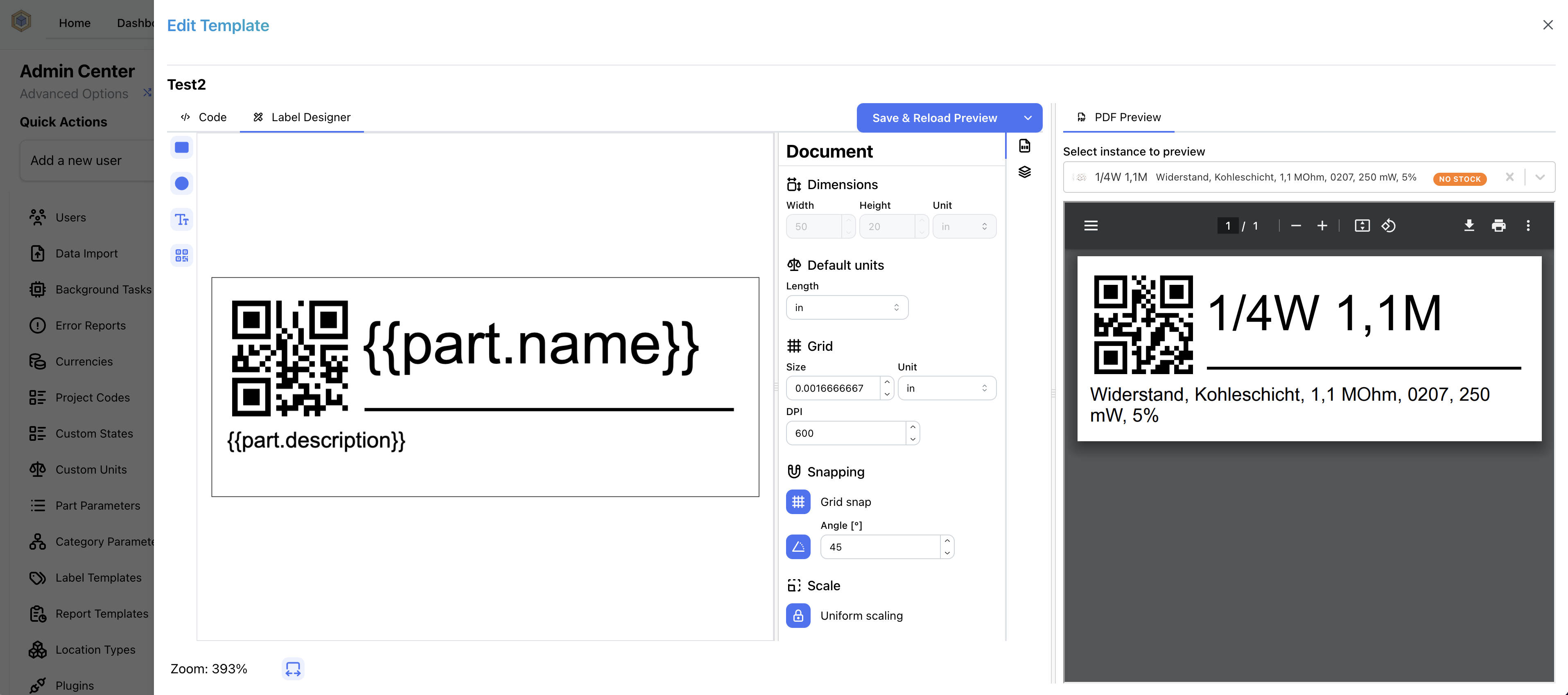
Goto the Admin Center > Label Templates and create a new Label template. Click on it in the table and select the "Label Designer". Click on the shapes on the left bar to add them to the label canvas.
🧑💻 Development
- Install as editable install to your inventree installation via
pip install -e /path/to/inventree-template-editor-plugin - Enable the plugin
- Install js dependencies via
cd inventree_template_editor/frontend && npm ci - Enable the dev mode for the plugin to use the vite dev server (that you need to start via
npm run dev) by setting theINVENTREE_TEMPLATE_EDITOR_DEV=Truevariable when running the inventree server. - Restart InvenTree and start vite dev server via
npm run dev
1 maintainer

Metadata
1 maintainer
Release files for inventree-template-editor-plugin 0.2.1
For a detailed explanation of source distributions (sdists) and built distributions (wheels), please see the package formats documentation.
Source distribution (sdist)
| File | Size | Uploaded | |
|---|---|---|---|
| inventree_template_editor_plugin-0.2.1.tar.gz | 211.8 kB | Details |
Built distribution (wheel)
| File | Interpreter | ABI | Platform | Reset |
|---|---|---|---|---|
| inventree_template_editor_plugin-0.2.1-py3-none-any.whl | Python 3 | none | any | Details |
Total release size: 423.6 kB
Release files / inventree_template_editor_plugin-0.2.1.tar.gz
| Download URL | inventree_template_editor_plugin-0.2.1.tar.gz |
|---|---|
| Size | 211.8 kB |
| Tags | Source |
|
SHA-256 checksum How to use checksums |
60658a7552b5c0a31363dc93282eddf9f3b7f0b9bf923efee62e7dcd2e4a8604
|
|
BLAKE2b-256 checksum How to use checksums |
0af686fecf2b4efad5f7a5b48364caa6930200651f6a1db07aec87059ecb9570
|
| Upload date | |
|
Uploaded using Trusted Publishing? What is trusted publishing? |
Yes |
| Uploaded via |
twine/6.1.0 CPython/3.12.9
|
Provenance
Provenance describes where a file came from. On PyPI, provenance is shared via attestations, which provide a verifiable record of the build or publishing details. View details, limitations and caveats.


PyPI Publish Attestation
PyPI verified that this artifact, at this checksum, originated from the publisher listed below.
Signed by GitHub Actions, verified by PyPI on Sep 23, 2025.
Transparency logRelease files / inventree_template_editor_plugin-0.2.1-py3-none-any.whl
| Download URL | inventree_template_editor_plugin-0.2.1-py3-none-any.whl |
|---|---|
| Size | 211.8 kB |
| Tags | Python 3 |
|
SHA-256 checksum How to use checksums |
22f605eab0d68ba4777482c9610b16f86b8c5d4401092ef5e826ad057b2d2edf
|
|
BLAKE2b-256 checksum How to use checksums |
cda7d28b1fc98627333a25940e099bcbefaa15af4f022d20a1eae9336dccdd3f
|
| Upload date | |
|
Uploaded using Trusted Publishing? What is trusted publishing? |
Yes |
| Uploaded via |
twine/6.1.0 CPython/3.12.9
|
Provenance
Provenance describes where a file came from. On PyPI, provenance is shared via attestations, which provide a verifiable record of the build or publishing details. View details, limitations and caveats.
PyPI Publish Attestation
PyPI verified that this artifact, at this checksum, originated from the publisher listed below.
Signed by GitHub Actions, verified by PyPI on Sep 23, 2025.
Transparency log













