
inverter


Get information from Deye Microinverter
The whole thing is just a learning exercise for now. We will see.
quickstart
overview
- clone the sources
- Bootstrap and create default user settings by just call
./cli.py edit-settings - Change the settings for your needs
- ...use the commands... ;)
- Setup systemd service to publish the inventer values to a Home Assistant instance via MQTT
Currently just clone the project and just start the cli (that will create a virtualenv and installs every dependencies)
Note: Please enable https://www.piwheels.org/ if you are on a Raspberry Pi !
e.g.:
~$ git clone https://github.com/jedie/inverter-connect.git
~$ cd inverter-connect
~/inverter-connect$ ./cli.py --help
The output of ./cli.py --help looks like:
Usage: ./cli.py [OPTIONS] COMMAND [ARGS]...

╭─ Options ────────────────────────────────────────────────────────────────────────────────────────╮
│ --help      Show this message and exit.                                                          │
╰──────────────────────────────────────────────────────────────────────────────────────────────────╯
╭─ Commands ───────────────────────────────────────────────────────────────────────────────────────╮
│ debug-settings        Display (anonymized) MQTT server username and password                     │
│ edit-settings         Edit the settings file. On first call: Create the default one.             │
│ inverter-version      Print all version information of the inverter                              │
│ print-at-commands     Print one or more AT command values from Inverter.                         │
│ print-values          Print all known register values from Inverter, e.g.:                       │
│ publish-loop          Publish current data via MQTT for Home Assistant (endless loop)            │
│ read-register         Read register(s) from the inverter                                         │
│ set-time              Set current date time in the inverter device.                              │
│ systemd-debug         Print Systemd service template + context + rendered file content.          │
│ systemd-remove        Write Systemd service file, enable it and (re-)start the service. (May     │
│                       need sudo)                                                                 │
│ systemd-setup         Write Systemd service file, enable it and (re-)start the service. (May     │
│                       need sudo)                                                                 │
│ systemd-status        Display status of systemd service. (May need sudo)                         │
│ systemd-stop          Stops the systemd service. (May need sudo)                                 │
│ test-mqtt-connection  Test connection to MQTT Server                                             │
│ version               Print version and exit                                                     │
╰──────────────────────────────────────────────────────────────────────────────────────────────────╯
Setup systemd services for Home Assistant
Update your settings via: ./cli.py edit-settings and insert MQTT credentials in section [mqtt]
Check also the config section [systemd] and [systemd.template_context]
but normally they must not be changed ;)
To verify your settings, call: ./cli.py debug-settings
To see the systemd service file content, just call: ./cli.py systemd-debug
Note: Some of the systemd commands, needs sudo because a normal user can't change systemd services!
You will see permission errors with a hint to call the cli with sudo ;)
If everything looks okay, setup and start the systemd service with: sudo ./cli.py systemd-setup
Check the services with: sudo ./cli.py systemd-status
most important commands
publish-loop
Help from ./cli.py print-values --help Looks like:
Usage: ./cli.py publish-loop [OPTIONS]

 Publish current data via MQTT for Home Assistant (endless loop)
 The "Daily Production" count will be cleared in the night, by set the current date time via
 AT-command.

╭─ Options ────────────────────────────────────────────────────────────────────────────────────────╮
│ *  --ip             TEXT                                  IP address of your inverter [required] │
│ *  --port           INTEGER                               Port of inverter services              │
│                                                           [default: 48899]                       │
│                                                           [required]                             │
│ *  --inverter       [deye_2mppt|deye_4mppt|deye_sg04lp3]  Prefix of yaml config files in         │
│                                                           inverter/definitions/                  │
│                                                           [default: deye_2mppt]                  │
│                                                           [required]                             │
│    --verbosity  -v  INTEGER RANGE [0<=x<=3]               Verbosity level; Accepts integer value │
│                                                           e.g.: "--verbose 2" or can be count    │
│                                                           e.g.: "-vv"                            │
│                                                           [default: 0; 0<=x<=3]                  │
│    --help                                                 Show this message and exit.            │
╰──────────────────────────────────────────────────────────────────────────────────────────────────╯
print-values
Help from ./cli.py print-values --help Looks like:
Usage: ./cli.py print-values [OPTIONS]

 Print all known register values from Inverter, e.g.:
 .../inverter-connect$ ./cli.py print-values

╭─ Options ────────────────────────────────────────────────────────────────────────────────────────╮
│ *  --ip             TEXT                                  IP address of your inverter [required] │
│ *  --port           INTEGER                               Port of inverter services              │
│                                                           [default: 48899]                       │
│                                                           [required]                             │
│ *  --inverter       [deye_2mppt|deye_4mppt|deye_sg04lp3]  Prefix of yaml config files in         │
│                                                           inverter/definitions/                  │
│                                                           [default: deye_2mppt]                  │
│                                                           [required]                             │
│    --verbosity  -v  INTEGER RANGE [0<=x<=3]               Verbosity level; Accepts integer value │
│                                                           e.g.: "--verbose 2" or can be count    │
│                                                           e.g.: "-vv"                            │
│                                                           [default: 0; 0<=x<=3]                  │
│    --compact    -c                                        Only show the values concerning power  │
│                                                           generation                             │
│    --help                                                 Show this message and exit.            │
╰──────────────────────────────────────────────────────────────────────────────────────────────────╯
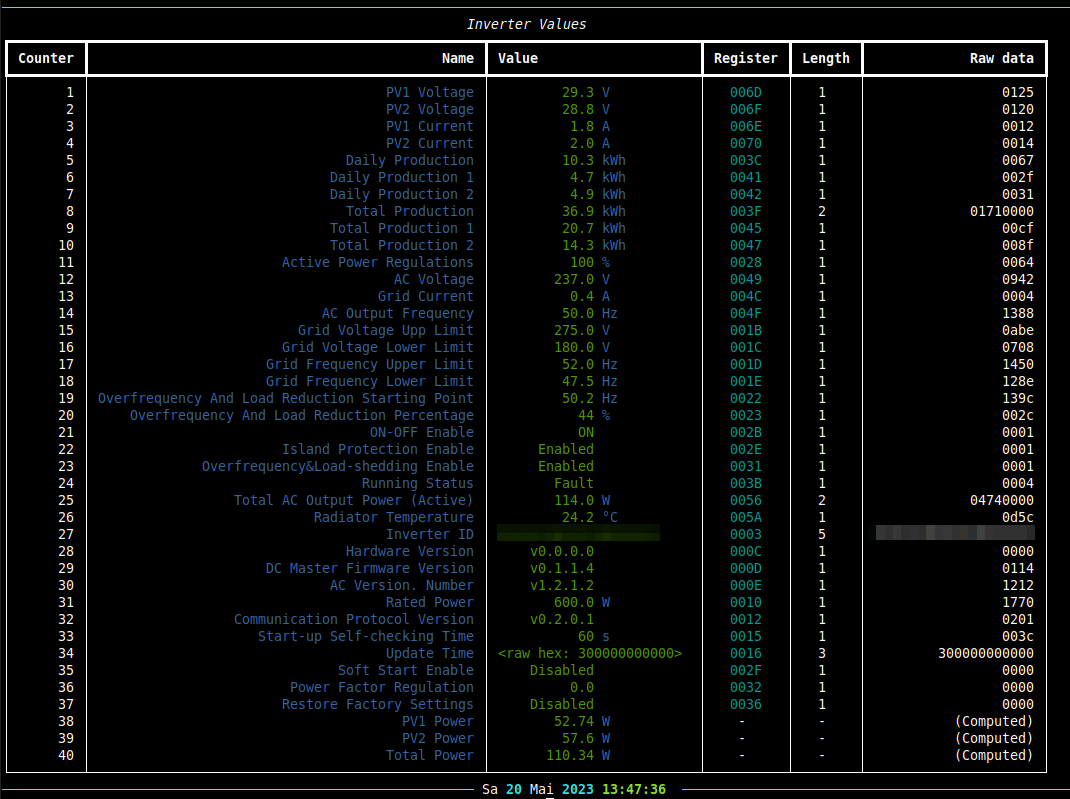
Example output of print-values call:
print-at-commands
Help from ./cli.py print-at-commands --help Looks like:
Usage: ./cli.py print-at-commands [OPTIONS] [COMMANDS]...

 Print one or more AT command values from Inverter.
 Use all known AT commands, if no one is given, e.g.:
 .../inverter-connect$ ./cli.py print-at-commands
 Or specify one or more AT-commands, e.g.:
 .../inverter-connect$ ./cli.py print-at-commands WEBVER .../inverter-connect$ ./cli.py
 print-at-commands WEBVER WEBU
 e.g.: Set NTP server, enable NTP and check the values:
 .../inverter-connect$ ./cli.py print-at-commands NTPSER=192.168.1.1 NTPEN=on NTPSER NTPEN
 wait a while and request the current date time:
 .../inverter-connect$ ./cli.py print-at-commands NTPTM
 (Note: The prefix "AT+" will be added to every command)

╭─ Options ────────────────────────────────────────────────────────────────────────────────────────╮
│ *  --ip             TEXT                     IP address of your inverter [required]              │
│ *  --port           INTEGER                  Port of inverter services [default: 48899]          │
│                                              [required]                                          │
│    --verbosity  -v  INTEGER RANGE [0<=x<=3]  Verbosity level; Accepts integer value e.g.:        │
│                                              "--verbose 2" or can be count e.g.: "-vv"           │
│                                              [default: 0; 0<=x<=3]                               │
│    --help                                    Show this message and exit.                         │
╰──────────────────────────────────────────────────────────────────────────────────────────────────╯
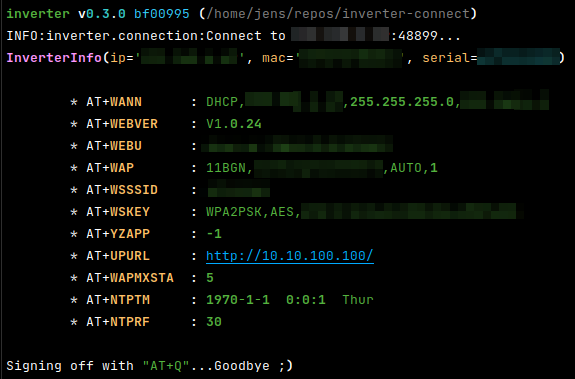
Example output of print-at-commands call:
read-register
Help from ./cli.py read-register --help Looks like:
Usage: ./cli.py read-register [OPTIONS] REGISTER LENGTH

 Read register(s) from the inverter
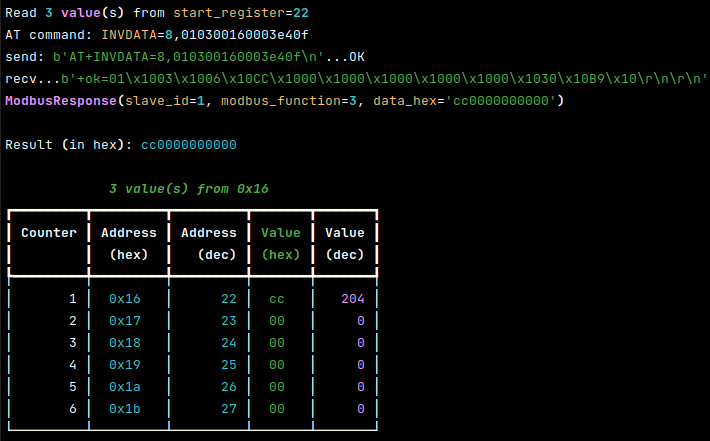
 e.g.: read 3 registers starting from 0x16:
 .../inverter-connect$ ./cli.py read-register 0x16 3
 e.g.: read the first 32 registers:
 .../inverter-connect$ ./cli.py read-register 0 32
 The start address can be pass as decimal number or as hex string, e.g.: 0x123

╭─ Options ────────────────────────────────────────────────────────────────────────────────────────╮
│ *  --ip             TEXT                     IP address of your inverter [required]              │
│ *  --port           INTEGER                  Port of inverter services [default: 48899]          │
│                                              [required]                                          │
│    --verbosity  -v  INTEGER RANGE [0<=x<=3]  Verbosity level; Accepts integer value e.g.:        │
│                                              "--verbose 2" or can be count e.g.: "-vv"           │
│                                              [default: 0; 0<=x<=3]                               │
│    --help                                    Show this message and exit.                         │
╰──────────────────────────────────────────────────────────────────────────────────────────────────╯
Example output of read-register call:
start development
For development, we have a separate CLI, just call it:
~/inverter-connect$ ./dev-cli.py --help
The output of ./dev-cli.py --help looks like:
Usage: ./dev-cli.py [OPTIONS] COMMAND [ARGS]...

╭─ Options ────────────────────────────────────────────────────────────────────────────────────────╮
│ --help      Show this message and exit.                                                          │
╰──────────────────────────────────────────────────────────────────────────────────────────────────╯
╭─ Commands ───────────────────────────────────────────────────────────────────────────────────────╮
│ check-code-style            Check code style by calling darker + flake8                          │
│ coverage                    Run and show coverage.                                               │
│ create-default-settings     Create a default user settings file. (Used by CI pipeline ;)         │
│ fix-code-style              Fix code style of all inverter source code files via darker          │
│ install                     Run pip-sync and install 'inverter' via pip as editable.             │
│ mypy                        Run Mypy (configured in pyproject.toml)                              │
│ publish                     Build and upload this project to PyPi                                │
│ safety                      Run safety check against current requirements files                  │
│ test                        Run unittests                                                        │
│ tox                         Run tox                                                              │
│ update                      Update "requirements*.txt" dependencies files                        │
│ update-test-snapshot-files  Update all test snapshot files (by remove and recreate all snapshot  │
│                             files)                                                               │
│ version                     Print version and exit                                               │
╰──────────────────────────────────────────────────────────────────────────────────────────────────╯
credits
Others before me have done good work. In particular, I have learned a lot from the following projects:
- https://github.com/s10l/deye-logger-at-cmd
- https://github.com/kbialek/deye-inverter-mqtt
- https://github.com/StephanJoubert/home_assistant_solarman
The included definitions yaml files are from:
various links
1 maintainer

Metadata
1 maintainer
Release files for inverter-connect 0.13.0
For a detailed explanation of source distributions (sdists) and built distributions (wheels), please see the package formats documentation.
Source distribution (sdist)
| File | Size | Uploaded | Provenance | Actions |
|---|---|---|---|---|
| inverter-connect-0.13.0.tar.gz | 69.5 kB | Without provenance | Details for inverter-connect-0.13.0.tar.gz |
Built distribution (wheel)
| File | Interpreter | ABI | Platform | Actions Reset |
|---|---|---|---|---|
| inverter_connect-0.13.0-py3-none-any.whl | Python 3 | none | any | Details for inverter_connect-0.13.0-py3-none-any.whl |
Total release size: 117.7 kB
Release files / inverter-connect-0.13.0.tar.gz
| Download URL | inverter-connect-0.13.0.tar.gz |
|---|---|
| Size | 69.5 kB |
| Tags | Source |
|
SHA-256 checksum How to use checksums |
c4515afa1aae3e1078fe58eaedcb74eb1fb614eb38c31a8db9e143b6b6a738c2
|
|
BLAKE2b-256 checksum How to use checksums |
22fc938266cdb52adea6015586d1458631b7d74489ec345780b17ae059581606
|
| Upload date | |
|
Uploaded using Trusted Publishing? What is trusted publishing? |
No |
| Uploaded via |
twine/4.0.2 CPython/3.10.12
|
Release files / inverter_connect-0.13.0-py3-none-any.whl
| Download URL | inverter_connect-0.13.0-py3-none-any.whl |
|---|---|
| Size | 48.2 kB |
| Tags | Python 3 |
|
SHA-256 checksum How to use checksums |
5cda6b545d898b156cb8479feb52031a0cfbb2e2bb38e839384e9176a727c38d
|
|
BLAKE2b-256 checksum How to use checksums |
920e459a138014790ca9a51f9b111c7556ce0422d3c018897a5dbe07d4aee097
|
| Upload date | |
|
Uploaded using Trusted Publishing? What is trusted publishing? |
No |
| Uploaded via |
twine/4.0.2 CPython/3.10.12
|
Security for inverter-connect 0.13.0
Provenance
Provenance describes where a file came from. On PyPI, provenance is shared via attestations, which provide a verifiable record of the build or publishing details. View details, limitations and caveats.
No provenance found
None of the files in this release were uploaded with provenance metadata.
A note on package security
PyPI is a repository for distributing packages, not a service for auditing them. While third-party security researchers and our staff do their best to detect and remove malicious packages, PyPI cannot guarantee the quality, security or suitability of any given package.
To learn more about protecting yourself from malicious actors, visit our package security documentation.














