
Codename: Invoke

Invoke is a lightweight framework that connects LLMs with real-world APIs using natural language and structured tool calls.
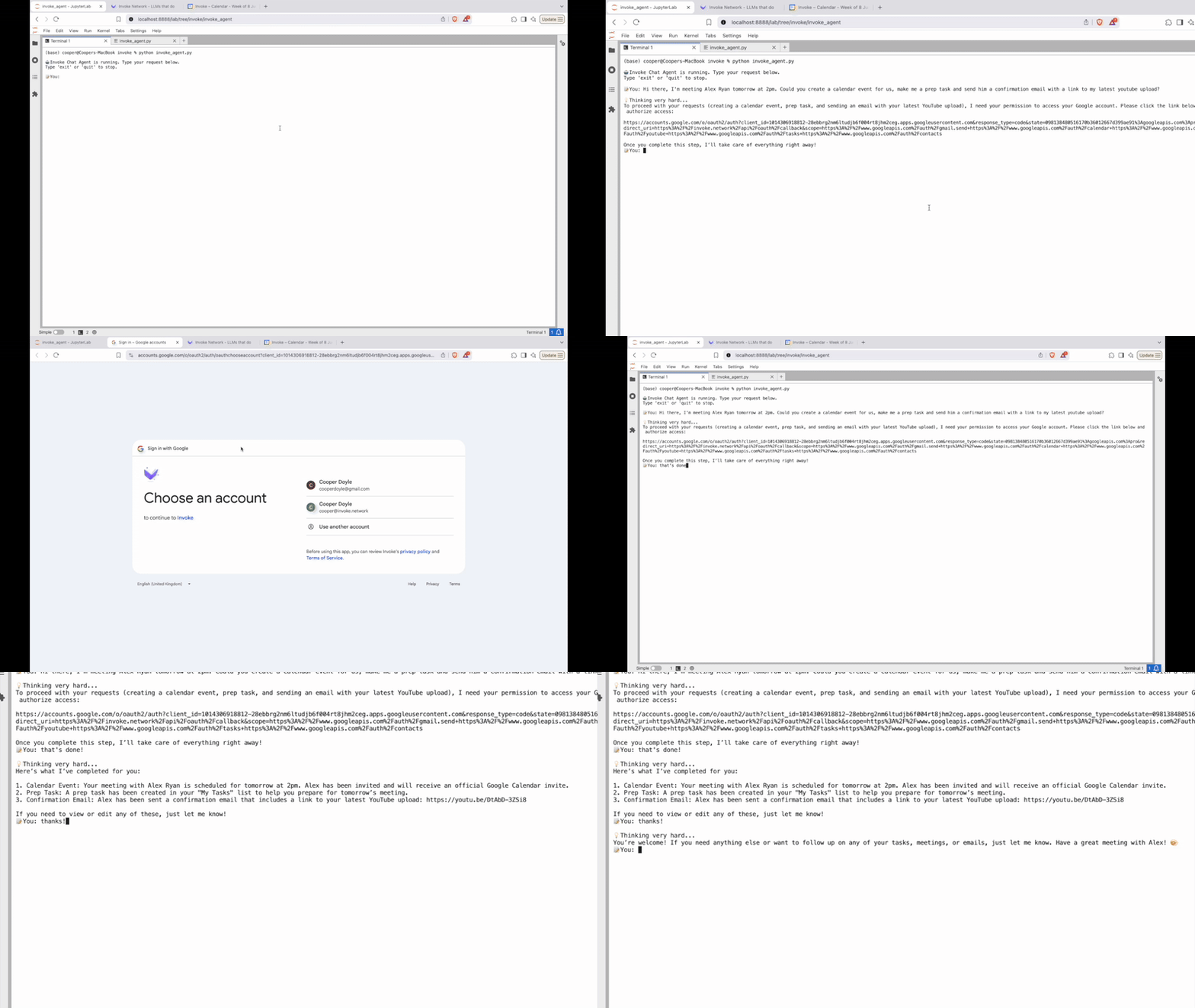
See the full demo here.

📦 Installation
pip install invoke-agent
🚀 Quickstart
from langchain_openai import ChatOpenAI
from invoke_agent.agent import InvokeAgent

# Use GPT-4.1 for best results
llm = ChatOpenAI(model="gpt-4.1")
# Pass built-in aliases, file paths, or URLs; or omit to auto-load agents_map.yaml
invoke = InvokeAgent(llm, agents=["google-calendar", "./custom/weather.json"])

while True:
    user_input = input("📝 You: ").strip()
    if user_input.lower() in ["exit", "quit"]:
        break
    response = invoke.chat(user_input)
    print("\n🤖", response)
🔗 LangChain Integration
For full control you can integrate with LangChain directly:
from invoke_agent.core import api_executor
from invoke_agent.context import build_context
from langchain.agents import AgentExecutor, create_tool_calling_agent
from langchain_core.prompts import ChatPromptTemplate

# Define your LLM
llm = ChatOpenAI(model="gpt-4.1")

# Build a prompt template
prompt = ChatPromptTemplate.from_messages([
    ("placeholder", "{chat_history}"),
    ("human", "{input}"),
    ("placeholder", "{agent_scratchpad}")
])

# Create the agent
agent = create_tool_calling_agent(llm=llm, tools=[api_executor], prompt=prompt)
executor = AgentExecutor(agent=agent, tools=[api_executor], verbose=True)

# Invoke with context containing your integrations
result = executor.invoke({
    "input": "What's the weather in Paris?",
    "chat_history": build_context(agents=["open-meteo"])
})
print(result["output"])
🛠️ Features
- 🌐 Access any HTTP API using natural language.
- 🔑 Automatic OAuth and API key management.
- 🧩 Flexible integrations via JSON, or TXT definitions.
- 🤖 Works with any LangChain-compatible LLM (we recommend GPT-4.1).
📑 Defining Integrations
You can specify integrations via the agents parameter:
- Built-in aliases: e.g.
"google-calendar","open-meteo" - File paths or URLs: direct references to
.jsonor.txtdefinitions - Explicit mappings:
{ "my-calendar": "./calendar.json" }
# All valid:
invoke = InvokeAgent(llm, agents=[
  "google-calendar",
  "https://example.com/my_agents.txt",
  {"custom-weather": "./agents/weather.json"}
])

# Or omit to load './agents_map.yaml' if present:
invoke = InvokeAgent(llm)
📘 agents.json / agents.txt
- agents.json is a structured schema defining tool names, URLs, methods, parameters, headers, and auth.
- agents.txt is the Markdown-rendered version produced by
render_agents_txt(), used in the system prompt.
{
  "agent": "gmail",
  "label": "Gmail API",
  "base_url": "https://www.googleapis.com",
  "auth": {"type": "oauth", "code": "i"},
  "endpoints": [ /* ... */ ]
}
🔐 Authorization
- None: no auth.
- api_key:
api_key(Locally-managed API key) - oauth:
oauth::i(Invoke-managed OAuth flow)
Override per-endpoint using auth_code. When specified, it overrides the top-level auth.
✅ Usage Patterns
- Auto YAML: omit
agentsto loadagents_map.yamlif available. - Explicit list: pass aliases, file paths, or mappings.
- Custom context: override system prompt via
contextargument.
📚 Invoke Documentation
Here’s how the pieces fit together:
      ┌─────────┐        ┌─────────────┐
      │ auth.py │───────▶︎│   core.py   │
      └─────────┘        └──────┬──────┘
                                │
                                ▼
      ┌───────────┐      ┌─────────────┐
      │context.py │─────▶︎│   agent.py  │
      └───────────┘      └─────────────┘
           ▲
           │
      ┌────────────┐     ┌─────────────┐
      │compile.py  │◀︎────┤ agents.json │
      └────────────┘     └─────────────┘
Each file plays a specific role:
| Module | Description |
|---|---|
agent.md |
How to instantiate and use the InvokeAgent |
core.md |
Core logic for API execution |
io.md |
Interface for prompts, logs, and OAuth code entry |
context.md |
Builds runtime context using agents.json and templates |
compile.md |
Converts agents.json into readable agents.txt |
auth.md |
Guide to adding custom OAuth logic (e.g. Flask server) |
agents_json.md |
Full schema spec for agents.json, with examples |
🚀 Getting Started
Jump right in with example notebooks to run your first agent with OpenAI, Claude, or Mistral.
Want to integrate a new API? Head to agents_json.md, add your agents.json and follow the prompts.
Need OAuth? See auth.md or override io.get_oauth_code().
⚙️ Ready to deploy? Use Per-User Mode
from invoke_agent.auth import set_current_user

# Set namespace before running queries:
set_current_user('current_user_id')
All OAuthManager calls now use credentials under that user_id namespace, and will never prompt interactively.
⚠️ BETA SOFTWARE — NOT FOR PRODUCTION
This project is in active development and provided as-is, for testing and evaluation purposes only. Use at your own risk. The author is not liable for any bugs, breakage, data loss, security issues, or cosmic anomalies that may arise from using this code.


1 maintainer

Metadata
1 maintainer
Release files for invoke-agent 0.1.3
For a detailed explanation of source distributions (sdists) and built distributions (wheels), please see the package formats documentation.
Source distribution (sdist)
| File | Size | Uploaded | Provenance | |
|---|---|---|---|---|
| invoke_agent-0.1.3.tar.gz | 17.7 kB | Without provenance | Details |
Built distribution (wheel)
| File | Interpreter | ABI | Platform | Reset |
|---|---|---|---|---|
| invoke_agent-0.1.3-py3-none-any.whl | Python 3 | none | any | Details |
Total release size: 34.9 kB
Release files / invoke_agent-0.1.3.tar.gz
| Download URL | invoke_agent-0.1.3.tar.gz |
|---|---|
| Size | 17.7 kB |
| Tags | Source |
|
SHA-256 checksum How to use checksums |
682d8ac7dd67bed0844c4ab801f955dc9e4228b35401937a6c8b554cc80a23b4
|
|
BLAKE2b-256 checksum How to use checksums |
a492fdab1d10d6117251b882e9db293b4eb08d79f1b99f3d3c42b473279bffdc
|
| Upload date | |
|
Uploaded using Trusted Publishing? What is trusted publishing? |
No |
| Uploaded via |
twine/6.1.0 CPython/3.9.18
|
Release files / invoke_agent-0.1.3-py3-none-any.whl
| Download URL | invoke_agent-0.1.3-py3-none-any.whl |
|---|---|
| Size | 17.2 kB |
| Tags | Python 3 |
|
SHA-256 checksum How to use checksums |
d90e7d0e7f268d761596d6462739a16628fde91f6407b55329eff8186500fb25
|
|
BLAKE2b-256 checksum How to use checksums |
2da34826a6077d9df89007f2ed12c1bb4c1e982e55e479374bca755f3ce00855
|
| Upload date | |
|
Uploaded using Trusted Publishing? What is trusted publishing? |
No |
| Uploaded via |
twine/6.1.0 CPython/3.9.18
|
Security for invoke-agent 0.1.3
Provenance
Provenance describes where a file came from. On PyPI, provenance is shared via attestations, which provide a verifiable record of the build or publishing details. View details, limitations and caveats.
No provenance found
None of the files in this release were uploaded with provenance metadata.
A note on package security
PyPI is a repository for distributing packages, not a service for auditing them. While third-party security researchers and our staff do their best to detect and remove malicious packages, PyPI cannot guarantee the quality, security or suitability of any given package.
To learn more about protecting yourself from malicious actors, visit our package security documentation.














