
PowerShell obfuscation through stacked junk logic, dead code, and variable chaos.

Project description
Invoke-Junkpile
Built to execute, not to be understood...
Overview
Project on Github: https://github.com/bobby-tablez/Invoke-Junkpile
Invoke-Junkpile is a Python-based tool that takes clean PowerShell scripts and transforms them into an entropic mess of stacked polymorphic variables, junk code, and obfuscated logic through randomization. The generated code is designed to be obfuscated while not appearing obfuscated. Designed for stealth, this tool aims to evade static detection signatures, confuse reverse engineers, and wreak havoc on basic string-matching defenses and entropy checks. In the end, it outputs fully functional, heavily obfuscated PowerShell code.
This was tested on a wide range of PowerShell scripts which worked in 99% of cases (see limitations below). This includes very large and complex scripts and scripts containing assemblies.
Features
- Base64 encoding: done prior to obfuscation to preserve functionality.
- Obfuscated chunking: Script is split into chunks assigned to randomly named variables.
- Chunk stacking: Variable groups are randomly joined (2–7 chunks per assignment).
- Realistic junk variables: Looks like legit PowerShell, using believable cmdlets and parameters.
- Dead code injection: Includes random try/catch, loops and dummy assignments throughout.
- Random execution obfuscation: Obfuscated reconstruction and execution of the final payload.
- Blend-in obfuscation: Random whitespace, variable names and syntax constructs enhance stealth.
Example Usage
python Invoke-Junkpile.py -f ./input.ps1 -o ./output_obfuscated.ps1
Or using an inline command:
python Invoke-Junkpile.py -c "Get-Process | Where-Object { $_.CPU -gt 100 }"
With debug output:
python Invoke-Junkpile.py -f ./input.ps1 -o ./obf.ps1 --debug
Output Example (Truncated)
$test01 = 6
${Read-Host -ArgumentList -Path \\Backups && ($gstknk)} = "ZSgk";${Compress-Archive -InputFormat -ComputerName $server_ip_09 && ($amicpk)} = "0LCRu";

for ($i = 0; $i -lt 9; $i++) { $nextvar = $i }

$Win32_count = 4

$randIndex = Get-Random -Minimum 2 -Maximum 17
${Expand-Archive -Force -Uri office365.com/?auth=1 && ($kiings)} = "sKSA=";

while ($null) { $run = 9; Start-Sleep -Seconds 6 }

$backupcount = 6
try { $void = Get-Random -Minimum 7 -Maximum 11 } catch { $void = $null }


${Get-ChildItem -ErrorAction SilentlyContinue -LogName Windows PowerShell && ($calran)} = @()
${Get-ChildItem -ErrorAction SilentlyContinue -LogName Windows PowerShell && ($calran)} += @(${Remove-Item -ErrorAction SilentlyContinue -ComputerName $dc_08 && ($eknrb)}, ${Invoke-WebRequest -OutputFormat -LogName Setup && ($egbe)}, ${Write-Output -Force -Name CcmExec && ($bsle)}, ${Write-Host -InputFormat -LogName Application && ($npnpfb)}, ${Restart-Service -Debug -Seconds 10 && ($enfmh)}, ${Read-Host -Debug -Seconds 14 && ($fclclb)}, ${Import-Module -ErrorAction SilentlyContinue -Name powershell && ($gblslr)})

$randIndex = Get-Random -Minimum 0 -Maximum 11

for ($j = 0; $j -lt 0; $j++) { $final += $j }
Command-Line Arguments
| Flag | Description |
|---|---|
-f, --file |
Path to the input PowerShell script |
-c, --command |
Inline PowerShell command to obfuscate |
-o, --output |
Path to save the obfuscated output |
--debug |
Enables debug output for development |
How It Works
Obfuscation Phase:
- Comment Stripping: All lines with
#comments are removed. - Base64 Encoding: The original PowerShell script is encoded as a single base64 string.
- Chunking: That string is split into randomized-sized segments.
- Variable Generation: Each chunk is assigned to a randomly named variable that mimics legit cmdlet/parameter combos.
- Stacking: Chunks are grouped (typically 2–7 per line) to create the illusion of standard logic flow.
- Final Array: The chunks are combined into an array and then joined into a single base64 string variable.
- Execution Line: The joined base64 is decoded back into the original script using a stealthy and obfuscated
[Text.Encoding]::UTF8.GetString()expression, which is piped intoIEX.
Execution Phase:
- PowerShell processes each fake variable assignment.
- Junk variables and dead code execute without effect.
- The final base64 string is reconstructed and decoded.
- The resulting original PowerShell code is executed via
IEX.
This creates a layered illusion of complexity while keeping the actual behavior intact.
VirusTotal Comparison
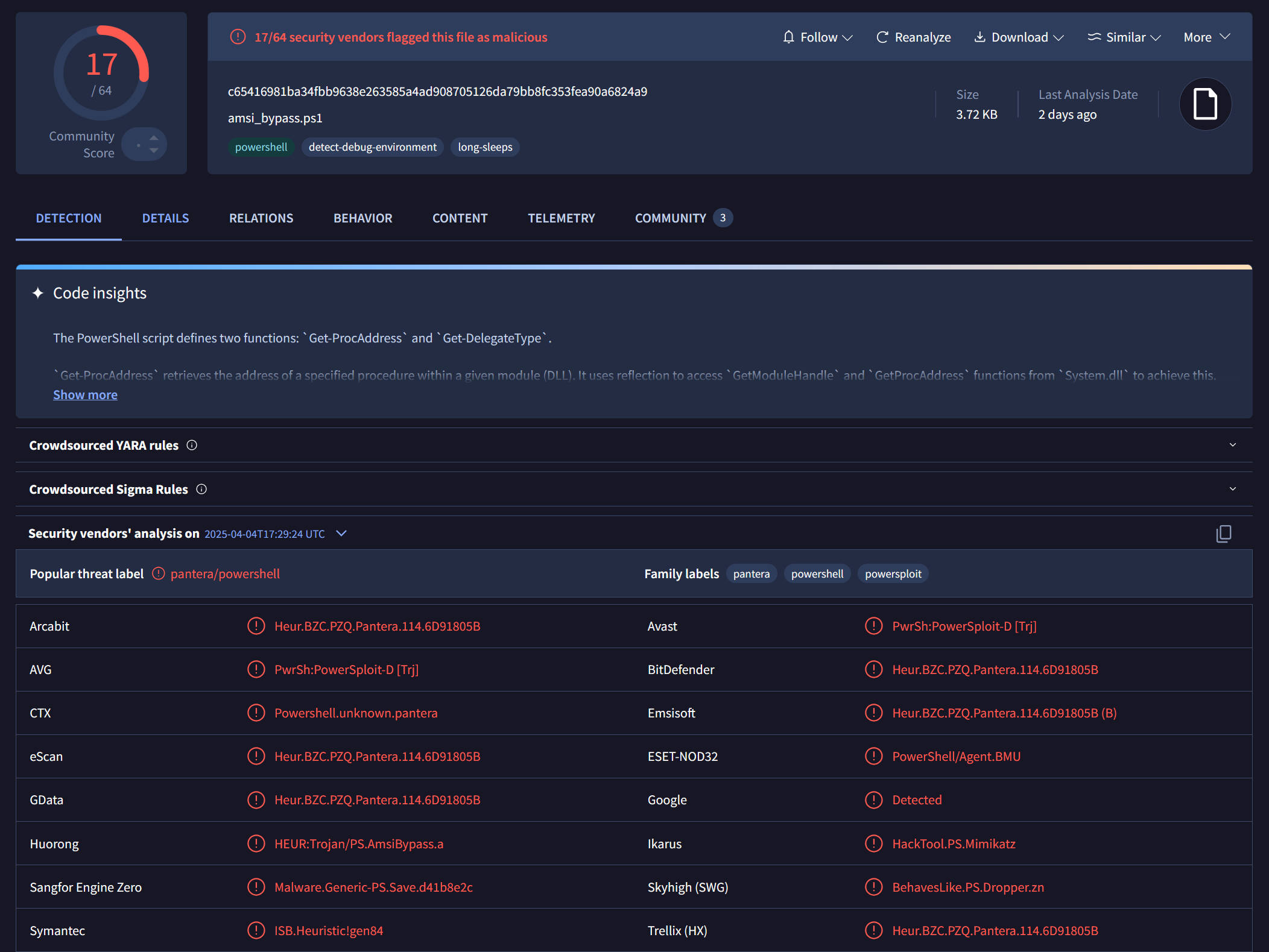
The power of obfuscation—visualized. The sample used was the "Using Reflection" script found over at https://github.com/S3cur3Th1sSh1t/Amsi-Bypass-Powershell
Original Script (Unobfuscated AMSI Bypass)
This sample was detected by numerous engines: c65416981ba34fbb9638e263585a4ad908705126da79bb8fc353fea90a6824a9
Invoke-Junkpile Obfuscated Script
After running the same script through Invoke-Junkpile: 3b5602182826d17beeac8ebb204950f6fe4a85809c91e38bd5dff7e46e684167
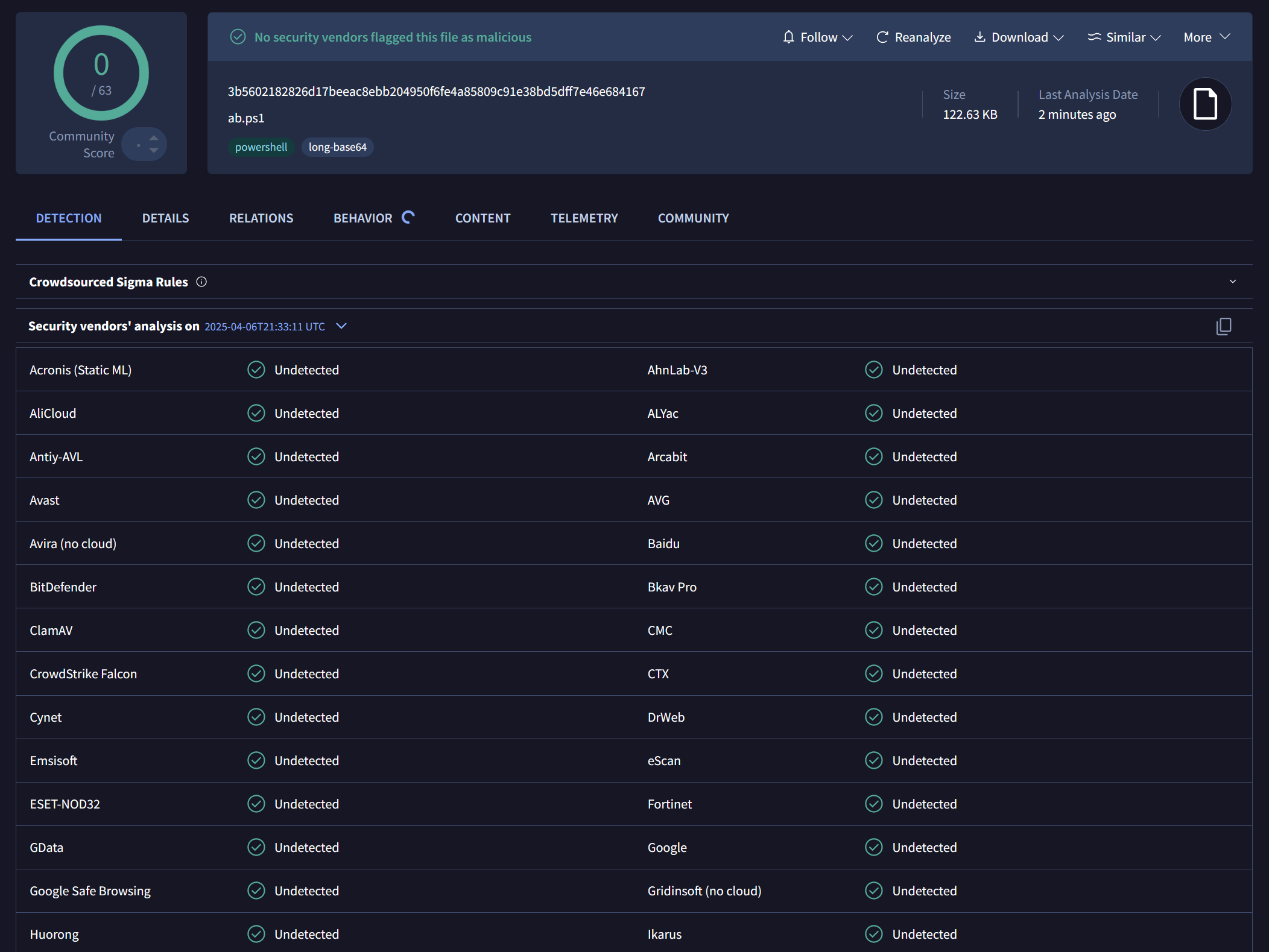
✅ 0 / 63 detections
Heavily obfuscated, yet still fully functional.
Limitations / Drawbacks
- ❌ Does not currently support:
- Scripts with very large inline binaries or images may not work properly (some did, some didn't)
- Increases script size.
Use Cases
- Testing SIEM detection logic
- Evading static detection for red team scripts
- Teaching or demonstrating PowerShell obfuscation techniques
Deobfuscation
If you know what to look for, it shouldn't be too bad if you allow the PowerShell interpreter to do most of the work for you.
- Identify the variable that gets invoked using PowerShell invoke expressions (iex). It will be near the bottom.
- Replace the invoke with Write-Host to print the contents of the variable.
- You'll get Base64 echoed upon script excution. Use your favorite command line utility or online utility such as Cyberchef to decode it.
- Profit!
To-do
More randomly generated obfuscation around the Base64 execution and invoke expression. More to come!
Disclaimer
This tool is intended for educational and research purposes only. Use responsibly and ethically.
Release history Release notifications | RSS feed


Download files
Download the file for your platform. If you're not sure which to choose, learn more about installing packages.
Source Distribution
Built Distribution
Filter files by name, interpreter, ABI, and platform.
If you're not sure about the file name format, learn more about wheel file names.
Copy a direct link to the current filters
File details
Details for the file invoke_junkpile-1.0.3.tar.gz.
File metadata
- Download URL: invoke_junkpile-1.0.3.tar.gz
- Upload date:
- Size: 9.6 kB
- Tags: Source
- Uploaded using Trusted Publishing? No
- Uploaded via: twine/6.1.0 CPython/3.13.2
File hashes
| Algorithm | Hash digest | |
|---|---|---|
| SHA256 |
5aa004dda9760e50dd078a368707e233ab4b0e279601153a3f451cfa1a53bed8
|
|
| MD5 |
32cfb63ed54b2dcac4a4b248487ff812
|
|
| BLAKE2b-256 |
831780a43ca19a45b3dcff3e3741652d09164b9a79c19e500d1aee80e36a0458
|
File details
Details for the file invoke_junkpile-1.0.3-py3-none-any.whl.
File metadata
- Download URL: invoke_junkpile-1.0.3-py3-none-any.whl
- Upload date:
- Size: 9.7 kB
- Tags: Python 3
- Uploaded using Trusted Publishing? No
- Uploaded via: twine/6.1.0 CPython/3.13.2
File hashes
| Algorithm | Hash digest | |
|---|---|---|
| SHA256 |
db65319d990b1b1b3c6f7cb075daf68687d1c92ef3d2b5bf336df1b8e8b61356
|
|
| MD5 |
42417d4694b60368a150f4afb735e3f5
|
|
| BLAKE2b-256 |
0274e4cc824a10b688fceb94e88c5c3f9fc07027c71286ec7d1efff2d9b05c26
|






