

Voice Isolator
Open-license (Apache-2.0) 48 kHz voice isolation for noisy speech recordings and live audio.

TL;DR
Inworld Voice Isolator v1 ships as two models that share one architecture:
voice-isolator-v1 |
voice-isolator-v1-realtime |
|
|---|---|---|
| made for | recorded audio and anything not latency-sensitive, at the best quality | live audio, as a stream in your pipeline or production |
| how it runs | offline: every frame sees its whole 8 s chunk | a causal stream with 20 ms of look-ahead |
| parameters | 64M | 58M |
Use them for cleaning recordings before playback or publication, curating speech datasets and voice pipelines where the speaker's identity must survive. With the realtime model, use them for live calls and streams. Subtract the isolated voice from the input to extract background noise or a backing-track residual for vocals/music separation.
They are not a speaker selector or a restoration model. Restoration is planned for version 2 (see Plans), stay tuned!
Quick start
Using a coding agent? Point it at the setup section of AGENTS.md: it installs the package, checks the machine with voice-isolate-doctor and cleans a first file.
pip install inworld-voice-isolation
# or from a clone: git clone https://github.com/inworld-ai/voice-isolator && cd voice-isolator && pip install -e .

# a noisy example; a clone also has it at demo/examples/sample_14.wav
curl -LO https://raw.githubusercontent.com/inworld-ai/voice-isolator/main/demo/examples/sample_14.wav

# offline isolation (downloads the offline model on first use):
# the voice goes to sample_14_clean.wav and the removed background
# to sample_14_clean_background.wav, beside it
voice-isolate sample_14.wav sample_14_clean.wav
Both are float32 WAVs at 48 kHz, with their original levels preserved; together they reconstruct the aligned mono input.
Use --output-sr 0 to keep the input rate, --background noise.wav to choose the background path for one file, or --no-background to save only the voice.
from inworld import voice_isolation

# isolate a recording offline
offline = voice_isolation.VoiceIsolator("inworld/voice-isolator")
wav, sample_rate = voice_isolation.load_audio("sample_14.wav")
voice = offline.isolate(wav, sample_rate)
voice_isolation.save_audio("sample_14_clean.wav", voice, sample_rate, subtype="FLOAT")
voice_isolation.save_audio("sample_14_clean_background.wav", wav - voice, sample_rate, subtype="FLOAT")  # what was removed
Streaming
The realtime model isolates the voice as the audio arrives, with 20 ms of look-ahead:
import torch
from inworld import voice_isolation

live = voice_isolation.VoiceIsolator("inworld/voice-isolator",
                                     mode="streaming", lookahead_frames=2)
session = live.stream()                             # takes 48 kHz mono, in pieces of any size
wav, sample_rate = voice_isolation.load_audio("sample_14.wav")  # 48 kHz mono, standing in for a live source
voice = []
for start in range(0, len(wav), 960):               # 20 ms at a time, as a microphone delivers it
    voice.append(session.push(wav[start:start + 960]))  # the samples that are final: play or send them
voice.append(session.flush())                       # the rest, once the source ends
voice_isolation.save_audio("sample_14_streamed.wav", torch.cat(voice), sample_rate)
The streaming CLI writes only the isolated voice, after the whole file has gone through:
voice-isolate sample_14.wav sample_14_streamed.wav --mode streaming --lookahead 2
inworld/voice-isolator is the weights' repository, huggingface.co/inworld/voice-isolator: they download on first use and are checked against the checksums in the registry.
The mode picks the checkpoint: voice-isolator-v1 offline, voice-isolator-v1-realtime for streaming.
--model and VoiceIsolator(...) also take either name, a local checkpoint path or an hf://<org>/<repo>/<file>[@<revision>] location.
Python 3.10 or later and PyTorch 2.1 or later; pip install "inworld-voice-isolation[fast]" adds the CUDA Mamba kernels.
CUDA is used when available, Apple's Metal backend (mps) on an Apple-silicon Mac with PyTorch 2.6 or later, and the CPU otherwise; --device picks one.
The interactive demo has Offline and Online tabs, with both models loaded at startup. Offline processes files and samples into voice and background audio. Online streams the microphone for up to 60 seconds, updating waveforms and spectrograms as you speak; capture pauses before playback. The background is whatever the model removed and can contain voice leakage.
The audio cleanup notebook walks through a first evaluation: clean a noisy sample, compare it with the original by ear, then try your own recording.
Hardware
Tested on NVIDIA Ampere, Hopper and Blackwell GPUs (A100, H100, B200 and B300) and on CPU. Smaller GPUs are not tested yet (see Plans).
The VIBE benchmark
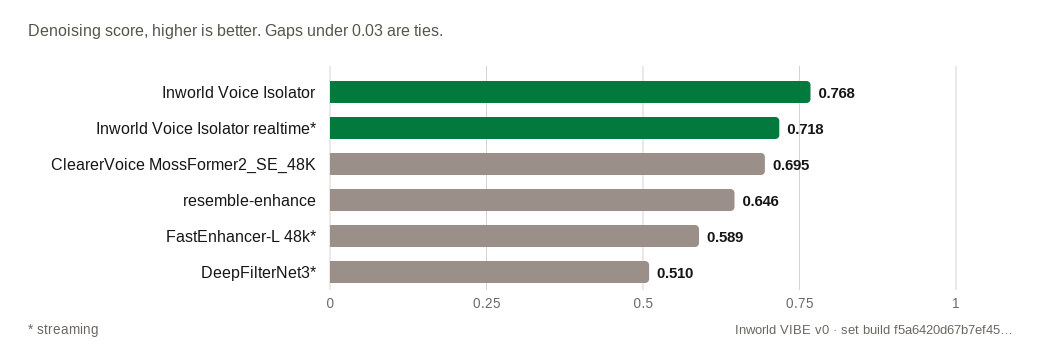
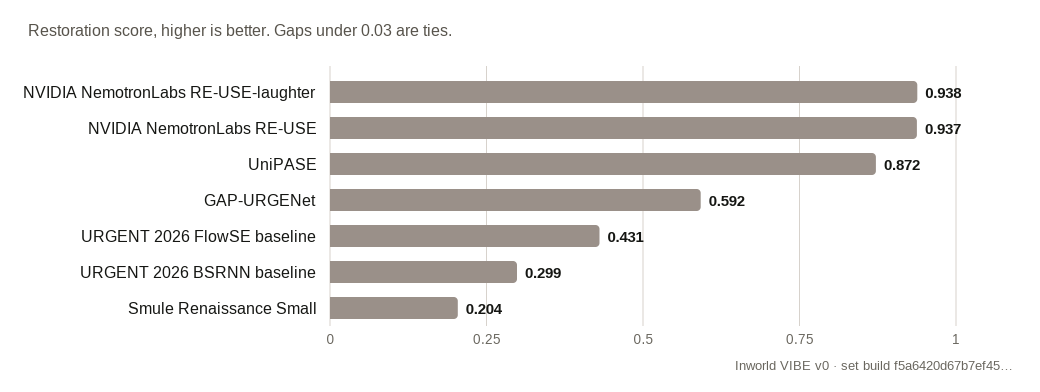
Inworld VIBE (Voice Isolation Benchmark and Evals) ranks 48 kHz voice isolators on two boards. A system that puts more than 10 dB more energy above a band-limited input's band than inside it is ranked on restoration; every other system is ranked on denoising. Inworld scores every system on its internal evaluation set, which is not distributed.
How the systems are scored and what the scores mean.
Architecture
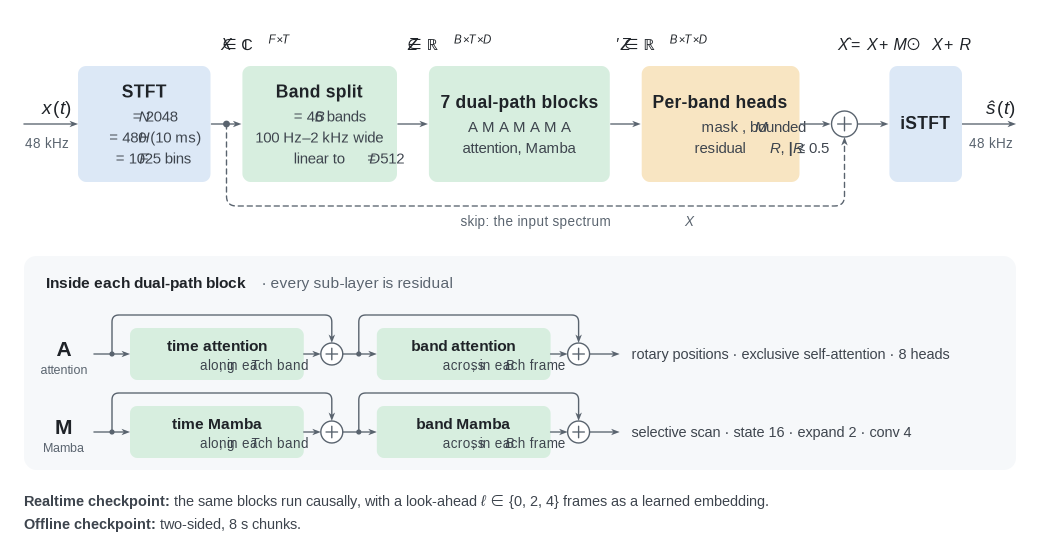
See the model card for architecture details and training data.
Plans
- Version 1, denoising only: two checkpoints, one for recordings and one for live audio.
- Version 2: one model that runs offline or streaming and does denoising and restoration. It keeps removing what is around the voice, and restores what the recording lost when asked to. It will be scored on both VIBE boards.
- Testing on smaller GPUs.
- On-device support (beyond Apple silicon).
- Allow natural language prompting.
License
Code and weights are Apache-2.0 (LICENSE). Third-party notices are in NOTICE.
How to contribute
Everyone is welcome to use the model however they like and to make it better in any way they see fit! Ask your agent to open a PR and we'll take a look. See CONTRIBUTING.md for setup, tests and bug reports, and AGENTS.md for coding conventions.
Built for people with ❤️ by Inworld.
Metadata
Release files for inworld-voice-isolation 1.0.0
For a detailed explanation of source distributions (sdists) and built distributions (wheels), please see the package formats documentation.
Source distribution (sdist)
| File | Size | Uploaded | Provenance | Actions |
|---|---|---|---|---|
| inworld_voice_isolation-1.0.0.tar.gz | 62.5 kB | With provenance | Details for inworld_voice_isolation-1.0.0.tar.gz |
Built distribution (wheel)
| File | Interpreter | ABI | Platform | Actions Reset |
|---|---|---|---|---|
| inworld_voice_isolation-1.0.0-py3-none-any.whl | Python 3 | none | any | Details for inworld_voice_isolation-1.0.0-py3-none-any.whl |
Total release size: 120.5 kB
Release files / inworld_voice_isolation-1.0.0.tar.gz
| Download URL | inworld_voice_isolation-1.0.0.tar.gz |
|---|---|
| Size | 62.5 kB |
| Tags | Source |
|
SHA-256 checksum How to use checksums |
24117ea5837c71a15aa2f426dfcdc73f5766e5123a8860ff00cb5c1a07ab749a
|
|
BLAKE2b-256 checksum How to use checksums |
fab03ff3faadfba4e9b801dee4f9e23c0cc14b2ef812e77e2057fb42e770937d
|
| Upload date | |
|
Uploaded using Trusted Publishing? What is trusted publishing? |
Yes |
| Uploaded via |
twine/7.0.0 CPython/3.13.16
|
Provenance
Provenance describes where a file came from. On PyPI, provenance is shared via attestations, which provide a verifiable record of the build or publishing details. View details, limitations and caveats.


PyPI Publish Attestation
PyPI verified that this artifact, at this checksum, originated from the publisher listed below.
Signed by GitHub Actions, verified by PyPI on Nov 18, 2026.
Transparency logRelease files / inworld_voice_isolation-1.0.0-py3-none-any.whl
| Download URL | inworld_voice_isolation-1.0.0-py3-none-any.whl |
|---|---|
| Size | 58.1 kB |
| Tags | Python 3 |
|
SHA-256 checksum How to use checksums |
0691e3a536f6f66dd32163355dd16324bfbe01a50c23fd3294df28b01ce3df0b
|
|
BLAKE2b-256 checksum How to use checksums |
712cb6ca545c08adbbb877367bf8c7228390f787f18c9d2730877216fdc05b2e
|
| Upload date | |
|
Uploaded using Trusted Publishing? What is trusted publishing? |
Yes |
| Uploaded via |
twine/7.0.0 CPython/3.13.16
|
Provenance
Provenance describes where a file came from. On PyPI, provenance is shared via attestations, which provide a verifiable record of the build or publishing details. View details, limitations and caveats.
PyPI Publish Attestation
PyPI verified that this artifact, at this checksum, originated from the publisher listed below.
Signed by GitHub Actions, verified by PyPI on Nov 18, 2026.
Transparency logSecurity for inworld-voice-isolation 1.0.0
Provenance
Provenance describes where a file came from. On PyPI, provenance is shared via attestations, which provide a verifiable record of the build or publishing details. View details, limitations and caveats.
Full provenance
Both files in this release have been uploaded with provenance metadata.
Attestation for inworld_voice_isolation-1.0.0.tar.gz
PyPI Publish Attestation
PyPI verified that this artifact, at this checksum, originated from the publisher listed below.
Signed by GitHub Actions, verified by PyPI on Nov 18, 2026.
Transparency logA note on package security
PyPI is a repository for distributing packages, not a service for auditing them. While third-party security researchers and our staff do their best to detect and remove malicious packages, PyPI cannot guarantee the quality, security or suitability of any given package.
To learn more about protecting yourself from malicious actors, visit our package security documentation.













