
IoddCom IO-Link master checker Gui

Project description
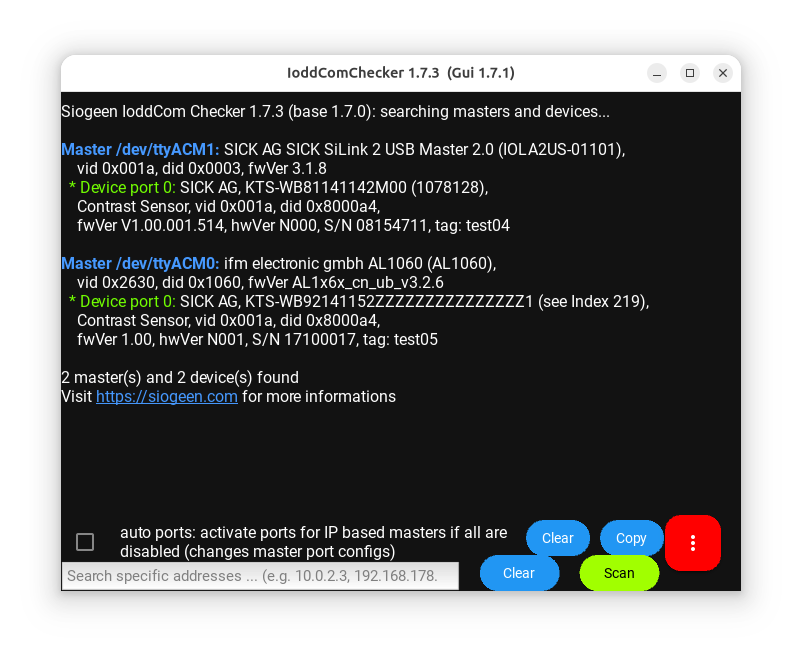
This is the GUI for checking your IO-Link masters working with Siogeen IoddCom.
For using CLI only use IoddComChecker
Install
Use pip to install IoddComCheckerGui:
>>> pip install IoddComCheckerGui
Usage
To start the Gui execute:
>>> python -m siogeen.tools.gui.IoddComChecker
For full package, requests and support go to https://siogeen.com
Copyright 2017-2023 Siogeen UG (limited liability)
Supported Platforms
OS |
Python 2.7, 3.4-3.5 |
Python 3.6 - 3.11 |
|---|---|---|
Windows |
x [2] |
|
Linux |
x [2] |
|
Raspberry |
3.7, 3.9 |
|
macOS |
3.8-3.11 (Intel) |
Support for other platforms on request.
Supported operating systems and IO-Link masters
Table of supported IO-Link masters for specific operating systems (OS):
Master |
supported OS |
|||
|---|---|---|---|---|
Windows |
Linux |
Raspberry Pi |
macOS 64 [3] |
|
x |
x |
x |
x |
|
TMG ethernet based masters [6] |
x |
x |
x |
x |
ifm ethernet based masters [7] |
x |
x |
x |
x |
ifm USB based masters [8] |
x |
x |
x |
x |
For Windows, Linux and Raspberry Pi both, 32-bit and 64-bit versions are available.
Support for other masters on request.
Release history Release notifications | RSS feed


Download files
Download the file for your platform. If you're not sure which to choose, learn more about installing packages.
Source Distributions
Built Distribution
Filter files by name, interpreter, ABI, and platform.
If you're not sure about the file name format, learn more about wheel file names.
Copy a direct link to the current filters
File details
Details for the file ioddcomcheckergui-1.6.1-py3-none-any.whl.
File metadata
- Download URL: ioddcomcheckergui-1.6.1-py3-none-any.whl
- Upload date:
- Size: 5.6 kB
- Tags: Python 3
- Uploaded using Trusted Publishing? No
- Uploaded via: twine/4.0.1 CPython/3.10.7
File hashes
| Algorithm | Hash digest | |
|---|---|---|
| SHA256 |
ed1d6a4c588de2c059fc7e87e7e140d6009563ff862f9e386a61205354126c90
|
|
| MD5 |
cb2a1d521a73c00a0e829c3461814a10
|
|
| BLAKE2b-256 |
d0648dec52b299cd6c1ed4f02f2dcbec9fddec8e48ac30bebf5b94415633b1dc
|






