
iometrics

Monitor and log Network and Disks statistics in MegaBytes per second.
Install
pip install iometrics
Usage
Pytorch-lightning integration
from pytorch_lightning import Trainer
from iometrics.pytorch_lightning.callbacks import NetworkAndDiskStatsMonitor

net_disk_stats = NetworkAndDiskStatsMonitor()

trainer = Trainer(callbacks=[net_disk_stats])
Metrics generated
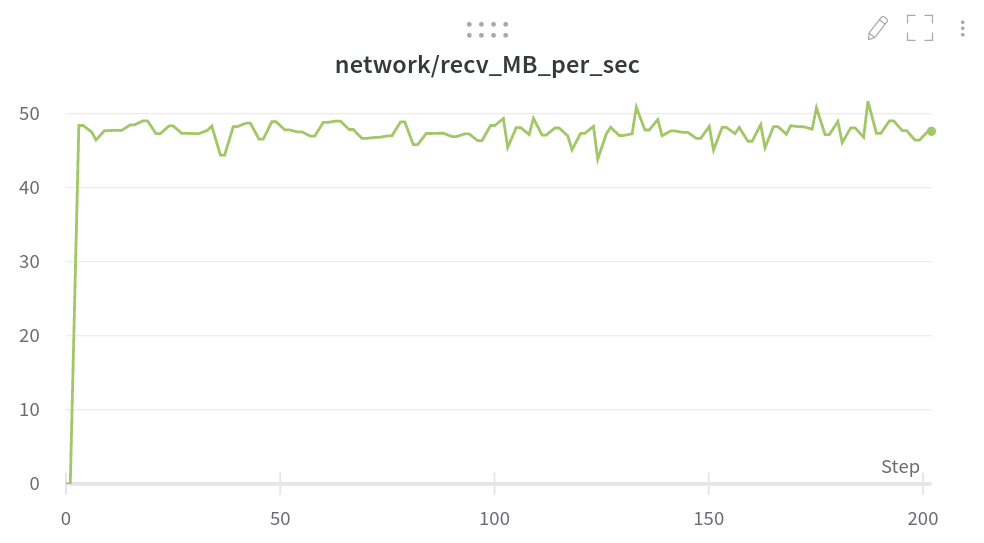
- network/recv_MB_per_sec – Received MB/s on all relevant network interfaces as a SUM.
- network/sent_MB_per_sec – Sent MB/s on all relevant network interfaces as a SUM.
- disk/util% – Disk utilization percentage as the average of all disk devices.
- disk/read_MB_per_sec – Disks read MB/s as the sum of all disk devices.
- disk/writ_MB_per_sec – Disks written MB/s as the sum of all disk devices.
- disk/io_read_count_per_sec – Disks read I/O operations per second as the sum of all disk devices.
- disk/io_writ_count_per_sec – Disks written I/O operations per second as the sum of all disk devices.
Screen shot
Pure-Python implementation (zero dependencies)
Quick check
python -c 'from iometrics.example import usage; usage()'
Example output
|        Network (MBytes/s)       | Disk Util |            Disk MBytes          |           Disk I/O          |
|     Received    |     Sent      |     %     |    MB/s Read    |  MB/s Written |     I/O Read    | I/O Write |
|   val  |   avg  |  val  |  avg  | val | avg |  val   |  avg   |  val  |  avg  |   val  |   avg  | val | avg |
| ------:| ------:| -----:| -----:| ---:| ---:| ------:| ------:| -----:| -----:| ------:| ------:| ---:| ---:|
|    4.6 |    3.5 |   0.1 |   0.1 |  49 |   2 |   52.8 |    1.1 |   0.0 |   0.9 |    211 |      4 |   5 |  18 |
|    4.1 |    3.5 |   0.1 |   0.1 |  61 |   3 |   60.4 |    2.4 |  40.3 |   1.7 |    255 |     10 | 149 |  21 |
Full code
import time
from iometrics import NetworkMetrics, DiskMetrics
from iometrics.example import DUAL_METRICS_HEADER
net  = NetworkMetrics()
disk = DiskMetrics()
for i in range(100):
    time.sleep(1)
    net.update_stats()
    disk.update_stats()
    if i % 15 == 0:
        print(DUAL_METRICS_HEADER)
    row = (
        f"| {net.mb_recv_ps.val:6.1f} | {net.mb_recv_ps.avg:6.1f} "
        f"| {net.mb_sent_ps.val:5.1f} | {net.mb_sent_ps.avg:5.1f} "
        f"| {int(disk.io_util.val):3d} | {int(disk.io_util.avg):3d} "
        f"| {disk.mb_read.val:6.1f} | {disk.mb_read.avg:6.1f} "
        f"| {disk.mb_writ.val:5.1f} | {disk.mb_writ.avg:5.1f} "
        f"| {int(disk.io_read.val):4d} | {int(disk.io_read.avg):4d} "
        f"| {int(disk.io_writ.val):3d} | {int(disk.io_writ.avg):3d} "
        f"|"
    )
    print(row)
Run in a Docker container
Containers don't have access to the host's network statistics, therefore this workaround is needed.
# on the host machine (not inside the container)
iometrics replicate proc &
after you run above script in the host you should mount the /host/proc/net/dev to the container. for example:
docker run -it -v "/tmp/proc_net_dev:/host/proc/net/dev:ro" <YOURIMAGE>
Contributing
See CONTRIBUTING.md
1 maintainer

Metadata
1 maintainer
Release files for iometrics 0.0.8
For a detailed explanation of source distributions (sdists) and built distributions (wheels), please see the package formats documentation.
Source distribution (sdist)
| File | Size | Uploaded | |
|---|---|---|---|
| iometrics-0.0.8.tar.gz | 14.5 kB | Details |
Built distribution (wheel)
| File | Interpreter | ABI | Platform | Reset |
|---|---|---|---|---|
| iometrics-0.0.8-py3-none-any.whl | Python 3 | none | any | Details |
Total release size: 31.1 kB
Release files / iometrics-0.0.8.tar.gz
| Download URL | iometrics-0.0.8.tar.gz |
|---|---|
| Size | 14.5 kB |
| Tags | Source |
|
SHA-256 checksum How to use checksums |
dc0998cf6173d5ca2355a926a018cc213aa1c548d81929207c7f025a13cd2c98
|
|
BLAKE2b-256 checksum How to use checksums |
353a381e66b97ec120c89143ed1236499e51fca6d5cda6ae96f42efe73966b04
|
| Upload date | |
|
Uploaded using Trusted Publishing? What is trusted publishing? |
No |
| Uploaded via |
poetry/1.1.12 CPython/3.7.12 Linux/5.13.0-27-generic
|
Release files / iometrics-0.0.8-py3-none-any.whl
| Download URL | iometrics-0.0.8-py3-none-any.whl |
|---|---|
| Size | 16.6 kB |
| Tags | Python 3 |
|
SHA-256 checksum How to use checksums |
eba1f6f23204ea29aff74423c9895dc2fa41752e0cc76afc8eb84e7b3d362655
|
|
BLAKE2b-256 checksum How to use checksums |
b573277f00b90962df7a480014eebcd2243184c2da42c34b7616126536b76867
|
| Upload date | |
|
Uploaded using Trusted Publishing? What is trusted publishing? |
No |
| Uploaded via |
poetry/1.1.12 CPython/3.7.12 Linux/5.13.0-27-generic
|














