
A many-in-one tool for managing your Markup Language files.
What is it?
iotree is a tool for managing your Markup Language files. It is capable to write and read files in the following formats:
- JSON
- YAML
- TOML
- XML
- And soon more... 😉
The basic goal was to have a small package anyone could add to their project and use it to manage their files. It is also possible to use it as a CLI tool.
Installation
You cannot install the CLI tool separately for now. You can install it with the following command:
pip install iotree
Usage
As a CLI tool
To see what the display function can do, you can use the following command:
iotree demo
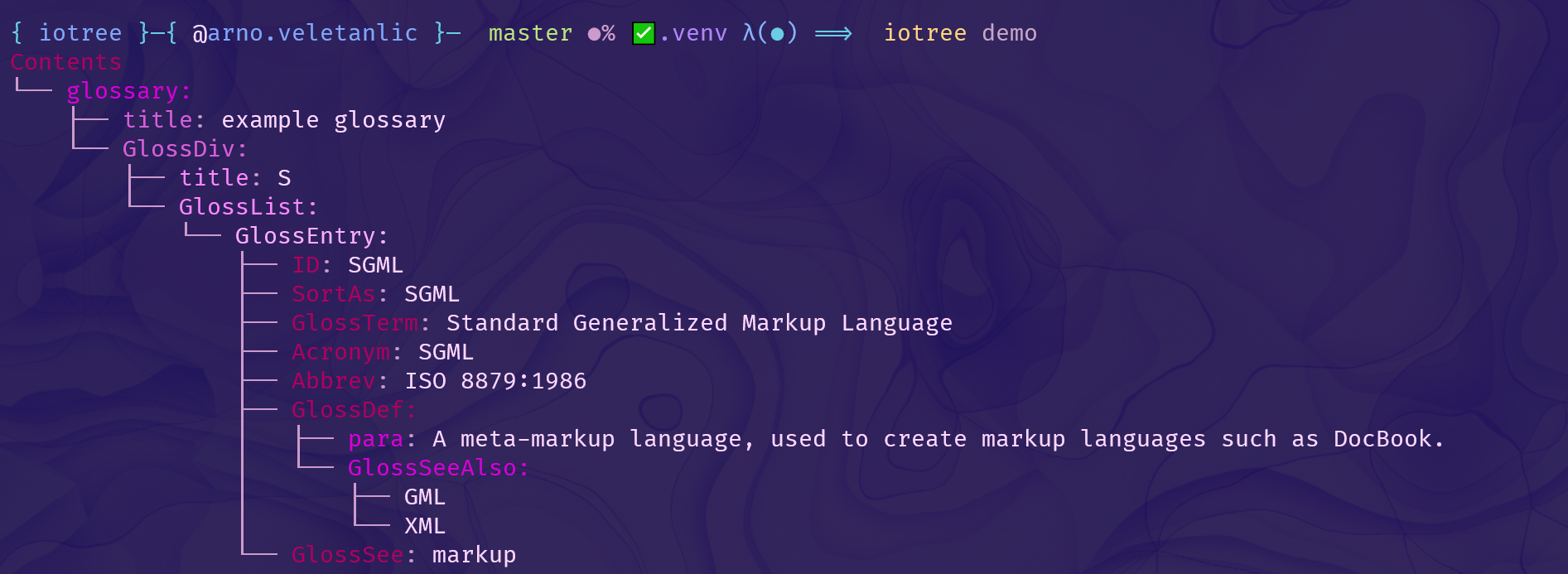
For example, the following JSON file (displayed in VSCode)
{
    "glossary": {
        "title": "example glossary",
        "GlossDiv": {
            "title": "S",
            "GlossList": {
                "GlossEntry": {
                    "ID": "SGML",
                    "SortAs": "SGML",
                    "GlossTerm": "Standard Generalized Markup Language",
                    "Acronym": "SGML",
                    "Abbrev": "ISO 8879:1986",
                    "GlossDef": {
                        "para": "A meta-markup language, used to create markup languages such as DocBook.",
                        "GlossSeeAlso": [
                            "GML",
                            "XML"
                        ]
                    },
                    "GlossSee": "markup"
                }
            }
        }
    }
}
will be displayed like this:
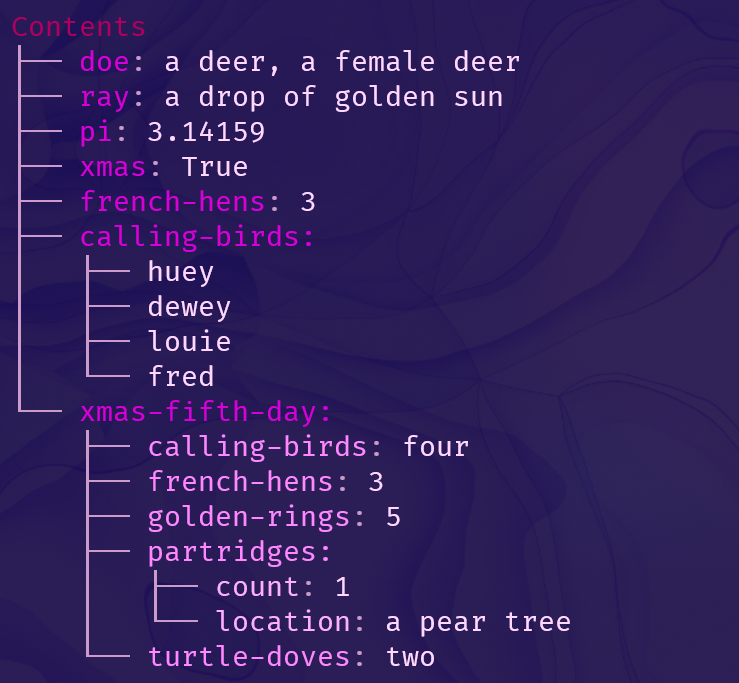
While the following YAML file (displayed in VSCode)
---
 doe: "a deer, a female deer"
 ray: "a drop of golden sun"
 pi: 3.14159
 xmas: true
 french-hens: 3
 calling-birds:
   - huey
   - dewey
   - louie
   - fred
 xmas-fifth-day:
   calling-birds: four
   french-hens: 3
   golden-rings: 5
   partridges:
     count: 1
     location: "a pear tree"
   turtle-doves: two
will be displayed like this:
Note: The CLI tool is not yet finished. It is still in development.
If this just looks like a wrapper around rich trees) to you, it almost because it is. 😉
As a CLI tool, the key difference I want to bring is the ability to configure themes and styles.
Just run the following command to interactively create a theme:
iotree config init
But if you're lazy, just use a file:
iotree config init from-json my_theme.json
For example, the following JSON file
{
    "name": "My super pseudonym",
    "username": "my.username",
    "symbol": "lgpoint",
    "theme": "bright-blue-green"
}
Does not immediately affect the display of the files. You need to use the following command:
To understand why, you can run
iotree config ls # same as iotree cfg ls
This is what the output looks like:
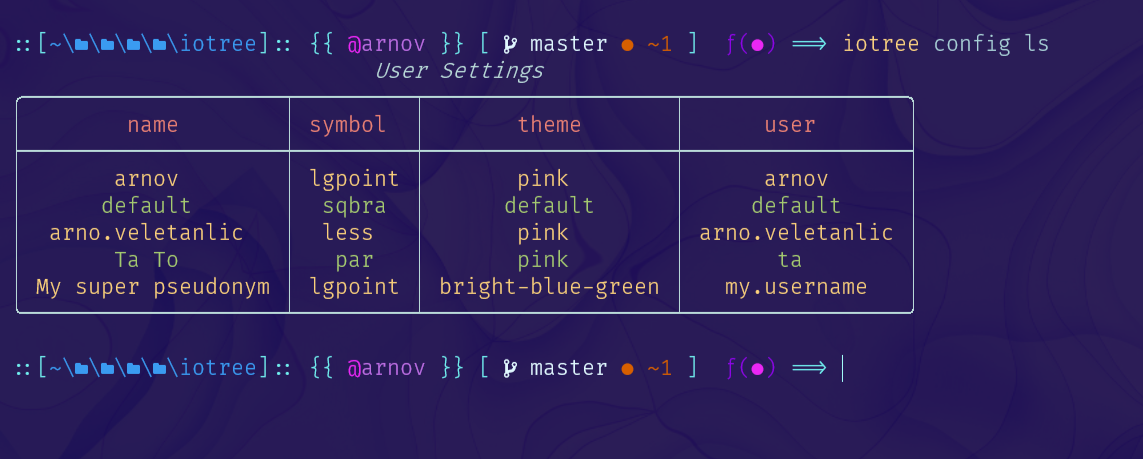
You can see that the theme is registered, but will not be used by default. The best proof of this is to ask who the current user is:
iotree cfg get last_user
#> ✅ Config found for user arnov
#> arnov
So the current user is arnov. To use YOUR theme, you need to run the following command:
iotree cfg set last_user my.username
#> 👷 Config: last_user ===> my.username
Now, if you try to render a file, you will see that the theme is used:
iotree render .\iotree\examples\example.toml
Here's what the output looks like:
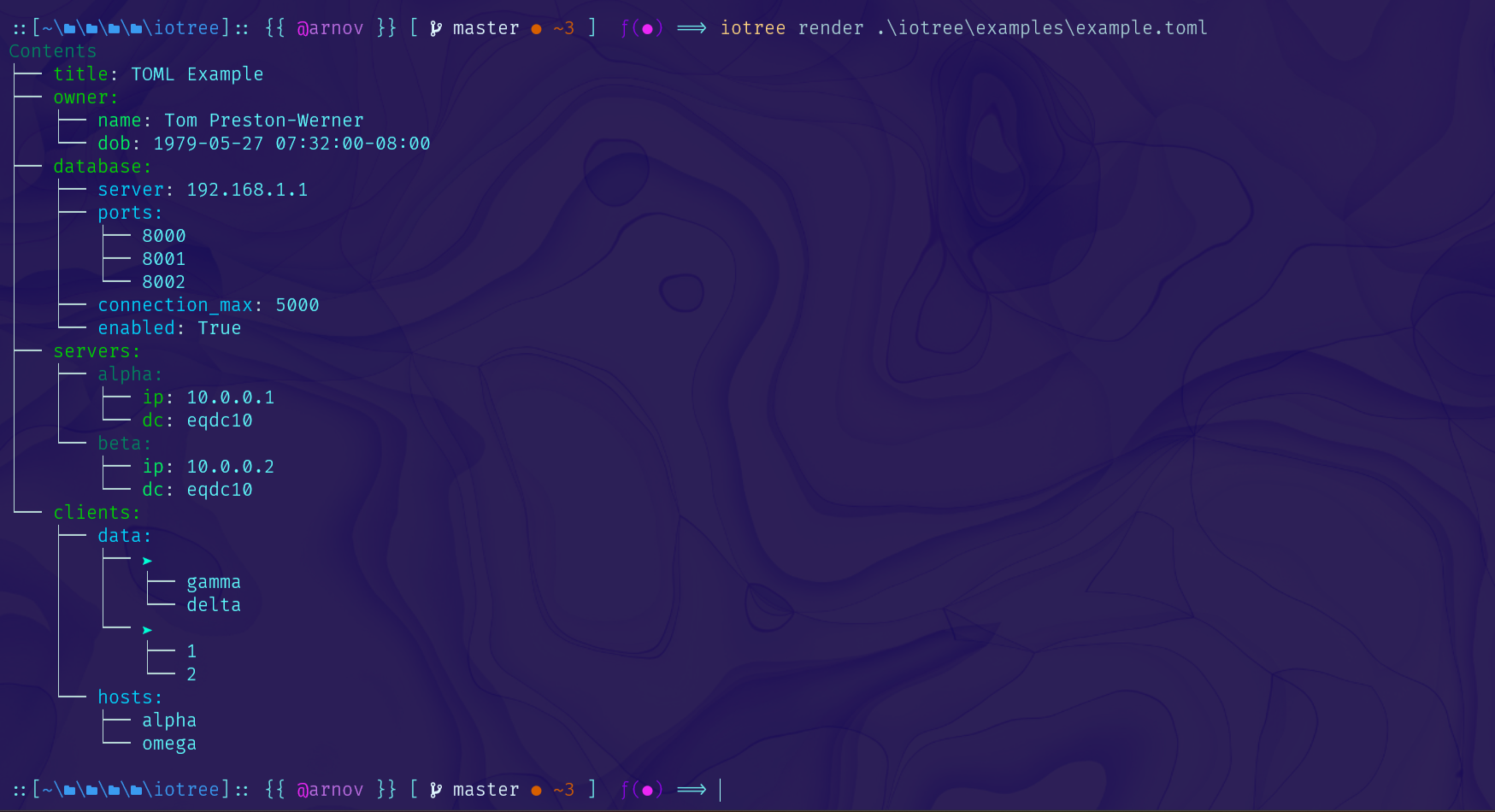
The theme is now used. 🎉🎉
As a Python package
You can use the package in your Python project. Here's an example:
from iotree.core.render import build
mydict = {
"super" : {
"dict": {
"just": {
"for": {
"example": "🤷♂️"
}
}
}
}
}
# Build the tree from the dict without hassle
tree = build(mydict) # or build(mydict, theme="my_style", symbol="my_symbol")
# Display the rich tree later
console.print(tree) # or rich.print(tree)
But there is more. You can also use the 'all in one' IO from the package:
from iotree.core.io import reader, writer

# Read a file, any extension is supported from the list

dict_one = reader.read("my_file.json")
dict_two = reader.read("my_file.yaml")
dict_three = reader.read("my_file.toml")
dict_four = reader.read("my_file.xml")
dict_five = reader.read("my_file.html")

# ... do some manipulations, like possibly merging the dicts or creating a new one

# Write the dict to a file

writer.write("my_file.json", dict_one)
writer.write("my_file.yaml", dict_two)
writer.write("my_file.toml", dict_three)
writer.write("my_file.xml", dict_four)
# writer.write("my_file.html", dict_five) # Not supported yet
Another small feature is the ability to detect the type of a file:
dict_guess = reader.read("mysterious_file.not_a_real_extension")
# if the content of the file is one of the supported types, it will be read correctly
There's also a functional package, which is not yet documented.
It allows you to compose functions while displaying rich progress using rich.progress.
Contributing
If you want to contribute, you can do so by forking the repository and creating a pull request.
You can also help me pick the new themes and symbols.
To see the possibilities, just run either of the following commands:
iotree view themes # or
iotree view symbols # or
iotree view colors
1 maintainer

Metadata
1 maintainer
Release files for iotree 0.1.22.post1
For a detailed explanation of source distributions (sdists) and built distributions (wheels), please see the package formats documentation.
Source distribution (sdist)
| File | Size | Uploaded | Provenance | Actions |
|---|---|---|---|---|
| iotree-0.1.22.post1.tar.gz | 32.2 kB | Without provenance | Details for iotree-0.1.22.post1.tar.gz |
Built distribution (wheel)
| File | Interpreter | ABI | Platform | Actions Reset |
|---|---|---|---|---|
| iotree-0.1.22.post1-py3-none-any.whl | Python 3 | none | any | Details for iotree-0.1.22.post1-py3-none-any.whl |
Total release size: 70.1 kB
Release files / iotree-0.1.22.post1.tar.gz
| Download URL | iotree-0.1.22.post1.tar.gz |
|---|---|
| Size | 32.2 kB |
| Tags | Source |
|
SHA-256 checksum How to use checksums |
088e5fd068a4e3b271251b776f0c4ad68ff74a7dab46a6698f67c9c42311130b
|
|
BLAKE2b-256 checksum How to use checksums |
724bc896949424f50ee5c81aa3dbad474e83dabd7fc4f599a934e40fe7a79320
|
| Upload date | |
|
Uploaded using Trusted Publishing? What is trusted publishing? |
No |
| Uploaded via |
poetry/1.3.2 CPython/3.9.13 Windows/10
|
Release files / iotree-0.1.22.post1-py3-none-any.whl
| Download URL | iotree-0.1.22.post1-py3-none-any.whl |
|---|---|
| Size | 38.0 kB |
| Tags | Python 3 |
|
SHA-256 checksum How to use checksums |
a51c5c325a2998227a1a63ae808531bae2817838edffa5658077722eee4b3e68
|
|
BLAKE2b-256 checksum How to use checksums |
886e4141ea72e0c4bf288045ea0f2f874b995bac1c6587b26e95af374cb0cb22
|
| Upload date | |
|
Uploaded using Trusted Publishing? What is trusted publishing? |
No |
| Uploaded via |
poetry/1.3.2 CPython/3.9.13 Windows/10
|
Security for iotree 0.1.22.post1
Provenance
Provenance describes where a file came from. On PyPI, provenance is shared via attestations, which provide a verifiable record of the build or publishing details. View details, limitations and caveats.
No provenance found
None of the files in this release were uploaded with provenance metadata.
A note on package security
PyPI is a repository for distributing packages, not a service for auditing them. While third-party security researchers and our staff do their best to detect and remove malicious packages, PyPI cannot guarantee the quality, security or suitability of any given package.
To learn more about protecting yourself from malicious actors, visit our package security documentation.














