
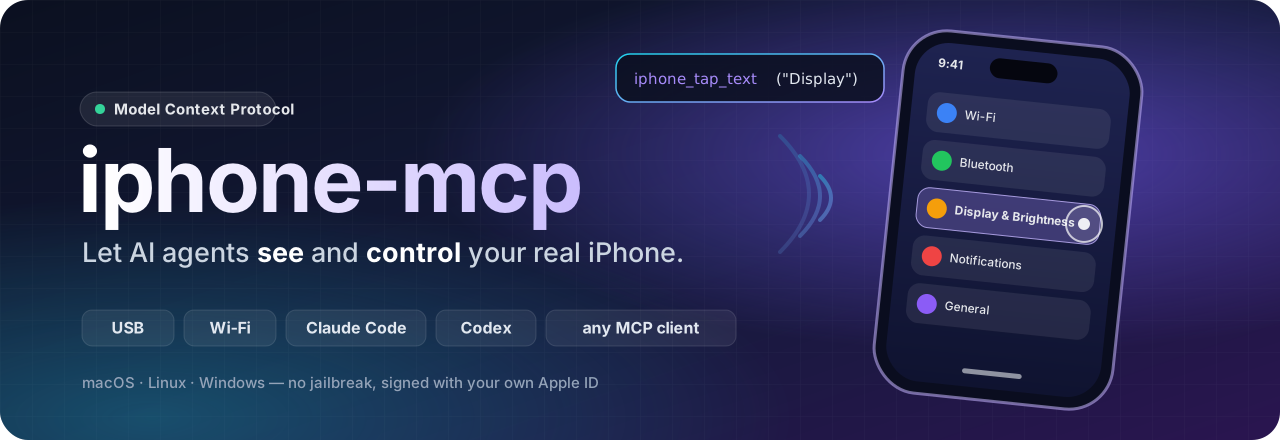







An MCP server that gives Claude Code, OpenAI Codex and any other MCP client
eyes and hands on a real, physical iPhone – over a cable or Wi-Fi.
Quick start · Tools · Wi-Fi · Linux & Windows · Safety · Troubleshooting · Sponsor ❤
✨ Highlights
🚀 Quick start
You need: uv, an iPhone with an Apple ID, and a Mac with Xcode (for Linux / Windows see below).
1 · Prepare the iPhone (once)
- Connect it by cable, unlock it and tap Trust.
- Settings → Privacy & Security → Developer Mode → on (the phone restarts).
- Settings → Developer → Enable UI Automation → on.
2 · Build WebDriverAgent (once, and again after Xcode updates)
uvx iphone-mcp doctor     # checks Xcode, signing, iPhone
uvx iphone-mcp setup      # builds & installs WebDriverAgent, signed with your Apple ID
3 · Add it to your agent
Claude Code
claude mcp add iphone -s user -- uvx iphone-mcp
OpenAI Codex
~/.codex/config.toml
[mcp_servers.iphone]
command = "uvx"
args = ["iphone-mcp"]
tool_timeout_sec = 180   # starting the agent can take a minute
Claude Desktop, Cursor, VS Code & other MCP clients
{
  "mcpServers": {
    "iphone": { "command": "uvx", "args": ["iphone-mcp"] }
  }
}
From a git checkout
git clone https://github.com/DamienDrash/iphone-mcp.git && cd iphone-mcp
uv run iphone-mcp setup
claude mcp add iphone -s user -- uv --directory "$PWD" run iphone-mcp
4 · Ask, for example:
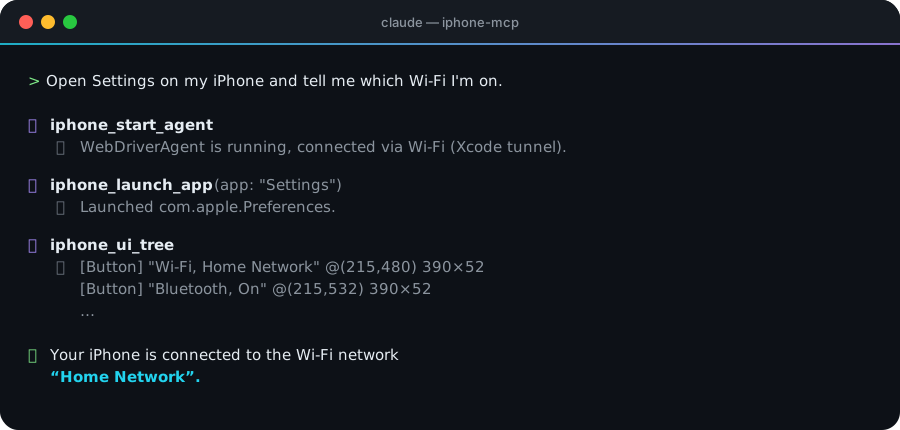
“Start the iPhone agent, open Settings and tell me which Wi-Fi I'm on.”
“Open the App Store, search for ‘Duolingo’ and show me the rating – don't install anything.”
“Test the sign-up flow of my TestFlight build and screenshot every step.”
🧠 How it works
flowchart LR
    A["Claude Code · Codex<br/>any MCP client"] -- stdio --> B["iphone-mcp"]
    B -- "HTTP :8100<br/>Xcode tunnel · usbmux · Wi-Fi IP" --> C["WebDriverAgent<br/>on the iPhone"]
    B -. "launch: xcodebuild (macOS)<br/>or pymobiledevice3 (any OS)" .-> C
    C -- XCUITest --> D["iOS UI"]
WebDriverAgent is the XCUITest-based agent that Appium also uses. It runs as a test runner on the iPhone and exposes the UI over HTTP. iphone-mcp:
- builds or installs it,
- starts it with
xcodebuildor with pymobiledevice3's XCUITest service, - keeps one connection alive across cable and Wi-Fi,
- turns it all into a handful of tools a model can use well.
🧰 Tools
| Tool | What it does |
|---|---|
iphone_start_agent · iphone_stop_agent |
Start / stop WebDriverAgent (cable or Wi-Fi) |
iphone_status |
Connection, screen size, lock state, keep-awake, foreground app |
iphone_screenshot |
Screenshot scaled to iOS points – image pixels = tap coordinates |
iphone_ui_tree |
Visible elements with text and center point |
iphone_tap · iphone_double_tap · iphone_long_press |
Touch at coordinates |
iphone_tap_text |
Tap the element showing a given text |
iphone_swipe · iphone_scroll |
Swipe / scroll in any direction |
iphone_type |
Type into the focused field, optionally press Return |
iphone_press_button |
Home, volume up, volume down |
iphone_lock |
Lock, or wake/unlock (without passcode) |
iphone_keep_awake |
Turn the no-auto-lock behaviour on or off |
iphone_list_apps · iphone_launch_app · iphone_close_app |
List, launch (name or bundle ID), terminate apps |
iphone_open_url |
Open a URL or deep link |
📶 Wi-Fi
- Connect the iPhone by cable once. In Xcode open Window → Devices and Simulators, select the iPhone and tick Connect via network.
- Put the iPhone and your Mac on the same Wi-Fi. The iPhone must be on Wi-Fi, not only on mobile data.
- Unplug.
uvx iphone-mcp doctorshould now sayconnected via Wi-Fi.
iphone-mcp uses the tunnel that Xcode itself keeps to the phone. That tunnel works the same over cable and Wi-Fi, so a flaky cable is not a problem once Wi-Fi is set up.
🔆 Screen lock
| Situation | What happens |
|---|---|
| Agent connected | Keep-awake stops the screen from auto-locking. Turn it off with iphone_keep_awake(false) or IPHONE_MCP_KEEP_AWAKE=0. |
| Phone already locked | The tools say so. The agent can wake the screen; you enter the passcode or use Face ID – the agent can't, by design. |
| Starting the agent | Needs an unlocked iPhone (Xcode's rule). The agent is told to ask you, and the start continues by itself once you unlock. |
🐧 Linux & Windows
Everything except building WebDriverAgent works without a Mac. iphone-mcp starts WebDriverAgent through pymobiledevice3's XCUITest service and its root-free userspace tunnel (iOS 17.4+), over USB or Wi-Fi.
uvx iphone-mcp setup --prebuilt          # downloads Appium's prebuilt, unsigned WebDriverAgent (.ipa)
# sign it with your Apple ID – Sideloadly (Windows, free Apple ID) or zsign (Linux, paid account)
uvx iphone-mcp setup --ipa signed.ipa    # installs it over USB and remembers its bundle ID
uvx iphone-mcp start                     # or let your agent call iphone_start_agent
| macOS | Linux | Windows | |
|---|---|---|---|
| Build & sign WebDriverAgent | ✅ setup |
➖ sign the prebuilt .ipa |
➖ sign the prebuilt .ipa |
| Install WebDriverAgent | ✅ | ✅ setup --ipa |
✅ setup --ipa |
| Start WebDriverAgent | ✅ Xcode or pymobiledevice3 | ✅ pymobiledevice3 | ✅ pymobiledevice3 |
| Control over USB | ✅ | ✅ needs usbmuxd |
✅ needs Apple Devices / iTunes |
| Control over Wi-Fi | ✅ | ✅ IPHONE_MCP_MODE=wifi after one USB pairing |
✅ IPHONE_MCP_MODE=wifi after one USB pairing |
You can also leave WebDriverAgent running from a Mac and drive it from anywhere on the network:
IPHONE_MCP_WDA_URL=http://<iphone-ip>:8100 uvx iphone-mcp
⌨️ Command line
| Command | |
|---|---|
iphone-mcp |
Run the MCP server on stdio (what your client starts) |
iphone-mcp doctor |
Check Xcode / signing / iPhone / connection |
iphone-mcp setup [--udid …] [--team …] |
Build & install WebDriverAgent with Xcode |
iphone-mcp setup --prebuilt · --ipa FILE |
Without Xcode: download the prebuilt app / install a signed one |
iphone-mcp start · stop |
Start / stop WebDriverAgent without an MCP client |
⚙️ Configuration
| Environment variable | Meaning |
|---|---|
IPHONE_MCP_UDID |
Pick a device when several iPhones are connected |
IPHONE_MCP_MODE |
auto (default), usb or wifi |
IPHONE_MCP_WDA_URL |
Fixed WebDriverAgent address, e.g. http://192.168.1.42:8100 |
IPHONE_MCP_KEEP_AWAKE |
1 (default) keeps the screen awake while connected, 0 turns it off |
IPHONE_MCP_LAUNCHER |
xcodebuild (default on macOS) or pymobiledevice3 |
IPHONE_MCP_TEAM_ID · IPHONE_MCP_BUNDLE_ID |
Signing team and bundle ID for setup |
IPHONE_MCP_RUNNER_BUNDLE_ID |
Bundle ID of an installed WebDriverAgent runner (no-Xcode launch) |
IPHONE_MCP_WDA_REF |
WebDriverAgent release to build or download (default: a tested one) |
iphone-mcp writes files only to these places, never to your project:
| What | macOS | Linux / Windows |
|---|---|---|
| Config | ~/.config/iphone-mcp/ |
~/.config/iphone-mcp/ |
| WebDriverAgent source and builds | ~/Library/Application Support/iphone-mcp/ |
~/.local/share/iphone-mcp/ |
| Logs | ~/Library/Logs/iphone-mcp/ |
~/.local/share/iphone-mcp/logs/ |
🛡️ Safety
This gives an AI agent hands on your real phone, with your accounts, messages and payment methods.
- The server tells the agent to ask before anything with real-world effect: sending messages, purchases, payments, deleting data, changing account or security settings. Watch what it does anyway, and keep your client's tool approvals on.
- iphone-mcp never types passwords or passcodes.
- While WebDriverAgent runs, it listens on port 8100 on the iPhone without authentication. Use trusted networks only, and stop it when you're done (
iphone-mcp stop).
See SECURITY.md for how to report vulnerabilities.
🩺 Troubleshooting
| Symptom | Fix |
|---|---|
Unable to find a destination matching … id: |
The iPhone isn't connected right now – replug, unlock, run iphone-mcp doctor. |
| “Unlock … to Continue” / “device is locked” | Unlock the iPhone; the start continues by itself. |
unavailable after unplugging |
Wi-Fi isn't set up – see Wi-Fi. Is the iPhone on the same Wi-Fi as the computer? |
Signing errors during setup |
Xcode → Settings → Accounts: sign in. Use --team if you're in several teams. |
| Worked yesterday, not today (free Apple ID) | The signature expired after 7 days – run iphone-mcp setup again. |
| Runner exits immediately | Settings → Developer → Enable UI Automation, and trust the developer app under General → VPN & Device Management. |
Logs: ~/Library/Logs/iphone-mcp/wda.log (runtime) and build.log (setup).
🤝 Contributing
Issues and pull requests are welcome – see CONTRIBUTING.md. Run the checks with:
uv sync && uv run pytest && uv run ruff check . && uv run ruff format --check .
👤 Author
Built by Damien Frigewski – @DamienDrash.
💖 Support the project
iphone-mcp is free and open source, and it stays that way. If it saves you time, you can support its development through GitHub Sponsors. Monthly and one-time options are available, and every amount helps. Sponsors get nothing extra in the software; it's simply a thank-you that keeps the work going.

A ⭐ on GitHub helps too – it makes iphone-mcp easier for others to find.
📄 License & credits
GPL-3.0-or-later. The GPL follows from pymobiledevice3, which iphone-mcp builds on.
WebDriverAgent (BSD-3-Clause, © Meta Platforms and Appium contributors) is downloaded and built or installed on your own machine; it is not redistributed here.
Not affiliated with Apple. iPhone, iOS and Xcode are trademarks of Apple Inc.
1 maintainer

Metadata
1 maintainer
Release files for iphone-mcp 0.1.2
For a detailed explanation of source distributions (sdists) and built distributions (wheels), please see the package formats documentation.
Source distribution (sdist)
| File | Size | Uploaded | Provenance | Actions |
|---|---|---|---|---|
| iphone_mcp-0.1.2.tar.gz | 183.9 kB | With provenance | Details for iphone_mcp-0.1.2.tar.gz |
Built distribution (wheel)
| File | Interpreter | ABI | Platform | Actions Reset |
|---|---|---|---|---|
| iphone_mcp-0.1.2-py3-none-any.whl | Python 3 | none | any | Details for iphone_mcp-0.1.2-py3-none-any.whl |
Total release size: 226.3 kB
Release files / iphone_mcp-0.1.2.tar.gz
| Download URL | iphone_mcp-0.1.2.tar.gz |
|---|---|
| Size | 183.9 kB |
| Tags | Source |
|
SHA-256 checksum How to use checksums |
266d2cd0f1c0449cd608eb8c38fdebd7e905cb434377aada4455e35fda09fefb
|
|
BLAKE2b-256 checksum How to use checksums |
a3113fe17fdf2328717ee9becaf524e68925634e2dac2d366255af824a86a7d2
|
| Upload date | |
|
Uploaded using Trusted Publishing? What is trusted publishing? |
Yes |
| Uploaded via |
twine/7.0.0 CPython/3.13.16
|
Provenance
Provenance describes where a file came from. On PyPI, provenance is shared via attestations, which provide a verifiable record of the build or publishing details. View details, limitations and caveats.


PyPI Publish Attestation
PyPI verified that this artifact, at this checksum, originated from the publisher listed below.
Signed by GitHub Actions, verified by PyPI on Nov 19, 2026.
Transparency logRelease files / iphone_mcp-0.1.2-py3-none-any.whl
| Download URL | iphone_mcp-0.1.2-py3-none-any.whl |
|---|---|
| Size | 42.5 kB |
| Tags | Python 3 |
|
SHA-256 checksum How to use checksums |
a14a6d3e06c8dd604b7f133360b525b582c88d09dc0249eaa8e5e6c17285eb1d
|
|
BLAKE2b-256 checksum How to use checksums |
492435392de2646cbd8c94e48a7e570ea77c9710bc5ec081a5c572a8e7cc09fe
|
| Upload date | |
|
Uploaded using Trusted Publishing? What is trusted publishing? |
Yes |
| Uploaded via |
twine/7.0.0 CPython/3.13.16
|
Provenance
Provenance describes where a file came from. On PyPI, provenance is shared via attestations, which provide a verifiable record of the build or publishing details. View details, limitations and caveats.
PyPI Publish Attestation
PyPI verified that this artifact, at this checksum, originated from the publisher listed below.
Signed by GitHub Actions, verified by PyPI on Nov 19, 2026.
Transparency logSecurity for iphone-mcp 0.1.2
Provenance
Provenance describes where a file came from. On PyPI, provenance is shared via attestations, which provide a verifiable record of the build or publishing details. View details, limitations and caveats.
Full provenance
Both files in this release have been uploaded with provenance metadata.
Attestation for iphone_mcp-0.1.2.tar.gz
PyPI Publish Attestation
PyPI verified that this artifact, at this checksum, originated from the publisher listed below.
Signed by GitHub Actions, verified by PyPI on Nov 19, 2026.
Transparency logA note on package security
PyPI is a repository for distributing packages, not a service for auditing them. While third-party security researchers and our staff do their best to detect and remove malicious packages, PyPI cannot guarantee the quality, security or suitability of any given package.
To learn more about protecting yourself from malicious actors, visit our package security documentation.














