
ipipeline
ipipeline is a micro framework to build and execute pipelines from different domains.
Features
-
Simplicity: high-level interfaces that can be used to perform complex tasks.
-
Flexibility: freedom to build according to the requirements of the problem.
-
Scalability: execution through concurrency or parallelism (coming soon).
Installation
ipipeline is installed from the Python Package Index (PyPI).
pip install ipipeline
Documentation
To learn how this package works, follow the documentation (coming soon).
Contribution
To learn how to contribute to this repository, follow the contribution file.
License
To learn about the legal rights linked to this repository, follow the license file.
Example
The ipipeline package tries to keep things simple, therefore all the work is done through a few interfaces.
import logging

from ipipeline.control import SequentialExecutor
from ipipeline.structure import Catalog, Pipeline


logging.basicConfig(
    format='[%(asctime)s] %(levelname)s %(name)s - %(message)s',
    datefmt='%Y-%m-%d %H:%M:%S',
    level=logging.INFO
)
Tasks
The functions below represent tasks that need to be executed in a certain order which forms a flow of tasks with the following idea: the data is extracted from a source, then transformed in different ways, and finally loaded to a destination. The focus in this example is not on the code block of the functions, but on the dependencies between them.
def extract_data(path: str, encoding: str = None) -> list:
    data = [2, 4]

    return data


def transform_data1(data: list) -> list:
    sum_data = [num + 2 for num in data]

    return sum_data


def transform_data2(data: list) -> list:
    sub_data = [num - 2 for num in data]

    return sub_data


def load_data(sum_data: list, sub_data: list, path: str) -> None:
    pass
Pipeline
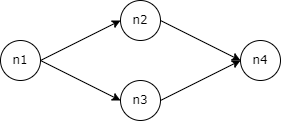
A pipeline stores a flow of tasks represented by nodes (tasks) and links (dependencies). The links between the nodes must compose a directed acyclic graph which is used to find a linear ordering for the execution.
pipeline = Pipeline('p1', tags=['example'])
pipeline.add_node(
    'n1',
    extract_data,
    pos_inputs=['src_path'],
    key_inputs={'encoding': 'encoding'},
    outputs=['data'],
    tags=['extract']
)
pipeline.add_node(
    'n2',
    transform_data1,
    pos_inputs=['data'],
    outputs=['sum_data'],
    tags=['transform1']
)
pipeline.add_node(
    'n3',
    transform_data2,
    pos_inputs=['data'],
    outputs=['sub_data'],
    tags=['transform2']
)
pipeline.add_node(
    'n4',
    load_data,
    pos_inputs=['sum_data', 'sub_data', 'dst_path'],
    tags=['load']
)
pipeline.add_link('l1', 'n1', 'n2')
pipeline.add_link('l2', 'n1', 'n3')
pipeline.add_link('l3', 'n2', 'n4')
pipeline.add_link('l4', 'n3', 'n4')
The pipeline produces a graph as shown in the image below.
Catalog
A catalog stores the items (arguments) of an execution. When a node is executed, its return is stored in the catalog linked to the name defined in the outputs parameter, creating a key:value pair. This pair is made available to all other nodes that depend on it as an argument. Therefore, the pos_inputs and key_inputs parameters are references to the keys of the arguments stored in the catalog. It is possible to pass default arguments to the nodes before the execution takes place as shown below.
catalog = Catalog('c1', tags=['example'])
catalog.set_item('src_path', 'src/file')
catalog.set_item('dst_path', 'dst/file')
catalog.set_item('encoding', 'utf-8')
Executor
An executor is responsible to execute a pipeline from the topological ordering of the graph built from the relationships between the nodes. The result of the execution is the catalog populated with the returns of the functions.
executor = SequentialExecutor()
ordering = executor.get_ordering(pipeline)
catalog = executor.execute_pipeline(pipeline, catalog, ordering)
The log generated while executing is shown below.
[2022-07-01 09:30:00] INFO ipipeline.control.executors - ordering: [['n1'], ['n2', 'n3'], ['n4']]
[2022-07-01 09:30:00] INFO ipipeline.control.executors - pipeline.id: p1, pipeline.tags: ['example']
[2022-07-01 09:30:00] INFO ipipeline.control.executors - catalog.id: c1, catalog.tags: ['example']
[2022-07-01 09:30:00] INFO ipipeline.control.executors - node.id: n1, node.tags: ['extract']
[2022-07-01 09:30:00] INFO ipipeline.control.executors - node.id: n2, node.tags: ['transform1']
[2022-07-01 09:30:00] INFO ipipeline.control.executors - node.id: n3, node.tags: ['transform2']
[2022-07-01 09:30:00] INFO ipipeline.control.executors - node.id: n4, node.tags: ['load']
The ordering list has inner lists that represent groups of nodes that must be executed sequentially and the nodes within these groups can be executed simultaneously. As in this case the sequential executor was used, the benefit of simultaneous execution was skipped, but soon new executors will be created to take advantage of this.
CLI
The package provides a CLI with two commands called project and execution. The project command builds a project in the file system that provides a standard structure for organizing the code. Let's assume the project path is the home directory and the project name is example, therefore the command would be entered like this:
python -m ipipeline project ~ example
The execution command executes a pipeline according to the location of the modules and functions that build the pipeline and the catalog. The pipeline and catalog building process can be wrapped into separate functions called, for example, build_pipeline and build_catalog. Let's assume both functions are in the main module of the example project, therefore the command would be as follows:
python -m ipipeline execution SequentialExecutor example.__main__ example.__main__ build_pipeline build_catalog
1 maintainer

Metadata
1 maintainer
Release files for ipipeline 0.17.0
For a detailed explanation of source distributions (sdists) and built distributions (wheels), please see the package formats documentation.
Source distribution (sdist)
| File | Size | Uploaded | Provenance | |
|---|---|---|---|---|
| ipipeline-0.17.0.tar.gz | 13.0 kB | Without provenance | Details |
Built distribution (wheel)
| File | Interpreter | ABI | Platform | Reset |
|---|---|---|---|---|
| ipipeline-0.17.0-py3-none-any.whl | Python 3 | none | any | Details |
Total release size: 35.1 kB
Release files / ipipeline-0.17.0.tar.gz
| Download URL | ipipeline-0.17.0.tar.gz |
|---|---|
| Size | 13.0 kB |
| Tags | Source |
|
SHA-256 checksum How to use checksums |
55d14dd5bf48366279ab278d8e194505806f4a51ca0d51b78ef5951f397fe883
|
|
BLAKE2b-256 checksum How to use checksums |
2f008b9d6ba16d0b75baf6650f8708ea7de8deedc3c69a8e1148fb6e72fa2bc6
|
| Upload date | |
|
Uploaded using Trusted Publishing? What is trusted publishing? |
No |
| Uploaded via |
twine/4.0.1 CPython/3.10.5
|
Release files / ipipeline-0.17.0-py3-none-any.whl
| Download URL | ipipeline-0.17.0-py3-none-any.whl |
|---|---|
| Size | 22.1 kB |
| Tags | Python 3 |
|
SHA-256 checksum How to use checksums |
3d841743525f145e6ec0e62ba1bdffda0d55d73995706903abee9c55a656947b
|
|
BLAKE2b-256 checksum How to use checksums |
975ab853cfd8620e59715e09c89a57cdc100c456f126881cbffa5f98e22fbba3
|
| Upload date | |
|
Uploaded using Trusted Publishing? What is trusted publishing? |
No |
| Uploaded via |
twine/4.0.1 CPython/3.10.5
|
Security for ipipeline 0.17.0
Provenance
Provenance describes where a file came from. On PyPI, provenance is shared via attestations, which provide a verifiable record of the build or publishing details. View details, limitations and caveats.
No provenance found
None of the files in this release were uploaded with provenance metadata.
A note on package security
PyPI is a repository for distributing packages, not a service for auditing them. While third-party security researchers and our staff do their best to detect and remove malicious packages, PyPI cannot guarantee the quality, security or suitability of any given package.
To learn more about protecting yourself from malicious actors, visit our package security documentation.














