
IP Lens CLI Tool
A lightweight CLI tool designed for fetching and displaying detailed IP address information. No API keys are required, making it accessible and easy to use for various use cases.
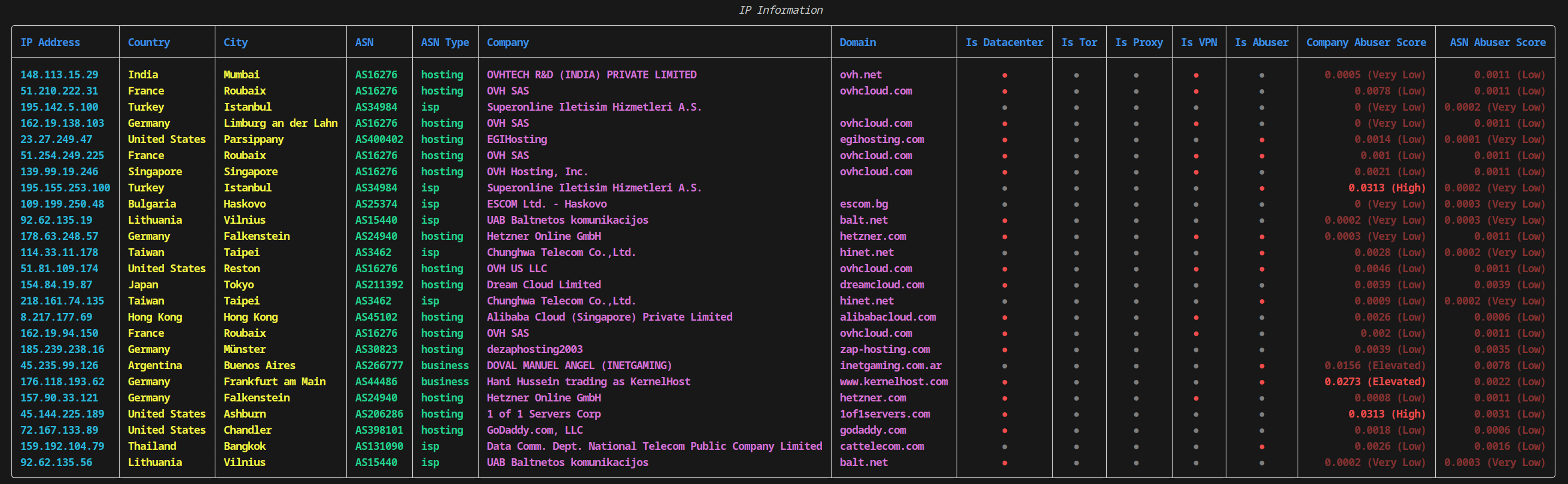
Installation
Install via pip
You can install the IP Lens CLI tool directly from PyPI:
pip install iplens
Install from source
To build and install the tool from source:
Clone the repository:
git clone https://github.com/aiomorphic/iplens.git
cd iplens
pip install -e .
Usage
CLI Tool
Basic usage:
iplens 8.8.8.8 1.1.1.1
Using an input file:
iplens --input-file ips.txt
The input file can be in one of the following formats:
- Plain text file with one IP address per line
- Text file containing a Python list of IP addresses
- JSON file with a list of IP addresses or a dictionary containing a list of IP addresses in any field
- CSV file with a column containing IP addresses (the column name should include "ip", case-insensitive)
- Log file containing IP addresses (the tool will extract unique IP addresses from the log)
Using an Input Folder to Parse Files for IP Addresses:
You can also specify a directory, and the tool will parse all non-binary files within that folder to extract IP addresses:
iplens --input-folder /path/to/logs/
Use Cases:
Scan system logs: For example, to scan the UFW log for IP addresses, you can run:
iplens --input-folder /var/log/ufw.log
or for e.g. analyze web server logs: Parse your web server logs to gather and analyze IP addresses.
Save output to a file:
iplens 8.8.8.8 1.1.1.1 --output results --format json
Available options:
--input-fileor-i: Specify an input file containing IP addresses--input-folderor-d: Specify an input folder containing files to parse for IP addresses--outputor-o: Specify output file (without extension)--formator-f: Specify output format (csv or json)
Note: The tool will automatically detect the input file format and extract valid IP addresses. Invalid IP addresses will be ignored.
Exports Examples
[
  {
    "ip": "8.8.8.8",
    "rir": "ARIN",
    "is_bogon": "False",
    "is_datacenter": "True",
    "is_tor": "False",
    "is_proxy": "False",
    "is_vpn": "True",
    "is_abuser": "True",
    "company_name": "Google LLC",
    "company_abuser_score": "0.0039 (Low)",
    "company_type": "business",
    "company_domain": "google.com",
    "company_network": "8.8.8.0 - 8.8.8.255",
    "company_whois": "https://api.ipapi.is/?whois=8.8.8.0",
    "abuse_email": "network-abuse@google.com",
    "asn_asn": "AS15169",
    "asn_abuser_score": "0 (Very Low)",
    "asn_route": "8.8.8.0/24",
    "asn_descr": "GOOGLE, US",
    "asn_country": "us",
    "asn_active": "True",
    "asn_org": "Google LLC",
    "asn_domain": "google.com",
    "asn_abuse": "network-abuse@google.com",
    "asn_type": "business",
    "asn_created": "2000-03-30",
    "asn_updated": "2012-02-24",
    "asn_rir": "ARIN",
    "asn_whois": "https://api.ipapi.is/?whois=AS15169",
    "location_country": "United States",
    "location_country_code": "US",
    "location_state": "California",
    "location_city": "Sunnyvale",
    "location_latitude": "37.36883",
    "location_longitude": "-122.03635",
    "location_zip": "95196",
    "location_timezone": "America/Los_Angeles"
  }
]
ip,rir,is_bogon,is_datacenter,is_tor,is_proxy,is_vpn,is_abuser,company_name,company_abuser_score,company_type,company_domain,company_network,company_whois,abuse_email,asn_asn,asn_abuser_score,asn_route,asn_descr,asn_country,asn_active,asn_org,asn_domain,asn_abuse,asn_type,asn_created,asn_updated,asn_rir,asn_whois,location_country,location_country_code,location_state,location_city,location_latitude,location_longitude,location_zip,location_timezone
8.8.8.8,ARIN,False,True,False,False,True,True,Google LLC,0.0039 (Low),business,google.com,8.8.8.0 - 8.8.8.255,https://api.ipapi.is/?whois=8.8.8.0,network-abuse@google.com,AS15169,0 (Very Low),8.8.8.0/24,"GOOGLE, US",us,True,Google LLC,google.com,network-abuse@google.com,business,2000-03-30,2012-02-24,ARIN,https://api.ipapi.is/?whois=AS15169,United States,US,California,Sunnyvale,37.36883,-122.03635,95196,America/Los_Angeles
As a Python Library
IP Lens can also be utilized as a Python library for direct integration into your Python projects.
from iplens.api import IPInfoAPI

api = IPInfoAPI()
results = api.fetch_data(['8.8.8.8', '1.1.1.1'])
This will fetch and process the IP information for the given IP addresses. The results will include detailed information such as ASN, location, company details, and more, extracted and formatted for easy access.
Configuration
The configuration file is located at src/iplens/config.cfg. The default API endpoint is https://api.ipapi.is (the successor to api.incolumitas.com). Legacy URLs pointing at api.incolumitas.com are automatically rewritten at runtime.
The SQLite cache is stored at ~/.cache/iplens/iplens_cache.db by default.
Available settings:
[API] url— API base URL (default:https://api.ipapi.is)[API] backoff_factor— seconds to wait between bulk requests[API] timeout— HTTP request timeout in seconds[Cache] expire_days— cache TTL in days[Logging] level— log level (DEBUG,INFO,WARNING, etc.)[Input] max_file_bytes— max size per input file (default: 50MB)[Input] max_folder_files— max files scanned in folder mode[Input] max_folder_depth— max directory depth for folder scans
Privacy
Uncached IP addresses are sent to the configured API for enrichment. Folder and file modes may read many local paths; review inputs before running in sensitive environments.
API Limits
Note that the API has rate limits in its free, unregistered mode. If you encounter a rate limit, simply wait for 20 minutes and then continue using the tool.
Caching
IP Lens includes a caching mechanism to store fetched IP information locally. This helps reduce the number of API calls, especially when processing large lists of IPs. The cache is automatically cleared after a configurable expiration period, which can be set in the config.cfg file.
Ignoring Fields
If there are specific fields you wish to exclude from the output, you can configure this in the src/utils.py file, where the list of field names is defined. This allows you to customize the output based on your needs.
Development
Setup
- Clone the repository
git clone https://github.com/aiomorphic/iplens.git
cd iplens
- Create a virtual environment:
python -m venv venv - Activate the virtual environment:
- Windows:
venv\Scripts\activate - Unix or MacOS:
source venv/bin/activate
- Windows:
- Install development dependencies:
pip install -r requirements.txt
Pre commit checks
make pre-commit
Adding New Features
Implement new functionality in the appropriate module under iplens/. Add tests for the new functionality in tests/. Update iplens_cli.py if the new feature should be accessible via CLI.
1 maintainer

Metadata
1 maintainer
Release files for iplens 0.2.2
For a detailed explanation of source distributions (sdists) and built distributions (wheels), please see the package formats documentation.
Source distribution (sdist)
| File | Size | Uploaded | Provenance | Actions |
|---|---|---|---|---|
| iplens-0.2.2.tar.gz | 22.7 kB | Without provenance | Details for iplens-0.2.2.tar.gz |
Built distribution (wheel)
| File | Interpreter | ABI | Platform | Actions Reset |
|---|---|---|---|---|
| iplens-0.2.2-py3-none-any.whl | Python 3 | none | any | Details for iplens-0.2.2-py3-none-any.whl |
Total release size: 40.4 kB
Release files / iplens-0.2.2.tar.gz
| Download URL | iplens-0.2.2.tar.gz |
|---|---|
| Size | 22.7 kB |
| Tags | Source |
|
SHA-256 checksum How to use checksums |
5ed743e1942d0726db486af13794ff1437a1eaf0310688eb8fc29cbe2eb346bd
|
|
BLAKE2b-256 checksum How to use checksums |
014773bfb206cca970f4b5604fcaf73e17eb006bda814027c4dcb87696795be8
|
| Upload date | |
|
Uploaded using Trusted Publishing? What is trusted publishing? |
No |
| Uploaded via |
twine/6.2.0 CPython/3.11.5
|
Release files / iplens-0.2.2-py3-none-any.whl
| Download URL | iplens-0.2.2-py3-none-any.whl |
|---|---|
| Size | 17.7 kB |
| Tags | Python 3 |
|
SHA-256 checksum How to use checksums |
eae3637d2a4ca3c5043b97436924d16369010c5c3b37fc0e14e72a9cb783da01
|
|
BLAKE2b-256 checksum How to use checksums |
cb8b65f64c2e3c47cd8c483db7b15f6dd53e87894e2e16b6718287c965327718
|
| Upload date | |
|
Uploaded using Trusted Publishing? What is trusted publishing? |
No |
| Uploaded via |
twine/6.2.0 CPython/3.11.5
|
Security for iplens 0.2.2
Provenance
Provenance describes where a file came from. On PyPI, provenance is shared via attestations, which provide a verifiable record of the build or publishing details. View details, limitations and caveats.
No provenance found
None of the files in this release were uploaded with provenance metadata.
A note on package security
PyPI is a repository for distributing packages, not a service for auditing them. While third-party security researchers and our staff do their best to detect and remove malicious packages, PyPI cannot guarantee the quality, security or suitability of any given package.
To learn more about protecting yourself from malicious actors, visit our package security documentation.














