
IPO-Mine: A Toolkit and Dataset for Section-Structured Analysis of Long, Multimodal IPO Documents



This work is licensed under a Creative Commons Attribution 4.0 International License.
Dataset Construction Pipelines
| Image Dataset Pipeline | Text Dataset Pipeline |
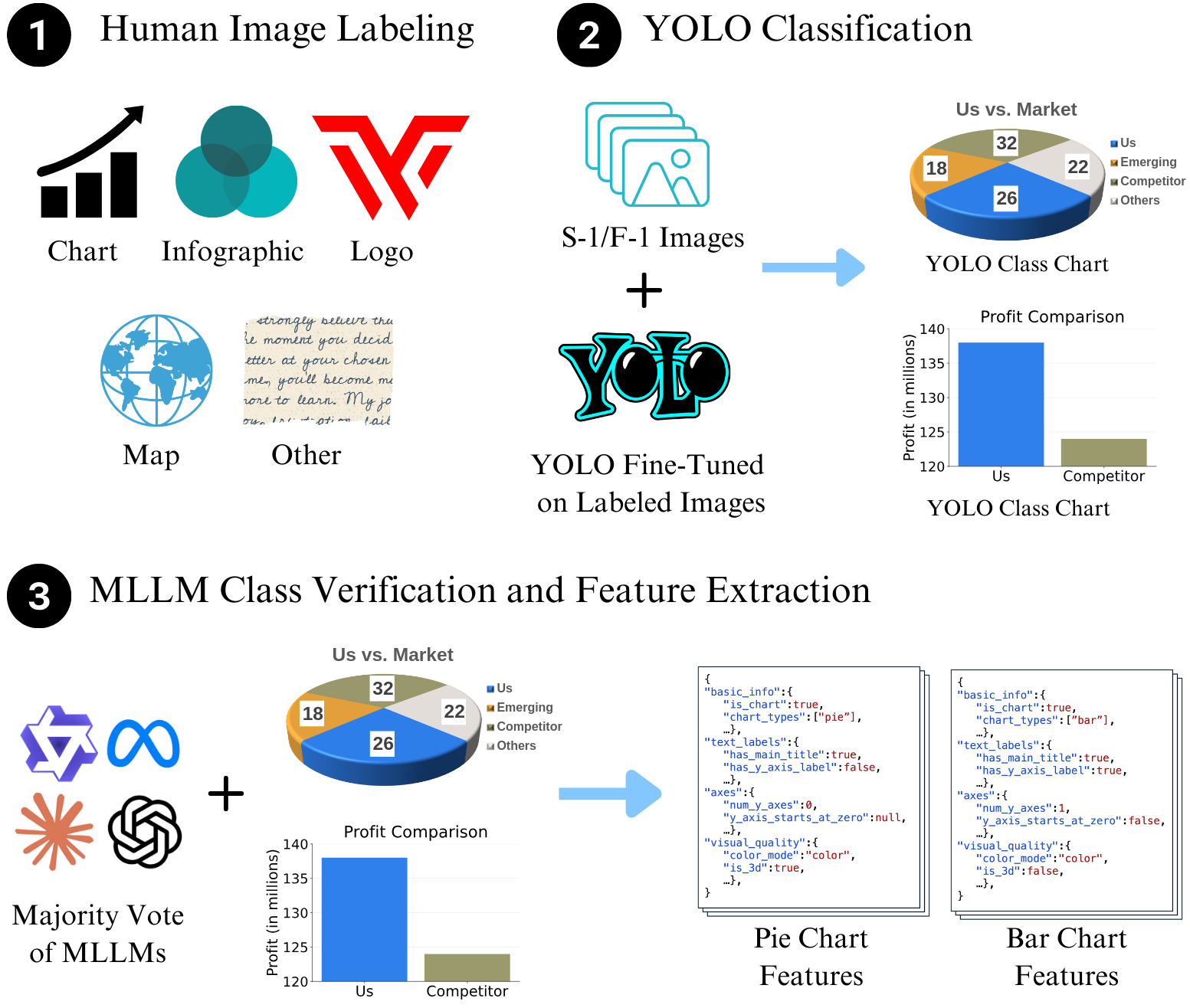
|
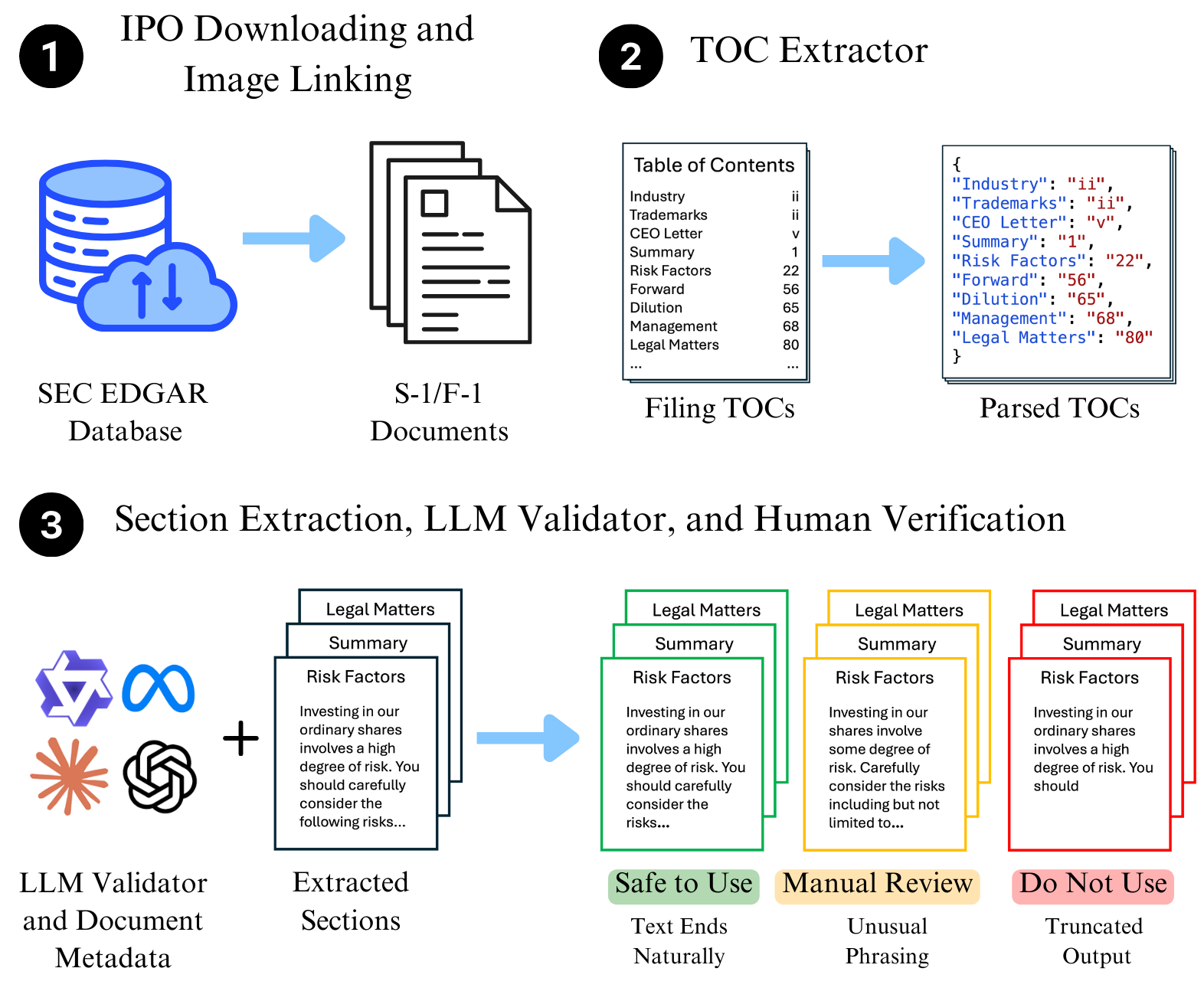
|
Quickstart
Install from PyPI
pip install ipo-mine
Using ipo-mine to Download an IPO Filing (Python API)
from download import IPODownloader, Company

downloader = IPODownloader(
    email="example@gmail.com",
    company="Your Example Organization"
)

company = Company.from_ticker("SNOW")

company_filings = downloader.download_ipo(
    company,
    limit=1,
    save_filing=True,
    save_images=False,
    verbose=True
)

filing = company_filings.filings[0]
Parsing the Table of Contents
results = parser.parse_company(
    ticker="SNOW",
    validate=False
)
CLI Usage
You can use the command-line interface to download and parse filings without writing Python code.
Download
Download the latest S-1 filing for a company:
ipo-mine download SNOW --email your@email.com --org "Your Org"
Options:
--limit N: Download previous N filings (default: 1)--images: Download and extract images from the filing--all: Download all available IPO filings for the ticker
Parse
Parse a downloaded filing into section-specific files:
ipo-mine parse SNOW
Options:
--validate: Enable LLM-based validation of extracted sections--provider: LLM provider (anthropic, openai, google, huggingface)--mode: Validation mode (binary, likert)
Validate
Run LLM validation on existing parsed text files to check for truncation or completeness.
ipo-mine validate SNOW --provider anthropic
Supported Providers
You can choose from the following providers (requires API keys):
| Provider | Argument | Env Variable |
|---|---|---|
| Anthropic (Claude) | --provider anthropic |
ANTHROPIC_API_KEY |
| OpenAI (GPT-4o) | --provider openai |
OPENAI_API_KEY |
| Google (Gemini) | --provider google |
GOOGLE_API_KEY |
| HuggingFace | --provider huggingface |
HUGGINGFACE_API_KEY |
Validation Modes
- Binary (
--mode binary): Returns "Yes" (Valid) or "No" (Truncated/Incomplete). Default. - Likert (
--mode likert): Returns a confidence score from 1 (Incomplete) to 5 (Complete).
Authentication
The CLI will look for API keys in this order:
- Command Line Argument:
--api-key "sk-..." - Environment Variable: e.g.,
export OPENAI_API_KEY="sk-..." - Interactive Prompt: If neither is found, the CLI will securely prompt you to enter the key (input is hidden).
Examples
Validate using OpenAI with Likert scale:
ipo-mine validate TSLA --provider openai --mode likert
Validate using Google Gemini with explicit key:
ipo-mine validate TSLA --provider google --api-key "your-api-key"
Notes
- The SEC requires a descriptive User-Agent. Provide a real organization name and your email.
download_iporeturns aCompanyFilingsobject; usecompany_filings.filings[0]to pass aFilinginto the parser.- The parser automatically chooses HTML or text parsing based on the filing URL.
8 maintainers


Release files for ipo-mine 0.1.4
For a detailed explanation of source distributions (sdists) and built distributions (wheels), please see the package formats documentation.
Source distribution (sdist)
| File | Size | Uploaded | |
|---|---|---|---|
| ipo_mine-0.1.4.tar.gz | 921.3 kB | Details |
Built distribution (wheel)
| File | Interpreter | ABI | Platform | Reset |
|---|---|---|---|---|
| ipo_mine-0.1.4-py3-none-any.whl | Python 3 | none | any | Details |
Total release size: 1.9 MB
Release files / ipo_mine-0.1.4.tar.gz
| Download URL | ipo_mine-0.1.4.tar.gz |
|---|---|
| Size | 921.3 kB |
| Tags | Source |
|
SHA-256 checksum How to use checksums |
f594596f35036072d3cae73365ce007aaa01e27294e8d0abb5bbab64ec19f951
|
|
BLAKE2b-256 checksum How to use checksums |
1862bb83daf56033d02ad0bffc3586c3ff73c042ce0829d5fc9132373ef973ac
|
| Upload date | |
|
Uploaded using Trusted Publishing? What is trusted publishing? |
No |
| Uploaded via |
twine/6.2.0 CPython/3.14.0
|
Release files / ipo_mine-0.1.4-py3-none-any.whl
| Download URL | ipo_mine-0.1.4-py3-none-any.whl |
|---|---|
| Size | 935.3 kB |
| Tags | Python 3 |
|
SHA-256 checksum How to use checksums |
49ea8acacd3520fb618f734fac6bbeb3caa43332525e9259b8fae44b589a9779
|
|
BLAKE2b-256 checksum How to use checksums |
aa81dc2b11b0acde64832648a4821e5eb80d08e6693fe35a309256786f2a157b
|
| Upload date | |
|
Uploaded using Trusted Publishing? What is trusted publishing? |
No |
| Uploaded via |
twine/6.2.0 CPython/3.14.0
|














