
InterPlanetary Wayback (ipwb): Web Archive integration with IPFS


Project description

InterPlanetary Wayback (ipwb)
Peer-To-Peer Permanence of Web Archives



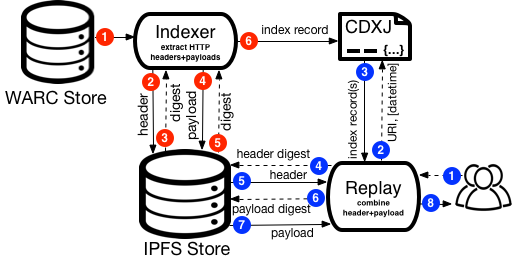
InterPlanetary Wayback (ipwb) facilitates permanence and collaboration in web archives by disseminating the contents of WARC files into the IPFS network. IPFS is a peer-to-peer content-addressable file system that inherently allows deduplication and facilitates opt-in replication. ipwb splits the header and payload of WARC response records before disseminating into IPFS to leverage the deduplication, builds a CDXJ index with references to the IPFS hashes returns, and combines the header and payload from IPFS at the time of replay.
InterPlanetary Wayback primarily consists of two scripts:
ipwb/indexer.py - archival indexing script that takes the path to a WARC input, extracts the HTTP headers, HTTP payload (response body), and relevant parts of the WARC-response record header from the WARC specified and creates byte string representations. The indexer then pushes the byte strings into IPFS using a locally running ipfs daemon then creates a CDXJ file with this metadata for replay.py.
ipwb/replay.py - rudimentary replay script to resolve requests for archival content contained in IPFS for replay in the browser.
A pictorial representation of the ipwb indexing and replay process:
Installing
The latest release of ipwb can be installed using pip:
$ pip install ipwbThe latest development version containing changes not yet released can be installed from source:
$ git clone https://github.com/oduwsdl/ipwb
$ cd ipwb
$ pip install -r requirements.txt
$ pip install ./
Setup
The InterPlanetary Filesystem (ipfs) daemon must be installed and running before starting ipwb. See the Install IPFS page to accomplish this. In the future, we hope to make this more automated. Once ipfs is installed, start the daemon:
$ ipfs daemonIf you encounter a conflict with the default API port of 5001 when starting the daemon, running the following prior to launching the daemon will change the API port to access to one of your choosing (here, shown to be 5002):
$ ipfs config Addresses.API /ip4/127.0.0.1/tcp/5002Indexing
In a separate terminal session (or the same if you started the daemon in the background), instruct ipwb to push a WARC into IPFS:
$ ipwb index (path to warc or warc.gz)…for example, from the root of the ipwb repository:
$ ipwb index ipwb/samples/warcs/salam-home.warcindexer.py, the default script called by the ipwb binary, parititions the WARC into WARC Records, extracts the WARC Response headers, HTTP response headers, and HTTP response body (payload). Relevant information is extracted from the WARC Response headers, temporary byte strings are created for the HTTP response headers and payload, and these two bytes strings are pushed into IPFS. The resulting CDXJ data is written to stdout by default but can be redirected to a file, e.g.,
$ ipwb index (path to warc or warc.gz) >> myArchiveIndex.cdxjReplaying
An archival replay system is also included with ipwb to re-experience the content disseminated to IPFS . The replay system can be launched using the provided sample data with:
$ ipwb replayA CDXJ index can also be provided and used by the ipwb replay system by specifying the path of the index file as a parameter to the replay system:
$ ipwb replay <path/to/cdxj>ipwb also supports using an IPFS hash or any HTTP location as the source of the CDXJ:
$ ipwb replay http://myDomain/files/myIndex.cdxj
$ ipwb replay QmYwAPJzv5CZsnANOTaREALhashYgPpHdWEz79ojWnPbdG
Once started, the replay system’s web interface can be accessed through a web browser, e.g., http://localhost:5000/http://www.cs.odu.edu/~salam/ with the sample CDXJ file.
Help
Usage of sub-commands in ipwb can be accessed through providing the -h or –help flag, like any of the below.
$ ipwb -h
usage: ipwb [-h] [-d DAEMON_ADDRESS] [-o OUTFILE] [-v] {index,replay} ...

InterPlanetary Wayback (ipwb)

optional arguments:
  -h, --help            show this help message and exit
  -d DAEMON_ADDRESS, --daemon DAEMON_ADDRESS
                        Location of ipfs daemon (default 127.0.0.1:5001)
  -o OUTFILE, --outfile OUTFILE
                        Filename of newly created CDXJ index file
  -v, --version         Report the version of ipwb


ipwb commands:
  Invoke using "ipwb <command>", e.g., ipwb replay

  {index,replay}
    index               Index a WARC file for replay in ipwb
    replay              Start the ipwb replay system
$ ipwb index -h
usage: ipwb [-h] [-e] index <warcPath>
Index a WARC file for replay in ipwb
positional arguments:
index <warcPath> Path to a WARC[.gz] file
optional arguments:
-h, --help show this help message and exit
-e Encrypt WARC content prior to disseminating to IPFS$ ipwb replay -h
usage: ipwb [-h] [-e] index <warcPath>
Index a WARC file for replay in ipwb
positional arguments:
index <warcPath> Path to a WARC[.gz] file
optional arguments:
-h, --help show this help message and exit
-e Encrypt WARC content prior to disseminating to IPFS
$ ipwb replay -h
usage: ipwb replay [-h] [index]
positional arguments:
index CDXJ file to use for replay
optional arguments:
-h, --help show this help message and exitProject History
This repo contains the code for integrating WARCs and IPFS as developed at the Archives Unleashed: Web Archive Hackathon in Toronto, Canada in March 2016. The project was also presented at:
The Joint Conference on Digital Libraries 2016 in Newark, NJ in June 2016.
The Web Archiving and Digital Libraries (WADL) 2016 workshop in Newark, NJ in June 2016.
The Theory and Practice on Digital Libraries (TPDL) 2016 in Hannover, Germany in September 2016.
The Archives Unleashed 4.0: Web Archive Datathon in London, England in June 2017.
The International Internet Preservation Consortium (IIPC) Web Archiving Conference (WAC) 2017 in London, England in June 2017.
License
MIT
Release history Release notifications | RSS feed


Download files
Download the file for your platform. If you're not sure which to choose, learn more about installing packages.
Source Distribution
Built Distribution
Filter files by name, interpreter, ABI, and platform.
If you're not sure about the file name format, learn more about wheel file names.
Copy a direct link to the current filters
File details
Details for the file ipwb-0.2017.11.6.1205.tar.gz.
File metadata
- Download URL: ipwb-0.2017.11.6.1205.tar.gz
- Upload date:
- Size: 3.9 MB
- Tags: Source
- Uploaded using Trusted Publishing? No
File hashes
| Algorithm | Hash digest | |
|---|---|---|
| SHA256 |
2c708f3ffdc85d01a2f3d887e89fee7d60e9909eaf351aab6922eed622134d06
|
|
| MD5 |
b8d44f9f99bf4138b0a3e28c773ba3a4
|
|
| BLAKE2b-256 |
84012f9ff6b3ffa0e558197a75e6a89105951bfc56fd05850d438ac1b25ba81b
|
File details
Details for the file ipwb-0.2017.11.6.1205-py2-none-any.whl.
File metadata
- Download URL: ipwb-0.2017.11.6.1205-py2-none-any.whl
- Upload date:
- Size: 3.9 MB
- Tags: Python 2
- Uploaded using Trusted Publishing? No
File hashes
| Algorithm | Hash digest | |
|---|---|---|
| SHA256 |
62341f6479a68a13140de41a42418a0fed6b46d1589516ccda68d48da9dca6c5
|
|
| MD5 |
d8960bc4adeb872f41b9d6c9941ffe7f
|
|
| BLAKE2b-256 |
f8fd6a81e9c8d463cbe3a8eeb653fd461e132acfaa6bb537de18d6d762a4709d
|






