
Jupyter Notebook + Slurm integration.

Project description
ipy-slurm-exec
Jupyter Notebook + Slurm integration.
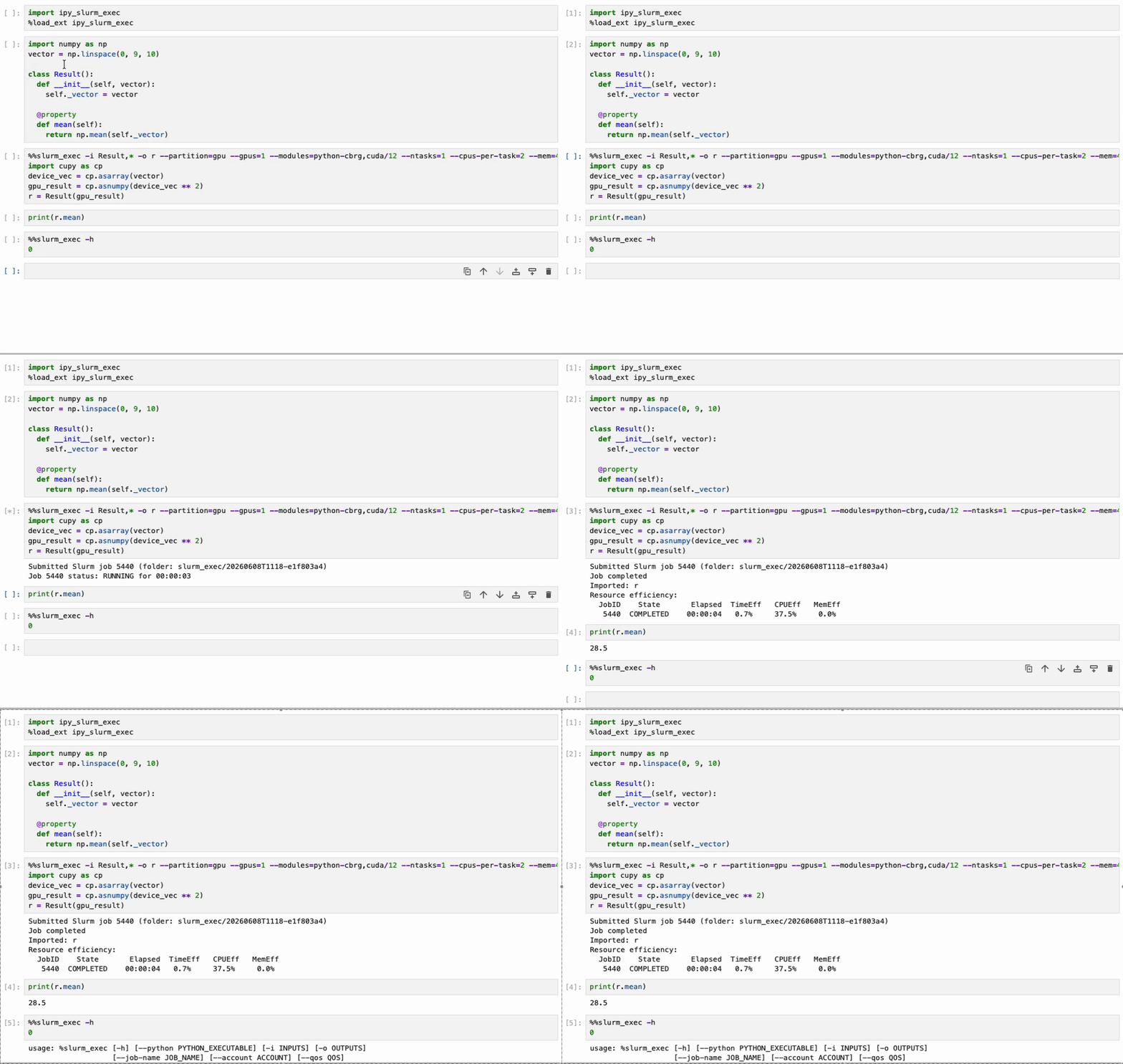
slurm_exec arguments:
Specify arguments with %%slurm_exec to manage variables and the Slurm job.
Managing variables
If you do not specify a list of variables to export, then all are exported to the Slurm job. Similarly for importing after the job finishes. For large notebooks this may cause problems - overwriting a variable in another part of your notebook, or exporting many big variables that are never used (wasting memory). Use these arguments to manage.
-i, --inputs: list of variables to input into the Slurm job

e.g. %%slurm_exec -i data,scale ...
-o, --outputs: list of output variables to import into Notebook from Slurm job

e.g. %%slurm_exec -o reduced ...
Import fail
Python variables created in the Slurm job may be dependent on additional modules it loaded that were not loaded by your Notebook, for example CUDA. These cannot be imported into Notebook so will be skipped - the execution report will list when this happens e.g.:
Skipped variables in Notebook:
  device_vec: 'cudaErrorInsufficientDriver: CUDA driver version is insufficient for CUDA runtime version'
Slurm job parameters
Refer to any Slurm cluster documentation for setting these parameters, as the values are simply passed to Slurm. When not set then Slurm defaults are used, same as when directly submitting a job to Slurm.
--partition
--time
--ntasks
--cpus-per-task
--mem
--gpus

e.g. %%slurm_exec --partition=gpu --gpus=1 --time=00:10:00
GNU environment modules
--modules: list of modules to load in Slurm job. Add prefix '+' to have job inherit modules loaded in Notebook.

e.g. %%slurm_exec ... --modules=+cuda
GPU example
Bringing everything together, here is a more realistic example - running a Notebook cell on a GPU.
Import ipy_slurm_exec
import ipy_slurm_exec
%load_ext ipy_slurm_exec
Setup data in Notebook:
import torch
import numpy as np
seed = 123
vector = np.linspace(-2, 2, 256, dtype=np.float32)
torch.manual_seed(seed)
Code to run on a GPU:
%%slurm_exec -i seed,vector -o torch_result --partition=gpu --gpus=1 --mem=1G
torch.manual_seed(seed)
device = torch.device("cuda")
x = torch.from_numpy(vector).to(device)
y = torch.tanh(x @ x.T)
torch_result = y.sum().item()
Execution report:
Submitted Slurm job 1326 (folder: slurm_exec/20251223T1152-dc0f96dc)
Job completed
Imported: torch_result
Release history Release notifications | RSS feed


Download files
Download the file for your platform. If you're not sure which to choose, learn more about installing packages.
Source Distribution
Built Distribution
Filter files by name, interpreter, ABI, and platform.
If you're not sure about the file name format, learn more about wheel file names.
Copy a direct link to the current filters
File details
Details for the file ipy_slurm_exec-1.0.0.tar.gz.
File metadata
- Download URL: ipy_slurm_exec-1.0.0.tar.gz
- Upload date:
- Size: 14.5 kB
- Tags: Source
- Uploaded using Trusted Publishing? No
- Uploaded via: twine/6.2.0 CPython/3.12.8
File hashes
| Algorithm | Hash digest | |
|---|---|---|
| SHA256 |
45702b56f855d00efd827885f4acaa9b3dbab425cf21db198b42ae02e5a3fd26
|
|
| MD5 |
ce7e7192c2a4956987a5b27324746a68
|
|
| BLAKE2b-256 |
1bde3dd665c01a4dc0cc35986110afb6fef70323e5bd8c90f5aa37c083e7f201
|
File details
Details for the file ipy_slurm_exec-1.0.0-py3-none-any.whl.
File metadata
- Download URL: ipy_slurm_exec-1.0.0-py3-none-any.whl
- Upload date:
- Size: 14.8 kB
- Tags: Python 3
- Uploaded using Trusted Publishing? No
- Uploaded via: twine/6.2.0 CPython/3.12.8
File hashes
| Algorithm | Hash digest | |
|---|---|---|
| SHA256 |
25dd7d2edbb82c1c06d7c19d776f0c4b4ee01371f23e87cc08f018cda1b8d297
|
|
| MD5 |
6f405a4550dc38fd1975094dd1b70d90
|
|
| BLAKE2b-256 |
49a7e5ffccb4d6633e687c0720e85a064683165a37a586bc54b1aa9550fc81b3
|






