
jupyter/ipython experiment containers for GPU and general RAM re-use and memory leaks detection.

Project description





ipyexperiments
jupyter/ipython experiment containers for profiling and reclaiming GPU and general RAM , and detecting memory leaks.
About
This module's main purpose is to help calibrate hyper parameters in deep learning notebooks to fit the available GPU and General RAM, but, of course, it can be useful for any other use where memory limits is a constant issue. It is also useful for detecting memory leaks in your code.
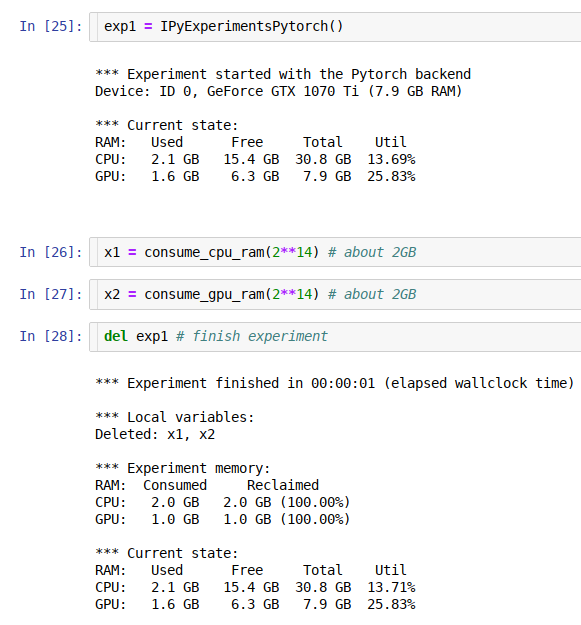
Using this framework you can run multiple consequent experiments without needing to restart the kernel all the time, especially when you run out of GPU memory - the familiar to all "cuda: out of memory" error. When this happens you just go back to the notebook cell where you started the experiment, change the hyper parameters, and re-run the updated experiment until it fits the available memory. This is much more efficient and less error-prone then constantly restarting the kernel, and re-running the whole notebook.
As an extra bonus you get access to the memory consumption data, so you can use it to automate the discovery of the hyper parameters to suit your hardware's unique memory limits.
The idea behind this module is very simple - it implements a python function-like functionality, where its local variables get destroyed at the end of its run, giving us memory back, except it'll work across multiple jupyter notebook cells (or ipython). In addition it also runs gc.collect() to immediately release badly behaved variables with circular references, and reclaim general and GPU RAM. It also helps to discover memory leaks, and performs various other useful things behind the scenes.
If you need a more fine-grained memory profiling, the CellLogger sub-system reports RAM usage on a per cell-level when used with jupyter or per line of code in ipython. You get the resource usage report automatically as soon as a command or a cell finished executing.
Currently this sub-system logs GPU RAM, general RAM and execution time. But can be expanded to track other important thing. While there are various similar loggers out there, the main focus of this implementation is to help track GPU, whose main scarce resource is GPU RAM.
Installation
-
pypi:
pip install ipyexperiments -
conda:
conda install -c fastai -c stason ipyexperiments -
dev:
pip install git+https://github.com/stas00/ipyexperiments.git
Usage
Here is an example with using code from the fastai library.
Please, note, that I added a visual leading space to demonstrate the idea, but, of course, it won't be a valid python code.
cell 1: exp1 = IPyExperimentsPytorch()
cell 2:   learn1 = language_model_learner(data_lm, bptt=60, drop_mult=0.25, pretrained_model=URLs.WT103)
cell 3:   learn1.lr_find()
cell 4: del exp1
cell 5: exp2 = IPyExperimentsPytorch()
cell 6:   learn2 = language_model_learner(data_lm, bptt=70, drop_mult=0.3, pretrained_model=URLs.WT103)
cell 7:   learn2.lr_find()
cell 8: del exp2
Demo
See this demo notebook, to see how this system works.
Documentation
Contributing
PRs with improvements and new features and Issues with suggestions are welcome.
If you work with tensorflow, please, consider sending a PR to support it - by mimicking the IPyExperimentsPytorch implementation.
Testing
- Install my fork of
pytest-ipynb(the original one is no longer being maintained)pip install git+https://github.com/stas00/pytest-ipynb.git - Run the test suite
make test
History
A detailed history of changes can be found here.
Release history Release notifications | RSS feed


Download files
Download the file for your platform. If you're not sure which to choose, learn more about installing packages.
Source Distribution
Built Distribution
Filter files by name, interpreter, ABI, and platform.
If you're not sure about the file name format, learn more about wheel file names.
Copy a direct link to the current filters
File details
Details for the file ipyexperiments-0.1.9.tar.gz.
File metadata
- Download URL: ipyexperiments-0.1.9.tar.gz
- Upload date:
- Size: 75.4 kB
- Tags: Source
- Uploaded using Trusted Publishing? No
- Uploaded via: twine/1.12.1 pkginfo/1.4.2 requests/2.20.1 setuptools/40.6.3 requests-toolbelt/0.8.0 tqdm/4.28.1 CPython/3.7.1
File hashes
| Algorithm | Hash digest | |
|---|---|---|
| SHA256 |
432d141db2682789b9dd0c7f748b55247761f0984012bffd9f965213fce48413
|
|
| MD5 |
95dc01739ff9d5638c7df8085d698ef3
|
|
| BLAKE2b-256 |
f9e7f2c1b05a60b2dd4c17e82ec0cf00f8b2d03a121c9f1fe7115badc76092e1
|
File details
Details for the file ipyexperiments-0.1.9-py3-none-any.whl.
File metadata
- Download URL: ipyexperiments-0.1.9-py3-none-any.whl
- Upload date:
- Size: 11.0 kB
- Tags: Python 3
- Uploaded using Trusted Publishing? No
- Uploaded via: twine/1.12.1 pkginfo/1.4.2 requests/2.20.1 setuptools/40.6.3 requests-toolbelt/0.8.0 tqdm/4.28.1 CPython/3.7.1
File hashes
| Algorithm | Hash digest | |
|---|---|---|
| SHA256 |
e42dcbc6864021a57e28f49ceb12d75a5cb1cf25c3f0da018550c475521c93e6
|
|
| MD5 |
e5bf44c8d1f0a592dd769c5e44caa9e6
|
|
| BLAKE2b-256 |
31488000b2f22dcddf8b0c238d8d9bc3fe4f178cd5662ab47474043e290c0cfd
|






