
Next-generation IPython kernel with reactivity, execution suggestions, syntax extensions, and more.

Project description
IPyflow







About
ipyflow is a next-generation Python kernel for Jupyter and other notebook
interfaces that tracks dataflow relationships between symbols and cells during
a given interactive session. Here are some of its main features:
Execution Suggestions
To keep the execution state consistent with the code in cells, rerun the turquoise cells, and avoid the red cells:

A turquoise input with red output just means that the output may be out-of-sync.
Reactivity
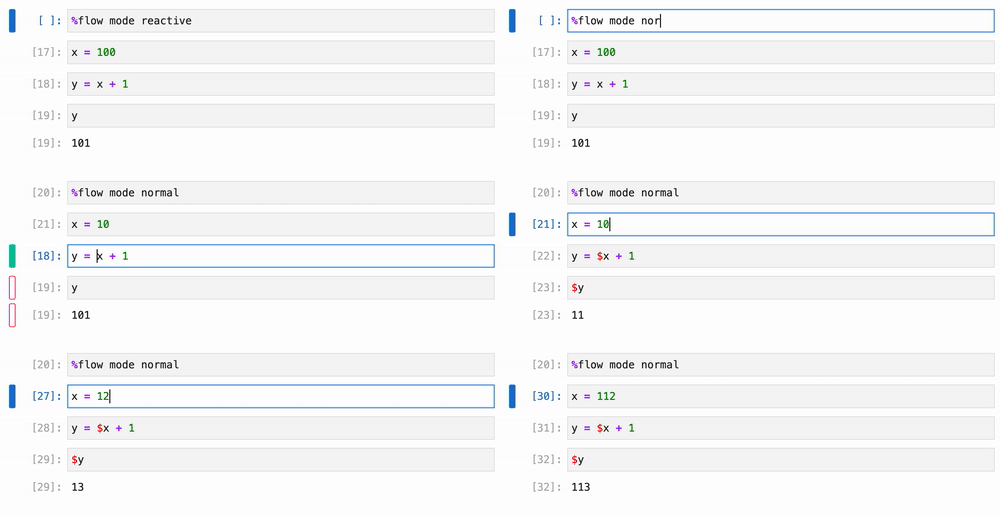
Do you trust me? Good. It's time to free yourself of the burden of manual re-execution:

Simply run the magic command %flow mode reactive in any cell to enable
reactivity. Disable by running %flow mode normal.
Syntax Extensions
Oh ye of little faith, oh ye unprepared to relinquish control, yet slothful enough to desire the same benefits of reactivity: we have toiled many hours to implement reactive modifiers that allow you to opt-in to reactivity on a per-symbol basis:
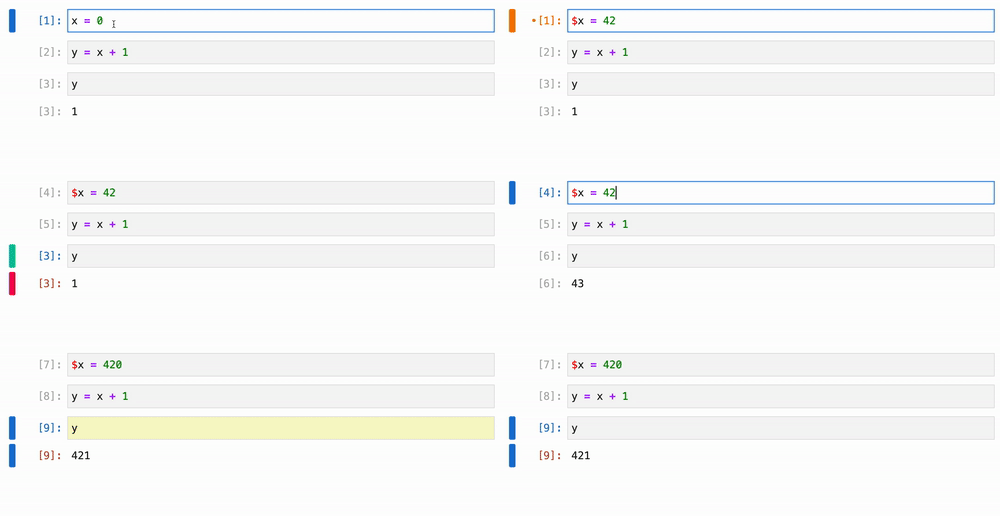
Prefixing a symbol with $ in a load context will cause the referencing cell
to re-execute itself, whenever the aforementioned symbol is updated. You can
also use the $ syntax in store contexts, which triggers cells that reference
the corresponding symbol to re-execute, regardless of whether the reference is
similarly $-prefixed:
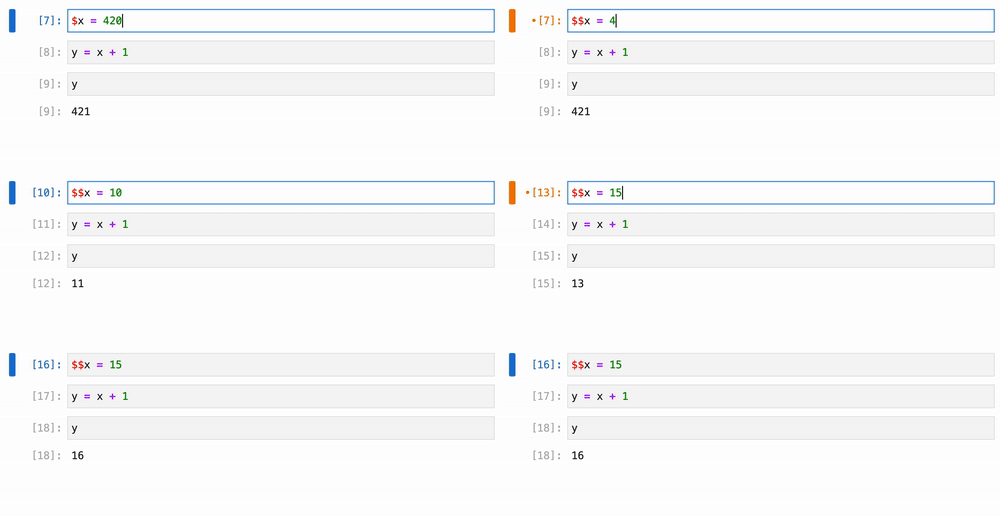
You can also prefix with $$ to trigger a cascading reactive update to all
dependencies in the chain, recursively:
Congratulations on reaching cusp of enlightenment. Now that you are here, why
not just enable reactivity by default with %flow mode reactive?
State API
ipyflow must understand the underlying execution state at a deep level in
order to provide its features. It exposes an API for interacting with some of
this state, including a code function for obtaining the code necessary to
reconstruct some symbol:
# Cell 1
from ipyflow import code

# Cell 2
x = 0

# Cell 3
y = x + 1

# Cell 4
print(code(y))
"""
Output:
# Cell 2
x = 0

# Cell 3
y = x + 1
"""
You can also see the cell (1-indexed) and statement (0-indexed) of when a
symbol was last updated with the timestamp function:
from ipyflow import timestamp
timestamp(y)
# Timestamp(cell_num=3, stmt_num=0)
To see dependencies and dependents of a particular symbol, use the deps and
users fuctions, respectively:
from ipyflow import deps, users

deps(y)
# [<x>]

users(x)
# [<y>]
If you want to elevate a symbol to the representation used internally by
ipyflow, use the lift function (at your own risk, of course):
from ipyflow import lift

y_sym = lift(y)
y_sym.timestamp
# Timestamp(cell_num=3, stmt_num=0)
Finally, ipyflow also comes with some rudimentary support for watchpoints:
# Cell 1
from ipyflow import watchpoints

def watchpoint(obj, position, symbol_name):
    cell, line = position
    if obj <= 42:
        return
    print(f"{symbol_name} = {obj} exceeds 42 at {cell=}, {line=}")

# Cell 2
y = 14
watchpoints(y).add(watchpoint)

# Cell 3
y += 10

# Cell 4
y += 20
# y = 44 exceeds 42 at cell=4, line=1
Quick Start
pip install ipyflow
To run an ipyflow kernel in JupyterLab, select "Python 3 (ipyflow)" from the
list of available kernels in the Launcher tab. For classic Jupyter, similarly
select "Python 3 (ipyflow)" from the list of notebook types in the "New"
dropdown dialogue.
| JupyterLab Entrypoint: | Classic Jupyter Entrypoint: |
|---|---|
 |
 |
Note: reactive execution features are not yet supported in classic Jupyter notebooks.
Citing
ipyflow started its life under the name nbsafety, which provided the initial
suggestions and slicing functionality.
For the execution suggestions:
@article{macke2021fine,
  title={Fine-grained lineage for safer notebook interactions},
  author={Macke, Stephen and Gong, Hongpu and Lee, Doris Jung-Lin and Head, Andrew and Xin, Doris and Parameswaran, Aditya},
  journal={Proceedings of the VLDB Endowment},
  volume={14},
  number={6},
  pages={1093--1101},
  year={2021},
  publisher={VLDB Endowment}
}
For the dynamic slicer
(used for the code function, for example):
@article{shankar2022bolt,
  title={Bolt-on, Compact, and Rapid Program Slicing for Notebooks},
  author={Shankar, Shreya and Macke, Stephen and Chasins, Andrew and Head, Andrew and Parameswaran, Aditya},
  journal={Proceedings of the VLDB Endowment},
  volume={15},
  number={13},
  pages={4038--4047},
  year={2022},
  publisher={VLDB Endowment}
}
We don't have a paper written yet for the syntax extensions that implement the
reactive algebra, but in the mean time, you can cite the ipyflow repo
directly for that and anything else not covered by the previous publications:
@misc{ipyflow,
  title = {{IPyflow: A Next-Generation, Dataflow-Aware IPython Kernel}},
  howpublished = {\url{https://github.com/ipyflow/ipyflow}},
  year = {2022},
}
License
Code in this project licensed under the BSD-3-Clause License.
Release history Release notifications | RSS feed


Download files
Download the file for your platform. If you're not sure which to choose, learn more about installing packages.
Source Distribution
Built Distribution
Filter files by name, interpreter, ABI, and platform.
If you're not sure about the file name format, learn more about wheel file names.
Copy a direct link to the current filters
File details
Details for the file ipyflow-0.0.140.tar.gz.
File metadata
- Download URL: ipyflow-0.0.140.tar.gz
- Upload date:
- Size: 51.0 kB
- Tags: Source
- Uploaded using Trusted Publishing? No
- Uploaded via: twine/3.8.0 pkginfo/1.8.2 readme-renderer/34.0 requests/2.27.1 requests-toolbelt/0.9.1 urllib3/1.26.9 tqdm/4.63.1 importlib-metadata/4.11.3 keyring/23.5.0 rfc3986/2.0.0 colorama/0.4.4 CPython/3.9.7
File hashes
| Algorithm | Hash digest | |
|---|---|---|
| SHA256 |
57f00c8fedc96e9e550bb27bdb49dbe610841a472d67eb3bc9211d70857534d4
|
|
| MD5 |
9f96ab2ae30fd9a687e552548bb0da85
|
|
| BLAKE2b-256 |
e03689f2947f338e348b2ce5b50cb381cf4a1c2468bd88df0078becc45593b40
|
File details
Details for the file ipyflow-0.0.140-py2.py3-none-any.whl.
File metadata
- Download URL: ipyflow-0.0.140-py2.py3-none-any.whl
- Upload date:
- Size: 49.9 kB
- Tags: Python 2, Python 3
- Uploaded using Trusted Publishing? No
- Uploaded via: twine/3.8.0 pkginfo/1.8.2 readme-renderer/34.0 requests/2.27.1 requests-toolbelt/0.9.1 urllib3/1.26.9 tqdm/4.63.1 importlib-metadata/4.11.3 keyring/23.5.0 rfc3986/2.0.0 colorama/0.4.4 CPython/3.9.7
File hashes
| Algorithm | Hash digest | |
|---|---|---|
| SHA256 |
41f90110c7f457bde4b3df46a5af2d1e43ea8fec33a1b645d39ab4c027e0ac60
|
|
| MD5 |
b80e963a891c7fb7bdff9a20fe4f1443
|
|
| BLAKE2b-256 |
185207b712b7d003db2a180643f67c1612dc94b51b33be129f337c8dccf4b1b5
|






