

- Author:
Robert Hajek, Bonitoo.io
Introduces a %flux (or %%flux) magic.
Connect to a InfluxDB and run Flux commands within IPython or IPython Notebook.
Examples
In [1]: %load_ext flux

In [2]: %%flux http://localhost:9999 --token "my-token" --org my-org
   ...: from(bucket: "apm_metricset")
   ...:   |> range(start: v.timeRangeStart, stop: v.timeRangeStop)
   ...:   |> filter(fn: (r) => r["_measurement"] == "apm_metricset")
   ...:   |> filter(fn: (r) => r["_field"] == "samples_system.process.cpu.total.norm.pct")
   ...:
Out[2]: ...
After the first connection, connect info can be omitted:
In [3]: %flux
   ...: from(bucket: "apm_metricset")
   ...:   |> range(start: v.timeRangeStart, stop: v.timeRangeStop)
   ...:   |> filter(fn: (r) => r["_measurement"] == "apm_metricset")
   ...:   |> filter(fn: (r) => r["_field"] == "samples_system.process.cpu.total.norm.pct")

Out[8]: ...
If no connect string is supplied, %flux will use environment variables INFLUXDB_V2_URL, INFLUXDB_V2_ORG, INFLUXDB_V2_TOKEN to create connection into InfluxDB.
Ordinary IPython assignment works for single-line %flux queries:
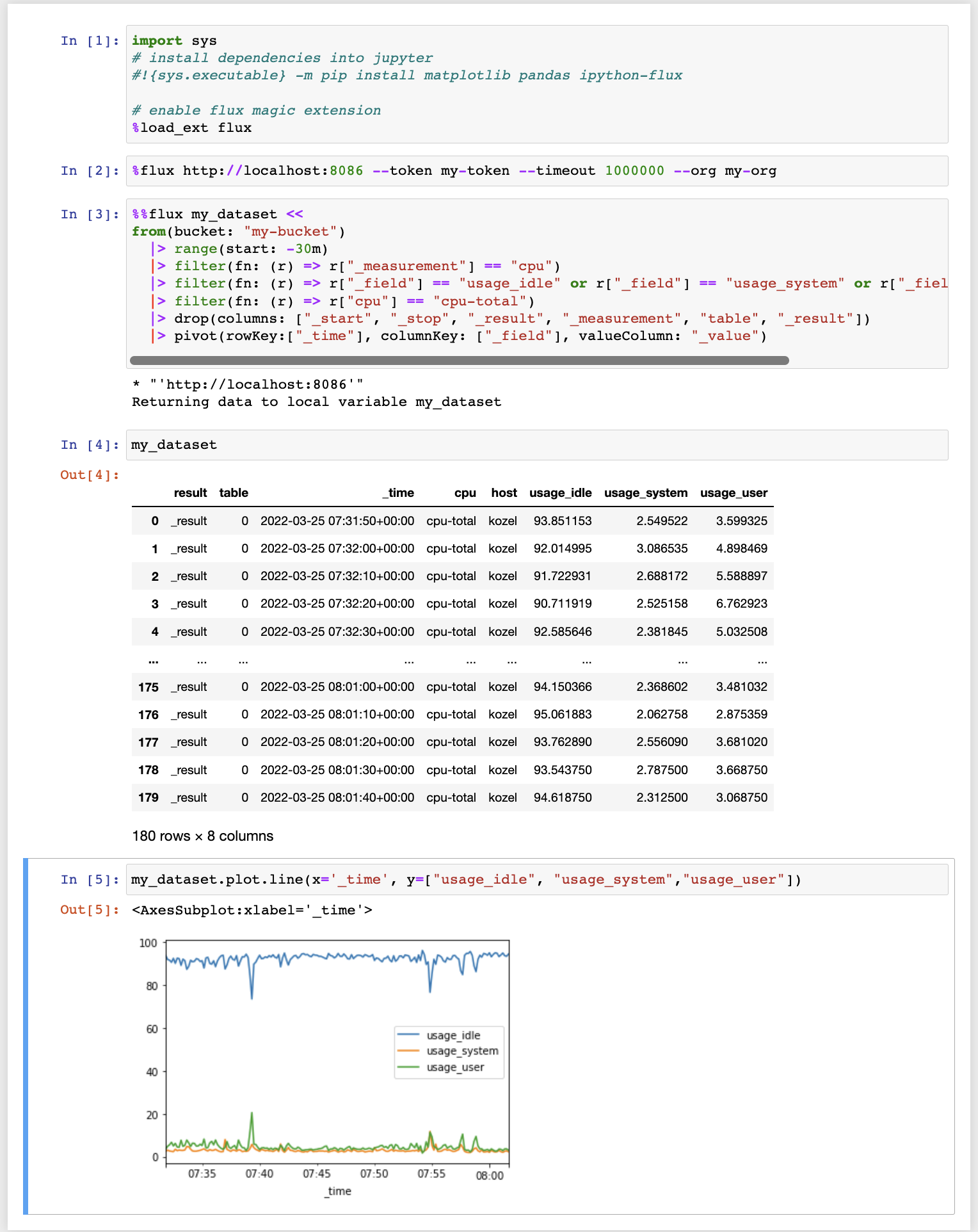
In [12]: result = %flux from(bucket: "my-bucket") |> range(start: 0)The << operator captures query results in a local variable, and can be used in multi-line %%flux:
In [19]: %%flux my_dataset <<
    ...: from(bucket: "my-bucket")
    ...: |> range(start: -30m)
    ...: |> filter(fn: (r) => r["_measurement"] == "cpu")
    ...: |> filter(fn: (r) => r["_field"] == "usage_idle" or r["_field"] == "usage_system" or r["_field"] == "usage_user")
    ...: |> filter(fn: (r) => r["cpu"] == "cpu-total")
    ...: |> drop(columns: ["_start", "_stop", "_result", "_measurement", "table", "_result"])
    ...: |> pivot(rowKey:["_time"], columnKey: ["_field"], valueColumn: "_value")
The result of the Flux command is automatically converted into Pandas dataframe. It is often useful to use Flux functions fieldsAsCol() or pivot() to convert data containing multiple timeseries into one dataset.
Persist dataframe
The --persist argument, with the name of a DataFrame object in memory will create a measurement in the database from the named DataFrame.
In [1]: %flux --persist <data_frame_variable_name> --bucket my-bucket --measurement <new measurement name> --tags tag_column1,tag_column2Options
- -l / --connections
List all active connections
- -t / --token
InfluxDB token
- -o / --org
InfluxDB org
- --timeout
InfluxDB query timeout in milliseconds (default timeout is 10_000 ms)
- -f / --file <path>
Run Flux from file at this path
- -x / --close <session-name>
Close named connection
Persist options
- -p / --persist
Create a measurement in the database from the named DataFrame
- -b / --bucket
target bucket name
- -T / --tags
comma separated list of columns that will be stored as tags, rest of columns will be stored as fields
- -m / --measurement
optional, target measurement name, if not specified measurement is taken from dataframe name
Installing
Install the lastest release with:
pip install ipython-flux
or download from https://github.com/bonitoo-io/ipython-flux and:
cd ipython-flux
sudo python setup.py install
Enable IPython flux magic extension in Jupyter notebook using
In [1]: %load_ext fluxDevelopment
News
0.0.6
Release date: 06-11-2022
#5 - Fix setup.py formatting
0.0.5
Release date: 25-03-2022
0.0.4
Release date: 18-08-2020
#1: Fixed token argument starts with “-”
0.0.3
Release date: 12-08-2020
Updated tox.ini and requirement dependencies
0.0.2
Release date: 6-08-2020
Fixed connection creation from os enviroment variables
Added persist dataframe into InfluxDB
0.0.1
Release date: 21-07-2020
Initial release


Release files for ipython-flux 0.0.6
For a detailed explanation of source distributions (sdists) and built distributions (wheels), please see the package formats documentation.
Source distribution (sdist)
| File | Size | Uploaded | |
|---|---|---|---|
| ipython-flux-0.0.6.tar.gz | 9.5 kB | Details |
Built distribution (wheel)
| File | Interpreter | ABI | Platform | Reset |
|---|---|---|---|---|
| ipython_flux-0.0.6-py3-none-any.whl | Python 3 | none | any | Details |
Total release size: 17.9 kB
Release files / ipython-flux-0.0.6.tar.gz
| Download URL | ipython-flux-0.0.6.tar.gz |
|---|---|
| Size | 9.5 kB |
| Tags | Source |
|
SHA-256 checksum How to use checksums |
113d0281e92a4ea45e57c031105f90526d5afe6798be2db205ba96228a7e5657
|
|
BLAKE2b-256 checksum How to use checksums |
82ad0f527dcac184ae70d158c2b62d886e00d4390a325816c555408c98342440
|
| Upload date | |
|
Uploaded using Trusted Publishing? What is trusted publishing? |
No |
| Uploaded via |
twine/4.0.1 CPython/3.9.15
|
Release files / ipython_flux-0.0.6-py3-none-any.whl
| Download URL | ipython_flux-0.0.6-py3-none-any.whl |
|---|---|
| Size | 8.4 kB |
| Tags | Python 3 |
|
SHA-256 checksum How to use checksums |
1d6b18530f99a5f7293f9cc609780a3df1ae815a0ec0c7ad7d6e108d97fb5983
|
|
BLAKE2b-256 checksum How to use checksums |
47644b82a4b60682e73d07e9ffc2b3b2e973475299b169d0356d556d29cd0974
|
| Upload date | |
|
Uploaded using Trusted Publishing? What is trusted publishing? |
No |
| Uploaded via |
twine/4.0.1 CPython/3.9.15
|














