
IPython ChatGPT extension




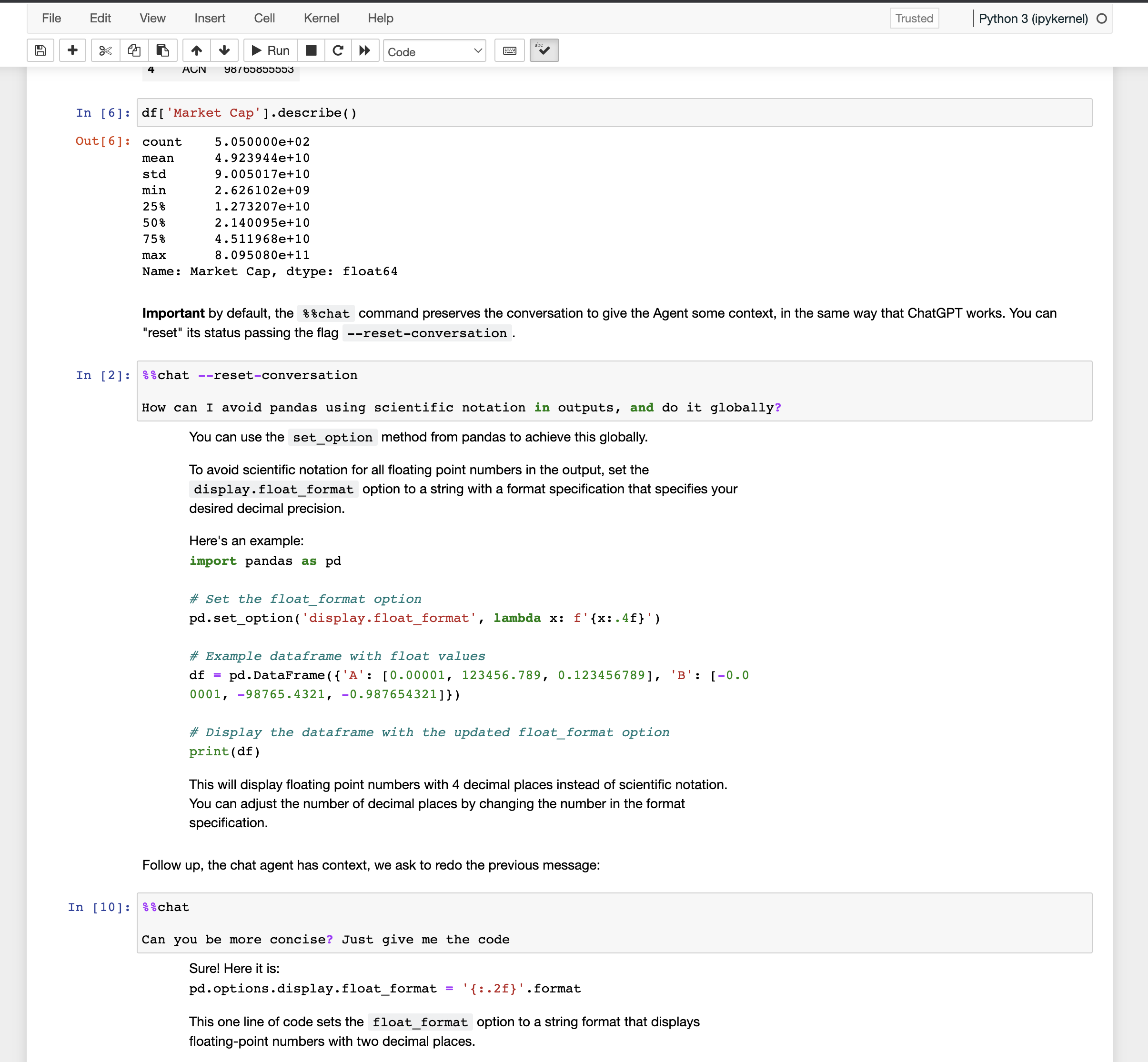
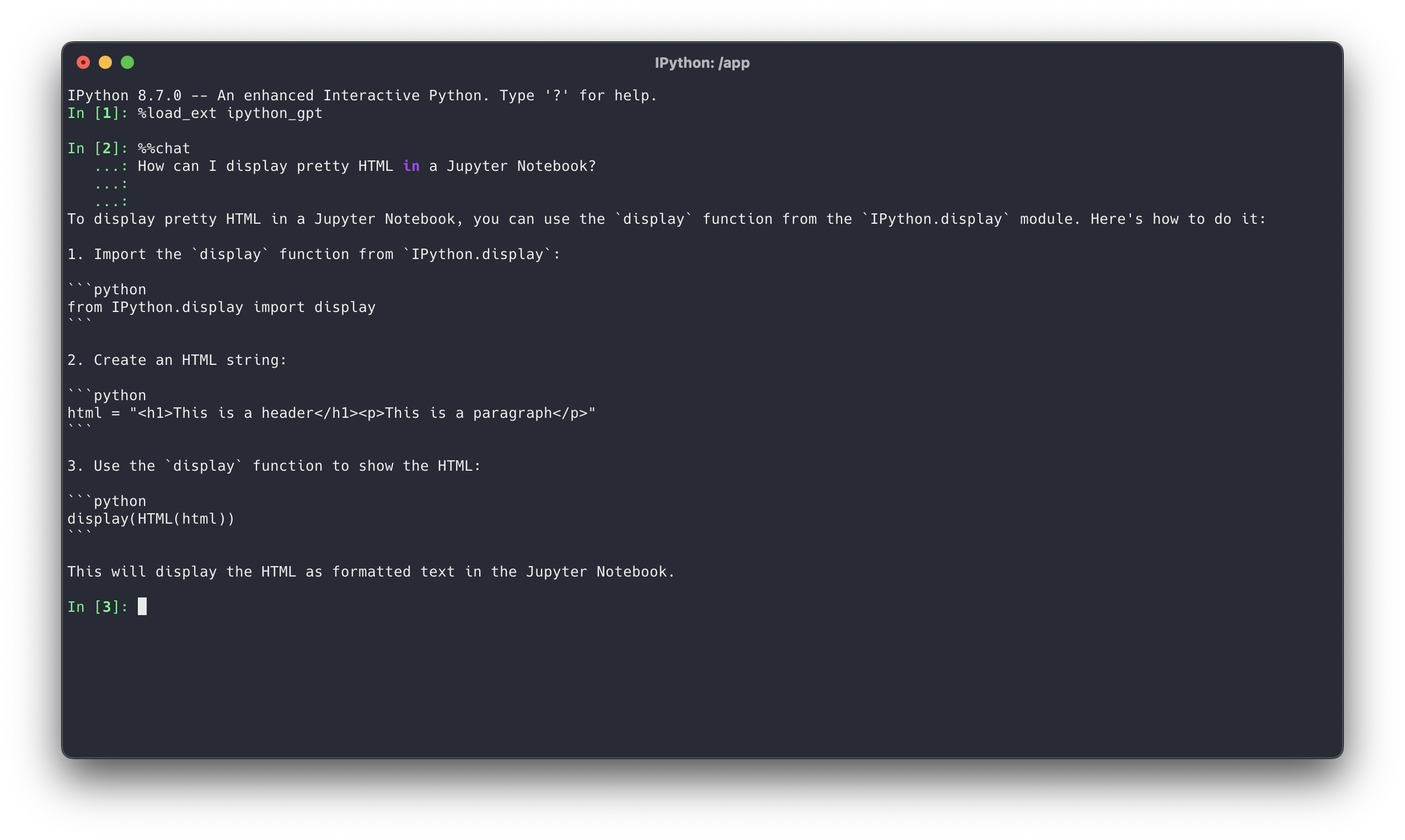
This (standalone, no external dependencies required) extension allows you to use ChatGPT directly from your Jupyter Notebook or IPython Shell (Demo).
Important! This is a very early and raw version, I have a lot of things to improve regarding code quality and missing functionality. Check this issue for a rough "roadmap".
Installation
!pip install ipython-gpt
Then in your notebook or ipython shell:
%load_ext ipython_gpt
Setup
You must first generate an API key at OpenAI (https://platform.openai.com/account/api-keys) and set is an environment variable OPENAI_API_KEY. You can do it by modifying your .bashrc/.zshrc or starting jupyter with it:
$ OPENAI_API_KEY=[YOUR-KEY] jupyter lab
# ...
$ OPENAI_API_KEY=[YOUR-KEY] ipython
There are a few other ways to set the API KEY, but the envvar is the recommended one.
ChatGPT API
The command %%chat interfaces with ChatGPT. It accepts multiple parameters (see Usage). Here's an example:
%%chat --max-tokens=25

What's the purpose of life?
...

>>> CHAT RESPONSE
Important by default, the %%chat command preserves the conversation to give the Agent some context, in the same way that ChatGPT works. You can "reset" its status passing the flag --reset-conversation.
%%chat --reset-conversation

How can I avoid pandas using scientific notation in outputs, and do it globally?
...
...
>>> CHAT RESPONSE
Agent's role (system message) and other chat parameters
By default, the Chat is started with the role: "You're a python data science coding assistant". You can change that by passing something different in your first %%chat:
%%chat --system-message="You're a R Data Science assistant"

Your message...
Once the conversation has started, you can't change the original message, as the context is preserved. To do so, you must reset the conversation:
%%chat --system-message="You're a R Data Science assistant" --reset-conversation

Your message...
Setting global config
You can change the defaults using the %chat_config line magic:
%chat_config --system-message="You're an R data scientist coding assistant specialized in visualizations" --model "other model" --reset-conversation
Invoke it without parameters to see the defaults set:
%chat_config
...

>>>
##### Conf set:

* **Default model**: gpt-3.5-turbo
* **Default system message**: You're a python data science coding assistant
* **Chat history length**: 0
Other methods
Display available models
Usage:
%chat_models [--all-models]
%chat_models
Available models:
- gpt-3.5-turbo-0301
- gpt-3.5-turbo
Display usage and accepted parameters
%reload_ext ipython_gpt
%chat_help
...


    usage: ipykernel_launcher.py [-h] [--openai-api-key OPENAI_API_KEY]
                                 [--reset-conversation]
                                 [--system-message SYSTEM_MESSAGE]
                                 [--no-system-message] [--model MODEL]
                                 [--temperature TEMPERATURE]
                                 [--max-tokens MAX_TOKENS] [--all-models]
Alternative authentication
Aside from setting the environment variable, you can also set OPENAI_API_KEY as a global variable in your notebook, or pass it directly as a parameter in any method --openai-api-key=YOUR-KEY.
These alternative methods are NOT recommended, as you might leak your API Key in the notebooks' history, stored in .ipynb_checkpoints.
1 maintainer

Metadata
1 maintainer
Release files for ipython-gpt 0.0.6
For a detailed explanation of source distributions (sdists) and built distributions (wheels), please see the package formats documentation.
Source distribution (sdist)
| File | Size | Uploaded | |
|---|---|---|---|
| ipython_gpt-0.0.6.tar.gz | 6.7 kB | Details |
Built distribution (wheel)
| File | Interpreter | ABI | Platform | Reset |
|---|---|---|---|---|
| ipython_gpt-0.0.6-py3-none-any.whl | Python 3 | none | any | Details |
Total release size: 14.4 kB
Release files / ipython_gpt-0.0.6.tar.gz
| Download URL | ipython_gpt-0.0.6.tar.gz |
|---|---|
| Size | 6.7 kB |
| Tags | Source |
|
SHA-256 checksum How to use checksums |
3558b87704c25190418f7ff8811fcf25939046c0dc307420f72942f8fee0e7b8
|
|
BLAKE2b-256 checksum How to use checksums |
6755fd99490401aa8dd41083f3474944c414eedb1f6b5173cca78fb87c0288a6
|
| Upload date | |
|
Uploaded using Trusted Publishing? What is trusted publishing? |
No |
| Uploaded via |
poetry/1.4.2 CPython/3.8.0 Darwin/21.6.0
|
Release files / ipython_gpt-0.0.6-py3-none-any.whl
| Download URL | ipython_gpt-0.0.6-py3-none-any.whl |
|---|---|
| Size | 7.8 kB |
| Tags | Python 3 |
|
SHA-256 checksum How to use checksums |
3539fece8db9643fe300aa55f923dfd2d6dfeea37ee00ef1162a6610d46acd45
|
|
BLAKE2b-256 checksum How to use checksums |
7e6cf8920abc7bf3ce4e74740d2378432e5c71826221fb74cd93875e280b4499
|
| Upload date | |
|
Uploaded using Trusted Publishing? What is trusted publishing? |
No |
| Uploaded via |
poetry/1.4.2 CPython/3.8.0 Darwin/21.6.0
|














