

ipyvizzu - Jupyter notebook integration of Vizzu.
Tutorial · Examples · Repository


About The Project
ipyvizzu is the Jupyter Notebook integration of Vizzu. ipyvizzu enables data scientists and analysts to utilize animation for storytelling with data using Python.
Similar to Vizzu, which is a free, open-source Javascript/C++ library, ipyvizzu also utilizes a generic dataviz engine that generates many types of charts and seamlessly animates between them. It is designed for building animated data stories as it enables showing different perspectives of the data that the viewers can easily follow.
Main features:
- Designed with animation in focus;
- Defaults based on data visualization guidelines;
- Works with Pandas dataframe, also JSON and inline data input is available;
- Auto scrolling to keep the actual chart in position while executing multiple cells.
Installation
ipyvizzu requires IPython and pandas packages.
However you can use it only in Jupyter Notebook therefore notebook project has to be installed.
pip install ipyvizzu
pip install notebook
You can also use ipyvizzu by locally installing Vizzu, you can find more info about this in the documentation
Usage
ipyvizzu only works in Jupiter Notebook environment. A notebook cell may contain the following code snippet resulting in the animation below.
import pandas as pd
from ipyvizzu import Chart, Data, Config

data_frame = pd.read_csv("titanic.csv")
data = Data()
data.add_data_frame(data_frame)

chart = Chart(width="640px", height="360px")

chart.animate(data)

chart.animate(
    Config(
        {
            "x": "Count",
            "y": "Sex",
            "label": "Count",
            "title": "Passengers of the Titanic",
        }
    )
)
chart.animate(
    Config(
        {
            "x": ["Count", "Survived"],
            "label": ["Count", "Survived"],
            "color": "Survived",
        }
    )
)
chart.animate(Config({"x": "Count", "y": ["Sex", "Survived"]}))
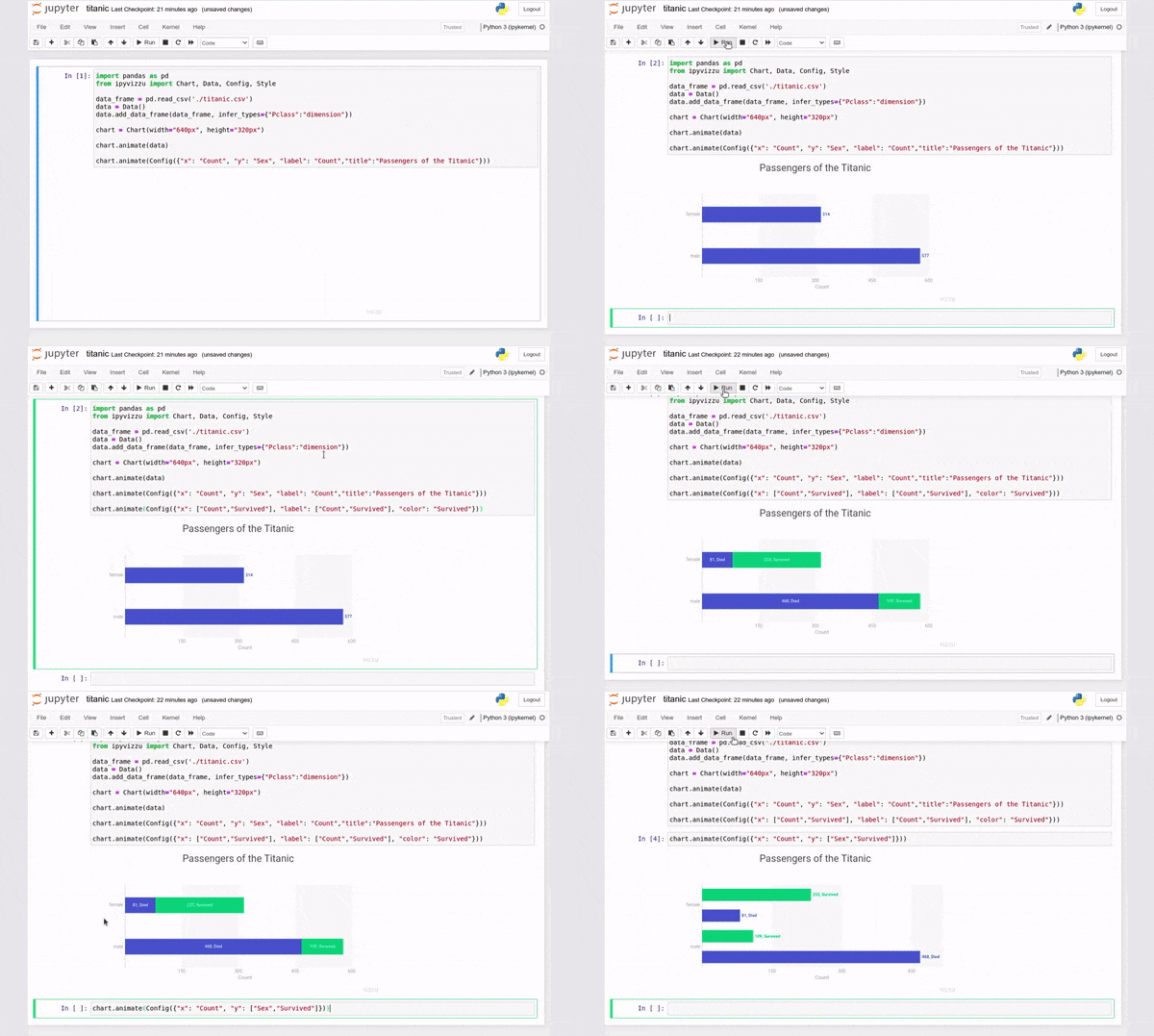
Visit our documentation site for more details and a step-by-step tutorial into ipyvizzu, or check out the example gallery.
Tools Support
ipyvizzu can also be used in a wide variety of environments! Check out the examples below to see the supported functions:
-
Colab example and interactive demo
-
Deepnote example and interactive demo
-
Kaggle example and interactive demo
-
Mercury example and interactive demo




Contributing
We welcome contributions to the project, visit our contributing guide for further info.
Contact
- Join our Slack if you have any questions or comments: vizzu-community.slack.com
- Drop us a line at hello@vizzuhq.com
- Follow us on twitter: https://twitter.com/VizzuHQ
License
Copyright © 2022 Vizzu Kft..
Released under the Apache 2.0 License.


Release files for ipyvizzu 0.11.0
For a detailed explanation of source distributions (sdists) and built distributions (wheels), please see the package formats documentation.
Source distribution (sdist)
| File | Size | Uploaded | |
|---|---|---|---|
| ipyvizzu-0.11.0.tar.gz | 13.9 kB | Details |
Built distribution (wheel)
| File | Interpreter | ABI | Platform | Reset |
|---|---|---|---|---|
| ipyvizzu-0.11.0-py3-none-any.whl | Python 3 | none | any | Details |
Total release size: 30.2 kB
Release files / ipyvizzu-0.11.0.tar.gz
| Download URL | ipyvizzu-0.11.0.tar.gz |
|---|---|
| Size | 13.9 kB |
| Tags | Source |
|
SHA-256 checksum How to use checksums |
ccb3b048cce5a1923e4aab3bda530edd988c54819bac9ba779a6742753c95299
|
|
BLAKE2b-256 checksum How to use checksums |
f112d13d1b52cba6104db54622a94e8943c539cd8d876b2d5ae99451a4d55c4e
|
| Upload date | |
|
Uploaded using Trusted Publishing? What is trusted publishing? |
No |
| Uploaded via |
twine/4.0.1 CPython/3.10.5
|
Release files / ipyvizzu-0.11.0-py3-none-any.whl
| Download URL | ipyvizzu-0.11.0-py3-none-any.whl |
|---|---|
| Size | 16.3 kB |
| Tags | Python 3 |
|
SHA-256 checksum How to use checksums |
c1a99cad63b15b1841f363b6b523e9523249a9bfdaf1af7ae2765a84d20c820f
|
|
BLAKE2b-256 checksum How to use checksums |
db788d9f6a5ae8c1c25a41249b11f328d42b85243632afe9631f7c5b7b8e12c2
|
| Upload date | |
|
Uploaded using Trusted Publishing? What is trusted publishing? |
No |
| Uploaded via |
twine/4.0.1 CPython/3.10.5
|














