
IRIS
The governed agent harness for small local models.
IRIS runs an agent loop (classify, plan, act with tools, curate the answer) on models that fit on a laptop. Every model call and every tool call passes through a governance kernel you cannot unplug, and a turn that can be answered exactly is answered with no model at all. Everything outside the loop and the kernel is a plugin, written against a small, stable SDK.
The proof is the email assistant that ships with it: a private inbox assistant that reads, sorts and labels your mail on a local model, writes nothing until you approve it, and leaves an audit row for every call.
Documentation: https://evarness-ai.github.io/iris-harness/
Try it in three minutes
You need uv or pipx; neither ships with Python, and pip install uv is the shortest route (details).
uv tool install "iris-harness[email]"   # or: pipx install "iris-harness[email]"
iris doctor                             # can IRIS run here, and what to fix
iris email demo                         # a synthetic mailbox, a scripted model, no network
Then your own mailbox. Connect an account first, because iris email setup only takes one
that is already connected:
iris auth imap login --user you@example.com    # an app password; or: iris auth gmail login --user you@gmail.com
ollama pull qwen3.5:4b-q4_K_M                  # the email judge's model; iris doctor --fix does not pull it
iris email setup                               # fetch, classify, preview labels, ask before any write
Connect your mailbox has the provider notes (iCloud, Fastmail, Yahoo, Gmail; Outlook and Microsoft 365 are not supported over IMAP) and the Gmail OAuth steps.
If iris is not found after installing, add ~/.local/bin to your PATH: run uv tool update-shell (or pipx ensurepath) and open a new terminal.
iris email demo needs no account, no credentials and no model server. It fetches a
200-message synthetic mailbox, sorts it, previews and writes labels, prints a first
digest, and ends with what it did, audit rows included. For your own mail you need
Ollama and 16 GB of RAM; iris doctor --fix pulls the
starter model. Step by step: Getting started;
if something does not work, see the common setup gotchas.
Build on it
A plugin is a package with a manifest.yaml and a setup(api). Scaffold one, with a
test that passes offline, by kind:
iris plugins new weather-now --kind tool   # or channel, mail-provider, research-provider, skill
cd weather-now && pip install -e ".[test]" && pytest
Through PluginAPI a plugin registers deterministic handlers, tools, agents, scheduled
jobs, channels and approval executors. Each lands on the same machinery the core uses,
so the same governance applies, with no side door. iris_harness.testing runs your
plugin inside a real governed IRIS in your test, on a scripted model, and lets you
assert on the audit ledger.
| Use case | What IRIS gives you |
|---|---|
| A private email assistant | Triage, a daily digest and labels on a local model. Personal data never reaches a cloud model; nothing changes in your mailbox until you approve it, once per account. |
| Your own domain agent | Tools, deterministic handlers and an agent on the governed loop (examples/05-your-own-agent). |
| Proactive routines | Scheduled jobs that deliver to a channel: Telegram, web push, the web console (examples/04-routine-to-telegram). |
| Governed research | One research tool over a provider chain (SearXNG, Tavily, Brave, DuckDuckGo), cached and reranked, behind the egress gate. |
| Safe code execution | A bounded model-to-sandbox loop that runs shell commands in a container. |
Nine runnable examples, each tested in CI, are in examples/.
What a plugin may import, and the deprecation rule that protects it, is the
stable API.
Why a harness
-
Determinism is a primitive. On one grounded action, a 7B model called the right tool 25% of the time and a 35B model 0%; a deterministic handler did it 100% of the time. A plugin can claim the turns it can answer exactly, and IRIS governs those answers like generated ones: the input screen before, the model-free response checks after, an audit row marked
deterministic. -
Governance is a passage, not a filter. Data is classified before it moves. Personal and secret data stays on local models. Secrets reach tools as vault handles, never as prompt text. Writes ask once; destructive actions wait for your approval.
-
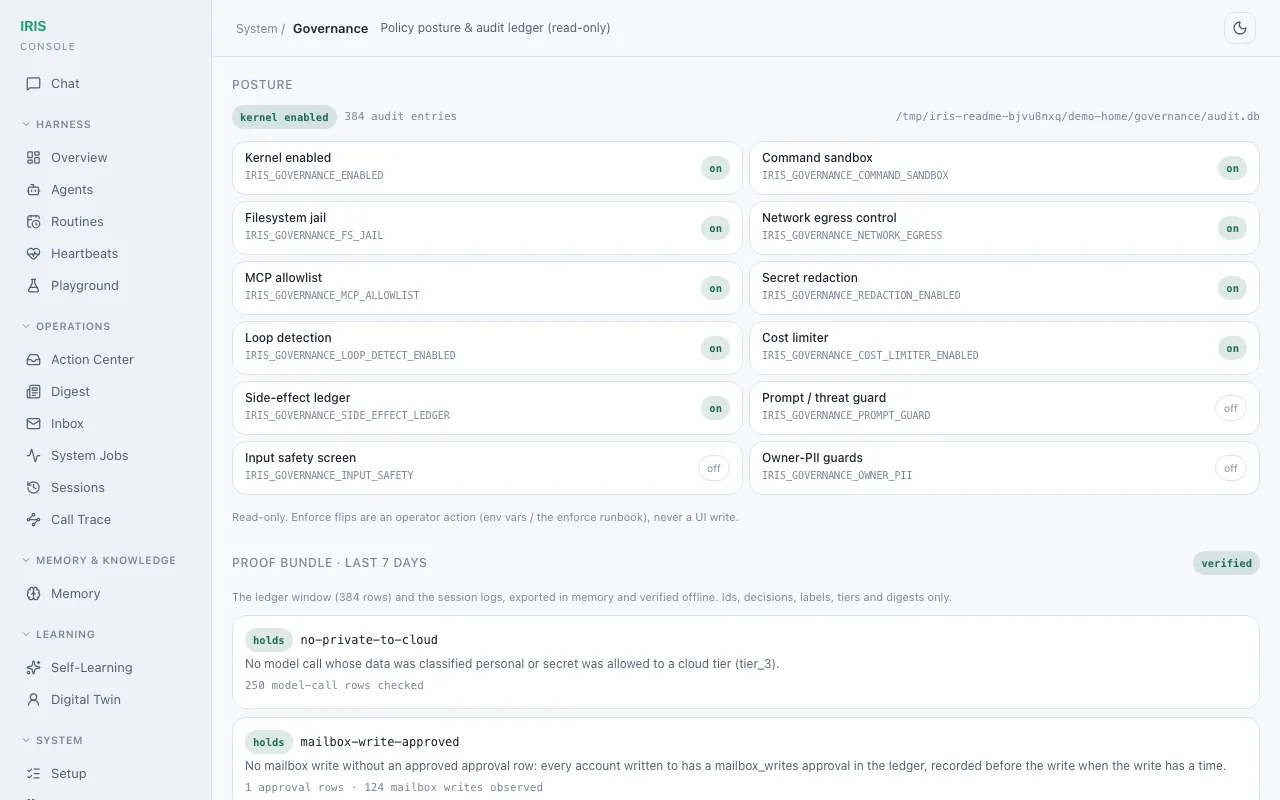
Every call is audited. Each model call, tool call and answer writes a ledger row. A proof bundle lets a CI job verify the email assistant's invariants offline: no personal data to a cloud model, no mailbox write without an approval, every call and answer audited. Check them yourself:
iris governance proof-bundle export --out bundle.json
iris governance proof-bundle verify bundle.json   # exit 0 verified, 1 a violation
-
The model-free guards hold. In an adversarial battery of 14 probes against the full guard stack, 11 were fully defended; the misses were in model-based judges, and the deterministic guards held. Since then every answer, generated or not, passes the model-free guards.
See every decision
The web console shows the ledger. Governance has the kernel's posture and the proof
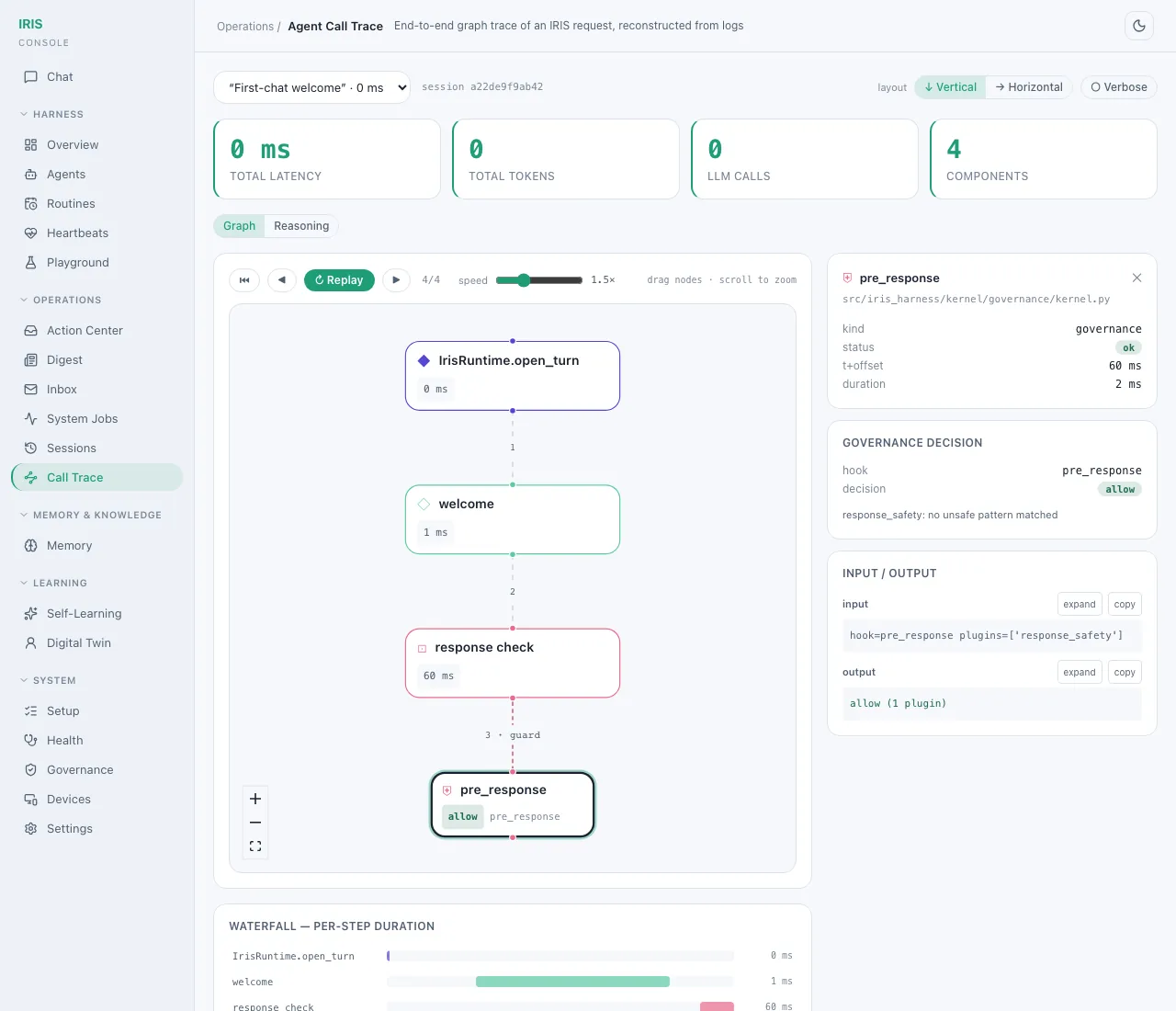
bundle's invariants, checked against the audit rows; Call trace has each turn as a graph,
with the governance decision at every hook. Both are from iris email demo:
What ships
| Part | Where |
|---|---|
| The agentic core: router, planner, ReAct loop, executor, curator, with tiered model routing (a router model, local tiers on Ollama or LM Studio, an opt-in cloud tier) | src/iris_harness/agent/, config/llm_tiers.yaml |
| The governance kernel: classification, the egress gate, a Fernet vault, tool policy, approvals, an out-of-process evaluator, the audit ledger | src/iris_harness/kernel/governance/ |
| The plugin SDK and host | src/iris_harness/sdk/, src/iris_harness/runtime/plugin_host/ |
Reference plugins: system, research, code_exec, and the Telegram, web and web-push channels |
src/iris_harness/plugins_builtin/ |
The email assistant: the mail record and the gmail, imap and email_workflows plugins |
src/iris_personal/ |
| memris, the memory graph: claims with provenance | src/memris/ |
| Four services: the IRIS API (chat, the MCP server, the web console; 8003), the Governor (8080), the evaluator (8090), the channel gateway (8006) | src/iris_harness/server/ |
| The web console (React), built into the released package | webui/ |
IRIS runs on macOS (Apple Silicon) and Linux; on Windows, use WSL2. It collects no telemetry. It is pre-1.0: the stable API changes only after a deprecation cycle, and everything else may change in any release.
Run the services
The scheduled jobs (the email sweep and judge) and the web console run in the IRIS API. Run with Docker keeps it up as a service:
export IRIS_AUTH_SECRET="$(openssl rand -hex 32)"
docker compose up        # Ollama, the Governor and the IRIS API, on 127.0.0.1 only
The email assistant guide shows how to run the API from an install and pair the web console.
Contributing
Plugins are the contribution unit. This is the shortest path from a clone to a change you
can check. You need Python 3.12 or 3.13 (.python-version pins 3.12) and
Poetry 2.x.
git clone https://github.com/evarness-ai/iris-harness.git && cd iris-harness
poetry install --with dev --extras email
poetry run iris email demo               # the whole stack from source: no account, no model server
Tests need two environment variables, and run on the narrowest path that covers your change:
export IRIS_AUTH_SECRET="test-secret-for-testing" IRIS_DISABLE_WARMUP=1
poetry run pytest tests/unit/<the path you changed>
Before you push, run the local gate: scripts/ci_local.sh --fast while you iterate (ruff,
black, mypy, import contracts, the tests for what changed), and scripts/ci_local.sh
before a pull request (the full suite, a playground smoke run, the secret and PII scan).
Where to look first:
| You are changing | Start here |
|---|---|
| A plugin | iris plugins new (above), examples/, stable API |
| The turn pipeline | src/iris_harness/runtime/turn/ |
| Governance (classification, egress, approvals, audit) | src/iris_harness/kernel/governance/ |
| The email assistant | src/iris_personal/ |
| The web console | webui/ |
Read CONTRIBUTING.md (the governance rules every change keeps, DCO sign-off, the stable-tier rule) and the code of conduct. Coding agents: AGENTS.md. Questions and ideas go to GitHub Discussions; bugs to Issues. Report vulnerabilities privately as described in SECURITY.md. Changes are listed in CHANGELOG.md.
License
Apache License 2.0; see LICENSE. IRIS is, and will remain, Apache-2.0.
1 maintainer

Metadata
1 maintainer
Release files for iris-harness 0.1.1
For a detailed explanation of source distributions (sdists) and built distributions (wheels), please see the package formats documentation.
Source distribution (sdist)
| File | Size | Uploaded | |
|---|---|---|---|
| iris_harness-0.1.1.tar.gz | 2.7 MB | Details |
Built distribution (wheel)
| File | Interpreter | ABI | Platform | Reset |
|---|---|---|---|---|
| iris_harness-0.1.1-py3-none-any.whl | Python 3 | none | any | Details |
Total release size: 5.9 MB
Release files / iris_harness-0.1.1.tar.gz
| Download URL | iris_harness-0.1.1.tar.gz |
|---|---|
| Size | 2.7 MB |
| Tags | Source |
|
SHA-256 checksum How to use checksums |
edf74a01875c6ba21c07467bfd626aebb5a1471cf7375f1e20d09ff5af056028
|
|
BLAKE2b-256 checksum How to use checksums |
a843e485da45e6033e238b7b2bc8df7834f32ede528eccc1638970185520945b
|
| Upload date | |
|
Uploaded using Trusted Publishing? What is trusted publishing? |
Yes |
| Uploaded via |
twine/7.0.0 CPython/3.13.14
|
Provenance
Provenance describes where a file came from. On PyPI, provenance is shared via attestations, which provide a verifiable record of the build or publishing details. View details, limitations and caveats.


PyPI Publish Attestation
PyPI verified that this artifact, at this checksum, originated from the publisher listed below.
Signed by GitHub Actions, verified by PyPI on Oct 11, 2026.
Transparency logRelease files / iris_harness-0.1.1-py3-none-any.whl
| Download URL | iris_harness-0.1.1-py3-none-any.whl |
|---|---|
| Size | 3.2 MB |
| Tags | Python 3 |
|
SHA-256 checksum How to use checksums |
c3a80b56055b6b10740c28733b51b9726e3ea236bd7ef4a555c56026748990bc
|
|
BLAKE2b-256 checksum How to use checksums |
3741f0362971b65eae1df01cab917ce5f8de0191a3595030585143e88e85c6f5
|
| Upload date | |
|
Uploaded using Trusted Publishing? What is trusted publishing? |
Yes |
| Uploaded via |
twine/7.0.0 CPython/3.13.14
|
Provenance
Provenance describes where a file came from. On PyPI, provenance is shared via attestations, which provide a verifiable record of the build or publishing details. View details, limitations and caveats.
PyPI Publish Attestation
PyPI verified that this artifact, at this checksum, originated from the publisher listed below.
Signed by GitHub Actions, verified by PyPI on Oct 11, 2026.
Transparency log













