

Iris - Data labelling
Iris
A browser based UI for labelling image files that tracks the labels using a database, rather than using folders and paths
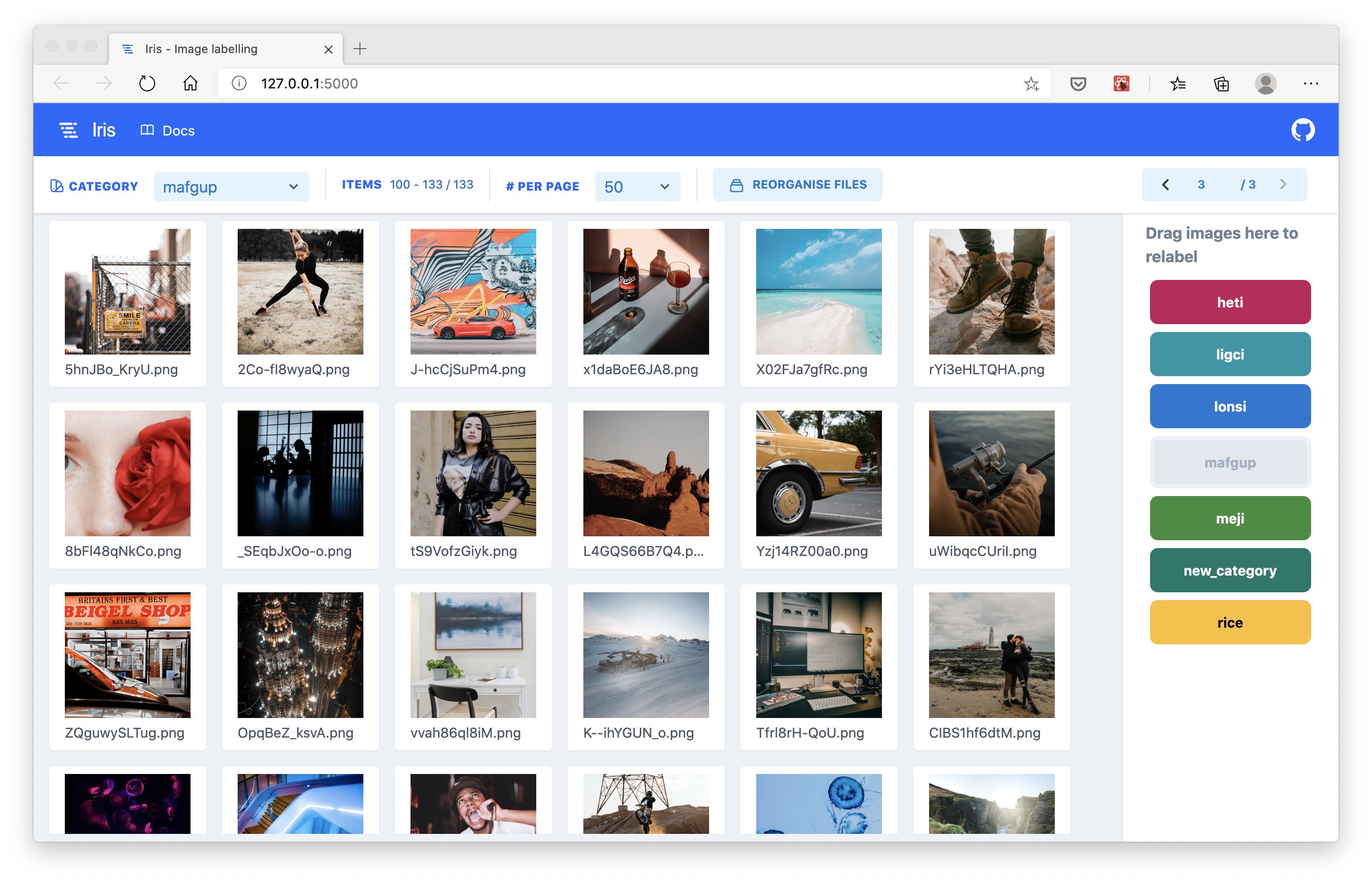
Why use Iris?
- Label thousands of images (or possibly millions?) easily without having to use a file manager that slows down with too many files.
- Iris uses pagination to view subsets of your data, so the platform doesn't slow down with large quantities of images.
- Keep track of all your labels using a database.
- Iris stores the labels for your data in an SQLite database file in a
.irisdirectory that is created in the root of your data folder. This decouples labels from the directory paths, helping to avoid mistakes.
- Iris stores the labels for your data in an SQLite database file in a
- Simple and easy to use drag and drop UI.
- Images can be labelled using simple drag and drop interactions, making it easy for anyone to use.
Installation
To install iris, use the following command:
$ pip install iris-image-labelling
Usage
Once installed, iris registers as a command in your terminal that is accessible from any directory.
Iris presumes your data is initially organised in a directory that has sub-directories for every category of your data may take on.
data/
    |---category_1/
        |---file_1.png
        |---file_2.png
    |---category_2/
        |---file_3.png
        |---file_4.png
The folders are initially used to deduce what categories your data can take on. They do not need to contain any data / images in them.
With the following project structure set up, navigate to the parent directory of data/ and then launch iris as follows from the terminal:
$ iris launch -f data
Iris launches by default on port 5000, from where you can go on and begin labelling your data.
| Argument | Description |
|---|---|
| -f | Folder to build database from |
| -h | The host to run the server on |
| -p | The port number to run the server on |
Reorganise data
To avoid any confusion between the re-labelled data, and the original categories inferred by the file paths of the images, a button labelled 'Reorganise data' is present in the toolbar. This will re-organise the files amongst the folders according to the new labels.
Tags
Images can also take on tags, which are initially inferred based on the sub-directories. That is any directory below the top level directory. For example:
data/
    tag_1/
        another_tag/
            file_1.png
            file_2.png
            file_3.png
    tag_2/
        file_4.png
        file_5.png
        file_6.png
These tags show up in the browser based UI after hovering over the Tag label.
Programmatic API
Once iris has been launched inside a directory and the .iris folder has been
setup, you can use the Python API to get the labels and make any more changes
programmatically.
Getting the list of files
The complete list of files can be returned using the following snippet. The folder argument to the Query class is the relative path to the folder where your images are stored.
from iris.api.files import Query

q = Query(folder="../images/")
df = q.get_all_files()
Example output:
| id | path | filename | category | tags |
|---|---|---|---|---|
| 270 | images/heti/clf/ignore/2Sph8IbCgnU.png | 2Sph8IbCgnU.png | heti | [clf, ignore] |
| 271 | images/heti/clf/ignore/1aiDVT31RRE.png | 1aiDVT31RRE.png | heti | [clf, ignore] |
| 272 | images/heti/clf/ignore/4GLI-k4wmFg.png | 4GLI-k4wmFg.png | heti | [clf, ignore] |
| 273 | images/heti/clf/ignore/-wuFyjSeLec.png | -wuFyjSeLec.png | meji | [clf, ignore] |
Modifying a file's attributes
You can modify any or all of the attributes of a file using the following snippet.
from iris.api.files import Query

q = Query(folder="../images/")
q.update_file(270, {"category": "new_category"})
The second argument, file_kwargs, is a dictionary whose keys should correspond to one of the columns in the DataFrame. If the key provided does not exist, it will be ignored.
To do
- Ability to change tags using drag and drop interface
- Add new categories using browser UI
- Write unit tests for JS frontend
- Write unit tests for Python backend
1 maintainer

Release files for iris-image-labelling 0.1.0
For a detailed explanation of source distributions (sdists) and built distributions (wheels), please see the package formats documentation.
Source distribution (sdist)
| File | Size | Uploaded | |
|---|---|---|---|
| iris-image-labelling-0.1.0.tar.gz | 3.9 MB | Details |
Built distribution (wheel)
| File | Interpreter | ABI | Platform | Reset |
|---|---|---|---|---|
| iris_image_labelling-0.1.0-py3-none-any.whl | Python 3 | none | any | Details |
Total release size: 4.4 MB
Release files / iris-image-labelling-0.1.0.tar.gz
| Download URL | iris-image-labelling-0.1.0.tar.gz |
|---|---|
| Size | 3.9 MB |
| Tags | Source |
|
SHA-256 checksum How to use checksums |
3d9c1af01ca39741d7fb6fa7d52a23c5da4760b96bc77255c0e7070bcd01e4f1
|
|
BLAKE2b-256 checksum How to use checksums |
6184de00d67f02c83bd96eaaf68f1ef5ea75874065bf0fa9c08a2324023b9e1c
|
| Upload date | |
|
Uploaded using Trusted Publishing? What is trusted publishing? |
No |
| Uploaded via |
twine/1.12.1 pkginfo/1.5.0.1 requests/2.23.0 setuptools/44.0.0.post20200106 requests-toolbelt/0.9.1 tqdm/4.25.0 CPython/3.6.8
|
Release files / iris_image_labelling-0.1.0-py3-none-any.whl
| Download URL | iris_image_labelling-0.1.0-py3-none-any.whl |
|---|---|
| Size | 456.9 kB |
| Tags | Python 3 |
|
SHA-256 checksum How to use checksums |
d7181111352d468d58fc5ffa8fdd1c5a84336e64b91bf31e37e29daa3497f0c0
|
|
BLAKE2b-256 checksum How to use checksums |
122b38c68410e525f0b16dba44fc3e8f648006ca2dbc882f9fb5017b5d5a9e5d
|
| Upload date | |
|
Uploaded using Trusted Publishing? What is trusted publishing? |
No |
| Uploaded via |
twine/1.12.1 pkginfo/1.5.0.1 requests/2.23.0 setuptools/44.0.0.post20200106 requests-toolbelt/0.9.1 tqdm/4.25.0 CPython/3.6.8
|













