
A REPL for InterSystems IRIS SQL
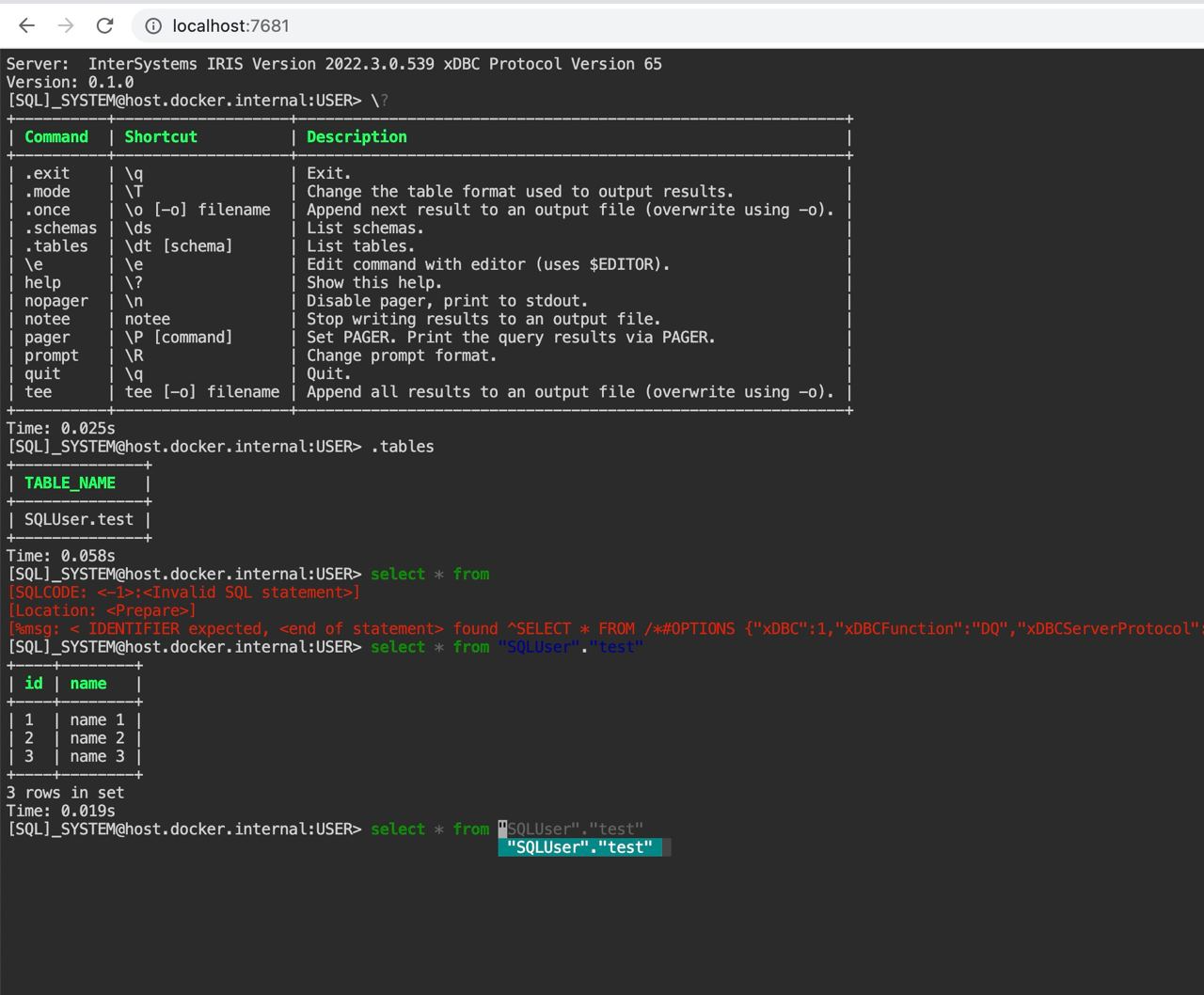
This is a InterSystems IRIS client that does auto-completion and syntax highlighting.
Based on pgcli
Quick Start
With Python
pip install -U irissqlcli
Or with homebrew
brew tap caretdev/tap
brew install irissqlcli
Usage
$ irissqlcli [uri]

or

$ irissqlcli iris://[user[:password]@][netloc][:port][/namespace]

or

$ irissqlcli iris+emb://[/namespace]
Examples:
$ irissqlcli iris://_SYSTEM:SYS@localhost:1972/USER

$ irissqlcli iris+emb:///
For more details:
$ irissqlcli --help
Usage: irissqlcli [OPTIONS] [URI] [USERNAME]

Options:
-h, --host TEXT         Host address of the IRIS instance.
-p, --port INTEGER      Port number at which the IRIS instance is listening.
-U, --username TEXT     Username to connect to the IRIS instance.
-u, --user TEXT         Username to connect to the IRIS instance.
-W, --password          Force password prompt.
-v, --version           Version of irissqlcli.
-n, --nspace TEXT       namespace name to connect to.
-q, --quiet             Quiet mode, skip intro on startup and goodbye on
                        exit.
-l, --logfile FILENAME  Log every query and its results to a file.
--irissqlclirc FILE     Location of irissqlclirc file.
--auto-vertical-output  Automatically switch to vertical output mode if the
                        result is wider than the terminal width.
--row-limit INTEGER     Set threshold for row limit prompt. Use 0 to disable
                        prompt.
-t, --table             Display batch output in table format.
--csv                   Display batch output in CSV format.
--warn / --no-warn      Warn before running a destructive query.
-e, --execute TEXT      Execute command and quit.
--help                  Show this message and exit.
irissqlcli also supports environment variables for login options (e.g. IRIS_HOSTNAME, IRIS_PORT, IRIS_NAMESPACE, IRIS_USERNAME, IRIS_PASSWORD).
Features
The irissqlcli is written using prompt_toolkit_.
-
Auto-completes as you type for SQL keywords as well as tables and columns in the database.
-
Syntax highlighting using Pygments.
-
Smart-completion (enabled by default) will suggest context-sensitive completion.
SELECT * FROM <tab>will only show table names.SELECT * FROM users WHERE <tab>will only show column names.
-
Pretty prints tabular data.
Config
A config file is automatically created at ~/.config/irissqlcli/config at first launch.
See the file itself for a description of all available options.
Docker
irisqlcli can be run from within Docker. This can be useful to try irissqlcli without installing it, or any dependencies, system-wide.
To create a container from the image:
$ docker run --rm -ti caretdev/irissqlcli irissqlcli <ARGS>
To access InterSystems IRIS databases listening on localhost, make sure to run the docker in "host net mode". E.g. to access a database called "foo" on the IRIS server running on localhost:1972 (the standard port):
$ docker run --rm -ti --net host caretdev/irissqlcli irissqlcli iris://_SYSTEM:SYS@localhost:1972/USER

or without `host net mode`

$ docker run --rm -ti caretdev/irissqlcli irissqlcli iris://_SYSTEM:SYS@host.docker.internal:1972/USER
IPython
irisqlcli can be run from within IPython console. When working on a query, it may be useful to drop into a irissqlcli session without leaving the IPython console, iterate on a query, then quit irissqlcli to find the query results in your IPython workspace.
Assuming you have IPython installed:
$ pip install sqlalchemy~=1.4.0 ipython-sql sqlalchemy-iris
After that, run ipython and load the irissqlcli.magic extension:
$ ipython

In [1]: %load_ext irissqlcli.magic

or
$ ipython --ext irissqlcli.magic
Connect to a database:
In [2]: %irissqlcli iris://_SYSTEM:SYS@localhost:1972/USER
self.dialect <class 'sqlalchemy_iris.iris.IRISDialect_iris'>
sqlalchemy.MetaData <class 'sqlalchemy.sql.schema.MetaData'>
Server:  InterSystems IRIS Version 2022.2.0.368 xDBC Protocol Version 65
Version: 0.1.0
[SQL]_SYSTEM@localhost:USER> select top 10 table_schema,table_name from information_schema.tables
+--------------------+----------------+
| TABLE_SCHEMA       | TABLE_NAME     |
+--------------------+----------------+
| %CSP_Util          | CSPLogEvent    |
| %CSP_Util          | Performance    |
| %Calendar          | Hijri          |
| %Compiler_Informix | ConversionRule |
| %Compiler_Informix | ImportedObject |
| %Compiler_Informix | Symbol         |
| %Compiler_LG       | WrapperPropDef |
| %Compiler_TSQL     | sysSymbol      |
| %DeepSee           | IDList         |
| %DeepSee           | TempSourceId   |
+--------------------+----------------+
10 rows in set
Time: 0.074s
[SQL]_SYSTEM@localhost:USER>
Exit out of irissqlcli session with Ctrl + D and find the query results:
[SQL]_SYSTEM@localhost:USER>
Goodbye!
Done.
Out[2]:
[('%DocDB', 'Database'),
 ('%ExtentMgr', 'GUID'),
 ('%ExtentMgr', 'GlobalRegistry'),
 ('%ExtentMgr_Catalog', 'Extent'),
 ('%ExtentMgr_Catalog', 'Index'),
 ('%ExtentMgr_Catalog', 'Property'),
 ('%ExtentMgr_Catalog', 'ShardIdRanges'),
 ('%SYS_Maint', 'Bitmap'),
 ('%SYS_Maint', 'BitmapResults'),
 ('%SYS_Maint', 'Bitmap_Message')]
The results are available in special local variable _, and can be assigned to a variable of your
choice:
In [3]: my_result = _
1 maintainer

Metadata
1 maintainer
Release files for irissqlcli 0.6.0
For a detailed explanation of source distributions (sdists) and built distributions (wheels), please see the package formats documentation.
Source distribution (sdist)
| File | Size | Uploaded | |
|---|---|---|---|
| irissqlcli-0.6.0.tar.gz | 43.9 kB | Details |
Built distribution (wheel)
| File | Interpreter | ABI | Platform | Reset |
|---|---|---|---|---|
| irissqlcli-0.6.0-py3-none-any.whl | Python 3 | none | any | Details |
Total release size: 90.6 kB
Release files / irissqlcli-0.6.0.tar.gz
| Download URL | irissqlcli-0.6.0.tar.gz |
|---|---|
| Size | 43.9 kB |
| Tags | Source |
|
SHA-256 checksum How to use checksums |
5e0e100bca0efe4f02a9ae7a6dab5243485cd873b276a99a1e53302094e1cb1a
|
|
BLAKE2b-256 checksum How to use checksums |
016874ddf4f50dd17e2e7694bf7d4c52db04f858a5313a3fa9678f8cc1c23a30
|
| Upload date | |
|
Uploaded using Trusted Publishing? What is trusted publishing? |
Yes |
| Uploaded via |
twine/6.1.0 CPython/3.13.12
|
Provenance
Provenance describes where a file came from. On PyPI, provenance is shared via attestations, which provide a verifiable record of the build or publishing details. View details, limitations and caveats.


PyPI Publish Attestation
PyPI verified that this artifact, at this checksum, originated from the publisher listed below.
Signed by GitHub Actions, verified by PyPI on Jun 12, 2026.
Transparency logRelease files / irissqlcli-0.6.0-py3-none-any.whl
| Download URL | irissqlcli-0.6.0-py3-none-any.whl |
|---|---|
| Size | 46.6 kB |
| Tags | Python 3 |
|
SHA-256 checksum How to use checksums |
7f81e34251945aacc2326a27ed35f7a18ce698bc47ad25b14addc6393a30de8a
|
|
BLAKE2b-256 checksum How to use checksums |
717d7af5ce593a4473151d22c72887f5725b6a9b873be547a1d64faa02654370
|
| Upload date | |
|
Uploaded using Trusted Publishing? What is trusted publishing? |
Yes |
| Uploaded via |
twine/6.1.0 CPython/3.13.12
|
Provenance
Provenance describes where a file came from. On PyPI, provenance is shared via attestations, which provide a verifiable record of the build or publishing details. View details, limitations and caveats.
PyPI Publish Attestation
PyPI verified that this artifact, at this checksum, originated from the publisher listed below.
Signed by GitHub Actions, verified by PyPI on Jun 12, 2026.
Transparency log













